CheckEmoji Community · the emoji forum
🏠 Home 🆕 What's new ❓ Unanswered 🔥 Popular 📡 RSS Members 👥 0 online log in · register
Home › feralmason4 › Posts

Posts by feralmason4

9 posts shown.

Thunderbolt dock/dongle recommendations? in Laptops ·
driftingcanyon2 said:Why even bother when there are easier ways? Every modern laptop comes with HDMI and Ethernet ports built-in by default, and if you need more USB ports, you just plug in a USB hub.

Yeah, right. They don't. Apple MacBook laptops have nothing but two Thunderbolt ports and an audio jack. No card reader, no Ethernet, not even HDMI. Honestly, these days they're even stripping Ethernet out of standard PC laptops.

The fix is this:
https://www.banggood.com/Bakeey-8-in...p-1705441.html
You even get 87W Power Delivery—so the laptop charges through the hub, meaning you aren't wasting a port just to power the thing.

wiredotter14 said:2x display output (2x HDMI or HDMI + DP). At least one has to be 4K.

That's a tall order. Finding a DisplayPort on a laptop right now is like looking for a unicorn. Just buy a gaming laptop if that's what you actually need—or go for dual HDMI. For example, a MacBook Pro doesn't even support two external displays natively, and even if it did, who cares? You've got its own screen plus one extra.
I think you're confusing laptops with desktop PCs.
Smart card readers: any recommendations? in Computer Peripherals ·
Noah Sanchez39 said:A buddy of mine just swapped his expired ID for a new electronic one (EU style).

Now he’s wondering—and honestly, I am too since I haven't dealt with this crap—where can he grab a smart card reader to actually get that thing activated.

Thanks 🙂

Check the local government offices, Amazon, Best Buy... they're everywhere.
Most readers work fine, and setting up the driver to read the ID is a breeze on basically any machine—even a MacBook M1.
The real headache? The government-side stuff (those digital certificates) won't run on a MacBook M1. If anyone actually knows how to make them work, drop a comment here on how to download and install them on macOS Big Sur running on M1 Apple Silicon.
App Store not working on my MacBook in Laptops ·
Look, tons of MacBook M1 owners are hitting this wall, and from what I can tell, nobody’s actually given a decent fix yet—not even Apple.

Here’s the deal: you fire up the App Store and all you get is a blank window staring back at you. If you manage to click some invisible button in the top left, you just get hit with a "connection failed" error.

It’s the same headache with Apple Music and iTunes, where signing in with your Apple ID becomes basically impossible.

And please, spare me the brainless advice like "check your Wi-Fi" or "call Apple support." Total waste of time.

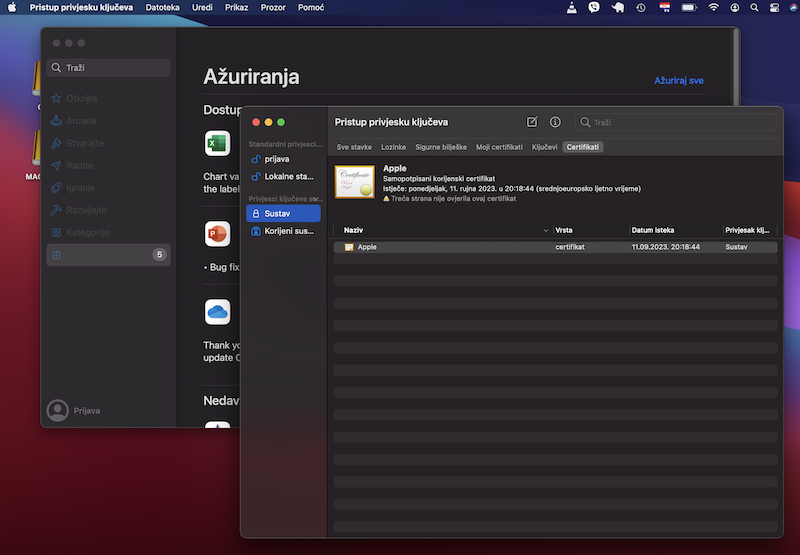
The real culprit? Corrupted or outdated certificates.

Now, you *can* sign into both the App Store and Apple Music if you boot into Safe Mode. For anyone who doesn't know the drill: shut down the computer, wait for the keyboard backlight to die (takes about 10 seconds), then hold down that power button in the top right until you see the startup text and the Apple logo (plus that first chord from Bruce Springsteen's Streets of Philadelphia—F major, by the way). Hold it a bit longer until the message pops up, let go, wait for the hard drive and gear icons to show, select the hard drive with your arrows, hold Shift until you see the "Safe Mode" label, and hit Enter. In Safe Mode, you'll be able to log into both apps with your Apple ID and hopefully run software updates since you can't otherwise.

But honestly? That’s just a band-aid. Once you reboot out of Safe Mode, you’re right back where you started.

The actual fix is to wipe those local certificates.

Go to Launchpad -> Other -> Keychain Access.

Select "Certificates" at the top, then pick "System" on the left. This opens the system certificates (you'll see root ones too—leave those alone!).
Select them all, right-click, and delete.
Just a heads-up: this wipes your saved passwords and stuff, so make sure you've got your logins written down somewhere first.
image

That's it. When you reopen the App Store and Apple Music, they'll ask for your Apple ID again, and once you sign in, everything should work perfectly.

Some people suggest resetting the keychain entirely, but I don't think that's necessary. Let me know if you guys have dealt with the App Store acting up like this.

As for why these certificate issues happen in the first place? That's a whole different story.
How to migrate macOS from one laptop to another? in IT Support ·
Carol Harris9 said:I’ve recently upgraded my hardware situation; I was running an older laptop, but I finally treated myself to a much more powerful machine with a significantly better processor and more RAM. My heart is set on having my entire digital environment—every single setting, file, and application—mirrored perfectly on this new device, yet I am quite desperate to avoid the tedious, soul-crushing process of reinstalling macOS and all my various software packages from scratch.
Now, I find myself wondering if there exists a specific utility or specialized software capable of migrating my existing macOS installations, system drivers, and all my installed programs directly from the old laptop over to the new one?

Just clone the drive using some cloning software. macOS should boot up fine; it'll realize the hardware is different—basically seeing that the drivers don't match—and it'll just grab what it needs via updates.
The only real catch is if the older version of macOS doesn't play nice with the new hardware at all, meaning it can't find the right drivers. Give it a shot and see what happens.
How to partition a MacBook Pro M1 in Laptops ·
They say this thing stays ice cold, supposedly has fans, but we’ve never actually heard them kick in...

Here’s a little DIY guide on how to make those fans scream on your MacBook Pro M1...

Grab one of those digital TV tuners—something like a Strong unit you can find at Spotify.
Record some movie or just random video footage. It'll be in .mts format, which I think is basically a Matryoshka container (not 100% sure). For instance, DaVinci won't touch it. Not even sure if Handbrake will play nice.

Pop open VLC on your Mac and start transcoding—basically turning that .mts into an mp4.
Enjoy the lovely sounds of a rushing waterfall.

P.S. Is there any other way to transcode .mts to mp4 without that constant white noise?
P.P.S. Why am I even transcoding? So I can cut out commercials and all the junk I don't want in DaVinci.
Maria Cox64 said:nah, I'm not gonna go out and grab a camera—got photographers in the family, so I've got that built-in talent

Seriously, did they not give you a decent camera so you wouldn't have to rely on your phone?
Maria Cox64 said:I haven't lost my creative spark since I realized Zane doesn't love me

Fine shot, though.

Maria Cox64 said:Guys, I gotta brag—I've finally moved on.

It shows...

Maria Cox64 said:Zavier, do you still love me? Did you find a wife or even just some decent hookup? Zavier, Zavier, Zavier!

...right here.
Mouse recommendations? in Computer Peripherals ·
So I finally picked up the Logitech M350 Pebble. Seriously, this thing is a game changer. Look, I’m over the whole hassle of constantly plugging and unplugging a USB dongle—plus, my MacBook doesn't even have any USB ports to speak of.
I just needed a solid Bluetooth mouse that wouldn't drive me crazy.
The Pebble is great because it gives you both Bluetooth and the classic wireless receiver option.
It’s super slim, so it doesn't create some weird bulge in my bag, and honestly, that magnetic cover idea? Genius. I was a little skeptical at first, but it works perfectly.

Highly recommend it—especially if you're rocking a small laptop and tossing it around in a tiny bag like I do.
Just picked up a Macbook Pro M1 in Laptops ·
Honestly, I’ve never been an Apple fan—to me, their stuff always felt like pure style over substance.
But then the M1 dropped, and suddenly everyone's losing their minds. You've got people praising it to high heaven, while others are comparing it to absolute beasts of machines and claiming "it just doesn't hit the same." Mostly it's the video editors working with 8K footage.
Whatever: here's what I've realized—maybe it isn't some monster like an Intel i9, but it costs less, performs nearly as well, uses about 10x less battery, stays ice cold, and unlike those massive rigs, it doesn't take up my entire desk space.

I picked one up for video editing and photo work, plus the ability to actually sit in coffee shops and get things done on battery alone, so I went with the beefier model with 16 GB of RAM. And seriously, the video I edit flies through it. Even though I usually work with proxies in DaVinci, I don't even need to on this little laptop. It handles 4K from my DJI drone like a total beast. It completely lived up to the hype. Apple fans (for whatever reason) absolutely hate the Touch Bar. Personally? I think it's awesome.
Obviously, I supplemented the tiny internal drive with a 1 TB Samsung T7 external drive (I could've gone with the X5, but there are reasons—and no, it wasn't the price—why I didn't) and it's plenty for now.

Bottom line: I recommend it (and I’m a certified Apple hater). Big Sur hasn't given me any grief, even with certain quirks like SIP and Gatekeeper. But I've gotten used to it, and besides, I know how to toggle them off when I need to.