8 posts shown.
I am not entirely sure I follow your point. All I know is that whenever I run the System File Checker via the command prompt, it consistently reports an issue within the CBS Log Files. I am at a loss as to how to proceed. Even when attempting minor tasks, I am met with constant errors that render my PC unusable. It is quite frustrating. Perhaps I will give it more thought tomorrow.
It displays this:
https://www.imageupload.net/image/LmVjM
Kenneth Cruz67 said:I guess you're sort of digging around in the OS without quite knowing the full impact of what you're doing, which might have turned a small hiccup into a much bigger headache.
The files you deleted weren't actually the corrupted ones themselves; they were just the lists documenting the corruption. So, deleting them doesn't fix the issue. The actual cause of your Blue Screens is whatever specific files are being flagged within that log.
Even if you managed to restore all the corrupted system files, I suppose the real question is why they got corrupted in the first place, and there's really no guarantee that the problem won't just happen all over again. Ideally, you'd probably want to just reinstall Windows, but even that might not solve it if we're looking at a physical hardware failure in your RAM or your hard drive—which is what that "kernel data inpage error" seems to suggest.
Here are some possible culprits; since you also saw a specific code alongside that kernel inpage error, you might be able to figure out exactly what's failing based on that number:
0x0000007A: File access errors
0xC000009C: Bad hard drive sectors
0xC000009D: Loose cables or hard disk failure
0xC000016A: Bad hard drive sectors
0xC0000185: Unseated or damaged cables
No code was provided. I am looking at the photo right now, and there is no code visible. Is this not an incredibly peculiar problem?
placidtinker39 said:Kernel errors usually point toward a failing hard drive or some memory issues. It could also be a malware infection...
Even following the advice provided by Tyler Parker4 proved fruitless. I am being met with a rotating door of Blue Screens of Death; one moment it is "Critical Process Died," the next it is "Kernel Data Inpage Error," followed by "APC Index Mismatch" or "System Service Exception." Every time I run the System File Checker, it reports corrupted files within the CBS Log Files. I have even attempted to manually delete those text files, yet they reappear immediately upon the next scan. Is there any permanent solution? I am truly at a loss.
Morgan Rodriguez40 said:Give this a shot,
Shut the machine down completely. Once you power it back up, hold down the F11 key; you should be greeted by a menu looking something like this:
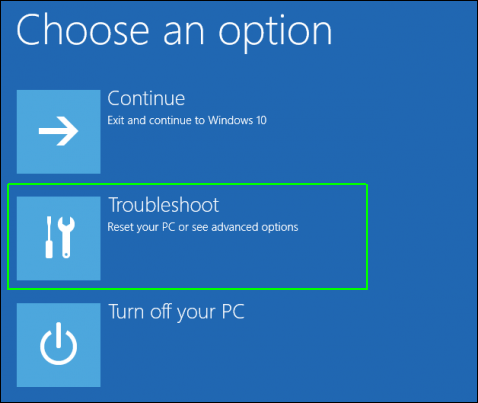
Select the troubleshoot option,

then move into advanced options,
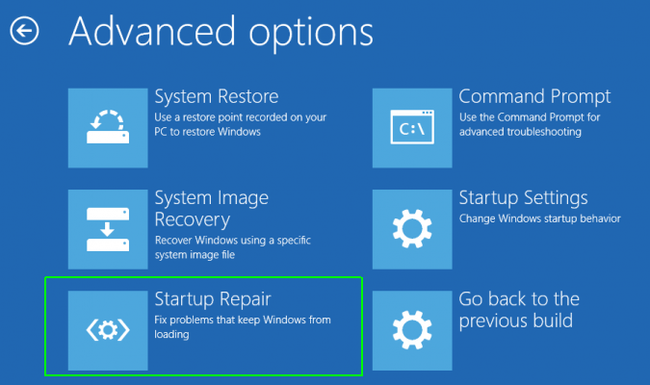
and finally, click on startup repair.
One thing, though—before you start tinkering with anything, unplug all the peripheral clutter from the tower, like external hard drives or USB sticks. It’s better to have a clean slate.
If you're working on a laptop, it's even wiser to strip it down entirely; pull the battery out for about ten minutes before you begin the process.
Thank you, I will try that.
Morgan Rodriguez40 said:Try searching for the System Restore option within the Control Panel and see if you can roll the whole system back to an earlier date. I don't run Windows 10 myself, so I'm a bit out of practice with how the interface is laid out these days.
Did you manage to clear anything out?
I am certain that those CBS Log Files are corrupted and causing the issue, yet I cannot delete them. It appears the PC cannot even complete its processes in Safe Mode, leaving me at a loss. I have watched numerous YouTube tutorials, but they all seem unnecessarily convoluted—spending ten minutes explaining twenty different steps for a simple fix. Is it really meant to be this difficult?
Morgan Rodriguez40 said:Which OS are we talking about here?
Is it legitimate?
It is a legitimate copy of Windows 10.
My PC has hit several Blue Screens of Death lately, specifically throwing "critical process died" and "kernel data inpage error." Initially, I hoped this wasn't anything serious; a simple restart would allow the machine to function normally for a few hours before the crash returned. I ran sfc/scannow via the command prompt, which reported that the System File Checker found corrupt files but was unable to repair some of them. It mentioned that details for online repairs are available in the CBS Log Files located at windr\logs\CBS\.log. I attempted to manually delete these corrupted files, but the system won't allow it. I am quite lost as to what these files actually are or where they originated. I then tried booting into Safe Mode, thinking the OS might resolve the issue itself. However, after sitting in that state for twelve hours, I read online that staying in Safe Mode for too long can cause a loop where the system fails to repair the corruption. I eventually had to force a shutdown. Now, upon restarting, the screen displays "Safe Mode," meaning it is still stuck in that state. While I can see my files, I assume I cannot use them properly. How does one resolve this? I suspect exiting Safe Mode is a simple enough task to find via a search engine, but the underlying corrupted files will remain, likely leading to another Blue Screen within hours. Even now in Safe Mode, running the command prompt yields the same result regarding the CBS Log Files. The issue persists. I urgently need this computer functional by tomorrow. Does anyone have a solution?