CheckEmoji Community · the emoji forum
🏠 Home 🆕 What's new ❓ Unanswered 🔥 Popular 📡 RSS Members 👥 0 online log in · register
Home › Patrick Sanchez84 › Posts

Posts by Patrick Sanchez84

11 posts shown.

Power supply issues in Computer Peripherals ·
Jerry Robinson56 said:In this scenario, it’s almost certainly just the battery—unless there's some weird issue where the traces on the motherboard connecting to the BIOS memory are broken. When that battery dies, or if the voltage drops too low during standby, the BIOS loses its saved data and reverts back to factory defaults. You can tell because the system clock resets; the hardware knows what day it is, but it doesn't know the specific time. My advice? Pop a new battery in, but before you do, try rotating the current one in its socket just to make sure it isn't a simple case of poor contact. Also, definitely test the voltage on that battery—if it's been sitting on a shelf for a while, it might just be drained.

🙏🙏🙏 I actually tried spinning the CMOS battery around—just a little nudge—for a couple of days straight... and it worked! For the last two days, the PC has been booting up perfectly.

Thanks, thanks, thanks a million!!!

😵🎉🥱🙂🤣😵
Power supply issues in Computer Peripherals ·
Jerry Robinson56 said:This right here is a dead giveaway that something is off with the CMOS battery—it could be a loose connection in the socket, or maybe the batteries are just old and worn out.
It really needs to sit above 3.2V (though honestly, it usually hangs on even at 3V) ... and of course, there's always the slim possibility the motherboard itself is acting up, though I wouldn't bet on that.
Usually, you can find an option right in the BIOS to check the battery voltage yourself.
Is it actually shutting down or resetting while you're in the middle of working? .. also, regarding what fadedorca66 mentioned

It isn't shutting down; it’s just being finicky during startup—exactly what I described. It doesn't reset either; everything else runs perfectly fine except for this one glitch.
Power supply issues in Computer Peripherals ·
fadedorca66 said:Here is the service manual for your PC:

https://www.dell.com/support/home/en...0-desktop/docs

If you look at page 94, there's a troubleshooting section for that specific error code (2 amber flashes followed by 1 white)—it suggests there might be an issue with the motherboard.

It’s just blinking 2+1, but both are amber.

One thing you could try—just as a long shot—is updating the BIOS:

https://www.dell.com/support/home/en...x-7070-desktop

(Make sure to read the note: "If your system BIOS version is earlier than 1.3.1, ensure that you update the BIOS to version 1.3.1 before updating to version 1.5.0 or later.")

My system is completely up to date; I'm running BIOS version 1.20.

Just a quick heads-up from my side—if the motherboard ends up failing completely, don't come blaming me! 😬

😁

If that doesn't do the trick, you could attempt to update various firmware components—things like the network card, the SSD, or the TPM module:

https://www.dell.com/support/home/en...esktop/drivers

(You'll need to select the firmware category).

Finally, if none of this works and you're out of warranty, buying random parts for this machine doesn't make much sense—they're pretty specific and can be hard to track down. You might want to check out a local specialist; there's a great electronics repair shop in San Francisco that does component-level work:

http://www.itelektronika.com

Thanks, I'll see what else I can try... I think I'll reach out to Dell support directly.
Power supply issues in Computer Peripherals ·
Jerry Robinson56 said:This is news to me—I don't recall seeing this mentioned before, or perhaps I just missed it,

So, does it actually prompt you to hit something like F1 to enter the BIOS?

Your best bet might be swapping out the CMOS battery on the motherboard.

Also, take a close look at the board itself; check if any capacitors—those little silver cylinders with the blue tops—look bulged or slightly lifted. Honestly, though, it might be much easier to just try a different power supply. You could borrow one from a friend since they're generally compatible, provided you make sure the wattage is sufficient.

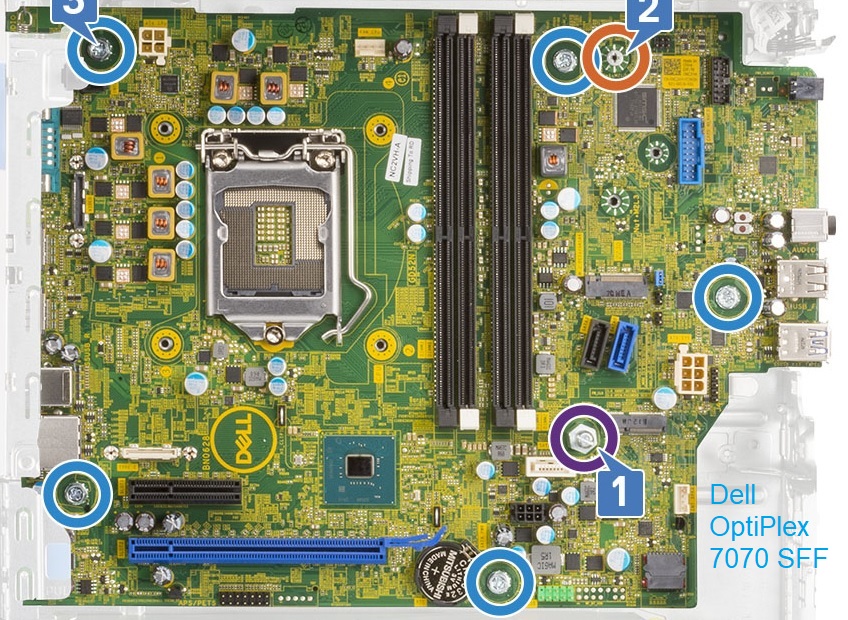
The Dell OptiPlex 7070 SFF comes with a 200 Watt PSU. That’s also a weak point—it's easy to lose some effective output, which leads to these exact kinds of symptoms.

image

Most hardware failures end up being mechanical issues—bad connections, for instance—but sometimes it’s a combination of factors. Based on what you're describing, I'd bet my money on the capacitors. Whether it's an issue on the board itself or a shaky power supply, that seems to be the culprit. Also, try unplugging the power connector on the motherboard and seating it firmly again. I dealt with a case once where a single pin had a poor connection—the connector actually turned black from the wire carbonizing.


Thnx for the advice...

I actually swapped the battery three times in just two days. First, I threw in one from Walmart, which seemed fine for a day, but then the same issue popped up, so I went with a brand-new one since that Walmart one had been sitting on the shelf for a while... but no luck there either.

I’ve gone over the board with a magnifying glass, and nothing looks bulged. I already tried messing with the connectors at the start—unplugged everything and reseated them—but they look perfectly fine. I even pulled the RAM, moved it around, and tried again, but nothing works. I'm honestly running out of things to try besides swapping the power supply, but this Dell unit is a bit tricky because of its proprietary cable setup—it uses those 4 and 6-pin configurations. A buddy lent me two working power supplies, but they were both standard units with the usual 4-pin connectors. My only real option now is to hunt down some adapters to make those 500W units work with this machine.

As for the BIOS, it doesn't give me a prompt to enter it; it just boots straight into two error messages... something about "time and date setup" plus "invalid configuration information"...
Power supply issues in Computer Peripherals ·
Jerry Robinson56 said:Like they mentioned, the core issue is most likely an electrolytic capacitor in the power supply—or perhaps the one feeding the MOSFET gate—that occasionally fails to provide enough conductivity to sustain the startup sequence while under voltage. That would explain why it works fine after you unplug the power cord and plug it back in. It’s also possible there's a weak contact in the standard US wall outlet (120V), though I doubt it's the cable itself.
Plus, it's pretty common for electronic circuits to occasionally "glitch out" due to various factors, causing transient states to fail to resolve properly.

Try leaving it completely disconnected from the wall—not just in standby mode—for a few hours or even overnight. This allows any parasitic capacitance within the components to fully discharge. Let me know if it behaves once you try again.

Thanks... So, I left it unplugged for about four and a half hours total. When I turn it back on, it does the exact same thing—it boots straight into the BIOS. If I shut it down, it won't start up again; the indicator light just blinks (a 2 + 1 pattern).
Power supply issues in Computer Peripherals ·
wiredotter14 said:Why do you think the power supply is the culprit?

To be honest, I’m a bit stuck—once I actually get it powered up, everything seems to run perfectly fine. But the advice I'm getting is all over the place; some people are pointing toward the power supply, others are suggesting the motherboard might be the culprit, and then there's the argument that it's a BIOS issue. It's hard to know which direction to take when everyone has a different theory.

So, I gave it a shot—tried digging through the setupact.log to see if I could track down that "Detected boot environment" entry.
I’m stumped. I honestly don't get it—in the BIOS, everything looks perfectly fine; UEFI is enabled and the SSD containing my Windows installation is correctly flagged, so on paper, there shouldn't be an issue at all. However, once I shut the PC down, I can't seem to get it to boot back up normally. The only way around it is to completely kill the power at the wall, plug it back in, and try again—but even then, the behavior is bizarre. It's like the power supply reacts strangely—I know that much for sure—and sometimes it’ll stay powered on for about a minute before just cutting out entirely, or occasionally it'll trigger a reboot on its own, even though I haven't set it to do that.

You know? I’m a total novice here—I get the basics, sure, but not nearly enough to feel confident—and honestly, this whole situation is driving me absolutely up the wall. 😵
Power supply issues in Computer Peripherals ·
wearymason4 said:Once you're in the BIOS after swapping out the battery, you really need to go through and recalibrate all your settings—starting with the date and time, then everything else—and make sure to save those changes before you exit.

I’ve been using hibernation to shut it down, but I'm running into a weird loop. If I hibernate it for just a short bit, it boots up fine—but if it sits in hibernation for a few hours or overnight, the same headache happens: it kicks me straight into the BIOS, even though it technically resumes from the hibernation state.

The folks over at Dell support mentioned that they might require an original receipt to process anything, which I unfortunately don't have—all I have left is the warranty info. Because of that, I'm thinking about picking up a new power supply just to see if that's actually the culprit. The tricky part is that the connectors on the Dell OptiPlex 7070 aren't like what you'd find in a standard PC. The PSU I currently have on hand only has two connectors—a 4-pin and a 6-pin. I was planning on grabbing this one—the Dell Power Supply—just as a test run to see if a faulty power supply is what's causing the glitch.
Power supply issues in Computer Peripherals ·
wearymason4 said:Well, once you're back in the BIOS after swapping out the battery, you really need to go through and reset all your settings—starting with the date and time, then everything else—and make sure to save those changes before you exit.

I've tried entering the date and time a few times now, but I keep hitting this "invalid configuration information" error—honestly, I'm at a bit of a loss as to where to go from here...
Power supply issues in Computer Peripherals ·
wiredotter14 said:those batteries don't actually recharge—they just last as long as they last—though it's possible something was draining a tiny bit of juice

It’s entirely plausible that the battery might fail again in a year or so. I've had PCs where the battery lasts maybe a year or two, and others where it holds up for five-plus years—it's certainly not a coincidence if you find yourself swapping out multiple batteries over the course of a single PC's lifespan.

Honestly, you just buy a pack of them and swap one out every few years.

Or, the battery was simply garbage to begin with, and now everything should be fine.

To be honest, I have no idea and it's driving me absolutely crazy... So, for two days, everything seemed fine, but now, every single time I try to start my PC—I have to unplug the cable and plug it back in, and every time, it boots straight into the BIOS... I tried resetting to factory settings and using "last known good settings," but nothing works; it just keeps kicking me back to the BIOS at startup. Yesterday, I popped in a battery I grabbed from Walmart, then thought maybe that wasn't it, so today I tried an Energizer, but still nothing.
Power supply issues in Computer Peripherals ·
wearymason4 said:Based on the symptoms, the power supply seems to be the culprit—likely some failing electrolytic capacitors.
If it’s still under warranty, I'd take it back to the retailer and have them send it off to an authorized Dell service center.

Actually, it wasn't that—I just figured it out. Swapped out the CMOS battery and now everything is running perfectly. 🙏

I was checking the warranty online, and it looks like this PC sat untouched in the US from July 2020 until July 2021. Then, the previous owner bought it for his company on July 23, 2021. When I picked it up from him in February 2022, it had Windows and Office pre-installed and was practically spotless—it honestly smelled brand new. So, the machine was essentially covered by warranty and sat idle for nearly a year and a half before I even touched it. I'm not entirely sure if that long period of sitting around actually matters or not.
Power supply issues in Computer Peripherals ·
Hey everyone. I’ve got an HP EliteDesk 800 G6 that’s about a year and a half old, and I’m running into some weird power issues. It’s happened two or three times now...

Basically, whenever I try to boot up the computer, the power button light just flashes a couple of times and then dies. If you look at the Dell documentation, they suggest it might be a faulty power cable. Well, I swapped out the cable and everything seemed fine for maybe three or four days—until two days ago. I tried another cable (I had a few spares lying around), but the next day when I went to turn it on, I ran into the exact same issue. Since the power strip I was using was pretty old, I decided to grab a brand-new one, but even with a fresh strip, nothing changed.

I finally figured something out this morning: if I unplug the power cord from the power supply itself, wait about 10 seconds until the blinking stops, and then plug it back in, the PC actually boots up fine. But once I shut it down again, I have to repeat that whole little ritual. What used to be an occasional glitch has turned into a mandatory step every single time I want to use my PC.

Any idea what’s going on here? Is it a loose connection in the power supply unit, or something else entirely? 😵