CheckEmoji Community · the emoji forum
🏠 Home 🆕 What's new ❓ Unanswered 🔥 Popular 📡 RSS Members 👥 0 online log in · register
Home › IT › IT Support › How to connect to WiFi on Windows XP?

How to connect to WiFi on Windows XP?

Started by Nancy Thompson8 · · 👁 6 views · 47 replies

📡 Subscribe to replies

Participants Nancy Thompson8wiredcanyon94Jack Cook7Drew Allen77fadedorca66Keith Garcia7darkcyclist92wearymason4Megan Thomas5Alexander Diaz4Michael Jackson10
Megan Thomas5 Megan Thomas5 Active Member
132 messages
joined Jan 2021
#21 ·
Even if you manage to get it connected and download this browser, you're dealing with a single-core relic from the Stone Age. With maybe 512MB of RAM—if you're lucky, maybe even 256MB—it'll struggle just to open a single tab.
Jack Cook7 Jack Cook7 Regular
376 messages
joined Aug 2017
#22 ·
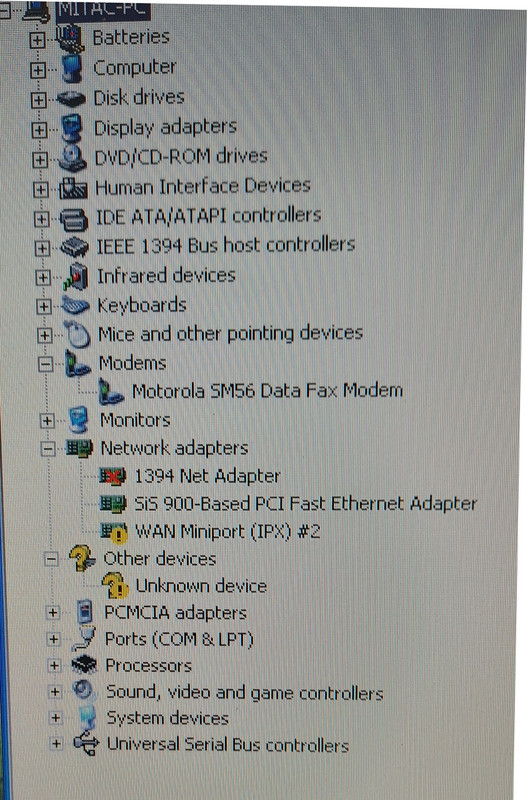
Nancy Thompson8 said:Look, I totally get it—it’s an old laptop, and if there isn't a network card tucked away inside somewhere, I'd probably just toss it in the recycling bin because honestly, it's not worth spending a dime to upgrade it.
Based on what you've shared here, can we actually tell if it has a wireless card built-in or not? Everything else about the machine runs smoothly and feels pretty snappy, but this whole internet situation is just a massive headache.

image

Just go into the properties for that "Unknown device," grab a screenshot of the Hardware ID, and paste it here. Then we can figure this out.

Also, just a heads up—some older laptops had a toggle right in the BIOS Setup to turn things like Wi-Fi, Bluetooth, or infrared on or off. If that's turned off, Windows won't even see the hardware.
When you reboot, try jumping into the BIOS Setup and see if there's anything like that hiding in there.

That laptop definitely HAS a network card, and getting it online should be a breeze. A network card <> Wi-Fi.

What model are we talking about anyway?
Megan Thomas5 Megan Thomas5 Active Member
132 messages
joined Jan 2021
#23 ·
There’s even a modem lying around—plug it in and you can get IE6 running. Pure nostalgia.
Though, honestly, I don't think anyone actually uses dial-up anymore. There's probably nothing left to even connect to.
Nancy Thompson8 Nancy Thompson8 MemberOP
37 messages
joined Jan 2017
#24 ·
Oh, I totally forgot to mention one little detail—this thing is actually a laptop "Dell Latitude"
I’ll say it again though, the machine itself runs like an absolute dream and it's surprisingly snappy, so the only real headache I'm dealing with is the internet connection
Honestly, if I can just figure out how to get the Wi-Fi working, I’d love to pass it down to my niece to use, but if I can't get it sorted, I might just end up tossing it in the trash
Megan Thomas5 Megan Thomas5 Active Member
132 messages
joined Jan 2021
#25 ·
Honestly, it's garbage. There's zero point in even connecting it to the internet. Maybe you can use it to play Solitaire.
Jack Cook7 Jack Cook7 Regular
376 messages
joined Aug 2017
#26 ·
Megan Thomas5 said:There’s even a modem lying around—plug it in and you can get IE6 running. Pure nostalgia.
Though, honestly, I don't think anyone actually uses dial-up anymore. There's probably nothing left to even connect to.

They still exist. 🙂
Jack Cook7 Jack Cook7 Regular
376 messages
joined Aug 2017
#27 ·
Nancy Thompson8 said:Oh, I totally forgot to mention one little detail—this thing is actually a laptop "Dell Latitude"
I’ll say it again though, the machine itself runs like an absolute dream and it's surprisingly snappy, so the only real headache I'm dealing with is the internet connection
Honestly, if I can just figure out how to get the Wi-Fi working, I’d love to pass it down to my niece to use, but if I can't get it sorted, I might just end up tossing it in the trash

Man, that thing is from 2004! It even comes with a service manual including the motherboard schematic and everything else. 👍 👍 🤣
https://www.eserviceinfo.com/downloa...itac_8640.html

No WiFi.

But, it DOES have an Ethernet card so you can easily plug it into a router—all you need is a Cat 5e patch cable of the right length.
Jack Cook7 Jack Cook7 Regular
376 messages
joined Aug 2017
#28 ·
Megan Thomas5 said:Honestly, it's garbage. There's zero point in even connecting it to the internet. Maybe you can use it to play Solitaire.

Writing stuff in Microsoft Word, throwing together some Microsoft Excel sheets, a few drawings, moving photos over from a USB drive, doing some light browsing without all those heavy videos and high-res images, checking webmail... it's actually a pretty useful machine.

If you ask me, you don't even need graphics in your browser—you could just get by with Lynx.
Nancy Thompson8 Nancy Thompson8 MemberOP
37 messages
joined Jan 2017
#29 ·
It’s honestly just like what you mentioned, my niece would probably only ever use a laptop for "lightweight web browsing without any video clips", and really nothing else besides that
Jack Cook7 Jack Cook7 Regular
376 messages
joined Aug 2017
#30 ·
Nancy Thompson8 said:It’s honestly just like what you mentioned, my niece would probably only ever use a laptop for "lightweight web browsing without any video clips", and really nothing else besides that

There you go. Super simple.

Just get that LAN card ready (plug an ethernet cable from the laptop into the router), and you're golden.
Alexander Diaz4 Alexander Diaz4 Member
39 messages
joined Sep 2021
#31 ·
Man, I am so done with these ancient laptops and Windows XP machines—it’s honestly pathetic. Just give the kid a decent modern computer or a real laptop running a recent version of Windows...

With the way computer science is taught in schools these days—which, let's be real, is basically just an optional elective LOL—a kid using this prehistoric Abacus of a laptop is going to end up digitally illiterate. Which, coincidentally, describes about 90% of the people hanging out on this forum anyway.

People can't even find basic info online, they struggle to follow simple four-step instructions to connect two devices, and don't even get me started on the fact that half of them don't even know the difference between RAM and a hard drive...
darkcyclist92 darkcyclist92 Active Member
66 messages
joined Nov 2014
#32 ·
Alexander Diaz4 said:Man, I am so done with these ancient laptops and Windows XP machines—it’s honestly pathetic. Just give the kid a decent modern computer or a real laptop running a recent version of Windows...

With the way computer science is taught in schools these days—which, let's be real, is basically just an optional elective LOL—a kid using this prehistoric Abacus of a laptop is going to end up digitally illiterate. Which, coincidentally, describes about 90% of the people hanging out on this forum anyway.

People can't even find basic info online, they struggle to follow simple four-step instructions to connect two devices, and don't even get me started on the fact that half of them don't even know the difference between RAM and a hard drive...

It isn't your place to pass judgment on that. Some people are cobblers, some are masons, others are doctors, and nobody expects them all to be IT experts, but that certainly doesn't mean they can't operate a computer.

However, one does expect that individuals harboring such attitudes and making these kinds of comments should stay far away from this PDF for the sake of the general mental health of this community. 😉

OT: What kind of investment are we talking about here?? You can just head over to a place like Best Buy and pick up a USB Wi-Fi adapter for maybe ten bucks; it’s smaller than half a centimeter. Just plug it into the laptop, and once it installs, a little bubble pops up in the bottom right corner saying "wireless connection available," you click it, select the network, type in the password, and rock and roll. It’s essentially the same process as in Windows 10.

Personally, I am still running Windows XP SP3 because I see absolutely no reason to move away from it. Sure, there are some issues with cross-browser compatibility, but at the end of the day, you usually just stick to the one single browser that works best for you.

Every other piece of software absolutely meets my needs—I don't know about everyone else's—ranging from Microsoft Office to video editing and even DTP publishing. And a GUI is perfectly normal for usage. In fact, regardless of how much time has passed since its release, my opinion remains that it is significantly ahead of Windows 10, a fact many people actually recognize.

If it runs perfectly on that Dell Latitude, it would be a damn shame to throw it away, especially since most of our field work is handled via smartphones anyway.
darkcyclist92 darkcyclist92 Active Member
66 messages
joined Nov 2014
#33 ·
Megan Thomas5 said:There’s even a modem lying around—plug it in and you can get IE6 running. Pure nostalgia.
Though, honestly, I don't think anyone actually uses dial-up anymore. There's probably nothing left to even connect to.

Haha 😁 damn, I remember once actually using $300 the internet on that connection, don't even bring it up @

Good grief, I just looked at the photo... I actually have a PCMCIA Wi-Fi adapter sitting here. If you can't find one or if you want it, just DM me your address and I'll ship it out to you along with the drivers.
Michael Jackson10 Michael Jackson10 Active Member
140 messages
joined Feb 2023
#34 ·
It’s all pretty sweet, really. Maybe you can bring the dead back to life! Honestly, I feel bad when a perfectly good piece of tech that still works gets retired, but in this case, keeping it should stay strictly in the realm of hobbyists and curiosity seekers.

Usually, these kinds of things are "rescued" by generous relatives from scrap heaps in Germany and then shipped over to the US as a big gift for "impoverished" family members... I've been in a few situations where people send two or three of these things, basically forcing the family to deal with their junk under the guise of a gift. Or they just have no clue; they follow the logic that a laptop is a laptop, and this was just the cheapest option available.

The only way you could actually make a niece happy with one of these is if she’s about 70 years old and knows her way around electronics because she used to regularly swap out vacuum tubes on an old Zenith TV...

The second mistake is thinking: "I just need the cheapest computer or laptop possible, nothing serious, just for the kids' schoolwork."
Even if we ignore the fact that they *will* use it for gaming (because let's face it, kids don't play with marbles or hide-and-seek anymore), they actually *do* need it for school. Anyone with kids in school knows that they're constantly rotating through .docx, .xlsx, .pptx files... usually requiring the latest versions of Microsoft Office, or the 365 version, or using Microsoft Sway, Zoom, or whatever else teachers throw at them via free school packages. They might need to use AutoCAD in high school, online Python interpreters, various portals, certifications... whatever. Basically, they need the latest browsers, the latest Office versions, and plenty of other stuff. Don't worry, though; they'll find a way to mess it up three times over regardless.
If you want your kids to work with compatible programs and formats—so they aren't begging neighbors to save files in a newer format for them... and more importantly, so they don't waste time fighting technology and can focus on the actual "useful load" (since focus is such a struggle these days)—then you need to get them something up-to-date.
And I know what you're thinking: "It's fine... there are converters... it's all the same thing..." We all know that. Microsoft hasn't done anything revolutionary in Microsoft Office for decades; they just move icons around, make them rounded or square, and call it a day. It works fine for backward compatibility, but it definitely doesn't work for forward compatibility...

And no, Windows XP wasn't even a stable or robust system; it only became usable once the service packs were out. Professionally, I've worked my way through everything from DOS to Windows 10. In business, OS choices are conservative; setups don't change if they work, and you don't install things just for the sake of it, but I was always forced to move to a newer version once it matured. Even though I always trusted the OS I was leaving more than the new one (mostly because I had learned the hard way what works and what doesn't), I admit that since Windows 7, I haven't really dealt with OS configurations much; I just focus on my job. Systems are mostly fine now—robust and stable. Hardware might fail, but you can't break the OS that easily. And practically speaking, hardware had to be upgraded too: new OS, new computer... the old ones still worked, but they just couldn't keep up anymore...

So, if you want to play around with these ancient machines, do it in your garage. Hook up some cheap Chinese car diagnostic tools or pretend you're some kind of file wizard... whatever. But don't force this outdated stuff on kids; you aren't doing them any favors. Those who are actually interested in the tech will find a way to have fun with it. For most people, computers are just black boxes—tools to get a job done... and these days, they won't even perform a proper shutdown for months.
darkcyclist92 darkcyclist92 Active Member
66 messages
joined Nov 2014
#35 ·
Michael Jackson10 said:It’s all pretty sweet, really. Maybe you can bring the dead back to life! Honestly, I feel bad when a perfectly good piece of tech that still works gets retired, but in this case, keeping it should stay strictly in the realm of hobbyists and curiosity seekers.

Usually, these kinds of things are "rescued" by generous relatives from scrap heaps in Germany and then shipped over to the US as a big gift for "impoverished" family members... I've been in a few situations where people send two or three of these things, basically forcing the family to deal with their junk under the guise of a gift. Or they just have no clue; they follow the logic that a laptop is a laptop, and this was just the cheapest option available.

The only way you could actually make a niece happy with one of these is if she’s about 70 years old and knows her way around electronics because she used to regularly swap out vacuum tubes on an old Zenith TV...

The second mistake is thinking: "I just need the cheapest computer or laptop possible, nothing serious, just for the kids' schoolwork."
Even if we ignore the fact that they *will* use it for gaming (because let's face it, kids don't play with marbles or hide-and-seek anymore), they actually *do* need it for school. Anyone with kids in school knows that they're constantly rotating through .docx, .xlsx, .pptx files... usually requiring the latest versions of Microsoft Office, or the 365 version, or using Microsoft Sway, Zoom, or whatever else teachers throw at them via free school packages. They might need to use AutoCAD in high school, online Python interpreters, various portals, certifications... whatever. Basically, they need the latest browsers, the latest Office versions, and plenty of other stuff. Don't worry, though; they'll find a way to mess it up three times over regardless.
If you want your kids to work with compatible programs and formats—so they aren't begging neighbors to save files in a newer format for them... and more importantly, so they don't waste time fighting technology and can focus on the actual "useful load" (since focus is such a struggle these days)—then you need to get them something up-to-date.
And I know what you're thinking: "It's fine... there are converters... it's all the same thing..." We all know that. Microsoft hasn't done anything revolutionary in Microsoft Office for decades; they just move icons around, make them rounded or square, and call it a day. It works fine for backward compatibility, but it definitely doesn't work for forward compatibility...

And no, Windows XP wasn't even a stable or robust system; it only became usable once the service packs were out. Professionally, I've worked my way through everything from DOS to Windows 10. In business, OS choices are conservative; setups don't change if they work, and you don't install things just for the sake of it, but I was always forced to move to a newer version once it matured. Even though I always trusted the OS I was leaving more than the new one (mostly because I had learned the hard way what works and what doesn't), I admit that since Windows 7, I haven't really dealt with OS configurations much; I just focus on my job. Systems are mostly fine now—robust and stable. Hardware might fail, but you can't break the OS that easily. And practically speaking, hardware had to be upgraded too: new OS, new computer... the old ones still worked, but they just couldn't keep up anymore...

So, if you want to play around with these ancient machines, do it in your garage. Hook up some cheap Chinese car diagnostic tools or pretend you're some kind of file wizard... whatever. But don't force this outdated stuff on kids; you aren't doing them any favors. Those who are actually interested in the tech will find a way to have fun with it. For most people, computers are just black boxes—tools to get a job done... and these days, they won't even perform a proper shutdown for months.

Windows XP is, as of this very second, the absolute core, fundamental backbone of the entire backend infrastructure for a long line of highly prestigious and most successful companies in our country—companies that refuse to gamble on Microsoft's erratic whims. Just look at the facts: I doubt there is a single retail point of sale out there that doesn't run on XP. Do you honestly believe that just because some tiny little program uses XP, it's nothing more than a piece of junk? Is that really your logic?

The truth is, new versions of Windows aren't even necessary unless you are looking to completely wreck your systems and disrupt your business operations. 🙂 Hah, it's not a joke, it's a reality.

Even in my own firm until recently, the entire technical and business side ran on XP. Windows 10 was relegated to a single machine used solely for format conversions that wouldn't run on XP—like h.265/HEVC, for instance—and maybe updating Garmin maps, and that was it.

Therefore, the statement above of yours is such a massive lie that it couldn't possibly be any larger. Even though insight regarding XP isn't even the topic here, fine.

So why don't you play around with such garbage in your garages, plugging in Chinese diagnostic tools and pretending to be some kind of file wizards or whatever... just don't force these outdated systems onto children; you aren't doing them any favors. Those who are actually drawn to technology will find their own ways to have fun, whereas for the majority, computers are just black boxes—tools meant to perform a job they want done... most people haven't even performed a shutdown in months...

Now, taking the facts from the paragraph above into account, I suspect that mastering Windows XP will require significantly more than just installing some cheap Chinese diagnostic software.

Let's be realistic: what is Windows 10? It's an OS for kids. Look at the attempts to follow trends, specifically with Android, which people went crazy for during the smartphone evolution, where they tried to pivot the situation with Windows 10 systems on Nokia smartphones. They even have their own "Windows Store," which has been obsolete on Nokia for a year already. And this "new" system!

Microsoft is well aware that they solved the core systems issues with Windows 2000 NT Server, XP, and Linux back in 2005, and they have held that ground through today and likely well into the future beyond 2022. All this tinkering with fancy cosmetics (GUI) and games for the casual mass market—starting with the failed Windows Vista—is probably all Microsoft does just to prevent desktop computing from migrating entirely to Android. Because the reality is that the gaming industry doesn't just keep the Windows OS alive; it keeps the entire desktop PC industry on its feet. And then there are those fancy internet browsers; otherwise, many businesses would have already shuttered their doors.

But for anything serious, Windows 10? No, absolutely not. 🙂
Drew Allen77 Drew Allen77 Active Member
82 messages
joined May 2017
#36 ·
Oh my god.
fadedorca66 fadedorca66 Regular
372 messages
joined Nov 2022
#37 ·
Why even bother sticking with Windows XP? I mean, Windows 98 SE is more than enough if you just want to play Solitaire, pinball, or listen to some CDs.

Plus, you've still got basic stuff like MS Paint and things like that.
wearymason4 wearymason4 Active Member
239 messages
joined Oct 2014
#38 ·
😁
https://ibb.co/jHs3pQ7
..so, I just pulled some gold reserves out from under the table here.
Michael Jackson10 Michael Jackson10 Active Member
140 messages
joined Feb 2023
#39 ·
Maybe if people actually read what’s being said, we wouldn't have so much unnecessary noise on this forum...

darkcyclist92 said:Windows XP is, as of this very second, the absolute core, fundamental backbone of the entire backend infrastructure for a long line of highly prestigious and most successful companies in our country—companies that refuse to gamble on Microsoft's erratic whims. Just look at the facts: I doubt there is a single retail point of sale out there that doesn't run on XP. Do you honestly believe that just because some tiny little program uses XP, it's nothing more than a piece of junk? Is that really your logic?

The truth is, new versions of Windows aren't even necessary unless you are looking to completely wreck your systems and disrupt your business operations. 🙂 Hah, it's not a joke, it's a reality.

Even in my own firm until recently, the entire technical and business side ran on XP. Windows 10 was relegated to a single machine used solely for format conversions that wouldn't run on XP—like h.265/HEVC, for instance—and maybe updating Garmin maps, and that was it.

Therefore, the statement above of yours is such a massive lie that it couldn't possibly be any larger. Even though insight regarding XP isn't even the topic here, fine.

So why don't you play around with such garbage in your garages, plugging in Chinese diagnostic tools and pretending to be some kind of file wizards or whatever... just don't force these outdated systems onto children; you aren't doing them any favors. Those who are actually drawn to technology will find their own ways to have fun, whereas for the majority, computers are just black boxes—tools meant to perform a job they want done... most people haven't even performed a shutdown in months...

Now, taking the facts from the paragraph above into account, I suspect that mastering Windows XP will require significantly more than just installing some cheap Chinese diagnostic software.

Let's be realistic: what is Windows 10? It's an OS for kids. Look at the attempts to follow trends, specifically with Android, which people went crazy for during the smartphone evolution, where they tried to pivot the situation with Windows 10 systems on Nokia smartphones. They even have their own "Windows Store," which has been obsolete on Nokia for a year already. And this "new" system!

Microsoft is well aware that they solved the core systems issues with Windows 2000 NT Server, XP, and Linux back in 2005, and they have held that ground through today and likely well into the future beyond 2022. All this tinkering with fancy cosmetics (GUI) and games for the casual mass market—starting with the failed Windows Vista—is probably all Microsoft does just to prevent desktop computing from migrating entirely to Android. Because the reality is that the gaming industry doesn't just keep the Windows OS alive; it keeps the entire desktop PC industry on its feet. And then there are those fancy internet browsers; otherwise, many businesses would have already shuttered their doors.

But for anything serious, Windows 10? No, absolutely not. 🙂

Windows XP is the main "backend" system?
I don't get it. Are you trying to say they're using Windows XP as a server or something? 🤦

Those "point of sale" systems you're talking about are probably just glorified digital receipts used in local diners, where nobody besides the owner knows what the actual inventory looks like, and even then, they "creatively" adjust numbers based on how many receipts they pocket... there's a more sophisticated way for those types of "users": they use an Android app on their phones, which handles the official reporting perfectly fine... but it's a nightmare to pull any actual sales data from them, because the developers are just enthusiasts who barely figured out one-way data transmission from the user to the tax authorities...
My work is strictly with "Point of Sale" (POS) systems, where the application interacts with a robust SQL database, whether it's local or remote, handling full inventory and all kinds of transaction documents during sales and shipping...

Look, I walked away from Clipper applications that stored everything in "reliable" DBF "databases" over twenty years ago, even though I used to build them myself... nowadays, they don't even meet basic legal standards...

And if you do find them still in use... well, plenty of Stephanie-types use Windows XP just to forward emails, having mastered nothing more than copy-paste... exclusively via mouse...

"American style" dictates that you don't go for the latest version of anything; you go for the "stable and polished" version that came before it. Windows 11 -> Windows 10 -> Windows 8.1 -> Windows 8 -> Windows 7 -> Windows XP (with all the available service packs)

Go back to the eighth week, but stick with XP...

Basically, you don't even need new versions of Windows unless you want to wreck your systems and your business operations. 🙂 Hah, I'm not even joking.

Even in my own company until recently, the entire technical and business side ran on XP. Windows 10 was just one machine used for converting certain formats that wouldn't run on XP, like h.265/HEVC, or maybe updating Garmin maps, and that was it.

So, that statement above is such a massive lie it's almost impressive. Even though insight regarding XP isn't even the topic here, but whatever.

Like I said, try reading with comprehension...
Formats?
I clearly stated: the formats of modern applications.
Meaning, modern Microsoft Office versions (not the 97 stuff...) won't run on XP at all, to continue the list...

Now, considering the facts from the paragraph above, I think knowing Windows XP will require a bit more than just installing some cheap Chinese diagnostic tool.

Because let's be real, what is Windows 10? It's an OS for kids. Look at the attempt to follow trends, especially with Android, which people went crazy for during the smartphone evolution, when they tried to fix things with Windows 10 systems on Nokia smartphones. They even have their own "Windows Store," which has been obsolete on Nokia for a year already. And that's a "new" system!
Let’s be real here—you can't even tell the difference between a GUI and the kernel...
Jack Cook7 Jack Cook7 Regular
376 messages
joined Aug 2017
#40 ·
My bad. What exactly even is a backend?

And how do you actually mount the Windows GUI to the kernel, starting from NT 4.0?

You must log in or register to reply here.

Log in Register

🔗 Similar threads