CheckEmoji Community · the emoji forum
🏠 Home 🆕 What's new ❓ Unanswered 🔥 Popular 📡 RSS Members 👥 0 online log in · register
Home › IT › IT Support › How to connect legacy hardware...

How to connect legacy hardware...

Started by stormyangler12 · · 👁 4 views · 7 replies

📡 Subscribe to replies

Participants stormyangler12driftingtinker7Maria James94darkowl72Kimberly Smith6
stormyangler12 stormyangler12 MemberOP
27 messages
joined Dec 2014
#1 ·
I ordered a pre-built PC configuration through an online shop. When I placed the order, I specifically requested that they include everything necessary for me to easily hook up my old hard drive at home—and they explicitly confirmed they would do it.

Well, the cable arrived, but...

image

Does anyone know how to actually connect this drive, or am I missing some kind of adapter?

PS
Here’s a photo of the "extra" mess of cables inside the case.

image

THANKS
driftingtinker7 driftingtinker7 Newcomer
7 messages
joined Aug 2016
#2 ·
They sent you a SATA cable, but you’re working with an old IDE hard drive.

You actually need a cable like this:

image

The real question is whether your motherboard even has an IDE slot left on it. Check it out or just snap a photo and let me know.

It should look something like this:

image

As for powering the drive, you'll need a connector like this:

image

You probably have one of those on your power supply, so it shouldn't be an issue.
stormyangler12 stormyangler12 MemberOP
27 messages
joined Dec 2014
#3 ·
I’ve actually got a power connector sitting right there among my spare cables inside the case.

See, that old drive used one of those wide, white cables. My motherboard is THIS —and I don't see an IDE slot anywhere on it.

Is there some kind of adapter or something similar available? (It holds all my document backups, photos, and everything else, so this is pretty critical for me.)

Thanks for the help.
driftingtinker7 driftingtinker7 Newcomer
7 messages
joined Aug 2016
#4 ·
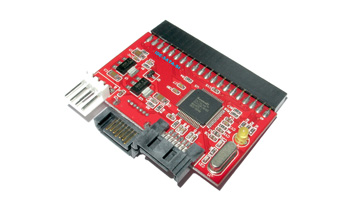
There are adapters out there similar to this:

image

You should check http://www.amazon.com/ to see what they have available locally and what the price point looks like.

Maybe there’s a thread on a forum where someone has actually used one, so it might be worth searching; personally, I haven't messed with them.

Alternatively, if you’re just using the drive for backups, you could grab an external IDE enclosure. Just slide the drive in and plug it via USB whenever you need it.

EDIT: Just realized I botched the images above 😬, but you get the gist of what I mean.🙂
Maria James94 Maria James94 Member
39 messages
joined May 2009
#5 ·
At my job, we just use an "IDE/SATA to USB" adapter whenever we need to rescue data from some older drives, and honestly, it does the trick just fine.
I can't find the exact model we use, but here's something pretty similar:

My advice? Grab everything you need off that old drive and move it over to a SATA drive. Once that's done, just retire the IDE drive for good—don't go trying to keep it running via an adapter indefinitely.
darkowl72 darkowl72 Regular
311 messages
joined Oct 2015
#6 ·
Yeah, you can pick up those kinds of adapters at most tech stores; Best Buy or Micro Center should definitely have them in stock. Honestly though, putting that drive into a new build is a waste of time. It’s tiny, and it’s painfully slow—especially since you’re building a rig with an SSD where everything is supposed to be snappy. If you actually need more storage than that 120GB SSD provides, just grab a 500GB SATA drive and slide it into the case. That's a much smarter move. Plus, that drive is ancient, and hard drives don't last forever. It's probably right on the edge of failing, and you really don't want to deal with it glitching out in a brand-new setup.

From a budget standpoint, you'll end up dropping maybe $100-$50 on an adapter, then a cable, and maybe even messing around with mounting brackets just to use an old, sluggish, unreliable drive. Meanwhile, a decent new 500GB drive starts around $117...

If there's anything important on that old drive, back it up to some external storage or a thumb drive. If the machine won't even boot, just ask a buddy to help you slave the drive to their PC to pull your files off.

And don't just trash the old computer. Either give it away to someone who'll actually use it, or throw it on Facebook Marketplace to see if you can snag a few bucks. Don't expect to get rich, obviously. But hey, if you can scrape together enough to help pay for your new hard drive, it's a win. 👍
stormyangler12 stormyangler12 MemberOP
27 messages
joined Dec 2014
#7 ·
...so in the end—I just dusted off an old PC, burned everything onto five DVDs, and called it a day...

thanks
Kimberly Smith6 Kimberly Smith6 Member
36 messages
joined Sep 2007
#8 ·
You can actually pick up one of those ATA/IDE to SATA adapters on eBay for just a few bucks, and they plug right into the motherboard without any fuss. I ended up ordering one myself recently because I’ve got this old hard drive sitting there that isn't really good for anything other than acting as a third backup tier alongside my two USB drives. Right now, the drive is hooked up via a PCI controller, but honestly, that controller is being such a headache—the drivers are incredibly buggy and end up freezing my Windows 7/8/10 system constantly. It’s frustrating because the drive itself is perfectly healthy, and I’d much rather just tinker with my files directly on it instead of having to constantly plug and unplug various USB drives all day long. As for selling it? Well, I don't think anyone would pay more than a couple of cents for it anyway.

Sent from my iPhone 6 using Reddit

You must log in or register to reply here.

Log in Register

🔗 Similar threads