CheckEmoji Community · the emoji forum
🏠 Home 🆕 What's new ❓ Unanswered 🔥 Popular 📡 RSS Members 👥 0 online log in · register
Home › IT › Software › Dell OEM license vs. Retail Box?

Dell OEM license vs. Retail Box?

Started by restlessmaker10 · · 👁 4 views · 9 replies

📡 Subscribe to replies

Participants restlessmaker10Noah Sanchez39Gregory HughesJack Alvarez
restlessmaker10 restlessmaker10 NewcomerOP
8 messages
joined May 2015
#1 ·
I’ve got this Dell OEM sticker on my current rig with a Product Key that came pre-installed on the machine. I'm planning on doing a full teardown—new case, new parts, the whole nine yards—so I was wondering if I can actually reuse those Windows licenses on the new build. My plan is basically to just download the installer from the web, run the setup, and then plug in that Product Key when it asks. Is that actually going to work, or am I wasting my time?
Noah Sanchez39 Noah Sanchez39 Member
30 messages
joined Mar 2010
#2 ·
If you're just swapping out the drive and/or the RAM, you should be able to reactivate Windows using the same Product Key.
But if you're replacing basically everything else, then technically you've got a whole new machine on your hands.

Anyway, don't sweat it. If you run into any activation headaches, just give me a shout. 😉

Activating Windows 7: frequently asked questions
restlessmaker10 restlessmaker10 NewcomerOP
8 messages
joined May 2015
#3 ·
Look, I didn't say I was building a rig for a corporation, which would mean needing a formal Windows license... and since I already have a sticker with a Product Key on it... that’s why I’m asking. Basically, I couldn't care less about anything illegal.
Noah Sanchez39 Noah Sanchez39 Member
30 messages
joined Mar 2010
#4 ·
So, you're upgrading to a new machine, right? That means you'll be needing a fresh Product Key.
Gregory Hughes Gregory Hughes Newcomer
4 messages
joined Feb 2011
#5 ·
If you happen to swap out your motherboard or your processor, you will find that you'll essentially need to acquire a brand-new license, whether you’re looking at a Dell OEM version or a Retail Box—and I am specifically referring to Windows 7 here...

The thing about a Dell OEM license is that it is fundamentally tied to the specific hardware, namely the motherboard and the CPU, whereas a Retail Box is instead tied to the user themselves; the only real restriction there, if my memory serves me correctly, is that you can only have it installed on one single computer at any given time.
restlessmaker10 restlessmaker10 NewcomerOP
8 messages
joined May 2015
#6 ·
Can someone break down the difference between DSP and Retail Box for me?
Noah Sanchez39 Noah Sanchez39 Member
30 messages
joined Mar 2010
#7 ·
Read this here
restlessmaker10 restlessmaker10 NewcomerOP
8 messages
joined May 2015
#8 ·
So, how exactly do they "bind" the hardware components to the Windows license to make sure it won't work on a different machine?
Noah Sanchez39 Noah Sanchez39 Member
30 messages
joined Mar 2010
#9 ·
It goes something like this (quoting):

"Product activation is a licensing verification process needed by certain proprietary software applications[1]. One version involves a patent held by Uniloc, where the software takes hardware serial numbers and hashes them along with a unique Product Key to create a specific installation ID. That ID is then transmitted back to the developer to confirm the Product Key is legitimate and to make sure it isn't being recycled across several different machines." (link)
Jack Alvarez Jack Alvarez Active Member
69 messages
joined Jan 2014
#10 ·
restlessmaker10 said:So, how exactly do they "link" the hardware components to a Windows license so that it won't work on a different machine?

Since I actually use an OEM version myself (Windows 7 OEM Professional), I run into this funny little situation quite often... I ordered a custom PC build in parts—you know, the whole works: motherboard, hard drive, processor, graphics card, power supply, RAM, case, cooler, and all that good stuff—and put it together myself. I bought and installed my Win 7 Pro OEM and activated it using the code found right on the DVD box, and everything worked perfectly. But after a while, I decided to toss in an extra graphics card and another hard drive. Then, down the road, I did a clean format of my C: drive and tried typing in that exact same code from the DVD box again, but it wouldn't take it! It just gave me an error saying the key wasn't valid and offered me options to
*use automated phone activation
*buy a new key online
*enter a different key
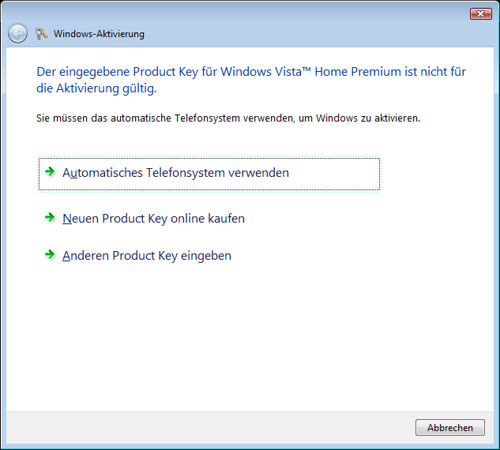
image
In my case, I use the automated phone activation method where I type in the installation ID
image
and it works every time. Even after a fresh format of the C: drive, I can usually activate normally using the number from the DVD box, but as soon as I pull out "just" that extra graphics card, I'm back to needing the phone activation again... So, regarding how they "link" the hardware to the Windows license... it's actually pretty straightforward. I was reading recently about what kind of data we send over to Microsoft, whether we explicitly consent to it or not, so for them, "linking" hardware to a specific license is really the easiest thing in the world!!

You must log in or register to reply here.

Log in Register

🔗 Similar threads