CheckEmoji Community · the emoji forum
🏠 Home 🆕 What's new ❓ Unanswered 🔥 Popular 📡 RSS Members 👥 0 online log in · register
Home › IT › IT Support › Using your old phone as a security camera

Using your old phone as a security camera

Started by steelhawk26 · · 👁 5 views · 2 replies

📡 Subscribe to replies

Participants steelhawk26ruggedcobra8
steelhawk26 steelhawk26 MemberOP
23 messages
joined Jan 2016
#1 ·
I have an old smartphone I want to repurpose as a security camera for my vacation home back in rural Montana.
I’ve tested a few apps that seem to work fine, but there's a catch: the house is on a completely different network than where I am now. I’m stuck on how to configure the settings so I can actually view the feed remotely from a different connection.
So far, I’ve installed these:
“IP webcam pro”
“WebcamXP”
“DroidCam”

Does anyone here know how to set this up for remote access?
ruggedcobra8 ruggedcobra8 Newcomer
9 messages
joined Jul 2016
#2 ·
First off, you’ll need to figure out which specific port your camera—or rather, the app you're using—is actually running on. Once you have that identified, you just have to head into the router settings for the network your phone is connected to and set up some port forwarding to get everything talking to each other!
steelhawk26 steelhawk26 MemberOP
23 messages
joined Jan 2016
#3 ·
I just launched the "IP webcam" app on my phone, and it shows 192.168.0.13:8080
. Checking the cmd/ipconfig window on my PC, I see: IPv4 Address ..... 192.168.0.26
. My router is a
Netgear model
. I am unsure what specific information needs to be entered into my router's port forwarding settings.
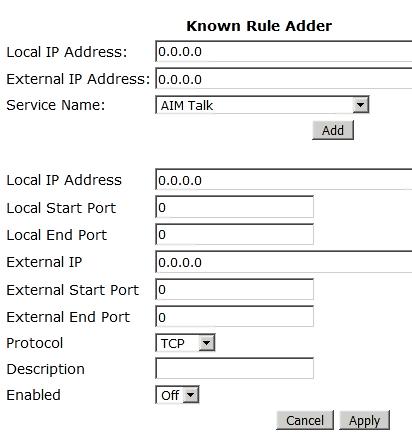
Here is what my current port settings look like:
image

You must log in or register to reply here.

Log in Register

🔗 Similar threads