CheckEmoji Community · the emoji forum
🏠 Home 🆕 What's new ❓ Unanswered 🔥 Popular 📡 RSS Members 👥 0 online log in · register
Home › IT › IT Support › Laptop specs?

Laptop specs?

Started by Morgan Ortiz6 · · 👁 4 views · 8 replies

📡 Subscribe to replies

Participants Morgan Ortiz6Gerald Cruzfadedorca66driftingcanyon2Jerry Robinson56
Morgan Ortiz6 Morgan Ortiz6 MemberOP
42 messages
joined Feb 2015
#1 ·
My neighbor picked up a new laptop and just left his old one—totally functional, by the way—sitting right next to the trash bins outside
I grabbed it, but I’m hitting a wall trying to dig up any basic specs since my neighbor is nowhere to be found at the moment
It looks like an older model, but it feels like a waste to just toss it if it still works; I figured it could serve as a decent backup machine for some odd jobs

Here is what’s printed on the casing: DELL MIT-TTT-N S/N: 181305860237

I’ve tried searching on Google, but nothing is turning up regarding this specific unit
To make matters worse, there wasn't a power adapter included (needs a 19v charger), so I haven't even been able to boot it up yet

Any chance anyone here knows how I might track down some info on this thing?
Gerald Cruz Gerald Cruz Newcomer
3 messages
joined Mar 2017
#2 ·
Post a pic of the laptop

Sent from my M2004J19C via Reddit
fadedorca66 fadedorca66 Regular
372 messages
joined Nov 2022
#3 ·
There might be a sticker on the bottom underneath the battery, or maybe the model number is just right by the screen...
Morgan Ortiz6 Morgan Ortiz6 MemberOP
42 messages
joined Feb 2015
#4 ·
So, a buddy of mine lent me his power adapter, and I managed to get this laptop to actually boot up.
I noticed it's running Windows XP, so I pulled up Aida to see what kind of specs we're dealing with here.
The configuration is... well, it's weird, to say the least:
-960 GB of RAM
-40 GB Hard Drive
-3066 MHz processor ??????

Look, I don't mind upgrading the storage or the RAM, but that processor speed? It makes zero sense.

We’ve got three laptops at my place, and none of them even touch the 2 GHz mark, yet they all run just fine.

Is it even worth putting any money into this thing?
driftingcanyon2 driftingcanyon2 Active Member
76 messages
joined Feb 2021
#5 ·
It’s basically an ancient relic that won't be able to handle modern Windows updates. Given how high that frequency is, you're probably looking at a single-core CPU, and I suspect you meant the RAM is in MB rather than GB. With an IDE hard drive instead of SATA, an upgrade just isn't worth the headache. Based on the specs, this laptop feels like it's from around 2005—honestly, its best use case is probably just running Windows XP.
Morgan Ortiz6 Morgan Ortiz6 MemberOP
42 messages
joined Feb 2015
#6 ·
I’ve been messing around with it for a few hours now, and honestly, it’s a beast—windows pop open faster than they do on my actual main rig
The plan is to bump up the RAM and swap in a bigger hard drive, but I’m dead set on keeping this thing running on Windows XP
Right now, the drive is split into two partitions (a 10 GB one and a 30 GB one), so I'm trying to figure out how to migrate the whole Windows XP setup, drivers and all, onto the new drive
Anyone out there know how to pull this off?
fadedorca66 fadedorca66 Regular
372 messages
joined Nov 2022
#7 ·
That thing is ancient history, honestly don't even bother.

The hard drive is probably an IDE (you should check), which means you'd need to hunt down a 2.5" IDE drive. Those aren't really being made anymore, so you're stuck looking for old stock or buying used. And honestly, buying a used drive that’s been sitting in a laptop for years? That's just asking for trouble.
There are 2.5" IDE SSDs out there, but if you want any decent amount of storage, you'll end up spending way too much money on a laptop that isn't worth the investment anyway.

As for the RAM, it all depends on what the max capacity actually is, plus you'd have to track down some super old DDR SODIMM sticks (check that too, I guess).

Bottom line—it's not worth it. Just use it as-is and call it a day. Maybe you could just merge those two partitions into one 40GB drive so you stop getting those annoying low disk space warnings and stuff.
driftingcanyon2 driftingcanyon2 Active Member
76 messages
joined Feb 2021
#8 ·
It’s honestly too ancient to be worth the effort. First off, you’d need to verify if the motherboard or BIOS even supports more than the 1 GB currently installed, and check how many slots are actually open—most laptops back then were strictly limited to two slots—but finding a RAM module that old feels like searching for something you'd only find in some dusty corner of China. As for IDE drives, you're basically looking at secondhand junk since that tech hasn't been manufactured in years. Plus, Windows XP is pretty much useless by today's standards; it isn't just about how fast it runs, there are plenty of other reasons why its heyday is long gone.
Jerry Robinson56 Jerry Robinson56 Regular
320 messages
joined Apr 2013
#9 ·
Morgan Ortiz6 said:I've been tinkering with this machine for a few hours now; it runs quite smoothly and windows pop up faster than they do on my current PC.
I am considering an upgrade to more RAM and a larger hard drive, though I have a strong desire to keep running this Windows XP setup.
The current drive is split into two partitions (10 and 30 GB), and I am trying to figure out the best way to migrate this Windows XP installation, complete with all its drivers, onto the new drive.
Does anyone have any insight?

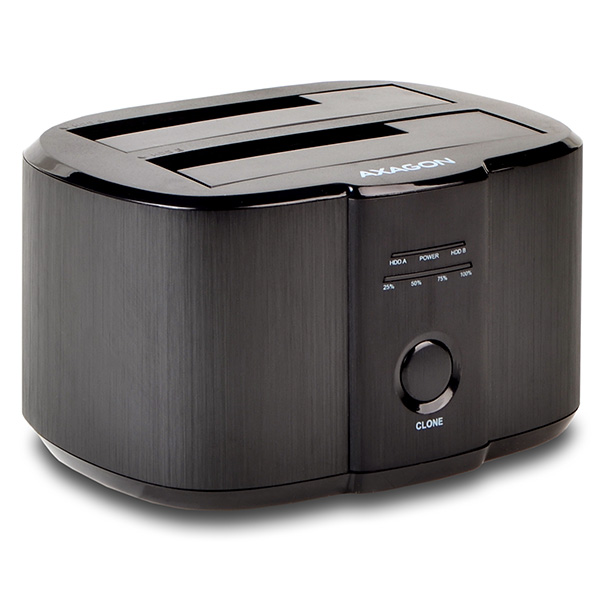
You could use Norton Ghost or perhaps one of those cloning tools listed below—it’s much simpler; you just plug in the drives, hit a button, and let it do the work without further intervention.🙂 However, you will definitely need some SATA IDE adapters...
Just be extremely careful about which drive is the source and which is the clone—it should be clearly labeled on the unit.

ttps://www.axagon.eu/en/produkty/adsa-st

It has worked flawlessly for me for years. Honestly, there are days when I feel the urge to go fully digital myself.😁

image

You must log in or register to reply here.

Log in Register

🔗 Similar threads