#1 ·
So, here’s the deal. This past summer, I lent my roommate my laptop while I was out at work. It was working perfectly when I handed it over. But when I got home? Total silence. No sound at all. I asked her what happened, and she honestly had no clue. She tried plugging in some external speakers, and everything sounded fine until she unplugged them. 🙄
I have tried absolutely everything. I checked the drivers, updated the drivers, messed with every single setting, performed a system restore from a few months back, and even did a full reinstall of Windows. Nothing worked. Nothing! I finally just resigned myself to the fact that I’d have to buy new speakers. Since I am incredibly lazy, I didn't want to bother buying anything new, so I figured I'd just stick to headphones or external speakers since the jack was still working.
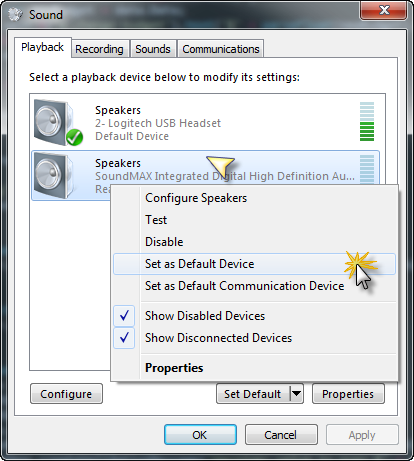
But then things got weird. Really weird. I was on a Skype call with a friend the other day and suddenly realized the audio was coming through my laptop speakers instead of my headphones. I was actually stoked for a second, thinking, "Hey, maybe the speakers are fixed!" But then I went to play a song and—nothing. Silence again. It turns out the speakers only work when I am actively on a Skype call. As soon as the call ends, the sound dies. 🤷 I've been digging through settings and poking around everywhere, but I can't make heads or tails of it. I searched online and found a couple of similar stories, but nobody seems to know why this happens or how to fix it. 🤷
The only way I've managed to get any sound at all is by creating a second Skype profile on my tablet so I can basically call myself. 😵
For context, I'm using an HP EliteBook running 32-bit Windows 7 Ultimate, if that helps anyone.
If anybody knows what's going on here, please help me out. I'm begging you!
I have tried absolutely everything. I checked the drivers, updated the drivers, messed with every single setting, performed a system restore from a few months back, and even did a full reinstall of Windows. Nothing worked. Nothing! I finally just resigned myself to the fact that I’d have to buy new speakers. Since I am incredibly lazy, I didn't want to bother buying anything new, so I figured I'd just stick to headphones or external speakers since the jack was still working.
But then things got weird. Really weird. I was on a Skype call with a friend the other day and suddenly realized the audio was coming through my laptop speakers instead of my headphones. I was actually stoked for a second, thinking, "Hey, maybe the speakers are fixed!" But then I went to play a song and—nothing. Silence again. It turns out the speakers only work when I am actively on a Skype call. As soon as the call ends, the sound dies. 🤷 I've been digging through settings and poking around everywhere, but I can't make heads or tails of it. I searched online and found a couple of similar stories, but nobody seems to know why this happens or how to fix it. 🤷
The only way I've managed to get any sound at all is by creating a second Skype profile on my tablet so I can basically call myself. 😵
For context, I'm using an HP EliteBook running 32-bit Windows 7 Ultimate, if that helps anyone.
If anybody knows what's going on here, please help me out. I'm begging you!