GPU Buying Guide - (Read first post)
in Desktops ·
fadedlynx10 said:Will this dip actually change anything regarding GPU prices?
It won't.
261 posts shown.
fadedlynx10 said:Will this dip actually change anything regarding GPU prices?
Jerry Watson2 said:I recently tore down my Sapphire RX 580 to repaste it, but it’s already nearly two years old. I’m not sure if upgrading is even worth it for 1080p gaming once prices level out. I was looking at something like an RX 5500, though maybe something newer will drop by then.
steelfalcon71 said:Things aren't looking up for the rest of 2022. We won't see any real production increases until 2023 at the earliest. It all still comes down to how COVID measures play out, the number of new gamers hitting the market, and the crypto miners.
Aaron Evans2 said:I was actually thinking about investing. $1000 Thinking about putting together a solid PC in two or three months.
Sean Ruiz33 said:Does anyone know where I can pick up an RTX 3060 Ti at a decent price including shipping?
urbanheron4 said:Got it, thanks for clearing that up.
Do miners even factor in their electricity costs? A rig like this can pull a massive amount of power, and there's no guarantee they'll actually break even. I wonder if some people just have access to dirt-cheap electricity.
I was thinking, since everything is currently down in Springfield and the surrounding areas, the power is basically free right now. It’s not exactly ethical, but someone could really take advantage of it. You could just grab a prefab house or one that's half-ruined, cram 50 GPUs inside—which are worth more than the house anyway—and mine for free.
wanderingbison9 said:I'm just sitting here waiting. I was watching for an RX 570 at $467, but while I was waiting, they sold out and now the RX 570 is up to $533, and the cheapest RX 580 is sitting at 2000.
wanderingbison9 said:I'm just sitting here waiting. I was watching for an RX 570 at $467, but while I was looking, they disappeared and now the RX 570 is up to $533, and the cheapest RX 580 is sitting at 2000.
Jerry Robinson56 said:It sounds like you're just having bad luck. Sorry about that. Maybe try a cheaper CPU for testing, or the BIOS might be acting up like mentioned. Just to be safe, pull the CMOS battery for a minute or two before putting it back in and trying to boot. Also, check the voltage on that battery—it needs to be over 3 Volts.
John Ortiz4 said:Your monitor isn't the problem. Mine's been acting up for 12 years now. After 12 years, you just gotta buy a new one.
Jerry Robinson56 said:That's smart... There's a chance if you use an old power supply, it won't have enough juice to handle the initial surge. If it can't hit the right voltage, the motherboard might just hang or the PSU could trip.
But since this happens with a new unit, it's a different issue. Try testing with the GPU; that’s what you have left. I haven't heard of anyone having issues with a GTX 1060 screaming, but that's not a guarantee.
Jerry Robinson56 said:Is your old power supply strong enough? Try swapping the new one into the old build first to test the PSU.
fadedorca66 said:I wouldn't just assume it's the power supply. This looks like a high-quality unit, and I doubt it's as old as the rest of the build.
It sounds to me like your motherboard might be glitching. Try putting just one stick of RAM in slot one (check your manual, I think it's actually slot two), then clear the CMOS. If it doesn't boot right away, just keep restarting it to force the board to kick in using the backup BIOS—most boards have a secondary one if the main fails to load. What BIOS version are you running? If it's an older version and you can get it to turn on, try flashing it to the latest one.
I have the exact same motherboard and mine glitched out right after a BIOS update. I had to clear the CMOS and reboot several times before it finally stabilized.
Jerry Robinson56 said:🤦 why aren't you listening to advice? You can jumpstart a power supply with a paperclip, but if the voltage isn't right, the system won't run.
It’s like checking your tire pressure because your car won't start...
I honestly can't believe some people are this clueless... you claimed you could get to another computer in two minutes and know everything.
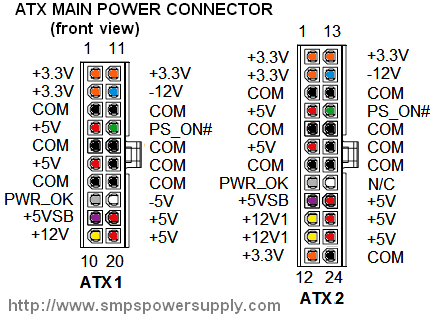
Electronic components don't last forever. They degrade over time, especially if the manufacturer used cheap parts or pushed the voltage and current limits too far—not to mention SMPS frequency issues... what you actually need to check is the voltage and current. For $20, you can grab a multimeter, hook it to the connector, and see everything, though it won't show you how it performs under load...
fadedorca66 said:What power supply are you using (make and model), and what else is in the build?