Posts by Douglas Stewart3
15 posts shown.
Is it even worth overclocking this build?
Biostar A55ML2
AMD A8-5600K (stock cooler)
AMD Radeon RX 570
8 GB RAM
650W PSU
amberotter19 said:It should look something like this on your end... Except instead of Intel display audio, you’ll likely see something along the lines of AMD high definition audio, plus a different monitor model.
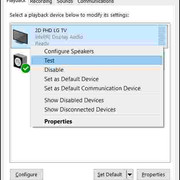
The easiest way to run a quick test is to just right-click on the monitor and select test. You should hear a chime if everything is working correctly... As far as those AMD GPU drivers go, I'm afraid I can't be much help there. Just for comparison, NVIDIA typically only lists audio-capable devices and then hands the rest over to Windows to manage (on Windows 10).
Got it working! 👋 I went into the BIOS, managed to Disable "Driver Signature Enforcement," and suddenly the HDMI sound kicked in. Thanks for the help, everyone. Happy holidays!👍
amberotter19 said:You missed the most critical piece of information here... Which version of Windows are you running, and which specific update was installed?
The latest builds of Windows 10 actually allow you to route audio to a separate output on an app-by-app basis.
Could you post a few screenshots?
Technically speaking, HDMI is designed to carry audio signals directly to the device, so you shouldn't need a separate cable if the sound is playing on the same unit as the video.
That 3.5mm audio input on the Samsung Monitor is usually intended for use with VGA or DVI connections.
Make sure that under the audio settings on your monitor, the output is set to "TV Speakers." Also, check your monitor's internal menu—usually something like Settings -> Input... where you see the list of inputs. Select your HDMI connection, and then look for an option like "Input Label" or "Input Type" where you can designate that HDMI port as a "PC." This tells the monitor it's connected to a computer, which often changes how it handles the signal.
My bad. I'm talking about Windows 7 SP1. TV speaker is set to "on," digital audio out is set to PCM. HDMI is labeled as PC. Still zero sound. Gonna try reinstalling drivers for the 50th time... maybe it's just those HDMI audio drivers acting up?
Bryan Taylor6 said:So, is it actually outputting sound through the HDMI?
Try enabling the HDMI audio within the Control Panel....
I had this exact same headache once. I went into the BIOS, switched the audio over to HDMI, rebooted, and then switched it back to the motherboard's onboard audio... and suddenly it worked. It made zero sense... some kind of glitch between the drivers, maybe DirectX, and the hardware itself...
Tried all that. Still dead silent on the HDMI.
Bryan Taylor6 said:Check your BIOS... see if the audio is set to HDMI or the onboard sound card
It's set on the sound card. But I gotta add—when I pull up the Control Panel and play some music, the volume meter jumps around like crazy, showing there's definitely audio playing... yet, absolutely nothing is coming out of the Speakers-HD audio Device. What gives?
wiredotter14 said:What exactly is showing up for you in the Control Panel? Is it just the Speakers-HD audio Device, or are there other options listed there?
There's a few "HDMI audio devices" listed, but they're all disabled with an X next to them.
Hey guys. Need some help with my monitor audio. Just dropped in a new NVIDIA GTX 1050 Ti, and now that I've installed the drivers, the sound is totally dead. The card is hooked up via HDMI to my Samsung Monitor, but I still have a separate audio cable plugged into the motherboard. In the Control Panel (sound settings), "Speakers-HD audio Device" is checked. Weirdly enough, everything worked fine before I installed this new GPU, but as soon as the drivers are back on, silence. Any ideas? Thanks in advance!
fadedorca66 said:What kind of power supply are you running right now? Like, brand and model?
Ugh, I honestly can't remember off the top of my head... but yeah, I'm swapping it out soon.
wiredotter14 said:Or used.
What's your build look like?
Used gear isn't really my thing—I need that warranty protection. My current setup is an AMD A8 5600K, an A55ML2 motherboard, and 4GB of RAM. My GPU kicked the bucket, so I'm stuck using the integrated graphics on the CPU right now. Thinking about grabbing a new card, another 4GB of RAM, and a decent power supply. I've got enough juice currently, but better safe than sorry, so I'll probably grab a 600W unit.
Hey guys, looking for some advice on the best GPU I can grab for under $500. My motherboard slot is just PCIe 2.0-16x. Thinking about ordering online through Amazon or maybe hitting up a Best Buy if I'm lucky. Any tips? Thanks!
Daniel Garcia said:What are we even talking about when you say strength training? Bodybuilding, powerlifting, functional stuff, calisthenics?
Bodyweight stuff for kickboxing? Just take those days off from everything else. Rest up.
When I hit strength, I mix bodyweight moves with some old-school bodybuilding
Yo, what's up guys. I'm starting kickboxing (I'm 15) and I've been hitting the weights for about a year now—just recreational stuff, nothing crazy. Right now, I'm lifting 6 days a week, Mon-Sat, taking Sundays off, plus I'll have kickboxing 3 times a week (Mon, Wed, Thu). So, how should I balance this out? Should I keep grinding the weights 6 days a week or what? School schedule is a bit weird, one week it's morning classes, the next it's afternoon.
Adam Moore3 said:Just plug that thing into its own slot on the motherboard and move the monitor cable over to the port on the tower. Simple enough, right? 🙂 That Dell Latitude 5480 integrated graphics in that high-end APU is still gonna outrun your dedicated card any day of the week. Seriously. How much RAM are you even running? What's the frequency? If you don't know, just go download a tool and check. CPU-Z? Just check it.
So I pull out the GPU and plug my monitor straight into the motherboard... and yeah, it actually picks up the integrated graphics on this ASUS board. I'm running a single 4GB stick of RAM at 800MHz. What else can I ask for?
crimsonstag84 said:Yeah, you just jump into the BIOS and toggle the onboard graphics on or kill the dedicated card—whatever setting works—then plug the monitor straight into the motherboard. But wait... what kind of crappy GPU are we even dealing with here?
Can't find that option in my BIOS (version 2.14.1219.). Plus, my dedicated card is absolute garbage—it's an NVIDIA GeForce GT 730.
So, I recently picked up an Intel Core i3-3220. Was browsing online a few weeks back and saw it listed as "Intel Core i3-3220 with integrated graphics." Does that actually mean the CPU has built-in graphics? And if it does, how do I set it as the primary one? (I've already got a dedicated card plugged in).🤷