CheckEmoji Community · the emoji forum
🏠 Home 🆕 What's new ❓ Unanswered 🔥 Popular 📡 RSS Members 👥 0 online log in · register
Home › wiredotter14 › Posts

Posts by wiredotter14

2114 posts shown.

Is it worth the upgrade? in Desktops ·
Not sure how those specific programs handle graphical loads, but since both CPUs are running 6 cores, you're looking at a pretty underwhelming upgrade here.
GPU Buying Guide - (Read first post) in Desktops ·
Brian Grant9 said:Is getting a Radeon 7900 XT for $850 on Amazon worth it for 1440p gaming and future-proofing, or should I look elsewhere?

If you're looking at prices in the US, this is a solid deal. It'll handle 1440p just fine, provided you aren't obsessed with Raytracing—which isn't exactly top-tier on the 7900 XT anyway.

https://www.amazon.com/placeholder-link

The 7900 XT at $850 is a decent card, sure, but let's not pretend it's some incredible steal.
What drivers are you running right now? The latest ones available are from mid-2022.

Run Furmark and see if your PC crashes during the stress test.

Usually, issues like this get fixed with a clean driver install—like I mentioned above.
What gentlecyclist16 wrote makes sense. Only thing is, that processor isn't exactly top-tier, so it’d be nice if a relatively modern, capable GPU could actually handle video playback without issues.

Wipe the old drivers first using the DDU removal tool, then install the new ones.

https://www.guru3d.com/files-details...-download.html

There's also a chance it's a hardware issue—maybe a faulty PSU, the GPU, or something along those lines. But that's a much bigger headache, and video playback alone shouldn't be crashing the whole system, especially if you aren't seeing the same thing while gaming.
Monitor buying guide (mega-thread) in Computer Peripherals ·
shouldn't be an issue with the monitor

drop the PC specs, what monitor model are you running, and how are they hooked up (which cable)
Power supply issues in Computer Peripherals ·
Why on earth do you think the power supply is the issue?
Gaming PC build recommendations? in Desktops ·
You've got a point, the manufacturer is Seasonic directly

My point was it's great for the money—you still have the Seasonic name backing it and a 7-year warranty

Here is the test for the 850W version (also Helly OEM)

https://www.nikktech.com/main/articl...review?start=7

Bottom line, it passed all the tests.

Anyway, I picked this one as a best buy—$90 for a Seasonic Gold PSU is a solid deal, though you could always grab something else

Quote : The G12 GC-850 850 w 80 plus Gold Power supply unit currently retails for around USD145 inside The USA and for 104.10 Euros inside The EU a price tag which is indeed balanced for a Seasonic model. Long story short The G12 GC-850 May not be Award winning material but IT does perform well, produces quite a bit of output, has a relatively strong +12 V rail and is 80 plus Gold certified sol so I strongly suggest giving it a chance if you’re out in the market for a power supply unit around its wattage and price range.


P.S.
If you're already looking at a Corsair RM, you might as well get the 650W version for less money:

https://www.amazon.com/corsair-rm-series-psu/b?node=162250211
Gaming PC build recommendations? in Desktops ·
granitegardener said:just grab the Intel 13600K

Gaming performance is basically the same, but you're looking at higher power draw and a crappy upgrade path—plus it costs more than the 7600X I ended up going with (can't tell if it shows up on the screenshot)

Forgot to pick a CPU cooler... need something in the $30-40 range
Gaming PC build recommendations? in Desktops ·
Alexander Moore67 said:Maybe I've just grown too old, but I always say you need to budget an extra 10% specifically for the PSU in high-end builds. In this case, don't skimp on the power supply—drop the $200. That’s just my take, and I’m sticking to it. An RM 850x with a 120-month warranty goes for about $175.

A few years back, it wasn't just the GPU costing nearly a grand; $100 for a decent PSU isn't exactly pocket change either. Power supplies have come a long way, too. For $100 today, you get much better quality than what you could get ten years ago for the same money, regardless of inflation.

This Seasonic is a solid unit, especially at this price point. With a 7-year warranty, you won't need anything beefier for this specific setup. If someone's planning on swapping in a massive, power-hungry card down the road... fine. But then you're talking about "future-proofing" a build, which usually isn't worth the extra cash unless there's a massive jump in power draw.

BTW, the Seasonic I mentioned isn't modular, which is why it's cheaper. Honestly, in modern PC Cases where the PSU sits in its own shroud at the bottom, it doesn't really matter. All the cables stay tucked away out of sight anyway.

Of course, if you view buying a premium PSU as an investment—something that might survive three different PC builds—then sure, go as high-end as possible.
Gaming PC build recommendations? in Desktops ·
rowdyridge58 said:Hey everyone,

I'm building a gaming rig—strictly for gaming, no software work or video editing or anything like that.
My budget is up to $2,000 max, but if I can put together a solid build for $1,500, why not?
Regarding parts, I already have a Crucial P5 Plus M2 2280, so if I can reuse it, great, but not strictly necessary.
I don't mind ordering from different stores, even if they're in other states, as long as it saves me significant money.

Thanks
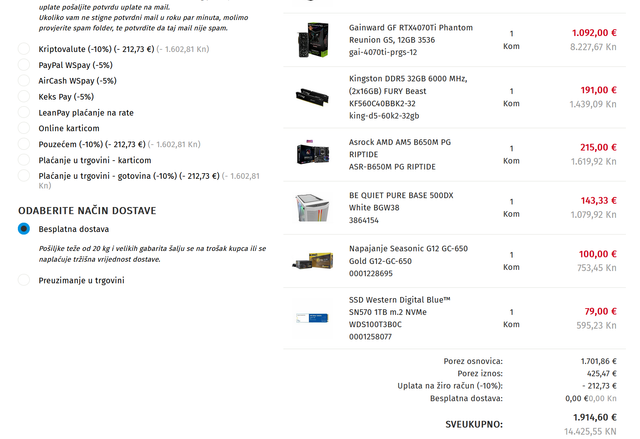
Here’s a build idea from a local retailer.

image

Motherboard/Platform:
- AM5, so you have an upgrade path later.
- The board looks fine for the price; Linus Tech Tips tested it and the VRM temps are solid. Just watch out for a weird setting where it caps the CPU at 75C—you'll need to disable that in the BIOS.

CPU: Solid for gaming, doesn't need massive cooling, and gives you a better upgrade path.

RAM: 6000 CL40 is decent enough for Ryzen.

GPU: In this budget, I think the 4070Ti is the best bet. It's not incredible value, but nothing else fits the budget better while still giving you current-gen graphics without being a power hog.

PC Case: I picked this one because I own it and it's good. Honestly, just a placeholder; pick whatever you actually like.

PSU: Seasonic Gold, 7-year warranty. You don't need anything beefier for this GPU and CPU combo.

SSD: Just a cheap 1TB SSD. That Crucial P5 Plus you already have is higher quality. The motherboard has two M.2 slots, so you could use both, or just ditch this one from the order.

I pulled this together using one shop if you want them to handle the assembly, but you can shop around for individual components, especially for something like a case you prefer.
You can skip the extra SSD entirely if you don't need it. Don't bother with a hard drive for gaming. I run a 1TB SSD and it's plenty for my library; much smoother than an old HDD.

A hard drive is only useful if you're downloading movies.

This is a balanced build without overdoing it. You might be able to squeeze in a 7800X3D when it drops, but that'll bump the price and isn't mandatory right now. Personally, I'd rather wait a few years and upgrade the CPU to something new then.
Power supply issues in Computer Peripherals ·
Jack Cook7 said:So the issue was just the motherboard CMOS battery? That little coin cell?

Could be. If a battery sits dead for 6-12 months, it might be toast, though that’s pretty rare nowadays. Usually, they last about 3 to 7 years.

And those batteries don't "recharge"—they just die when they die. Maybe something was pulling a tiny bit of juice from it.

It’s entirely possible that battery will fail again in a year or so. I’ve had PCs where the battery lasts a year or two, and others where it stays good for 5+ years. It's not random; you really do end up swapping them multiple times over the life of the same PC.

Whatever. Just buy a pack of them and swap it out every few years.

Or maybe the battery was just straight-up garbage and now everything's fine.
Steven Walker72 said:If I can write this off on a business account, what's a better pick than the RX 6700XT for $400?

Where are you buying?

In the States, the 6700XT goes for about $450-$500 after tax anyway, so we're looking at roughly $400 before tax.

For that kind of money, there isn't anything better right now.
https://www.mobileshop.eu/hr/other/r...m_medium=click

A Biostar RTX3070 for $500 from some German/EU shop?
What's a good AIO replacement? in Desktops ·
Look, just buy an air cooler and leave Canada alone.
It'll work on pretty much any motherboard from the last 15 years, including yours.
The NVIDIA RTX 3060 Ti at $400 is a total steal right now. I actually grabbed one for about $440 just a couple of weeks ago. Honestly, for that price, it beats the 6650XT any day of the week.

If you can hunt down an RX6800 for $550, do it. There were some decent deals popping up over at Newegg recently, but they’re hard to catch.

Finding a 6700XT for $400? Yeah, that's a solid deal if you find it.
Monitor buying guide (mega-thread) in Computer Peripherals ·
Lawrence Ortiz2 said:Yeah, I had my eye on that Dell too because of the IPS panel, except it isn't curved.🙂

In my opinion, flat is better if you care about color accuracy over gaming. A 34" ultrawide isn't overkill for a flat panel.

This Gigabyte model uses a VA panel too, so it’ll likely feel almost identical to the Xiaomiu in daily use—only difference is the peak brightness (350 vs 300 nits).

Bottom line? Try to find an IPS if you can. If not, neither the Xiaomi nor the Gigabyte are bad bets.

BTW, don't sleep on a 1080p ultrawide (2560x1080). At that height, the pixel density isn't actually that bad since a 34" ultrawide has way less surface area than a standard 34" screen.
I don't really see it happening on my end. Maybe if you're running one of those high-end gaming laptops, you'd actually notice a hit to performance. I don't have a dedicated GPU, and honestly, my laptop probably can't even pull more than 40W at full load—especially if the screen is off
crimsonfox20 said:That second smaller laptop comes with a 65W USB-C charger out of the box. Sometimes, if I don't have the original one handy, I'll use my Samsung 45W brick instead. Ubuntu realizes the power supply is weak and throttles the performance, but it manages to stay alive or charge slowly if I'm not hammering it with heavy apps.

My laptop also flags when the charger isn't the original high-wattage one. But honestly? A 35W Samsung charger is plenty to run an i5U 10th gen without a dedicated GPU. It's never drained faster than it charges.
Help! What do I do if my motherboard dies? in Desktops ·
Alexander Moore67 said:Take my advice
Dell OptiPlex Small Form Factor PC - Intel Core i5-12400, 4 GB RAM, 250 GB HDD, DVD drive, Windows 7 Pro License - Windows 10 Pro installed. Front ports: 4x USB 2.0, 2x 3.5mm Audio. Rear ports: 6x USB 2.0, 1x DisplayPort, 1x VGA, 1x Serial, 2x PS/2, 2x 3.5mm Audio, 1x RJ45 Ethernet. 4x RAM slots, 2 available
The i5 is three times more powerful than your processor. You can swap your GPU into this case without any issues
It’s $128 at Best Buy
This would be the cheapest option that still comes with a 12-month warranty

https://www.bestbuy.com/rennowa-hp-...m_medium=click

fadedorca66 said:What's the point? It's basically ten years old anyway. Either someone should fix what they have or just buy something new.

For $128, you get a machine with a warranty, but honestly, it's not much to write home about for that price.

My brother has the exact same model, but with 8GB of RAM instead of 4. He'll sell it for $65 if anyone's interested. It's a way better investment than buying a used motherboard for an ancient computer.
Maybe grab a GPU too. You could probably flip your current power supply for $10-$20.