CheckEmoji Community · the emoji forum
🏠 Home 🆕 What's new ❓ Unanswered 🔥 Popular 📡 RSS Members 👥 0 online log in · register
Home › Amy Baker83 › Posts

Posts by Amy Baker83

17 posts shown.

I run CCleaner on a regular basis.
Honestly, that Malwarebytes adwcleaner is the real deal!
It flagged 66 suspicious files and wiped them all out,
and so far, everything is running smooth—no connection drops at all.

Big thanks to Noah Miller6 👍
lonepilot24 said:Yeah. Ping is fine. Something else is clearly broken. Just do a Windows reinstallation 🙂

A full reinstall? Ugh, that's my absolute last resort! I really want to dig in and actually figure out what's going on first, you know?
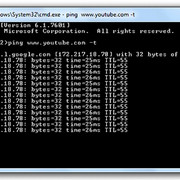
lonepilot24 said:Try pinging some website when it happens


Like this?

image
So, for the last couple of weeks, my internet on my PC has been acting super flaky. I'm running Windows 7.
It happens maybe once a day or every other day—it just flat-out refuses to load any website at all. Like, nothing!

My computer is hardwired to the router, and honestly, I've never had any issues with the connection or the speed before this.

At the same time, the Wi-Fi is working perfectly fine; my phone connects to the Wi-Fi and gets online without a hitch, so I know the modem isn't the culprit.
I also have this little USB Wi-Fi adapter I plug into the PC, which sees the network and connects just fine, but guess what? Still can't open a single webpage!

I've already tried using both Chrome and Firefox, but neither one will load anything.
If I check the Control Panel under the Network and Sharing Center, it shows that I actually have an active connection.

The weird thing is, if I just restart the PC, everything works normally again. But then, after a day or two, the whole mess starts all over again.

Does anyone have any clue what might be causing this headache?
How do I get this kind of audio effect? in Software ·
frozenheron7 said:It's called Auto-Tune.

Auto-Tune, yep! Thanks for clearing that up, that's exactly what I was looking for. 👍
It doesn't run as its own separate thing, but it works perfectly as a plugin inside Cubase.
👍
How do I get this kind of audio effect? in Software ·
Does anyone happen to know how to pull off an audio effect like this?

http://bit.ly/1OmgDwp

I'm talking about totally transforming the voice.
What kind of software or specific effect am I looking for—is it a filter, or something else entirely?
Nickname change (read first post!) in Forum Help! ·
Can I change my username to Amy Baker83? (I noticed the handle is available)

Just want to ditch these random numbers in my handle... plus, I don't want people thinking I'm some walking advertisement for a mobile carrier! ☕

Sure thing, just reach out to Nice.
northernpilot2
My Hard Disk Drive is making a clicking sound in IT Support ·
So, I finally pulled the plug on that whole HDD Regenerator operation,
it flagged 73 bad sectors and wouldn't fix a single one of them. 🤦
Yeah, that whole Linux route was definitely an option too, just like cloning the entire drive.
I actually dug up some tutorials on it. Downloaded all the tools and stuff, but then... nothing. Just sat there.
Honestly, the drive itself isn't a huge deal, and the data on it isn't exactly irreplaceable.
Mostly just some music, mostly MP3 files, a few TV series and movies I've finished.
It would be awesome if I could get it back, but why spend endless hours and effort on
something with such an uncertain outcome? Better to just let it go for now and maybe try again down the road
using that cloning method with Linux.
Anyway, thanks so much for the ideas and all the help! 👍
My Hard Disk Drive is making a clicking sound in IT Support ·
So, I finally picked up a registered version of HDD Regenerator.
The drive shows up fine, so I went ahead and tried option number 1,
but then I got hit with this: Master Boot Record of this hard drive is damaged!

image

Then I grabbed the free version of AOMEI Partition Assistant to see if I could just 'fix' the MBR (Master Boot Record).
It actually said it worked! Success, right?

image

But wait—I jump back into HDD Regenerator and... nope, same old story.
Master Boot Record of this hard drive is damaged!
At least the program keeps running, though.

image

image

Look, I’m definitely no expert at this kind of stuff, but if this thing is still sitting at 0.00% after an entire hour, am I just chasing my tail here? It feels like this could go on forever and I might end up with nothing. From what I can tell, it hasn't fixed a single one of those 12 bad sectors it flagged.

I’ve already swapped out the cable and even tried a different SATA port, but no luck—same result.
When the SATA-to-USB adapter was working properly, I plugged it into my laptop,
and wouldn't you know it? Still the exact same issue.

Before all this, I tried booting into Safe Mode, and when I checked Disk Management, it says the drive is in RAW format? 🤔
It's been over an hour and fifteen minutes now, and the processing is still stuck at 0.00%. Honestly, I don't think this is going to work. 🤷
My Hard Disk Drive is making a clicking sound in IT Support ·
Looks like my cheap SATA to USB power adapter just kicked the bucket.
I tried plugging it into a different drive and still nothing—not even a little light blinking on the thing.
image

The power supply itself seems fine, though. I took the connector I was using for that clicking hard drive
and hooked it up to another drive, and it works perfectly! So, the power is good, right?

Anyway, I got the hard drive reconnected, and here is what CrystalDisk is showing me.
image

I tried to initialize the drive in Disk Management, but it just failed. It keeps throwing an error at me.
image

I've only got the demo version of HDD Regenerator, but hey, at least it actually recognizes the drive!
image
So, once you open up HDD Regenerator, there are all these different options available,
but honestly, I have no clue which one I should even try.
It says that with this demo version, I can only fix the very first
bad physical sector on the drive.
My Hard Disk Drive is making a clicking sound in IT Support ·
So, I downloaded CrystalDiskInfo, got it installed, fired it up, and... nothing. That drive just wouldn't show up at all.
On my other drives, though, everything looks fine—they all show Health Status: Good.

Right around that same time, this chirping hard drive started making this increasingly loud clicking sound, and then
out of nowhere, there was this sharp noise, almost like a short circuit.
The breaker tripped and the whole system went dark.
I flipped the breaker back on, booted up the PC, and everything seems to be running normally, but I am definitely NOT
touching that drive again. I don't want to risk frying my motherboard or who knows what else! 😵

It’s fine, I guess. I mean, this is actually the first time I've had a drive die on me,
even though I have some old ones from like 15 years ago that are still spinning away.
This one was only about 4 years old, give or take. RIP. 🙂
My Hard Disk Drive is making a clicking sound in IT Support ·
The OS is Windows 7 SP1, and the drive is a Western Digital Black 1 TB HDD.

Everything was running smoothly, and then—bam!—out of nowhere, things just started crawling.
It really hit me when I opened This PC; you know that little green loading bar at the top?
Man, that thing was moving at a snail's pace! And once it finally showed all my drives,
I tried clicking on one, and... nothing. Just that same green bar staring back at me like it was struggling to load anything at all.

So, I try to reboot, right? But the system won't even start up.
And then I hear it—this weird little chirping sound coming from one of the drives. It’s not super loud, but it's definitely there.
Once I unplugged that specific drive, the system booted up perfectly fine!

I decided to hook that problematic drive up using a SATA to USB adapter.
I heard the usual "new device connected" chime.
Windows says it's installed and ready to go.

In This PC, I can see the drive, but there's a catch: it won't show the capacity
or how much space is actually being used.
image

I tried opening Disk Management, but it just hangs... loads and loads and... nothing. Not a single disk shows up!

Funny enough, if I open Device Manager and check the Disk Drivers, I can see all the drives listed there.
image

I gave it my best shot with GetDataBack for NTFS,
but it just threw an error at me saying it couldn't read the disk.

So, I moved on to try TestDisk.
Guide:
http://www.cgsecurity.org/wiki/TestDisk_Step_By_Step

Interestingly, TestDisk actually recognized the Hard Disk Drive, its size, and the amount of occupied space!
I started the analysis, but based on my math, this thing might take about 4 days to finish. Can you believe that?
image

But honestly, what am I even going to get out of this analysis?
Is it worth sticking with this, or has the drive finally kicked the bucket? 🤦
How to install Windows XP on VMware in IT Support ·
Joshua Garcia3 said:Check out this tutorial.

Thanks so much! I actually got it to work! 👍
How to install Windows XP on VMware in IT Support ·
So, I just got VMware set up on my Windows 7 machine! Now I'm sitting here wondering... if I go ahead and install Windows XP inside the VMware environment, is there any chance it’ll wipe out my entire hard drive where the software is living? Like, could it format everything? 🤔

image
Google Chrome pages won't load in IT Support ·
Honestly, this is the only fix that actually works for me, but whenever I fire up Google Chrome, it gives me this big warning saying it's not a secure way to browse. 😕
youtube.com/watch?v=GdNHPtATsc4

image
click image upload
Google Chrome pages won't load in IT Support ·
Honestly, this is the only fix that actually works, but every time I fire up Chrome, it throws a warning at me saying it’s not a secure way to operate. 😕
youtube.com/watch?v=GdNHPtATsc4
Google Chrome pages won't load in IT Support ·
I’m running Windows 7 and using Google Chrome, but out of nowhere, everything just broke! I try to open a new tab and... nothing. Absolutely nothing happens. It just sits there with that little loading circle spinning and spinning. I’ve already tried uninstalling Chrome, rebooting my PC, and then installing a totally fresh version of Chrome, but it’s the exact same story!
For security, I’ve got Avast running, and I’ve run full scans with both Avast and Malwarebytes, but nope—nothing comes up as infected. I did some digging online and saw that other people are dealing with this too, but I haven't found a single actual fix yet.
Does anyone have any clue what might be causing this?
Do you think doing a System Restore would actually help anything at this point?
The weirdest part is that Mozilla Firefox works perfectly fine on this same computer!
🤷