It’s clearly just some test unit not meant for retail, which is what the label says.
What kind of specs are you actually looking for, and what would you even pay for this? It's been sitting around for years and isn't exactly cutting edge anymore...
Do you have at least 20GB of free space on your main SSD? Maybe a Windows update is running in the background? What does Task Manager and the performance tab show—is something constantly eating up your CPU or GPU? Have you checked for any malware? Maybe run a scan with Malwarebytes anti-malware software.
I mean, if you're actually going to sell the laptop, just reinstall Windows already. Why on earth would you leave Lana and Laura files sitting on there? 😁
If you still have a DVD drive lying around, you could probably just rip it out, grab an external enclosure, and swap in a regular HDD or another SSD. Or, looking at the specs, it seems like there’s an M.2 SATA slot available, so you could just toss in an extra card-style SSD like this:
Which laptop are we talking about? I guess it might be safer to just pop it into a second slot if there is one, since booting from a USB would probably be pretty slow.
So, which image host are you using? I'm dealing with this one site—can't even remember the name right now—that has this weird bug where the image won't load on the first try. It only shows up if you refresh, so it’s kind of a pain when you're trying to reload the page.
Have you already cloned it and managed to get the same OS running on a new laptop just using a USB port? If that worked, then I guess swapping the drive physically would work too.
Michael Jackson10 said:I think the whole point was about moving or cloning an OS from one drive to another and being smart about space... ☕ Personally, I like keeping my daily drivers on the C drive (actually, I don't bother with partitions anymore since SSDs became the standard, and mine are usually 256 GB), while I use my old SATA drives as a D drive for storage and archives... There are a million different theories on how to organize storage. I don't mess around with software installations much anymore; I don't spread them across different partitions because it's pointless when you have to rebuild everything after a crash anyway. A data partition makes sense for easy archiving, but the most important thing is just having some common sense when installing stuff. I don't install things I don't actually need or use actively. Everything else is just a quick download away... Ever since SSDs hit the scene, it feels like there's been this general shift. We went from those massive 1 or 2 TB HDDs where everyone tried to cram the "entire internet" onto them, to the era of the 256 GB SSD which was the sweet spot for price and performance during the initial boom. We finally learned how to be efficient... Those old TB drives were a nightmare. I once helped a buddy by swapping in an SSD and setting up a 1 TB HDD for his "everything else" storage. A few days later, he calls me complaining about a "problem." I look at the drive and it's absolutely slammed. He had crammed half a closet full of CDs/DVDs and MP3s onto it, and he's whining about how much more he still needs to move over... WTF? You aren't going to listen to 3 TB of music in your lifetime, let alone every single day... plus then the kids jump in with movies and those ridiculous games that eat up an entire universe, along with millions of useless photos from phones, all under the logic of "I don't need it now, but I'll keep it just in case..."
Basically, most of the "problems" I see on the computers I help out with (friends, family) end up being caused by completely maxed-out drives.
I don't really get these digital hoarders. They feel the need to cram everything onto physical drives like we're still stuck in the 56k dial-up era, even though everything is just available on demand via streaming services now.
So I was talking to a buddy of mine the other day. I asked if he finally jumped into that game he’d been obsessing over for years—you know, the one that dropped a few months back. He tells me he hasn't started because his drive is totally maxed out. When I asked why on earth his storage is full, he goes, "Oh, I keep all my Star Wars movies in 4K and stuff." I mean, does he really need to watch them every single day? I guess not. 🤔
"Windows 10 Now Requires a minimum of 32GB of storage space."
Maybe you and @Michelle Bennett5 should look into it.Carol Harris9 A 35 GB partition would have been plenty. Just like how 35 gallons of gas might be plenty for some people—depending on their personal views and needs. Just an idea. Regarding, Why? [No input provided for rewriting.]What? Not even owning a vehicle.
Carol Harris9 said:Well, if all that is considered "undesirable," then what on earth is the point of having these specialized partition management tools at our disposal?
Those tools are more like "if you absolutely have to" options. You can always end up losing data or just breaking things when you mess with partitions, so I guess it's probably better to just leave them alone as much as possible...
Carol Harris9 said:I find myself quite perplexed by this issue, especially considering I’m working with a brand-new hard drive that I picked up just two days ago and used to install Windows 10
I guess why didn't you just partition it during the initial setup? That's how most people handle it, and honestly, messing with partition sizes later on is usually more trouble than it's worth...
coppersailor28 said:Try running a disk defrag, though I doubt you'll see much of an improvement.
'Size of available shrink space in MB: 121000' means you're stuck with 'only about' 121 GB of actual shrinkable space. There's some locked, unmovable file sitting right on that boundary holding everything up.
I mean, there’s really no point in defragging an SSD. It’s just not necessary, I guess.
Megan Thomas5 said:80GB is nothing. You install a few programs, run a couple of Windows updates, let the temp files pile up, and suddenly your roaming and local folders are eating everything. I run my main drive at 240GB, keep all my games on separate disks, and even then I’ve only got about 30GB left over.
I guess you're right. Honestly, there's probably more chance of just causing yourself a massive headache than actually doing anything smart by splitting up such a tiny drive into two partitions.
Megan Thomas5 said:Look, you aren't going to lose your data—this isn't Windows XP. Even if Windows completely crashes, you just reinstall it without touching your files, and everything will be sitting right there in the Windows.old folder.
How old is this laptop even supposed to be if it’s running on a 140GB HDD (probably 160GB)? I guess you have to wonder if it's actually worth putting any money into it.
Samuel Castillo49 said:For real? I see those prices listed, but does anyone actually buy them? I guess there's a reason the 4GB models are so much cheaper. Also, what's the safest way to ship this—USPS or maybe UPS? Does USPS have some kind of escrow service where they hold the money until the seller is verified?
If I remember correctly, 4GB isn't great for mining, so performance is probably pretty lackluster.
If you sell it, just assume you won't be able to afford anything better with that cash. You could also just let it mine for a few months if you feel like it; maybe you could pull in $30-$50 a month from it...
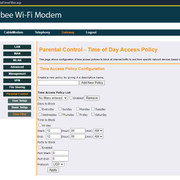
Routers can be pretty versatile sometimes... Like, some let you block specific devices via their MAC address during certain hours or days and stuff like that. From what I can tell, this one unfortunately doesn't seem to have those options.
Man, they really overcomplicated this one. Might as well launch a satellite into orbit just to toggle the Wi-Fi on and off at this rate. 🤣
Just type 192.168.0.1 into your browser address bar to get into the router settings. Depending on the model, the login credentials might vary. I guess you could try leaving both fields blank for the first login, and then it’ll probably prompt you to set a new username and password.
Once you're in:
From what I can tell, there isn't an option to just kill the Wi-Fi; it looks like you have to shut down everything at once.