CheckEmoji Community · the emoji forum
🏠 Home 🆕 What's new ❓ Unanswered 🔥 Popular 📡 RSS Members 👥 0 online log in · register
Home › Michelle Bennett5 › Posts

Posts by Michelle Bennett5

171 posts shown.

GPU output? in IT Support ·
Tyler Smith40 said:thanks. First step is grabbing that adapter. My card has two DVI ports—does it matter which one I plug into?

Sent from my iPhone using Reddit

Only DVI-I works with VGA. Just look up the pin layouts online if you aren't sure.
URGENT: New PC won't boot - Need help! in IT Support ·
Maybe the PSU isn't actually delivering all the voltages and amperage it's supposed to?
It kind of reminds me of this one time I dealt with something similar just by swapping out the power supply entirely.
How to recover photos from a dead laptop in IT Support ·
wearymason4 said:If you can get your hands on a desktop—maybe borrow a buddy's old rig if yours is totally dead—you could technically just plug into an open SATA port. You know, just run the power and data cables out there in the open air, boot it up, and move your stuff over to a thumb drive or whatever.

So, if you're looking for a quick fix to get a SATA hard drive connected to a tower temporarily... why not just unplug the DVD drive? Swap the HDD into its spot, clone everything, then put the optical drive back where it was.
In that scenario, you wouldn't even need any extra cables.
Headset mic issues? in IT Support ·
Morgan Ortiz6 said:I mean, I’m just scratching my head over why the seller isn't mentioning the group banana. It’s kind of a dealbreaker, right? Because let's be real, those headphones wouldn't even work for anyone without that banana in the mix.

Newer laptops and basically every smartphone out there only have one hole for a combo jack.
You still find the separate ones on desktop PCs—you know, the line-in, headphone, and mic jacks, all color-coded red, green, and blue, tucked away on the back panel.
Headset mic issues? in IT Support ·
Morgan Ortiz6 said:Here’s a shot for you

image

So, yeah... your laptop has separate jacks for headphones and mic, while yours just has one single combo jack on there

Just grab that adapter I mentioned—it takes that single plug and splits it into two separate ones, then you just plug those two into the laptop

It works. But if you tried shoving that single combined plug into just the microphone jack, you'd end up with nothing but audio coming out of your mic instead of your headphones. Makes sense, right?
Headset mic issues? in IT Support ·
Splitter from single jack to separate stereo + mic jacks

Turning those split stereo and mic inputs back into one combined jack

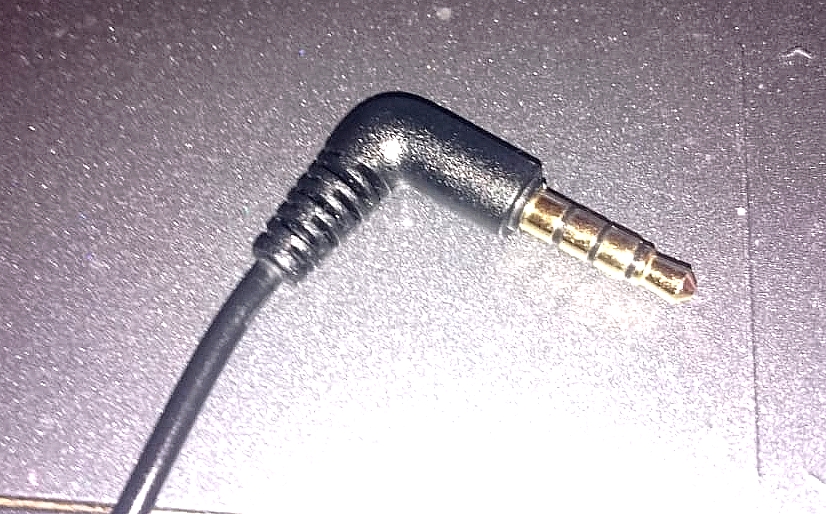
Just count how many individual contact rings you've actually got on your headphone plug first
How to recover photos from a dead laptop in IT Support ·
Nicholas Sanchez21 said:Thanks for the tip! Honestly, I think I could probably handle this myself... or at least I’d prefer to try so I actually learn something. Taking the hard drive out of the old laptop and slapping it into an enclosure? Yeah, I can manage that. I'm just a little worried about whether it'll force me to format the drive or something. If it does, I'm totally screwed.

Laptop drives are always 2.5"
but a 3.5" desktop enclosure will take a smaller drive just fine.

The real headache is whether you're dealing with an ancient machine. Old laptops used PATA drives, which means you'd have to hunt down a specific type of enclosure.
Most modern stuff uses SATA though.

You definitely won't need to format it. You just pop it into the external housing, plug that into the USB port on your new laptop, and it should show up just like any other external drive.

BUT—and this is a big but—the system might ask you a few questions when you first boot it up. There's always that tiny risk of clicking the wrong thing and accidentally wiping everything.
Headset mic issues? in IT Support ·
Morgan Ortiz6 said:So, my sister ordered these over-ear headphones with a built-in mic—the Kodak ones—and they just got delivered to the house today.
The thing is, you can't see a microphone anywhere on them. We actually called the seller, and they're claiming the mic is just tucked away somewhere inside the headset or hidden in the cable itself.
Anyway, she plugged them into her laptop jack and we hopped on a Zoom call to test things out.
The video works fine, and I can hear her perfectly, but even though she can see me, there’s absolutely no sound coming from her side. Just dead silence.
I'm a bit stumped because these only have one single plug. From what I understand, most headsets that include a mic usually need two separate cables—one for the audio and one for the mic input.
Does anyone here actually know what might be going on?

image

It all comes down to that metal jack. It could be a TRRS plug—stereo plus mic—or just a standard TRS stereo plug.

I mean, what kind of laptop doesn't come with its own speakers and mic built-in anymore?

If the laptop has two separate jacks, you're gonna need a splitter adapter to turn that single combo plug into two different connections.

Or... honestly? There's a decent chance they just sent her regular headphones without a mic at all.
How to share one printer between two PCs in IT Support ·
mistyranger said:Can someone explain how to get them connected over the network?

Connecting via the network is actually the easiest way to go here.
All you really need is a small desktop switch and three Ethernet cables—just plug all three devices into the switch and call it a day.
The only thing you have to do is make sure they're on the same workgroup, which takes about thirty seconds tops.
With this setup, every computer can print independently without bothering the others.
You don't even necessarily have to share the printer between computers or worry about being in the same group if you don't want to.
A switch only costs a few bucks, and you can find them at any Best Buy or even a local CVS.
Honestly, it's the most reliable long-term fix.

Yeah, I mean, if the computers are already hooked up to the Wi-Fi router, just plug the printer into the router too.
Just make sure you install the printer software on both machines.
2FA started acting up on its own, just randomly toggled itself on, and then my Outlook completely tanked
The easiest fix was just turning back on "less secure apps" like I used to do before all this mess
Missing the Apple App Store on Windows 10? in IT Support ·
Matthew Kern3 said:All sorted out now

But what was the actual point of all that? Since we're already knee-deep in this mess anyway...
Missing the Apple App Store on Windows 10? in IT Support ·
It’s like PowerShell isn't even working
hmm, could be that... at least I'm hoping. Can't really say for sure until tomorrow though, since I don't have that computer with me right now.
I ran into some issues getting into my account via Windows, but I managed to verify everything by confirming an SMS code on my phone—assuming that’s what they call 2FA
. Still, when I'm just using Gmail on Windows, I usually just log in with my password
. As far as I know, POP mail requires both the account name and the password
. My account name is listed right there on my profile
.
It feels like the POP server might be holding onto some old account or a different password entirely, regardless of the ones I use to access Gmail through my Windows browser. Is that even possible?
So I've got this Gmail account name@gmail.com along with the password, which happens to be the email address itself
I can log in through the Gmail web app just fine—sending and receiving works perfectly well enough

But here’s the headache: whenever I try to set it up via Outlook 2007 using the servers
pop.gmail.com
smtp.gmail.com
following all the standard advice for ports 995 and 587
I’ve even made sure POP3 access is toggled on in the Gmail web settings

Every single tutorial online says this should be a breeze, just a few clicks and you're done, but no matter what I type, the server at pop.gmail.com just refuses to recognize my account or password

Is there some secret trick I'm missing here?
The thing is, the web version works, but I really want to get it running through Outlook 2007
Could the pop.gmail.com server be looking for a different password or some specific username format for my Gmail account?

A long time ago, this exact setup worked fine in Outlook 2007, but ever since I updated my Gmail password, Outlook just stopped working altogether
How do I convert a PDF back to Microsoft Word? in IT Support ·
If it’s an actual PDF—not some grainy scan of a physical page—you should be able to just select all, copy, and paste it like standard text. Sure, the formatting will probably go completely out the window, but the content stays intact. Might be enough to run through a translator if you're desperate enough.
It’s probably just some background process hijacking my focus while I’m typing and stealing it right out from under me,
honestly, those pop-up notifications—like when Windows tells you an update is ready—drive me absolutely insane. They just jump out at you, steal the focus, and demand an immediate restart. You don't even realize it happened until you've already smashed the Enter key by mistake.

Wouldn't it be fair if software just... stayed in its lane? Like, fine, open a window on top of everything else if you have to, but leave the keyboard focus alone.
macOS 19-09 printer detection issues in IT Support ·
Yeah, everything looks solid on paper, but here's the kicker: it seems like Windows 10 keeps trying to shake hands with the network printer, only to just... give up after a few minutes
With 1803, that whole step wraps up in like two seconds flat
macOS 19-09 printer detection issues in IT Support ·
macOS, version 1909. I'm trying to add a printer—just typing in the IP address for this HP LaserJet—but it can't find any drivers.
I tried going through macOS Update to see if it would suggest all the available drivers so I could just pick one, but...

Back when I was running an earlier version of macOS, like 1803, it used to work perfectly. You’d just punch in the IP address and boom, it found the driver and installed everything in seconds.

It’s a 32-bit system in both cases.
And yeah, I did a completely fresh install both times. Same exact steps, click-click-done, nothing unusual.
For some reason, 1909 just won't pull the driver even when I give it the direct IP.

Are there some new default network settings in macOS now that mess with this?
File sharing tips and tricks in IT Support ·
is everyone running macOS, and which versions are out there?
when you check the computer properties, is the workgroup name supposed to be identical on every machine?
also, if you're looking at a shared folder, what kind of permissions show up when you're checking through Finder