CheckEmoji Community · the emoji forum
🏠 Home 🆕 What's new ❓ Unanswered 🔥 Popular 📡 RSS Members 👥 0 online log in · register
Home › IT › IT Support › How to connect to WiFi on Windows XP?

How to connect to WiFi on Windows XP?

Started by Nancy Thompson8 · · 👁 5 views · 47 replies

📡 Subscribe to replies

Participants Nancy Thompson8wiredcanyon94Jack Cook7Drew Allen77fadedorca66Keith Garcia7darkcyclist92wearymason4Megan Thomas5Alexander Diaz4Michael Jackson10
Nancy Thompson8 Nancy Thompson8 MemberOP
37 messages
joined Jan 2017
#1 ·
So, I recently picked up this older laptop running Windows XP—it’s actually surprisingly snappy and runs incredibly fast! I was thinking it would be the perfect little machine for my niece to play around with, but I've hit a bit of a snag because I have absolutely no clue how to get it connected to our home router. Honestly, I used to be able to do all this stuff in my sleep about 20 years ago, but my memory isn't what it used to be, and now I'm totally stumped. If anyone out there remembers the ropes and could walk me through it, I'd really appreciate the help!
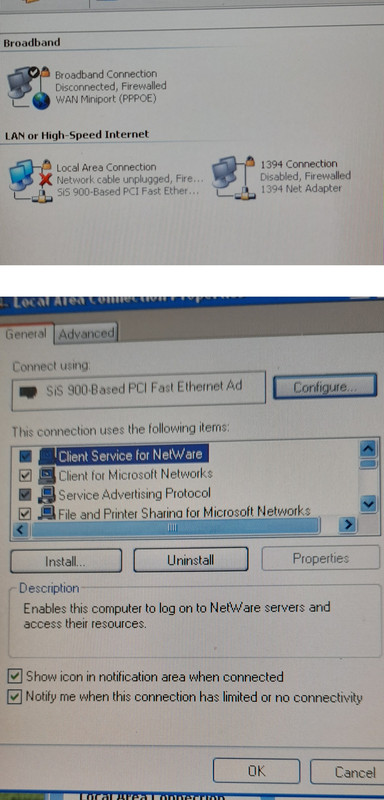
Here is a quick shot of what pops up when I click on that little icon down by the clock
Does anyone know what settings I need to tweak in here to get things moving?

image
wiredcanyon94 wiredcanyon94 Active Member
129 messages
joined Nov 2022
#2 ·
Nancy Thompson8 said:So, I recently picked up this older laptop running Windows XP—it’s actually surprisingly snappy and runs incredibly fast! I was thinking it would be the perfect little machine for my niece to play around with, but I've hit a bit of a snag because I have absolutely no clue how to get it connected to our home router. Honestly, I used to be able to do all this stuff in my sleep about 20 years ago, but my memory isn't what it used to be, and now I'm totally stumped. If anyone out there remembers the ropes and could walk me through it, I'd really appreciate the help!
Here is a quick shot of what pops up when I click on that little icon down by the clock
Does anyone know what settings I need to tweak in here to get things moving?

image

What kind of WiFi card is inside this "older laptop," and does it even have one installed?
Jack Cook7 Jack Cook7 Regular
376 messages
joined Aug 2017
#3 ·
Your PC already has a network card built-in (check under Connections, it's the SiS-900), so just grab an Ethernet patch cable and plug it straight into your router.

You can also go ahead and turn off "Service Advertising Protocol" and "File and Print Sharing for Microsoft Networks"
Nancy Thompson8 Nancy Thompson8 MemberOP
37 messages
joined Jan 2017
#4 ·
Here’s a bit of info for you, assuming this covers everything you need!

I was just sitting here thinking about how much I still miss those old-school days when you’d fire up your computer and everything felt so straightforward, almost like driving a classic muscle car on an open highway where you actually knew exactly what was under the hood. There was this specific kind of magic to using Microsoft Windows XP Professional that you just don't see much anymore in our modern, hyper-complex tech world. It had this wonderful, breezy simplicity to it—kind of like a Sunday morning at a local diner where nothing is rushed and everything just works the way it should. Nowadays, everything feels so layered and heavy, but back then, you could just dive right in and get things done without feeling like you needed a PhD in computer science just to navigate the desktop.
So, I just finished getting Service Pack 3 all installed and up and running!

I was just sitting here thinking about how much things have changed, and my mind drifted back to that old Intel Pentium 2400 MHz network setup I used to run. It’s funny how you can get so attached to a specific piece of hardware, almost like an old friend that’s been through the wars with you, especially when you look at how far we've come since those days.

Network:
So, looking at my settings here, it turns out my primary IP address is just sitting there at 127.0.0.1. It’s kind of funny when you think about it—it’s like being at home and realizing you’re actually just talking to yourself in a mirror! It's that classic loopback address, basically the computer's way of saying, "Hey, I'm right here!"
The primary MAC address is 00-40-D0-3A-62-30.
So, I was just digging through my old hardware stash today and stumbled upon this SiS-900-based PCI Fast Ethernet Adapter, which really got me thinking about how much things have changed since the days when we were all just trying to get a decent connection to work. It’s one of those classic pieces of gear that feels like a little relic from a different era of computing, isn't it? Back then, you'd pop one of these into a slot and feel like a total tech wizard once the lights started blinking. It's funny how we used to obsess over these specific chipsets, almost like they were some kind of holy grail for getting online, whereas now everything is just seamless and built right into the motherboard without us even giving it a second thought. It definitely brings back memories of tinkering around with drivers and hoping for the best!
So, I was just messing around with my old gear today and stumbled upon this classic little piece of tech—the Motorola SM56 Data Fax Modem. It’s funny how much hardware changes over the years, isn't it? You look at these things now and realize they were the absolute backbone of how we actually got online back in the day, long before everyone had high-speed fiber running through their walls. It’s one of those nostalgic bits of kit that really makes you think about how far we've come from those screeching dial-up tones to the seamless connections we take for granted now.
wiredcanyon94 wiredcanyon94 Active Member
129 messages
joined Nov 2022
#5 ·
Keith Garcia7
Jack Cook7 said:Your PC already has a network card built-in (check under Connections, it's the SiS-900), so just grab an Ethernet patch cable and plug it straight into your router.

You can also go ahead and turn off "Service Advertising Protocol" and "File and Print Sharing for Microsoft Networks"

He put it right there in the title—he wants WiFi, not a wired connection. Honestly, there’s a good chance his machine doesn't even have a wireless card installed.
wiredcanyon94 wiredcanyon94 Active Member
129 messages
joined Nov 2022
#6 ·
Nancy Thompson8 said:Here’s a bit of info for you, assuming this covers everything you need!

I was just sitting here thinking about how much I still miss those old-school days when you’d fire up your computer and everything felt so straightforward, almost like driving a classic muscle car on an open highway where you actually knew exactly what was under the hood. There was this specific kind of magic to using Microsoft Windows XP Professional that you just don't see much anymore in our modern, hyper-complex tech world. It had this wonderful, breezy simplicity to it—kind of like a Sunday morning at a local diner where nothing is rushed and everything just works the way it should. Nowadays, everything feels so layered and heavy, but back then, you could just dive right in and get things done without feeling like you needed a PhD in computer science just to navigate the desktop.
So, I just finished getting Service Pack 3 all installed and up and running!

I was just sitting here thinking about how much things have changed, and my mind drifted back to that old Intel Pentium 2400 MHz network setup I used to run. It’s funny how you can get so attached to a specific piece of hardware, almost like an old friend that’s been through the wars with you, especially when you look at how far we've come since those days.

Network:
So, looking at my settings here, it turns out my primary IP address is just sitting there at 127.0.0.1. It’s kind of funny when you think about it—it’s like being at home and realizing you’re actually just talking to yourself in a mirror! It's that classic loopback address, basically the computer's way of saying, "Hey, I'm right here!"
The primary MAC address is 00-40-D0-3A-62-30.
So, I was just digging through my old hardware stash today and stumbled upon this SiS-900-based PCI Fast Ethernet Adapter, which really got me thinking about how much things have changed since the days when we were all just trying to get a decent connection to work. It’s one of those classic pieces of gear that feels like a little relic from a different era of computing, isn't it? Back then, you'd pop one of these into a slot and feel like a total tech wizard once the lights started blinking. It's funny how we used to obsess over these specific chipsets, almost like they were some kind of holy grail for getting online, whereas now everything is just seamless and built right into the motherboard without us even giving it a second thought. It definitely brings back memories of tinkering around with drivers and hoping for the best!
So, I was just messing around with my old gear today and stumbled upon this classic little piece of tech—the Motorola SM56 Data Fax Modem. It’s funny how much hardware changes over the years, isn't it? You look at these things now and realize they were the absolute backbone of how we actually got online back in the day, long before everyone had high-speed fiber running through their walls. It’s one of those nostalgic bits of kit that really makes you think about how far we've come from those screeching dial-up tones to the seamless connections we take for granted now.

It looks like that laptop doesn't have a built-in WiFi card. You'll either have to run a cable or pick up a USB WiFi adapter that fits one of your available ports.

Just a heads-up: if you go out and grab a newer WiFi card, make sure it actually supports Windows XP. There's a good chance modern hardware won't have drivers for an old OS like that.
Jack Cook7 Jack Cook7 Regular
376 messages
joined Aug 2017
#7 ·
wiredcanyon94 said:Keith Garcia7

He put it right there in the title—he wants WiFi, not a wired connection. Honestly, there’s a good chance his machine doesn't even have a wireless card installed.

True, but why make things so complicated when you can just plug in an ethernet cable?

If the router is tucked away somewhere hard to reach, then yeah, you can go the WiFi route in a few different ways:
- A PCI wireless client adapter. Those are getting pretty tough to find nowadays.
- An ethernet-to-WiFi bridge adapter.
https://www.amazon.com/BrosTrend-600...118SPFCK&psc=1
- A USB WiFi adapter. He’ll just need to double-check which USB version his PCu supports, and usually, you have to grab the antenna separately.
wiredcanyon94 wiredcanyon94 Active Member
129 messages
joined Nov 2022
#8 ·
Jack Cook7 said:True, but why make things so complicated when you can just plug in an ethernet cable?

If the router is tucked away somewhere hard to reach, then yeah, you can go the WiFi route in a few different ways:
- A PCI wireless client adapter. Those are getting pretty tough to find nowadays.
- An ethernet-to-WiFi bridge adapter.
https://www.amazon.com/BrosTrend-600...118SPFCK&psc=1
- A USB WiFi adapter. He’ll just need to double-check which USB version his PCu supports, and usually, you have to grab the antenna separately.

I don't know, I'm just answering the question.
Maybe my niece is allergic to cables. Or maybe they're all lost in the woods somewhere.
Nancy Thompson8 Nancy Thompson8 MemberOP
37 messages
joined Jan 2017
#9 ·
Aha, so it sounds like there probably isn't even a network card installed in there at all
Honestly, if that's the case, I don't think it's worth throwing any more money or energy into this thing just to go in circles
Drew Allen77 Drew Allen77 Active Member
82 messages
joined May 2017
#10 ·
It has a wired connection, but no WiFi.
fadedorca66 fadedorca66 Regular
372 messages
joined Nov 2022
#11 ·
And even if she did, what would my niece even do with a laptop like that? Windows XP is pretty much useless these days; you’d have to hunt down ancient software just to struggle through getting anything to actually work...
Keith Garcia7 Keith Garcia7 Newcomer
3 messages
joined Jul 2015
#12 ·
Most WiFi USB adapters still play nice with Windows XP, like this one:
TP-Link TL-WN725N

If you're hunting for a browser that actually handles modern sites on Windows XP, you've got a few paths:

You could go with a Firefox-based setup or maybe try Mypal: https://www.mypal-browser.org/

Or just grab one of those Chinese Chrome derivatives:
https://archive.org/details/360EE_Modified_Version

https://msfn.org/board/topic/182876-...ified-version/

Personally, I'm running this 360 Extreme Explorer Modified version (which is basically Chrome) alongside the Mypal "Based on Firefox Quantum" beta—though you should probably watch out because on some rigs, it can trigger a sudden BSOD, but my Mypal 68 keeps things steady.

Just a heads up though, even if you get everything running, the real bottleneck is going to be the hardware itself; trying to load modern web pages on an old machine feels like driving a tractor on a highway.

Best,
darkcyclist92 darkcyclist92 Active Member
66 messages
joined Nov 2014
#13 ·
Keith Garcia7 said:Most WiFi USB adapters still play nice with Windows XP, like this one:
TP-Link TL-WN725N

If you're hunting for a browser that actually handles modern sites on Windows XP, you've got a few paths:

You could go with a Firefox-based setup or maybe try Mypal: https://www.mypal-browser.org/

Or just grab one of those Chinese Chrome derivatives:
https://archive.org/details/360EE_Modified_Version

https://msfn.org/board/topic/182876-...ified-version/

Personally, I'm running this 360 Extreme Explorer Modified version (which is basically Chrome) alongside the Mypal "Based on Firefox Quantum" beta—though you should probably watch out because on some rigs, it can trigger a sudden BSOD, but my Mypal 68 keeps things steady.

Just a heads up though, even if you get everything running, the real bottleneck is going to be the hardware itself; trying to load modern web pages on an old machine feels like driving a tractor on a highway.

Best,

To be perfectly honest, I am unaware of a single WiFi adapter on the market that doesn't support Windows XP; the real challenge isn't the hardware itself, but rather the sheer headache of hunting down the drivers. If you actually know what you're doing and rely on the Device ID, finding those drivers is hardly an issue at all.

Regarding the OT situation and that laptop, I’m operating under the assumption that the individual is battling a driver issue rather than an actual hardware failure within the laptop's WiFi module. As for how they're attempting to connect to the WiFi, here is the sequence:
The moment you finish installing the correct WiFi driver on Windows XP, a notification bubble pops up immediately in the bottom right corner by the system icons, explicitly stating that a wireless network is available.

If you’re hunting for a web browser that actually functions on Windows XP and can still handle most modern websites, you need to stop wasting your time with outdated software. Most things just won't load anymore, but there are specific ways to make this work if you know what you're looking for.

Is this Mypal based on an older version of Firefox or a more recent one? Mypal : https://www.mypal-browser.org/ Quote

👍

I currently rely on this 360 Extreme Explorer Modified version (Chrome) alongside the Mypal beta based on Firefox Quantum—though one should exercise extreme caution because that browser has a nasty habit of triggering an immediate Blue Screen of Death on certain machines, yet in my experience, Mypal 68 performs perfectly fine.

The absolute biggest hurdle you’re going to face—and I mean this with total certainty—is that if you actually attempt to run all of that at once, your web browsing speeds will crawl at a snail's pace because the hardware is ancient!

Look, you can certainly get Chrome running on Windows XP, but don't expect a seamless experience right out of the box; you’re going to have to manually import the certificates from a Windows 10 machine via the internet properties settings, because Chrome draws its certificate authority data from the exact same system store that Internet Explorer used to rely on back in the day.

As a standalone setup, Firefox—some older legacy version, I can't recall the exact build right now—and Mypal function perfectly without any issues whatsoever. Setting Windows XP aside for a moment, the OS remains completely viable for specific tasks; in fact, there are technical, administrative, and production departments that absolutely must utilize it to get their work done. If you asked those professionals about Windows 10, they’d likely dismiss it as nothing more than a chaotic, disorganized circus. 🙂

I rely on this system for several high-stakes tasks, and frankly, I wouldn't dream of even considering an installation process or making a move over to Windows 10 or 11.
Nancy Thompson8 Nancy Thompson8 MemberOP
37 messages
joined Jan 2017
#14 ·
Drew Allen77 said:It has a wired connection, but no WiFi.

Wait, what do you mean it doesn't have WiFi?
I've got two other laptops right here in the same room, and they're both picking up the WiFi signal without any trouble at all.
fadedorca66 fadedorca66 Regular
372 messages
joined Nov 2022
#15 ·
Just keep in mind the laptop doesn't actually have a WiFi card to connect to a WiFi network
Jack Cook7 Jack Cook7 Regular
376 messages
joined Aug 2017
#16 ·
Nancy Thompson8 said:Wait, what do you mean it doesn't have WiFi?
I've got two other laptops right here in the same room, and they're both picking up the WiFi signal without any trouble at all.

That Windows XP laptop looks like it doesn't even have WiFi built-in. It does have an ethernet card, though—that SiS-900 one. You should be able to plug it straight into the router with a cable and be good to go.

Plus, it’s got (or used to have) a Motorola 56kbps analog dial-up modem.
wearymason4 wearymason4 Active Member
239 messages
joined Oct 2014
#17 ·
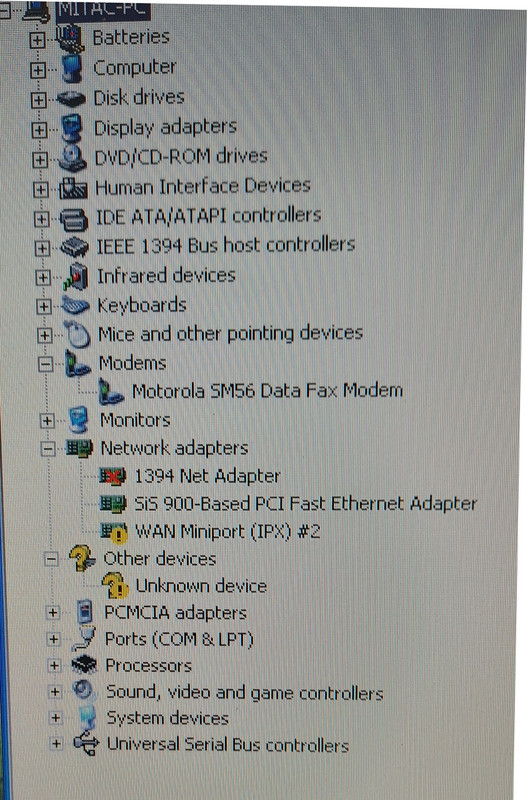
Who knows, right? Maybe there's a WiFi card tucked inside that just needs drivers. You’d probably see it showing up in the Device Manager with one of those annoying yellow warning triangles, which is exactly why it isn't showing up under your Network adapters.
How are we even supposed to figure that out if we don't know what kind of laptop we're dealing with? I mean, there’s probably some sticker or something tucked away on the bottom somewhere you can check to actually Google the specs.
Megan Thomas5 Megan Thomas5 Active Member
132 messages
joined Jan 2021
#18 ·
Man, those old laptops actually had a physical switch on the side you had to slide back and forth just to turn on the WiFi.
wiredcanyon94 wiredcanyon94 Active Member
129 messages
joined Nov 2022
#19 ·
Megan Thomas5 said:Man, those old laptops actually had a physical switch on the side you had to slide back and forth just to turn on the WiFi.

Some models had that, sure, but plenty of them didn't even come with WiFi built-in to begin with.
Nancy Thompson8 Nancy Thompson8 MemberOP
37 messages
joined Jan 2017
#20 ·
Look, I totally get it—it’s an old laptop, and if there isn't a network card tucked away inside somewhere, I'd probably just toss it in the recycling bin because honestly, it's not worth spending a dime to upgrade it.
Based on what you've shared here, can we actually tell if it has a wireless card built-in or not? Everything else about the machine runs smoothly and feels pretty snappy, but this whole internet situation is just a massive headache.

image

You must log in or register to reply here.

Log in Register

🔗 Similar threads