CheckEmoji Community · the emoji forum
🏠 Home 🆕 What's new ❓ Unanswered 🔥 Popular 📡 RSS Members 👥 0 online log in · register
Home › IT › IT Support › USB ports not working on my laptop

USB ports not working on my laptop

Started by Elizabeth Mendoza · · 👁 3 views · 4 replies

📡 Subscribe to replies

Participants Elizabeth Mendozawearymason4
Elizabeth Mendoza Elizabeth Mendoza RegularOP
821 messages
joined Oct 2020
#1 ·
I’m running a dual boot setup with Windows 7 and Ubuntu. On Ubuntu, the USB ports work perfectly—whatever I plug in works instantly. But on Windows 7? Not a single port works. I even tried a clean reinstall of Windows, but still nothing.

I haven't touched a single setting in the BIOS, so I know it's not that. Plus, when I check the Device Manager, I don't see anything under the USB controllers...
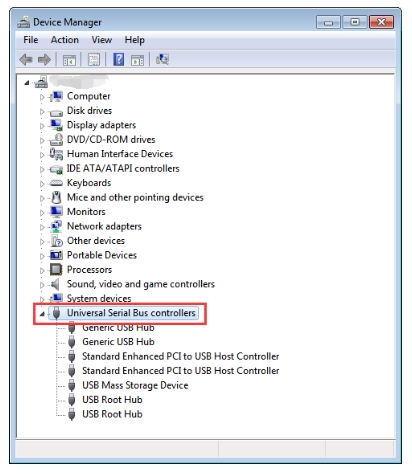
image

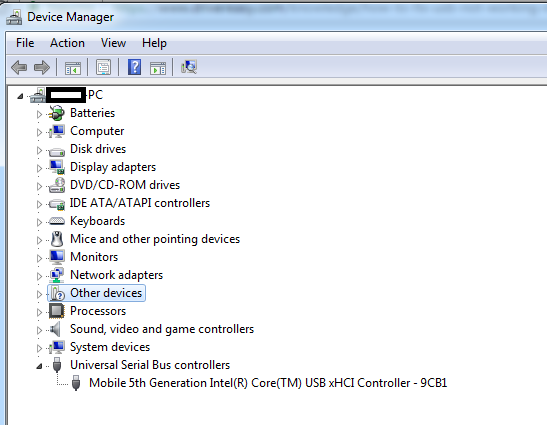
..instead, this is what shows up for me:
image

I've spent ages Googling fixes and trying everything I could find online. I even attempted the methods suggested in this guide https://www.drivereasy.com/knowledge...-in-windows-7/.

I even went through all that nonsense on the Dell support site where they try to get you to run driver scans and stuff. They didn't find a thing, and it was just a massive waste of my time.

Nothing works. I can't connect a keyboard, a mouse, a USB TV tuner, or even a simple flash drive...
All the drivers from the disc that came with the laptop were installed right after I reinstalled Windows.
wearymason4 wearymason4 Active Member
239 messages
joined Oct 2014
#2 ·
...have you tried going into Device Manager, right-clicking that "iPhone 5" thing to uninstall it, and then hitting "action" and "scan for hardware changes" in the top menu? Usually, the system just grabs the right drivers itself once you do that.
I've pulled that trick off more times than I can count when things get glitchy.
Elizabeth Mendoza Elizabeth Mendoza RegularOP
821 messages
joined Oct 2020
#3 ·
Yeah, I'm telling you, once that was done, there was absolutely nothing left in that section. Even running a scan for changes didn't change a single thing.
wearymason4 wearymason4 Active Member
239 messages
joined Oct 2014
#4 ·
Just so you know, running an uninstaller doesn't actually wipe the drivers from your PC (they just hang out in System32), so when the computer spots that hardware again, it can just go ahead and perform a clean install without any drama.
It’s also possible your laptop is a newer model and Windows 7 is just too old to recognize USB 3.0 natively—it basically won't even see the hardware. You might need to build a custom setup using the specific drivers from the manufacturer's site for that exact laptop and Windows 7. Though, honestly, good luck finding them; these days, most manufacturers only bother making drivers for Windows 10 on their newer machines.
Elizabeth Mendoza Elizabeth Mendoza RegularOP
821 messages
joined Oct 2020
#5 ·
I've had this laptop for three years now, and honestly, it’s been a total workhorse until just recently. I’ve cycled through everything—Ubuntu, Linux Mint, Windows 7, and Windows 10. I’ve done plenty of solo installs and some dual-boot setups too. I actually rolled back to Windows 7 specifically for the World Cup because I’m using this ancient USB TV tuner that just refuses to play nice with Windows 10. Everything was running perfectly fine until a couple of days ago. I powered the thing on, and suddenly, nothing works. Not even my external keyboard or mouse plugged into the USB ports. My setup has two USB 3.0 ports and two USB 2.0 ports.

The weird part? Everything works flawlessly when I boot into Linux Mint. I tried doing a clean reinstall of Windows 7, but no luck there either—the exact same issue popped up immediately after the installation finished. At this point, I'm thinking my only real move might be to try installing Windows 10 again. 🤷

You must log in or register to reply here.

Log in Register

🔗 Similar threads