wiredotter14 said: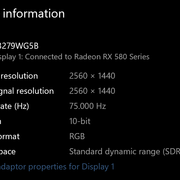
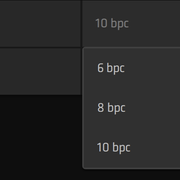
In both Windows Settings and Radeon Settings under the Display tab
Is MadVR some kind of player?
If I download an HDR torrent, can I just watch it straight up in VLC player?
Thanks. So it looks like everything is working fine on your end.
Man, what a headache. I was actually starting to really love this Lenovo. But here's the thing—when I test gradients from a 16-bit image using D3D Fullscreen Exclusive mode via MadVR, they look perfectly smooth, whereas in windowed mode, you see all those nasty banding issues. It seems like Exclusive mode manages to bypass Windows entirely and pushes a 10-bit surface directly to the GPU, which might actually be why it works so much better. I guess I’ll have to give it some more thought.
I just double-checked, and you can definitely watch HDR video converted to SDR directly in VLC, though I'm not entirely sure if VLC provides a true 10-bit render output like the MadVR renderer does. I gave it a shot, and since VLC doesn't utilize that Exclusive mode, you aren't getting a genuine 10-bit signal from a 10-bit source to the monitor; instead, you're just getting 8-bit dithering. Personally, I'm not a huge fan of VLC, so if you're looking for that 10-bit experience, I’d highly recommend using MPC HC combined with MadVR.
With MadVR, you can actually push your monitor to its peak brightness—which is around 280 nits, as you might have seen in reviews—and by saving that value into the MadVR settings, you can achieve a pretty decent HDR-like presentation...


