CheckEmoji Community · the emoji forum
🏠 Home 🆕 What's new ❓ Unanswered 🔥 Popular 📡 RSS Members 👥 0 online log in · register
Home › IT › Hardware › Computer Peripherals › Monitor buying guide (mega-thread)

Monitor buying guide (mega-thread)

Started by Kimberly Gomez34 · · 👁 20 views · 811 replies

📡 Subscribe to replies

Participants Kimberly Gomez34quietridge92crimsonstag84Daniel Rivera5Noah Diazanalogtiger19Charles Campbell8velvetskipper8Brenda Walker75Robert Rodriguez2dustyridge7Lawrence Ortiz2Karen Chase10Mark Ramirez11ironcyclist40Adam Moore3Larry Ortiz5Jerry Fowler79Drew Roberts3granitescoutmellowsurfer9wiredotter14Peter Greencrimsonnomad5 …
wiredotter14 wiredotter14 Regular
433 messages
joined Aug 2007
#761 ·
Linus Tech Tips recommends the one you linked, but that’s a VA panel with heavy curvature. Color accuracy and general productivity might take a hit there.

They also suggest this one if you want a decent balance of color fidelity and motion performance—it's an IPS panel.
https://www.amazon.com/monitors/gigabyte...16-9-187167281

And then there's this model mentioned for having a wider color gamut.

https://www.amazon.com/search.php?q=mpg321ur&cod=&cdo=

Anyway, just watch the video. Skip to the 4K segment.
Nancy Booth Nancy Booth Newcomer
5 messages
joined Nov 2012
#762 ·
Quick question for the experts out there..

Which monitor setup actually makes for a better reading experience—like when I'm stuck staring at Word docs all day? Is it better to go with a higher resolution, say something like 2K, or am I better off sticking to a standard 1080p screen that just happens to have a high 160Hz refresh rate?

Thanks.
urbanheron4 urbanheron4 Active Member
56 messages
joined Mar 2022
#763 ·
Higher resolution matters, though I guess it really depends on how big the screen actually is. At the end of the day, pixel density is what you should be looking at.
Also, make sure whatever you pick has some kind of anti-flicker tech. If it doesn't, staring at the thing for hours is going to be a massive headache, especially if you're doing a lot of reading.
There’s plenty of other stuff to consider too. Not all panels are built with the same level of quality, but honestly, there's no magic rule for that. You just have to dig through reviews for every specific model you're eyeing.
Grace Taylor3 Grace Taylor3 Newcomer
1 message
joined Dec 2022
#764 ·
Anyone got a solid recommendation for a 24-inch 1080p monitor?
Jesse Morris3 Jesse Morris3 Newcomer
4 messages
joined May 2022
#765 ·
I'm looking to pick up a new monitor, nothing fancy. My current setup is getting on in years—about 7 years old now. I'm running a Sapphire R7 260 x 1GB DDR5 paired with an AMD x4 860 processor. It’s mostly just for general home use, schoolwork for the kids, and the occasional light game like Roblox. Does anyone have recommendations that would pair well with this specific graphics card? The only other option is if I end up replacing the entire PC; in that case, I'd want a monitor that stays relevant for a future build. But for now, it's primarily simple household stuff and casual gaming. We aren't hardcore gamers by any means. Thanks!
Nancy Booth Nancy Booth Newcomer
5 messages
joined Nov 2012
#766 ·
Quick question for you all—which panel type actually holds up better for gaming: IPS or VA?
amberhound8 amberhound8 Member
14 messages
joined Nov 2022
#767 ·
ips
ironhound95 ironhound95 Newcomer
6 messages
joined Feb 2023
#768 ·
Hey there,

I'm on the hunt for a decent monitor for some casual gaming.
I've got my sights set on a 27" model, with a budget somewhere around $300.

So far, these are the ones that caught my eye:

Naturally, I'm open to anything better within that price range.

Thanks! ��
Nancy Booth Nancy Booth Newcomer
5 messages
joined Nov 2012
#769 ·
I’m pretty sure this is the best deal you'll find at Best Buy right now—feel free to set me straight if the tech experts out there disagree...

https://www.nabava.net/monitori/aoc-...16-9-187168631

PS: What kind of GPU are you running??
ironhound95 ironhound95 Newcomer
6 messages
joined Feb 2023
#770 ·
Ronald Bishop58 said:PS: What GPU are you running??

RX6700, 10GB

I'll take a look. Thanks!
Nancy Booth Nancy Booth Newcomer
5 messages
joined Nov 2012
#771 ·
ironhound95 said:RX6700, 10GB

I'll take a look—thanks!

Honestly, I'm not entirely sure if the RX6700 handles 1440p well enough, especially since this is a 1440p monitor... maybe some experts here can weigh in? I actually have an RX6750, which I know for a fact works fine at 1440p...
ironhound95 ironhound95 Newcomer
6 messages
joined Feb 2023
#772 ·
The RX6700 handles 1440p just fine.

Is this AOC actually the ultimate budget pick?
Nancy Booth Nancy Booth Newcomer
5 messages
joined Nov 2012
#773 ·
ironhound95 said:The RX6700 handles 1440p just fine, too.

Is this AOC one really the best bang-for-your-buck option?

Well, you can see for yourself—since yesterday, Best Buy has had this sitting at $100 cheaper than anything else in its class...
If you're willing to shell out an extra hundred bucks for an LG, then go ahead and grab the LG.
velvetcobra6 velvetcobra6 Newcomer
4 messages
joined Nov 2009
#774 ·
I have a quick question regarding my workflow. My job requires me to take a lot of screenshots, which really helps streamline my tasks.
Unfortunately, the quality of my screenshots looks pretty poor—they seem pixelated and grainy. It’s a bit frustrating because my colleague's screenshots look incredibly sharp, almost like perfect vectors rather than images.

I'm wondering what actually determines this level of quality. Does it depend on my monitor or its specific settings?
I've been using an older monitor, and no matter how much I tweak the settings, the result stays exactly the same.

If the hardware is indeed the issue, what kind of monitor would you recommend I pick up?
Jesse Sanchez4 Jesse Sanchez4 Member
39 messages
joined Jul 2022
#775 ·
Perhaps my colleague is working with a higher resolution monitor, or they might just be saving their files as PNGs instead of using high-compression JPGs 😁

Just throw out a few silly examples using non-sensitive data and we can take a look.
Nancy Booth Nancy Booth Newcomer
5 messages
joined Nov 2012
#776 ·
velvetcobra6 said:I’ve got a question—my job involves taking a ton of screenshots, which makes my life way easier.
The problem is, my screenshot quality is pretty terrible and looks all grainy—compared to my coworker's, whose shots look so crisp you can't even tell they aren't vectors.

I'm wondering what actually determines that quality—is it the monitor and its settings?
I'm using an old monitor, and no matter what I tweak, nothing changes.

If the monitor is the issue, any recommendations on what I should buy?

It really comes down to your graphics card... What kind of PC are we talking about here? What GPU are you running?
velvetcobra6 velvetcobra6 Newcomer
4 messages
joined Nov 2009
#777 ·
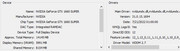
Nvidia GeForce GTX 1660 super

image
Jesse Sanchez4 Jesse Sanchez4 Member
39 messages
joined Jul 2022
#778 ·
It has absolutely nothing to do with the graphics card.
velvetcobra6 velvetcobra6 Newcomer
4 messages
joined Nov 2009
#779 ·
Jesse Sanchez4 said:It has absolutely nothing to do with the graphics card.

Fair enough, but what's causing it then?
Jesse Sanchez4 Jesse Sanchez4 Member
39 messages
joined Jul 2022
#780 ·
Give me a few specific examples so we can actually figure out what’s causing this. It could be anything from your colleague working on a high-end 4K monitor while you're stuck with a lower resolution and some botched Windows scaling settings, or perhaps she's exporting her captures as lossless PNG files while you're cranking out heavily compressed JPEGs at 95% quality.

You must log in or register to reply here.

Log in Register

🔗 Similar threads