CheckEmoji Community · the emoji forum
🏠 Home 🆕 What's new ❓ Unanswered 🔥 Popular 📡 RSS Members 👥 0 online log in · register
Home › IT › Hardware › Internal PCIe to USB Type-C header card

Internal PCIe to USB Type-C header card

Started by granitecrane2 · · 👁 4 views · 19 replies

📡 Subscribe to replies

Participants granitecrane2wiredotter14bluesurfer66wanderingbison9
granitecrane2 granitecrane2 MemberOP
31 messages
joined Apr 2022
#1 ·
Hi everyone.
I'm currently running a Be Quiet! case (Dark Base 700) and I honestly have nothing but praise for it. The synergy with my ASUS ROG Strix boards and the AURA lighting is seamless—you can set it up so the motherboard handles the lighting, or just let the case controller take the lead. Fan management was also a breeze; I just had to switch the header setting to PWM in the BIOS, and now the motherboard can manage everything perfectly when the front panel is set to AUTO.

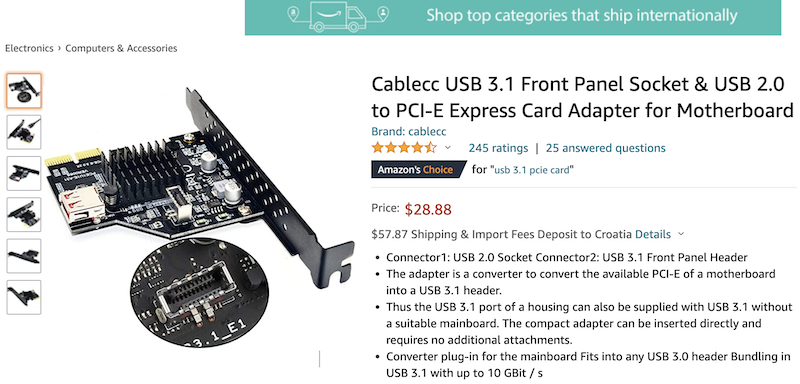
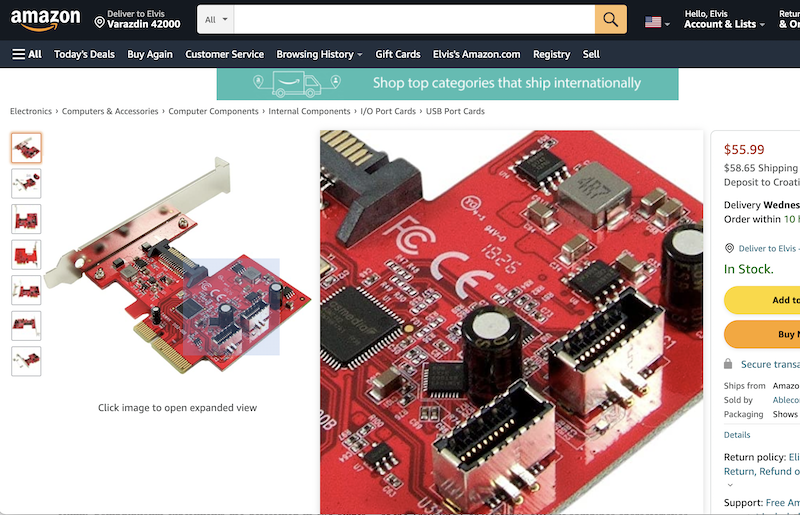
So, here’s the deal. I’ve got one single cable left unplugged: the USB Type-C port on the front of the case. To get that working, you need a 20-pin USB Type-C internal connector (specifically a USB 3.0 (3.1 Gen 2) Internal IDC 20 Pin Motherboard Header), but my motherboard doesn't have the slot for it. You can pick up a PCIe card to solve this, like the one in the photo. They are available on Amazon in two versions—I’d personally go for the red one from the Taiwanese manufacturer since it has two connectors, but I used this Chinese one because the actual connector is easier to see in the shot.
image

The catch? Amazon is charging $50 for shipping, which is exactly what the red version costs on its own.
image

So, my question is this:
Does anyone know if I can find this through our local suppliers or at a brick-and-mortar shop? It’s incredibly difficult to even find the official NAME of this hardware, let alone explain to a clerk what it actually does.
wiredotter14 wiredotter14 Regular
433 messages
joined Aug 2007
#2 ·
I don't think you actually need a PCIe card unless you're dead set on hitting 10 Gbps.
I was looking into this myself since I'm in a similar spot. I thought I found an adapter that plugs into a USB-A header, but honestly, you'd probably just be stuck at 5 Gbps.

https://www.ebay.de/itm/324739654774...CABEgInwvD_BwE

It claims to support 10 Gbps, but I wouldn't trust that blindly.
granitecrane2 granitecrane2 MemberOP
31 messages
joined Apr 2022
#3 ·
wiredotter14 said:I don't think you actually need a PCIe card unless you're dead set on hitting 10 Gbps.
I was looking into this myself since I'm in a similar spot. I thought I found an adapter that plugs into a USB-A header, but honestly, you'd probably just be stuck at 5 Gbps.

https://www.ebay.de/itm/324739654774...CABEgInwvD_BwE

It claims to support 10 Gbps, but I wouldn't trust that blindly.

Exactly. If I'm going to sacrifice a PCIe slot anyway, I might as well get some decent speed out of it. Beyond that, the second option is superior because it includes a SATA power connector (the same kind used to power hard drives directly from the PSU). This allows it to pull a solid 3A straight from the power supply instead of taxing the motherboard. As others have pointed out, if you don't plug that in, it'll just draw power from the board. In either scenario, it's pulling 12V, which is then stepped down via an onboard voltage regulator—likely a buck converter—to the 5V standard used by USB. That's actually quite handy if you want to charge devices, like a smartphone, while they're plugged in.
wiredotter14 wiredotter14 Regular
433 messages
joined Aug 2007
#4 ·
USB ports on a motherboard—whether they're on the back I/O or connected via headers—usually have pathetic power delivery. In my experience, you can rarely rely on a full 1A. If this fix actually solves that problem for you and it's something you genuinely need, then great.

But honestly, you probably have an open USB 3.0 (USB-A) header lying around. You could just use that for what I linked instead of eating up a PCIe slot. It might even hit 10 Gbps, though I doubt anyone really cares about 10 Gbps speeds on a front panel port.
If you do decide to go the PCIe route, I don't think you'll need extra SATA power. A PCIe slot can pull 75W, which is way more than any device like this would ever demand.
granitecrane2 granitecrane2 MemberOP
31 messages
joined Apr 2022
#5 ·
wiredotter14 said:USB ports on a motherboard—whether they're on the back I/O or connected via headers—usually have pathetic power delivery. In my experience, you can rarely rely on a full 1A. If this fix actually solves that problem for you and it's something you genuinely need, then great.

But honestly, you probably have an open USB 3.0 (USB-A) header lying around. You could just use that for what I linked instead of eating up a PCIe slot. It might even hit 10 Gbps, though I doubt anyone really cares about 10 Gbps speeds on a front panel port.
If you do decide to go the PCIe route, I don't think you'll need extra SATA power. A PCIe slot can pull 75W, which is way more than any device like this would ever demand.

I don't have one. I have a single USB 2.0 header, but it's already hooked up to the USB 2.0 ports on the front panel. So, that's already occupied. Also, I have this cable with a 20-pin connector hanging there that I want to plug in so it isn't just dangling around. I know adapters exist, but I have nowhere to plug them in because the 2.0 header is taken. To make a long story short, the Be Quiet! case has two USB Type-A ports and one USB Type-C port on the front (along with everything else like the fan controller, reset button, lighting controls, and obviously the power button). Everything works perfectly except for that USB Type-C port. Oh well, I'll just drop $100 on Amazon and call it a day. But still, if there were a local supplier nearby, that would be much better...
wiredotter14 wiredotter14 Regular
433 messages
joined Aug 2007
#6 ·
What motherboard are you running that doesn't even have a USB 3.0 header?
granitecrane2 granitecrane2 MemberOP
31 messages
joined Apr 2022
#7 ·
wiredotter14 said:What motherboard are you running that doesn't even have a USB 3.0 header?

ASUS ROG Strix B550-F WiFi
wiredotter14 wiredotter14 Regular
433 messages
joined Aug 2007
#8 ·
granitecrane2 said:ASUS ROG Strix B550-F WiFi

image

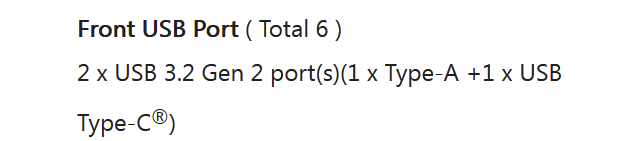
The specs right here show it has both USB Type-A and USB Type-C

https://rog.asus.com/us/motherboards...-fi-model/spec
bluesurfer66 bluesurfer66 Newcomer
6 messages
joined Sep 2021
#9 ·
Despite what you might see listed on some random retail site, this motherboard doesn't actually feature a front-panel USB Type-C header.
wiredotter14 wiredotter14 Regular
433 messages
joined Aug 2007
#10 ·
bluesurfer66 said:Despite what you might see listed on some random retail site, this motherboard doesn't actually feature a front-panel USB Type-C header.

It’s got USB Type-A, though. It's been ages since any decent board shipped with nothing but a USB 2.0 header.
bluesurfer66 bluesurfer66 Newcomer
6 messages
joined Sep 2021
#11 ·
It’s pretty obvious, really; when we’re discussing USB Type-C, anyone looking for a modern setup clearly needs that specific standard, so I can see why it’s such an irritation to him that they still included a USB Type-A port.
wiredotter14 wiredotter14 Regular
433 messages
joined Aug 2007
#12 ·
bluesurfer66 said:It’s pretty obvious, really; when we’re discussing USB Type-C, anyone looking for a modern setup clearly needs that specific standard, so I can see why it’s such an irritation to him that they still included a USB Type-A port.

Just read my first post.
bluesurfer66 bluesurfer66 Newcomer
6 messages
joined Sep 2021
#13 ·
This is actually the first time I’ve suggested grabbing a USB Type-C adapter to plug into the motherboard's existing USB Type-A port. If you’re referring to my previous comment as the "first post," then I’m afraid we are talking past one another entirely. Why on earth would anyone phase out USB Type-A when it’s perfectly obvious that a kid just wants both—Type-A and Type-C—available on the front panel of their case?

Let’s try to apply a little logic here. My point was simply that this specific motherboard lacks a front-panel USB Type-C header. That’s all it was. Either they missed the mark during the marketing phase, or perhaps they didn't, though one can always chalk it up to a simple human error. Yet, instead of addressing that, you’re hitting back at me with this whole diversion about USB Type-A. 🤦
wiredotter14 wiredotter14 Regular
433 messages
joined Aug 2007
#14 ·
bluesurfer66 said:This is actually the first time I’ve suggested grabbing a USB Type-C adapter to plug into the motherboard's existing USB Type-A port. If you’re referring to my previous comment as the "first post," then I’m afraid we are talking past one another entirely. Why on earth would anyone phase out USB Type-A when it’s perfectly obvious that a kid just wants both—Type-A and Type-C—available on the front panel of their case?

Let’s try to apply a little logic here. My point was simply that this specific motherboard lacks a front-panel USB Type-C header. That’s all it was. Either they missed the mark during the marketing phase, or perhaps they didn't, though one can always chalk it up to a simple human error. Yet, instead of addressing that, you’re hitting back at me with this whole diversion about USB Type-A. 🤦

1) According to the manufacturer's specs, the board has both.

2) The user claims there isn't a single one available, neither USB 3 Type-A nor Type-C.

3) I find option 2 impossible, since basically every motherboard has at least a USB 3 Type-A header.

4) The guy says the board has one 2.0 Header, but it's already being used.

5) Honestly, I'm not even sure how many headers a typical board carries or what the standard baseline should be.

6) My advice was based on having a spare USB 3.0 header, but given point 5, I'm out of ideas.

7) Looking at it now, this case is supposed to have 2x USB 3 Type-A and 1x Type-C on the front. So USB 2 isn't the issue; the USB 3 is likely occupied, leaving nothing else free.
bluesurfer66 bluesurfer66 Newcomer
6 messages
joined Sep 2021
#15 ·
1 - he says there isn't any USB Type-C, but like I mentioned before, they clearly just botched the labeling on this one.

here is the photo - View on imgur

2 - alright, well, the kid clearly tripped up on the 2.0 thing; it’s pretty obvious he didn't realize the case itself explicitly lists both 3.1 and 3.0 right there on the chassis.
wanderingbison9 wanderingbison9 Active Member
159 messages
joined Jan 2018
#16 ·
bluesurfer66 said:1 - he says there isn't any USB Type-C, but like I mentioned before, they clearly just botched the labeling on this one.

here is the photo - View on imgur

2 - alright, well, the kid clearly tripped up on the 2.0 thing; it’s pretty obvious he didn't realize the case itself explicitly lists both 3.1 and 3.0 right there on the chassis.

Access to i.imgur.com was denied. You don't have authorization to view this page.
HTTP ERROR 403
granitecrane2 granitecrane2 MemberOP
31 messages
joined Apr 2022
#17 ·
wiredotter14 said:image

The specs right here show it has both USB Type-A and USB Type-C

https://rog.asus.com/us/motherboards...-fi-model/spec

Of course it does. This is a high-end board. It features a USB Type-C port on the rear I/O.
However, it lacks the specific front panel header needed to connect a USB Type-C port from a case on the front. And that's exactly what we're talking about.
It’s just like how every motherboard comes with onboard audio, but some people prefer having headphone and mic jacks right on the front of their chassis. For that, you need an audio front panel header.

It doesn't matter to me, though. I'm going to grab this red board anyway, and I'll find a way to make it work.
granitecrane2 granitecrane2 MemberOP
31 messages
joined Apr 2022
#18 ·
wiredotter14 said:1) According to the manufacturer's specs, the board has both.

2) The user claims there isn't a single one available, neither USB 3 Type-A nor Type-C.

3) I find option 2 impossible, since basically every motherboard has at least a USB 3 Type-A header.

4) The guy says the board has one 2.0 Header, but it's already being used.

5) Honestly, I'm not even sure how many headers a typical board carries or what the standard baseline should be.

6) My advice was based on having a spare USB 3.0 header, but given point 5, I'm out of ideas.

7) Looking at it now, this case is supposed to have 2x USB 3 Type-A and 1x Type-C on the front. So USB 2 isn't the issue; the USB 3 is likely occupied, leaving nothing else free.

Exactly. There is a USB 3 header, I just misspoke and said 2 earlier. And since that one is already being used, I definitely don't want to use an adapter to turn it into a USB Type-C port. It's perfectly clear now.

bluesurfer66 said:This is actually the first time I’ve suggested grabbing a USB Type-C adapter to plug into the motherboard's existing USB Type-A port. If you’re referring to my previous comment as the "first post," then I’m afraid we are talking past one another entirely. Why on earth would anyone phase out USB Type-A when it’s perfectly obvious that a kid just wants both—Type-A and Type-C—available on the front panel of their case?

Let’s try to apply a little logic here. My point was simply that this specific motherboard lacks a front-panel USB Type-C header. That’s all it was. Either they missed the mark during the marketing phase, or perhaps they didn't, though one can always chalk it up to a simple human error. Yet, instead of addressing that, you’re hitting back at me with this whole diversion about USB Type-A. 🤦

You're right. There's no sense in arguing about this anymore. My question was strictly whether those PCIe cards are available locally here, or if I should just order them from Amazon and eat the extra shipping cost.
wiredotter14 wiredotter14 Regular
433 messages
joined Aug 2007
#19 ·
wanderingbison9 said:Access to i.imgur.com was denied. You don't have authorization to view this page.
HTTP ERROR 403

Imgur likes to mess with you sometimes. If you strip this part out first, it actually works.

imgur.com/mXnQFA6.jpeg

Looks like there really isn't one...

But then again, the diagram shows a Thunderbolt header, which is weird because why include that but skip the USB Type-C header?

Can you plug a USB Type-C into a Thunderbolt header? Theoretically, USB Type-C should just be a subset of Thunderbolt functions.
granitecrane2 granitecrane2 MemberOP
31 messages
joined Apr 2022
#20 ·
wiredotter14 said:Imgur likes to mess with you sometimes. If you strip this part out first, it actually works.

imgur.com/mXnQFA6.jpeg

Looks like there really isn't one...

But then again, the diagram shows a Thunderbolt header, which is weird because why include that but skip the USB Type-C header?

Can you plug a USB Type-C into a Thunderbolt header? Theoretically, USB Type-C should just be a subset of Thunderbolt functions.

Yes. It has a Thunderbolt header, but that requires a specific expansion card (a Thunderbolt card) to actually function. Essentially, while they use the same connector, Thunderbolt handles video signals too—like how Apple uses Thunderbolt to drive external monitors. That’s why those specific headers exist.
Personally, I'm not too worried about that, though. My main issue is that I have this 20-pin front panel cable that I'm dying to plug into something. I haven't been able to find a Thunderbolt card that also includes a standard internal 20-pin USB-C header.

You must log in or register to reply here.

Log in Register

🔗 Similar threads