Home › Miscellaneous › Forum Help! ›
How do I upload images and videos to the forum?
How do I upload images and videos to the forum?
Started by swiftbison7 · · 👁 15 views · 1.9K replies


#1823 ·
https://i.postimg.cc/28xKJQqd/Capture-SVŠ.jpg
Good grief, I used to be able to upload photos without a second thought, but now all I can manage is posting a dead link. It’s incredibly frustrating; I just can't seem to get an image to actually show up properly.
Good grief, I used to be able to upload photos without a second thought, but now all I can manage is posting a dead link. It’s incredibly frustrating; I just can't seem to get an image to actually show up properly.

#1824 ·
Just click the image icon at the top of the post, paste your link right in there, and hit confirm.
With Postimg, you actually have to grab the direct link specifically, if you follow instructions—maybe that's where people are tripping up.
With Postimg, you actually have to grab the direct link specifically, if you follow instructions—maybe that's where people are tripping up.

#1826 ·
The video isn't working; it's just YouTube.
If you have the file locally, just upload it to a Google Drive and send over the link.
If you have the file locally, just upload it to a Google Drive and send over the link.
#1827 ·
Casey Bennett said:The video isn't working; it's just YouTube.
If you have the file locally, just upload it to a Google Drive and send over the link.
I find myself increasingly preoccupied with the implications of YouTube.
#1828 ·
You have to manually enter the tag for YouTube yourself, but the real headache is that no matter how I type it, I just end up with a video window popping up 🙏
Look,
[..yt] hmmm [../yt]
You need to strip out those extra dots I accidentally threw inside the brackets, so you're left with just "yt" in the first set and "/yt" in the second.
Then, you grab the tail end of the YouTube URL—the part that comes after "watch?v="—and paste it right between those brackets, making sure there aren't any spaces like the mess I made earlier.
Is that clear enough? 🤔 😁
Look,
[..yt] hmmm [../yt]
You need to strip out those extra dots I accidentally threw inside the brackets, so you're left with just "yt" in the first set and "/yt" in the second.
Then, you grab the tail end of the YouTube URL—the part that comes after "watch?v="—and paste it right between those brackets, making sure there aren't any spaces like the mess I made earlier.
Is that clear enough? 🤔 😁
#1829 ·
Here it is, laid out in pictures for you.
The way the post looks is right there in the preview above.
Regarding this specific video:
The way the post looks is right there in the preview above.
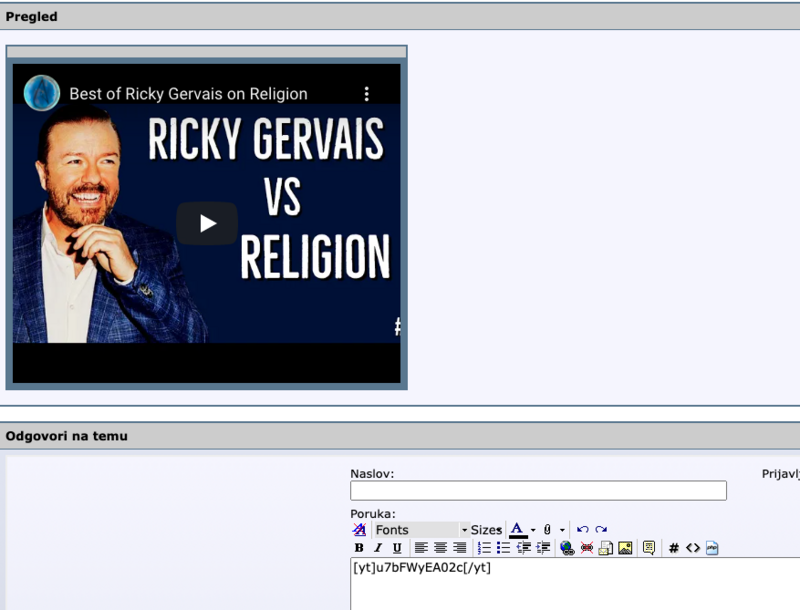
Regarding this specific video:

#1830 ·
Casey Bennett said:Here it is, laid out in pictures for you.
The way the post looks is right there in the preview above.
Regarding this specific video:
Regarding this specific video:
I truly appreciate the effort you put into this; I managed to 🙂


#1835 ·
https://imagizer.imageshack.com/v2/2...922/TFDxsc.jpg
https://imagizer.imageshack.com/v2/2...922/TFDxsc.jpg
https://imagizer.imageshack.com/v2/2...922/TFDxsc.jpg

#1836 ·
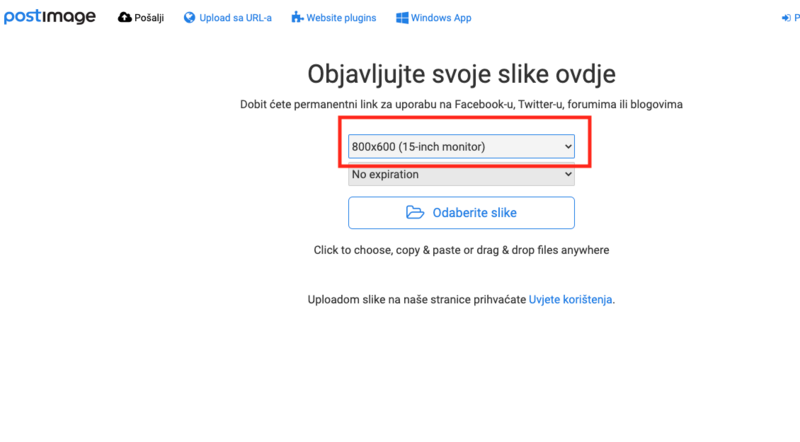
That isn't quite right, I suppose. You should probably click on , and then perhaps you could enter that specific link there.


🔗 Similar threads
- How much influence do forum members actually have on moderator changes? in Feedback & Suggestions · Mar 17, 2023
- dariom2 in the History subforum in Feedback & Suggestions · Feb 24, 2023
- Has there been a security breach on the forum? in Forum Help! · Jan 19, 2023
- Is it against the rules to discuss non-EU immigration on this forum? in Banned Users Corner · Dec 30, 2022
- HTTPS and privacy: How much of our activity is actually being tracked on this forum? in Forum Help! · Dec 21, 2022