CheckEmoji Community · the emoji forum
🏠 Home 🆕 What's new ❓ Unanswered 🔥 Popular 📡 RSS Members 👥 0 online log in · register
Home › IT › Hardware › Desktops › Gaming PC Build Ideas?

Gaming PC Build Ideas?

Started by neonlynx12 · · 👁 3 views · 13 replies

📡 Subscribe to replies

Participants neonlynx12Chloe Hill62Larry Ortiz5swiftridge40wiredotter14Elizabeth Morales49Kimberly Gomez34
neonlynx12 neonlynx12 NewcomerOP
6 messages
joined Feb 2014
#1 ·
Hey everyone, I just put together a gaming PC build on my own. Full disclosure: I’m really not an expert in this field and have no idea what I'm doing,😵 so I reached out to a few friends who know their stuff. Based on their advice and a rough budget I set for myself, I managed to piece this together. 🤔 🤦
What do I need from you? Let's get right to it—I was hoping you could help me figure out if this setup is actually good. If you have the expertise, please let me know what works, what doesn't, and which components I should swap out (and of course, if you could explain the reasoning behind any changes, I’d appreciate it). Most importantly, is everything here compatible? Feel free to shoot me a DM if that's easier. Thanks in advance!
Here is the configuration:
CASE:
NZXT H210 - Black/Red
I want something as large as possible; this one looks decent to me.

CPU:
AMD Ryzen 7 3700X

MOTHERBOARD:
MSI MPG X570 gaming plus

GRAPHICS CARD:
Asus dual GeForce GTX 1660 super 6 GB OC edition GDDR6
Some people tell me GeForce isn't compatible with AMD, while others say it works perfectly fine. What's the actual consensus here?
Also, I'm not sure if it's an issue that the graphics card only has one output, since I'm planning on running a dual-monitor setup eventually.

RAM:
HyperX Predator HX436C17PB3/16 - 16 GB - DIMM

POWER SUPPLY:
Corsair HX1200 - 1200 W

COOLING:
Cooler Master Wraith Ripper

CASE COOLING:
NZXT Aer RGB 2 - 140mm Single fan x3

SSD:
Samsung 970 - 500GB x1
or
Samsung 970 evo plus - 250GB x2

HD:
Seagate Barracuda - 1 TB - 3.5"

Regarding the SSD and HD, most people seem to recommend two SSDs and one HD—using one SSD for Windows, one for games, and the HD for miscellaneous files. Is that strictly necessary, or is it fine to just stick with one SSD and one HD? (I've heard SSDs tend to fail more often, so I wasn't sure.)

Again, if anyone has the time or inclination to help me out, I'd be very grateful. I'm completely out of my element here, and of course, sorry if I posted this in the wrong section! 🎉🎉🎉
Chloe Hill62 Chloe Hill62 Newcomer
1 message
joined Apr 2020
#2 ·
For anyone just looking to get through some 1080p gaming, this setup is more than enough to get the job done.

So, what’s the damage on the total price tag?
Larry Ortiz5 Larry Ortiz5 Regular
710 messages
joined May 2020
#3 ·
Honestly, you're looking at a CPU that’s way more than you need just for gaming, and that motherboard is definitely overpriced for what you're actually trying to do—unless you have other plans besides playing games. On top of that, the graphics card is pretty weak considering the budget you clearly have—I can tell by the processor, motherboard, and power supply you picked out. The PSU is total overkill, too. Overall, the build feels really unbalanced... but hey, if this is your first time putting something together, it’s totally understandable. 🙂

Just let me know what your actual budget looks like—and are you planning to pay cash or use a credit card for installments? Also, do you just need the tower itself, or are you looking for a full setup with a monitor and peripherals?
Larry Ortiz5 Larry Ortiz5 Regular
710 messages
joined May 2020
#4 ·
Chloe Hill62 said:For anyone just looking to get through some 1080p gaming, this setup is more than enough to get the job done.

So, what’s the damage on the total price tag?

Please, don't tell him this setup is actually good—because it really isn't..
neonlynx12 neonlynx12 NewcomerOP
6 messages
joined Feb 2014
#5 ·
Larry Ortiz5 said:Honestly, you're looking at a CPU that’s way more than you need just for gaming, and that motherboard is definitely overpriced for what you're actually trying to do—unless you have other plans besides playing games. On top of that, the graphics card is pretty weak considering the budget you clearly have—I can tell by the processor, motherboard, and power supply you picked out. The PSU is total overkill, too. Overall, the build feels really unbalanced... but hey, if this is your first time putting something together, it’s totally understandable. 🙂

Just let me know what your actual budget looks like—and are you planning to pay cash or use a credit card for installments? Also, do you just need the tower itself, or are you looking for a full setup with a monitor and peripherals?


Like I mentioned, I'm no expert in this field, so everything I said stands. Basically, I need the whole setup. Right now, I'm stuck using a laptop that struggles to handle anything, which is why I'm putting this PC together. Also, my budget isn't set in stone because I plan to buy components gradually, so I don't have one specific number in mind.

If you don't mind, I would really appreciate it if you could explain what's wrong with my choices (you mentioned the CPU is unnecessary... I won't go into detail there) and give me some suggestions. You can even send them via DM if that's easier.
swiftridge40 swiftridge40 Member
17 messages
joined Sep 2013
#6 ·
Ugh, I almost never post in this thread, but here we go.

So you're looking at a 3600/x versus a 9600k? Honestly, I’d just wait for the new Intel chips—you know, those AMD processors coming out later this year. And why on earth do you need a 1200W power supply? That's overkill. A 550W or 650W Corsair modular unit is plenty. Also, skip the HDD entirely. Just grab two 512 GB SSDs, or maybe one 1 TB and one 512 GB. If your budget allows, just go with two 1 TB drives. As for the GPU, any graphics card will work with any motherboard, but you didn't even mention what kind of monitor you're using! What's the resolution? If you're trying to push anything higher than 1080p, you're going to need a much beefier graphics card.
neonlynx12 neonlynx12 NewcomerOP
6 messages
joined Feb 2014
#7 ·
swiftridge40 said:Ugh, I almost never post in this thread, but here we go.

So you're looking at a 3600/x versus a 9600k? Honestly, I’d just wait for the new Intel chips—you know, those AMD processors coming out later this year. And why on earth do you need a 1200W power supply? That's overkill. A 550W or 650W Corsair modular unit is plenty. Also, skip the HDD entirely. Just grab two 512 GB SSDs, or maybe one 1 TB and one 512 GB. If your budget allows, just go with two 1 TB drives. As for the GPU, any graphics card will work with any motherboard, but you didn't even mention what kind of monitor you're using! What's the resolution? If you're trying to push anything higher than 1080p, you're going to need a much beefier graphics card.


Regarding the processor, my take is that if I want equal performance between Intel and AMD, I'll get much better value for my money with AMD. Look, I'm no expert, but that's just my opinion.
As for the power supply, like I mentioned earlier, I asked several friends who know their stuff, and they all emphasized getting a high-quality unit that can handle the load, specifically insisting on a modular one. Originally, I was actually planning on going with an 850W unit.
I know I don't strictly need an HDD, but I've heard that SSDs can fail relatively quickly, and I'm worried about losing important data or whatever.😵😵
Maybe I'll just play it safe and go with two 512GB drives.

I'll most likely end up choosing a better graphics card than the one I listed in my initial post. As for the monitor, I haven't actually looked for one yet; I'm just planning on having two setups, and of course, one will be a gaming model.
Larry Ortiz5 Larry Ortiz5 Regular
710 messages
joined May 2020
#8 ·
1. Honestly, don't take IT advice from your buddies—seriously. If you follow their lead, you'll just end up throwing money down the drain when it comes to your power supply. Unless you're planning on running a dual-GPU setup or a server motherboard that supports two processors, you really don't need to go overboard with it.

2. So, quick question—when are you actually looking to pull the trigger on this build? Are we talking a few months out, or is it sooner? If it's coming up soon, let me know. There’s really no point in us starting to piece everything together right now if you aren't ready to buy in the next couple of days.
neonlynx12 neonlynx12 NewcomerOP
6 messages
joined Feb 2014
#9 ·
Larry Ortiz5 said:1. Honestly, don't take IT advice from your buddies—seriously. If you follow their lead, you'll just end up throwing money down the drain when it comes to your power supply. Unless you're planning on running a dual-GPU setup or a server motherboard that supports two processors, you really don't need to go overboard with it.

2. So, quick question—when are you actually looking to pull the trigger on this build? Are we talking a few months out, or is it sooner? If it's coming up soon, let me know. There’s really no point in us starting to piece everything together right now if you aren't ready to buy in the next couple of days.


Alright, let's try this: can I get a gaming PC build recommendation for under $1,500, including monitors?
wiredotter14 wiredotter14 Regular
433 messages
joined Aug 2007
#10 ·
Where are you buying from (which country)?

How are you paying?

Do you set the price or does the shop decide?

When do you usually pull the trigger?
neonlynx12 neonlynx12 NewcomerOP
6 messages
joined Feb 2014
#11 ·
wiredotter14 said:Where are you buying from (which country)?

How are you paying?

Do you set the price or does the shop decide?

When do you usually pull the trigger?


The US, using cash, probably in a month or two.
wiredotter14 wiredotter14 Regular
433 messages
joined Aug 2007
#12 ·
Look, people can give you a rough idea, but there’s no such thing as a fixed configuration. It all changes depending on which retailer you use, what part of the US you're in, and honestly, just how much the market shifts from week to week.

If I were you, I'd just pull the trigger and buy now. Given how things are looking lately, we could easily run into parts shortages at any moment.
Elizabeth Morales49 Elizabeth Morales49 Member
34 messages
joined May 2023
#13 ·
AMD Ryzen 5 3600
The stock cooler comes in the box, and honestly, it'll get the job done. But if you’re actually worried about temps... swap it out. I personally run an Arctic Freezer 34 eSports Duo, picked it up on Amazon for about $30
Crucial MX500 500GB SSD, then grab a 1TB hard drive if you need extra storage space
Two 8GB sticks at 3200 MHz. Ryzen really benefits from higher frequencies, and running dual channel with two sticks is just better than a single one
A 650W power supply should be plenty. Just check some reviews on YouTube to find one that hits the sweet spot between quality and price

MSI B450 Tomahawk Max motherboard

Graphics card—it all depends on what kind of monitor you’re eyeing and what resolution you want to hit, but I think you could squeeze an RX 5700 XT into this budget if you find the right one

Case—just find one you actually like looking at. Make sure it fits the budget and has decent airflow... otherwise, you're asking for trouble
Kimberly Gomez34 Kimberly Gomez34 Regular
686 messages
joined Jul 2009
#14 ·
neonlynx12 said:The US, using cash, probably in a month or two.

See, you really should lead with that info in your very first post. 😁

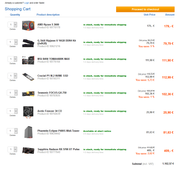
From what I’ve gathered through some digging over in Ireland, people usually suggest sticking with Amazon or maybe checking out Overclockers or one of those big German retailers.

Here is my suggestion: check out ComputersUniverse out of Germany. They ship to pretty much everyone in the European Union, their selection is solid, and the prices are fair.

image

By the way, make sure the SSD is 1TB and the RAM is 3200MHz CL16. As for the case, just pick something you actually like—just don't buy any cheap junk.

That should leave you with about $300 left over for a monitor. Think about whether you want a 24" 1080p 144Hz setup, or if you'd rather go for a 27" or 31.5" 1440p 75Hz display...

You must log in or register to reply here.

Log in Register

🔗 Similar threads