CheckEmoji Community · the emoji forum
🏠 Home 🆕 What's new ❓ Unanswered 🔥 Popular 📡 RSS Members 👥 0 online log in · register
Home › IT › IT Support › New laptop, Windows 11 installation issues—HELP!

New laptop, Windows 11 installation issues—HELP!

Started by Sandra Fowler · · 👁 5 views · 12 replies

📡 Subscribe to replies

Participants Sandra FowlerKenneth Cruz67Michelle Bennett5amberhound8fadedorca66Megan Thomas5
Sandra Fowler Sandra Fowler NewcomerOP
6 messages
joined Nov 2022
#1 ·
Hello everyone,

Please, help me any way you can... I am honestly on the verge of tears and feeling like just tossing both my old and new laptops right out the window. 🙂

Basically, I was talked into buying a new laptop without Windows pre-installed—the idea being that I’d get a much better machine for the same price I was originally looking at—because apparently, installing it myself is "easy" and "something anyone can do." Well, turns out I can't. 🤦

First, I had a massive struggle just trying to access the BIOS to boot from a USB drive, and I was actually feeling quite relieved when the installation finally started... but now I've hit a wall. It's asking me to connect to the internet, but it won't show a single available network, and I am completely lost.

I managed to find some advice online saying I should use the command prompt, but I simply cannot get into it. I've tried Shift + F10, then Win + X, then Win + R... nothing works.

I just want to cry... 😢
Kenneth Cruz67 Kenneth Cruz67 Regular
376 messages
joined Oct 2017
#2 ·
Sandra Fowler said:Hello everyone,

Please, help me any way you can... I am honestly on the verge of tears and feeling like just tossing both my old and new laptops right out the window. 🙂

Basically, I was talked into buying a new laptop without Windows pre-installed—the idea being that I’d get a much better machine for the same price I was originally looking at—because apparently, installing it myself is "easy" and "something anyone can do." Well, turns out I can't. 🤦

First, I had a massive struggle just trying to access the BIOS to boot from a USB drive, and I was actually feeling quite relieved when the installation finally started... but now I've hit a wall. It's asking me to connect to the internet, but it won't show a single available network, and I am completely lost.

I managed to find some advice online saying I should use the command prompt, but I simply cannot get into it. I've tried Shift + F10, then Win + X, then Win + R... nothing works.

I just want to cry... 😢

You can always just get connected later once everything is set up. It's probably just that you don't have the network drivers installed yet. Just skip the connection step for now, finish the installation, load the drivers, and then you can get online. Don't let it get to you! It's simple.
Michelle Bennett5 Michelle Bennett5 Active Member
89 messages
joined Dec 2007
#3 ·
Just hit the Start button in the bottom left corner and type "cmd" into the search bar—that’ll pull up the command prompt for you.
Alternatively, you can just open File Explorer from that same menu, head over to This PC, dive into your local disk (C:), then navigate through the Windows folder to System32, and you'll find "cmd" sitting right there in the list.
Sandra Fowler Sandra Fowler NewcomerOP
6 messages
joined Nov 2022
#4 ·
Kenneth Cruz67 said:You can always just get connected later once everything is set up. It's probably just that you don't have the network drivers installed yet. Just skip the connection step for now, finish the installation, load the drivers, and then you can get online. Don't let it get to you! It's simple.

It’s not as if it ever crossed my mind to look for a "skip internet connection" button—mostly because there wasn't one to begin with... 🙄

I have no issue admitting when I'm stumped or when I don't know something—I can be quite clueless about certain tech stuff sometimes—but at least I don't pretend to be an expert when I clearly am not.
Sandra Fowler Sandra Fowler NewcomerOP
6 messages
joined Nov 2022
#5 ·
Michelle Bennett5 said:Just hit the Start button in the bottom left corner and type "cmd" into the search bar—that’ll pull up the command prompt for you.
Alternatively, you can just open File Explorer from that same menu, head over to This PC, dive into your local disk (C:), then navigate through the Windows folder to System32, and you'll find "cmd" sitting right there in the list.

The issue was that I didn't have any kind of menu to work with—the laptop was completely blank, just totally empty... nothing at all. All I could see was a "next" button, but it was greyed out and wouldn't let me click it.

I finally got it connected to the modem via a cable—thank goodness for a certain kind soul who remembered to grab one, because honestly, I hadn't even thought about it—and once the installation finished, here I am, typing away from a brand-new laptop.

Feel free to lock this thread or delete it, whatever you need to do...
Kenneth Cruz67 Kenneth Cruz67 Regular
376 messages
joined Oct 2017
#6 ·
Sandra Fowler said:It’s not as if it ever crossed my mind to look for a "skip internet connection" button—mostly because there wasn't one to begin with... 🙄

I have no issue admitting when I'm stumped or when I don't know something—I can be quite clueless about certain tech stuff sometimes—but at least I don't pretend to be an expert when I clearly am not.

It’s just a bit disheartening when you encounter someone who is clearly reaching out for a helping hand, yet they manage to be so incredibly rude about it. I guess it makes it much harder to want to step up and assist, doesn't it?

I guess you might be running into a bit of a snag because you mentioned earlier that you were setting it up using a Microsoft account. If that's the case, you should probably just turn that option off and set up a local account instead. I think if you go that route, it might actually let you skip the whole network installation step entirely!

Once you've finished installing everything, logging in with your Microsoft account is actually quite a breeze, though I guess I can't help but wonder who would truly find that specific step necessary.
Sandra Fowler Sandra Fowler NewcomerOP
6 messages
joined Nov 2022
#7 ·
Kenneth Cruz67 said:It’s just a bit disheartening when you encounter someone who is clearly reaching out for a helping hand, yet they manage to be so incredibly rude about it. I guess it makes it much harder to want to step up and assist, doesn't it?

I guess you might be running into a bit of a snag because you mentioned earlier that you were setting it up using a Microsoft account. If that's the case, you should probably just turn that option off and set up a local account instead. I think if you go that route, it might actually let you skip the whole network installation step entirely!

Once you've finished installing everything, logging in with your Microsoft account is actually quite a breeze, though I guess I can't help but wonder who would truly find that specific step necessary.

I was being perfectly polite when I asked for assistance, yet you handed me an impossible solution and then called me a crybaby—and now somehow *I'm* the one being rude?!

And for the record, I never "set it" to install with a Microsoft account... that option only popped up after I got stuck at this specific step. I'm certainly not the only one dealing with this, either—I found a massive amount of people online having the exact same issue, only the fixes they suggested didn't work for my machine.

I ended up plugging directly into the modem with an Ethernet cable, the installation finished, and the whole problem vanished. Just thought I'd share that, in case you run into someone else with this issue... maybe you could offer them a real tip before calling them a crybaby.
Kenneth Cruz67 Kenneth Cruz67 Regular
376 messages
joined Oct 2017
#8 ·
Sandra Fowler said:I was being perfectly polite when I asked for assistance, yet you handed me an impossible solution and then called me a crybaby—and now somehow *I'm* the one being rude?!

And for the record, I never "set it" to install with a Microsoft account... that option only popped up after I got stuck at this specific step. I'm certainly not the only one dealing with this, either—I found a massive amount of people online having the exact same issue, only the fixes they suggested didn't work for my machine.

I ended up plugging directly into the modem with an Ethernet cable, the installation finished, and the whole problem vanished. Just thought I'd share that, in case you run into someone else with this issue... maybe you could offer them a real tip before calling them a crybaby.

Well, you did say you were on the verge of tears yourself, so if that isn't being a bit of a crybaby or a total drama queen, I don't know what is! 🕺

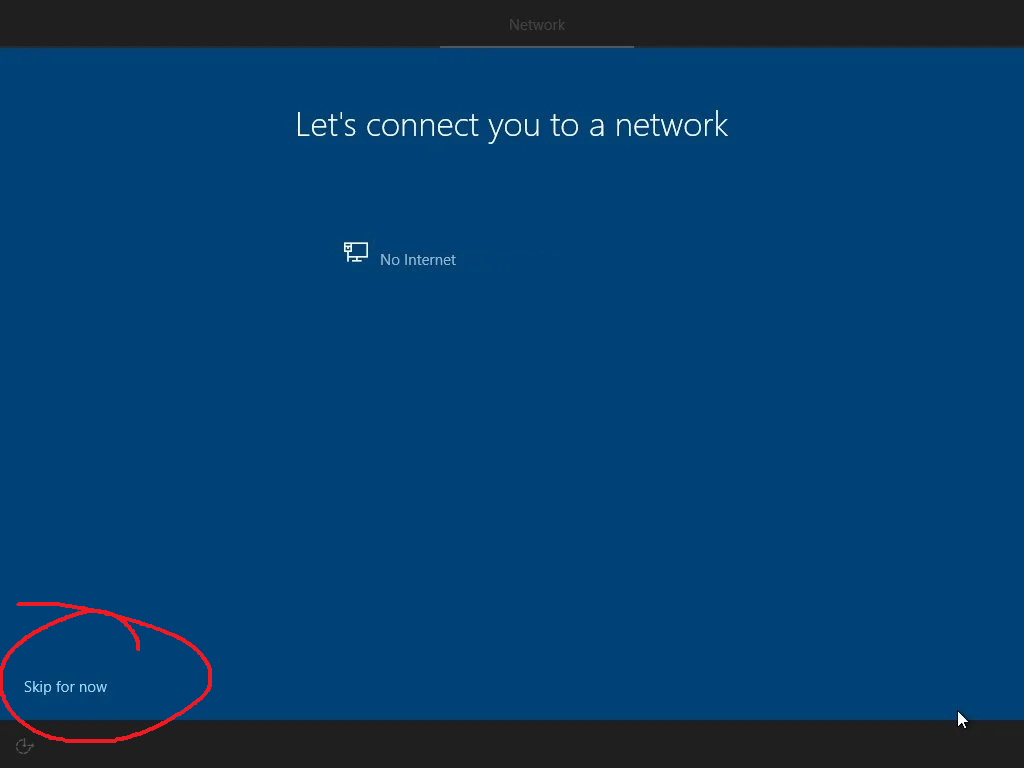
I honestly have no clue how you went about the installation, but the skip button is a pretty standard option, you know?

image
Sandra Fowler Sandra Fowler NewcomerOP
6 messages
joined Nov 2022
#9 ·
And then there is this... I cannot find a single skip option anywhere—unless you count that grayed-out "next" button that refuses to be clicked...
amberhound8 amberhound8 Member
14 messages
joined Nov 2022
#10 ·
I guess you could just head back up to that top left arrow to go one menu back. From there, try selecting the option to sign in with a work or school account. Then, if you click on that additional options link, you should be able to pick the domain. Just create a local user from there and, voila, you're all set.
fadedorca66 fadedorca66 Regular
372 messages
joined Nov 2022
#11 ·
I haven't even touched Windows 11 yet, but from what I hear, you can't really set up the Home edition with just a local account, whereas Professional lets you.

Typical Microsoft nonsense.
Megan Thomas5 Megan Thomas5 Active Member
132 messages
joined Jan 2021
#12 ·
Sure, go ahead and type in an email like no@thankyou.com and any random password you want. They'll just tell you the account is invalid and report you to the local authorities right away.
Sandra Fowler Sandra Fowler NewcomerOP
6 messages
joined Nov 2022
#13 ·
amberhound8 said:I guess you could just head back up to that top left arrow to go one menu back. From there, try selecting the option to sign in with a work or school account. Then, if you click on that additional options link, you should be able to pick the domain. Just create a local user from there and, voila, you're all set.

There wasn't any back arrow available, so... nothing. What you're seeing in the screenshot is truly everything I had to work with. Nothing would even budge until I finally plugged a cable directly into the modem...

You must log in or register to reply here.

Log in Register

🔗 Similar threads