CheckEmoji Community · the emoji forum
🏠 Home 🆕 What's new ❓ Unanswered 🔥 Popular 📡 RSS Members 👥 0 online log in · register
Home › mellowraven8 › Posts

Posts by mellowraven8

96 posts shown.

Are "healthy calories" actually a thing? in Hobbies & Leisure ·
wiredtiger2 said:What I'm getting at is whether every calorie contributes to fat storage in the exact same way, regardless of where it comes from. Does a tablespoon of med with 70 calories affect you the same way a bar of Milka chocolate with the same 70 calories would?

Yeah, as long as you're eating in a caloric surplus.

Keep in mind that carbs (like Milka or med) hold onto water, unlike fats or proteins, so any weight gain on the scale might look higher than the actual calorie count due to that extra water weight.

Look at cows—they eat nothing but grass and hay, which is pretty much living proof that if you eat enough of anything, you'll put on weight.
Show us your setups (keep comments in a separate thread!) in Hobbies & Leisure ·
image

I’m not really complaining, except for the fact that my gut fat just refuses to budge. I'll probably never win that battle, so whatever. It is what it is.

Maybe I should double down on the beer? Either that or I seriously need to get to a barbershop, I know.😁
Show us your setups (keep comments in a separate thread!) in Hobbies & Leisure ·
Lila was before

Righty is now, after a few too many cases of beer and losing a couple of pounds.
I’m starting to think beer is some kind of miracle elixir. If you don't believe me, you should probably try it.

image
Show us your setups (keep comments in a separate thread!) in Hobbies & Leisure ·
Left side was about 218 lbs back in April 2019
Right side is 200 lbs now

image

The weight loss has been steady, just incredibly slow—except for one stretch in July and August where I managed to drop about 13 lbs in two months.

I’ve probably got another 5 or so pounds to go just to clear out the remaining belly fat. I should hit that mark by summer.

And people love to claim you can't lose the weight once you hit 40... I'm living proof that's nonsense. You don't have to sacrifice all your muscle to do it, either. Most importantly, you can still enjoy a beer and eat pretty much whatever you want.
GPU Buying Guide - (Read first post) in Desktops ·
Keith Nguyen7 said:Great, now let's give the kids a glass of water to pour over the PC...

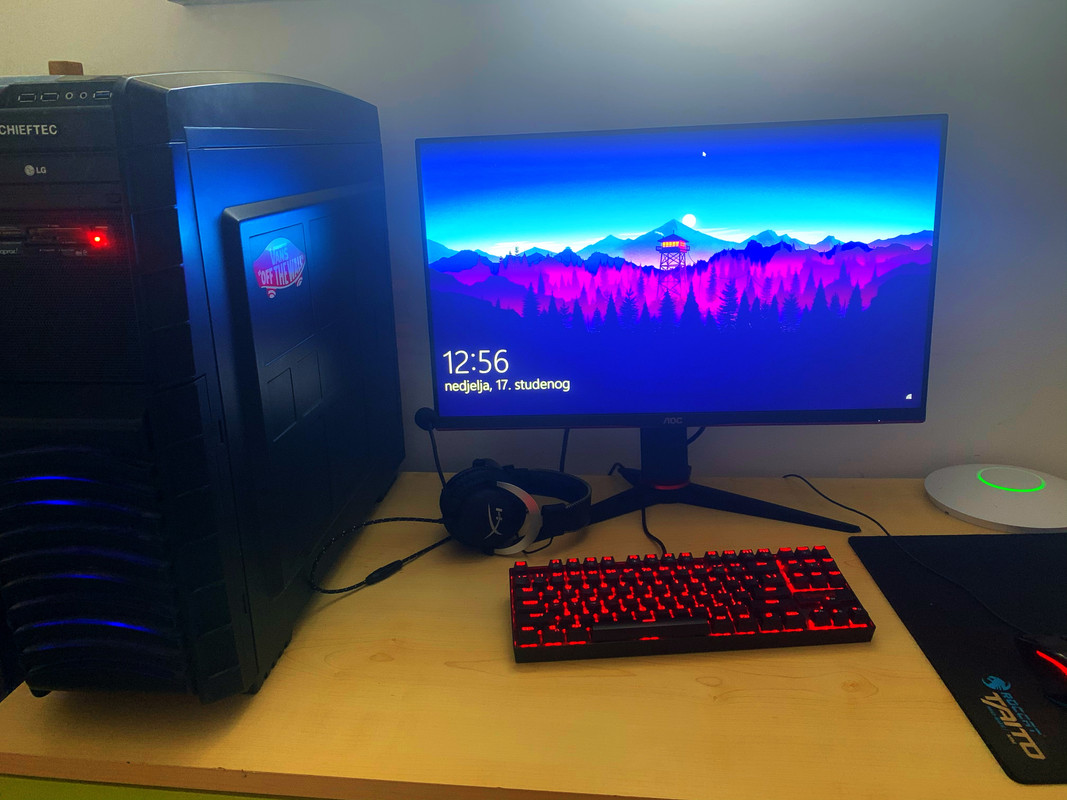
Anyway, the case is sitting on the desk now—exactly where I always suggest it should be, instead of tucked under the desk where the kids find it convenient.

image

Let's see who tries to move it. And the monitor is going back on the wall, right where the old one lived.

Timothy Kim60 said:Look, you didn't need to worry about it during the GPU swap, but since we're changing the motherboard, it's actually recommended.

The SSD isn't tied to any of that; it was ordered along with the monitor a few days before the Kraft incident.
It's a new 500GB PCIe drive replacing the old 120GB SATA SSD. Makes sense.
GPU Buying Guide - (Read first post) in Desktops ·
It’s a fresh OS install on a brand-new SSD from scratch. Honestly, even I was impressed by how smooth it is.
GPU Buying Guide - (Read first post) in Desktops ·
Timothy Kim60 said:Check out the performance here

https://www.techpowerup.com/review/e...-ultra/29.html

But yeah, you're right about the price-to-performance ratio. These more expensive models aren't actually delivering a proportional jump in speed.

Nice breakdown. The more I look at this, the more I feel like I made the right call. Thanks.

Timothy Kim60 said:Especially if the Radeon HD 7950 was still holding its own. Honestly, looking back, that GPU was one of the best buys ever in terms of how long it stayed relevant.

That 7950 lasted me a solid six years... and would have gone even longer if it wasn't for a freak power surge that fried both the card and my new motherboard (the old one had only been in for a few months). To top it off, while the kids were trying to "help" fix things, they snapped a connector on a terabyte drive, so that's dead too.

Picked up an EVGA GeForce GTX 1660 super this morning, and getting it installed was a total nightmare.

I've never wrestled with drivers more in my life. They just refused to install, kept throwing the error: "Nvidia installer cannot continue, This NVIDIA graphics driver is not compatible with this version of Windows."

So I spent forever hunting down newer versions, flashing the board to F50, and patching Windows... until it finally decided to cooperate.

On the bright side, the motherboard, the card, and Winsi are all fully updated now. Small victories, I guess.
GPU Buying Guide - (Read first post) in Desktops ·
Thanks for the advice.

Basically, here’s how I’m looking at it:

The 1660 is roughly $667
. I found an EVGA GeForce GTX 1660 super for about the same price ($680), thanks to a tip from Timothy Kim60.
The 1660 Ti is around $833
.
So, the base 1660 isn't worth the headache.

There's about a 20% price gap between the 1660 Super and the 1660 Ti, but the performance jump is only 4-5%.

The RTX 2060 is nothing less than $1000
.
Comparing the RTX 2060 to the 1660 Super, the 2060 costs 49% more for only a 20% better benchmark score.

I think I'll just settle on the 1660 Super. $667It's an extra expense I wasn't planning on, but compared to my old Radeon HD 7950, it's roughly 130% faster, which is actually noticeable.
GPU Buying Guide - (Read first post) in Desktops ·
wiredotter14 said:I think a 1660Ti is a solid pairing, but I’d try to figure out if the GPU is actually the culprit first. Not just to save money, but so you actually know what needs replacing—especially since you'll likely want an upgrade anyway once you get that new monitor

Here's the situation: my old Radeon HD 7950 won't work in this new motherboard, and it's running way hotter than it should during the last third of my sessions.

Just stuck in traffic on the I-95...

So the real question is: which card is the actual best buy? A 1066, a 1066Ti, or a 2060? Which specific model and where should I grab it? Right now, my pick is EVGA GeForce RTX 2060 even though I'd much rather find an ASUS with three fans for a better price.
GPU Buying Guide - (Read first post) in Desktops ·
Timothy Kim60 said:Just grab the EVGA GeForce GTX 1660 super. The 1660 super is nearly as fast as the 1660Ti, but it’ll save you $133$300
.
You can find them at Best Buy all over the country...

Here are some pricier options if you're feeling reckless: RTX 2060 6GB, or maybe a custom click and click for a Radeon RX 5700 as a ceiling.

But honestly, if they were happy with the Radeon HD 7950, this one will be great too (it's noticeably stronger).

What's the best buy if I want to be set for 4 years until the kid heads off to college?😁
Best Buy has it, and Best Buy is solid. The card (1660) is big—double slot—but there's always room in a Corsair case. Plus, the price is low enough that I might just pay for it out of my own pocket. Might even leave him some extra, I have a soft spot for the kid...

I'll go for the more expensive 2060 if it's actually worth the jump in price. Is it?

wiredotter14 said:First, I'd try borrowing a GPU from someone, even an ancient one, just to see if the graphics card is actually the issue.

I don't have anyone to ask. Everyone I know is tech-illiterate.

wiredotter14 said:Or just throw that old one into another PC to see if it works.

I could do that. Put it in my own rig out in the garage. Then we look at the power supply, if it's not the card.
GPU Buying Guide - (Read first post) in Desktops ·
Peter Green said:What resolution and refresh rate are you running on that monitor?

It's an AOC 27 G2U Refresh 144 Hz.

144Hz.

Works fine for me.

(image)[/IMG]

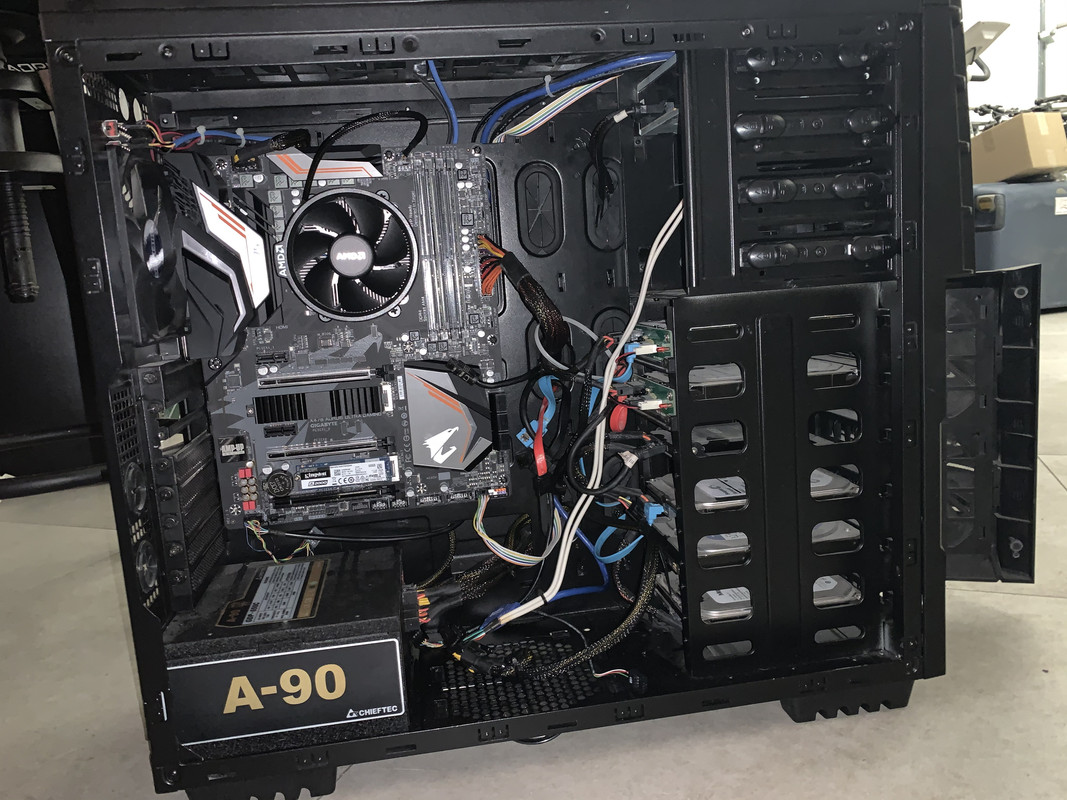
Here’s the dead gaming rig, freshly operated on after pulling out the useless GPU.

imagephoto upload site

As for me...

image

😁
GPU Buying Guide - (Read first post) in Desktops ·
Here’s the situation:

The kid's PC had motherboard issues, so I'm upgrading it to a GIGABYTE B450 Aorus elite with a Ryzen 5 (the one without integrated graphics, the 2600, I think), plus 16 GB of DDR4 since his old 32GB of DDR3 won't fit.

Kid wants a bigger monitor—honestly, his old one was ancient and had this weird red line running along the bottom from age, so I figured an AOC would be decent for the price. To me, a new one feels like a solid deal compared to that cheap junk from Best Buy I've been struggling with for years. While at it, I picked up a 500 GB SSD just so everything runs smoothly. Fast and efficient, like a DMV clerk on a good day.

Story over?

Hardly. It's a disaster.

It’s pretty much the same story whether you're in the Midwest or out on the coast; small details change, but the outcome stays the same. In this case, the result is total chaos.

The "advice" (and ironically, not mine, but his) was to spill some soda all over the computer. Gravity did its thing, and the liquid soaked everything underneath.

Everything is dead. Not even a light on the mouse or keyboard, and the monitor is black.

Deduction—let's start with the motherboard. I'll just buy a new one. Now things are even better: a GIGABYTE X470 Aorus Ultra gaming. It arrived this morning, and I already had to argue with these miserable people (sorry if you're reading this) because they were being impossible. It's not my fault; I'm just the messenger. Kids these days are a nightmare. And damn that ULTRA brand, nothing but trouble, I should have known better. Whenever there's an ULTRA sale in Miami, it's just crowds and chaos. No real benefit, not even from this board.

Lights are on for the mouse and keyboard, but the screen is still black. I'm losing hope here.

THE GPU. Probably.

The old one was a classic 7950 with three fans.

Good, fast, reliable, and still "good enough," unfortunately not resistant to soda poison.

So, long intro aside, the question is: what replaces the 7950?

A 6600, 6600 Ti, or 1060? I need a true best buy—something significantly better than the 7950, since I'm forced to replace something I wasn't even planning to touch. Ideally, it needs 2 or maybe 3 fans; I like keeping critical components cool and quiet.

Cash is fine, whatever works, as long as it's reliable (unless it gets drenched in another round of soda—which is unlikely given how far away they'll be kept) and reasonably priced. To put it professionally: what's the best value?

The target budget is $667, max $3,000. Actually, lower is better because the kids will complain regardless, and I'm pulling this from their account anyway—I see no point in wasting money.

I don't need the absolute best of the best; I need the best bang for my buck.

Any advice on where to look or what to buy?
Show us your setups (keep comments in a separate thread!) in Hobbies & Leisure ·
Years of backyard BBQs and cheap beer have finally caught up with me, so here’s the starting point.

97 kg, aiming for 90-92. Hoping to hit at least 😁

image

image

image

Body fat is way over 20. I'd say I'm sitting at 22-23, easy.

Time to go melt this fat off. It’s going to be a long 🤣
Gaming PC Upgrade Ideas in Desktops ·
Kimberly Gomez34 said:So, your logic follows the idea that "thermal stress" supposedly shortens the component's lifespan. While there isn't a single relevant scientific paper that empirically proves that specific claim, let's just play along with the theory for a moment. The catch here is how long that "lifespan" actually is from a human perspective. For example, a heavily overclocked chip might have a lifespan of, say—let's call it—24, 47, or 89 years, whereas a non-overclocked one might last 24 years and 8 months, 49 years, or 92 years. But let's be real: nobody is going to be using a computer for that many decades anyway.

It’s the same deal as when kids start a thread saying "my processor is burning," only to find out their i3 is sitting at a perfectly fine 49°C under load. 😁
Just because 49°C is hot for a human doesn't mean it's hot for a processor. The same applies to this whole "shortened lifespan" argument regarding thermal stress, electron migration, and whatever else. In my opinion, it's much better for someone to tell you, "Hey, it's stable at this clock and this voltage," which saves you hours of testing, rather than lying and claiming it was "never overclocked." It reminds me of an acquaintance of mine with that i7 4770 I mentioned earlier; I was grabbing a beer with him when he got a call from some guy on Craigslist. He told the guy, "It's never been overclocked, it just ran on its Turbo Boost," while he was actually selling a K-series CPU equipped with an aftermarket cooler. 🤣

I can't speak for silicon (though I know higher temps mean better conductivity and more current), but when it comes to electrolytes drying out or solder joints—where expansion and contraction eventually lead to fractures (those dreaded cold solder joints)—heat definitely plays a role. That’s why I try to keep my gear as cool as possible.

Luckily, computer components become obsolete long before they actually die, so maybe it doesn't even matter that much.
Best multimedia laptop under $1,000? in Laptops ·
Thanks for the suggestions, darkowl72.

I’ve owned way more PCs than Macs over the years. I lean toward Windows, though I'm not strictly exclusive—the dream machine would be an Apple hardware/Microsoft software hybrid, but we all know that doesn't exist.

At one point, I was fully committed to the Apple ecosystem (Mobile-laptop-tablet), but now that they're pushing these annoying proprietary constraints, I'm slowly backing out. Honestly, I think only the Mobile side will remain relevant for them in the end.

The Envy is decent, but the glossy screen is a dealbreaker for me; it's impossible to use in daylight.
Reviews also mention you can see the touchscreen grid and that the build quality isn't anything to write home about... so I'll pass.

That makes the Pavilion more interesting to me. It has a Non-glossy screen (though the resolution isn't great), a newer gen processor, and those B&B speakers. The real downside is the "plastic-fantastic" build—it looks nice, sure, but based on my experience tearing down my old Pavilion from years ago, HP designs their connectors so poorly that you basically need luck and a surgeon's hands to open or clean it without snapping something.

My old HP was a different beast entirely; you could take it apart and put it back together endlessly without worrying about damaging the ribbon cables or connectors.

The Lenovo Yoga caught my eye, as did the Asus N550JX.

They're all different concepts, but each has "that certain something" I actually like.

I have a soft spot for Asus. I used to own one, and my wife's Asus has been running flawlessly for years. In the time her Asus has stayed alive, I've already laid a Sony Vaio to rest and, predictably, grown frustrated with the quirks of Mac.

I'll probably settle on a compromise again. I don't need massive power, but it's nice to know a laptop can actually handle a game if needed. On the flip side, when it comes to size and weight, smaller is better, and battery life should be as long as possible.

Sound needs to be great, and the screen absolutely has to be Non-glossy.
Best multimedia laptop under $1,000? in Laptops ·
Thanks, fadedorca66.

By the time I realized where I was, I'd already lost my connection and my chance to edit.
Best multimedia laptop under $1,000? in Laptops ·
Right now I’m running an Apple MacBook Air 13 with an i5, 4GB RAM, and a 128GB SSD. Even though there are things I actually love about it—it's light, sleek, has a great screen, boots fast, and the battery life is solid (plus it's basically immune to viruses)—the downsides are driving me nuts. The storage is too small, moving files to a Dell or my phone is a headache, and the lack of compatibility with Xcell files between Mac / PC is a real pain.

So, I'm thinking about selling it (I already have an offer for $1500) and heading back to the Windows ecosystem. I loved it up through Windows Vista / 7; the newer versions haven't really done it for me, but it is what it is.

Basically, I want to keep the perks of a MacBook Air: lightweight, fast boot times, long battery life, and a killer screen. I don't need anything bigger than 13-15 inches; I mostly just watch movies and do Office work. The audio needs to be top-tier—the best possible—because I don't want to carry external speakers.

The first thing that caught my eye was the HP Pavilion Star Wars edition. It comes in two versions; the pricier one has better graphics thanks to a dedicated GPU.

image

HP 15-an 000 Laptop Star Wars SE P0S46EA $2000

HP 15-an 000 Laptop Star Wars SE P0S47EA $2167

The cheaper one would probably suffice since I can't remember the last time I actually played a game.
The catch is the weight (it's definitely not light), the screen (TN panel, max res around 13xx * 9xx), and the nagging question of whether there's something better out there for the same price.

I also looked at the HP Envy 15, but the reviews aren't exactly glowing.

HP Envy x360 15-w 101

Aside from HP, I like Asus, but I'm having trouble finding anything from their "N" series.

As for Toshiba, given my bad experiences with their importer and how much of a nightmare it is to actually use the warranty, they are completely off the table. They might as well not exist.

If you have any suggestions, I'm all ears.
Nosy banks in Banking, Insurance & Loans ·
Nobody ever asks me anything. I guess they already think they know everything. 😁
Car loans in Banking, Insurance & Loans ·
Look, I honestly think he could manage a small loan for a used car, assuming his child support payments actually show up on time,
but the real kicker is the cost of gas and upkeep—things people always overlook until they're staring at a repair bill.

$233Between the monthly payment and even just $333 keeping the thing legal and running (registration, tires, routine maintenance, those sudden repairs, and obviously fuel), he might be underwater. Even with the extra cash from child support, if those checks don't arrive consistently, he’s screwed.

He’s been working for a year, he’s young, and his desire for a car is clearly overriding his common sense.
If I were him, I’d save up and buy a car in cash. That way, if the child support ever dries up, he can just park the thing and walk away, knowing he still has something of value he can sell.
Car loans in Banking, Insurance & Loans ·
I signed the post from two spots up.

Forget the car; look at bikes. You can finance them through a few installments—maybe even use a Chase credit card if you’re careful. If you can handle those payments without breaking a sweat, then come back here and tell me how it feels to live with an extra $500$233 shaved off your paycheck every month.
Once you hit phase two, you'll be ready to pick up a scooter.