CheckEmoji Community · the emoji forum
🏠 Home 🆕 What's new ❓ Unanswered 🔥 Popular 📡 RSS Members 👥 0 online log in · register
Home › Edward Thompson86 › Posts

Posts by Edward Thompson86

78 posts shown.

Buying 3DMark and PCMark 8 in Software ·
That’s exactly how I handled it. The two pieces of software take up about 9 GB total, so the installation took a bit longer than expected, and you have to set up an account on the 3DMark website.

The license and keys are hosted on the 3DMark site, so I guess you could just archive everything if you ever need to reinstall the software later.
Here are the test results.

image
Buying 3DMark and PCMark 8 in Software ·
I bought 3DMark and PCMark 8 on Steam today.
I have never used Steam before. I registered today specifically to buy this software, so I am not sure if I am just unable to figure out how to download the keys. I cannot find them anywhere; it just says the license is for the Steam Store.

I installed the Steam Store client, but even there, I can't locate the keys. What is going on? Should I contact support regarding the software keys or what?

I would download the software, but I need to know how to get the keys I paid for on Steam.
Whenever I have purchased software in the past, I received keys, and then I could install the software whenever I wanted.

What should I do? I can't navigate this Steam platform. If I had known it worked like this, I probably wouldn't have bought it.

What is the procedure here?
PC Upgrade Guide: Best ways to spend $450? in Desktops ·
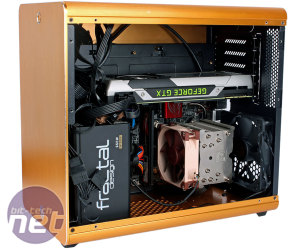
Finished building this rig today. It was a bit of a struggle trying to cram everything into such a small case. Here are a few photos.

I couldn't install the new power supply because my current graphics card wouldn't have been able to handle it. Once I pick up a new GPU, I'll swap out the power supply then. For now, I guess it stays like this.

The new SSD is excellent. I am quite satisfied. The speed is insane. I ran some tests today and I'm posting two images: one shows the Intel 535 and the other is the Samsung PM961. I guess I'll be installing the new OS on the Samsung in the next few days.

image image image image
image
image
image image
PC Upgrade Guide: Best ways to spend $450? in Desktops ·
We'll just have to see how the liquid cooling performs; I haven't used one before, so this is my first time running it in a build.

Also, there will be two SSD drives inside, maybe even three.
I'm putting my old graphics card in this rig for now, so we'll see how it holds up. If it doesn't perform well enough, I might upgrade to a GF1060. I have the funds available, but I'd rather not spend the money if this one can manage for a while.

Everything is ready for the assembly; all the parts are here.

I swapped out the memory. Apparently, this set is better, though it was a bit more expensive than what was originally ordered. The RAM is PC-19200, 8 GB, Kingston HyperX Savage, HX424C12SB2K2/8, DDR4 2400 MHz, 2x4GB kit.

image
PC Upgrade Guide: Best ways to spend $450? in Desktops ·
There is a sale on liquid cooling at Links tomorrow, so I am somewhat undecided. Currently, I am still running an Intel Core2 duo E4300, which was sufficient for my needs back then.

What interests me most is how the new Samsung PM961 SSD will perform.
I am assembling the PC tomorrow; if I don't pick up the liquid cooling, I will just use the stock cooler and see how it behaves.
My main concern right now is the noise from the power supply fans, the CPU, the GPU, and the single 120mm case fan. My current setup is almost silent, so I suppose we will see how it changes later.

This is what I am looking forward to most.
image

Thanks for the suggestions.

I just ordered a CHIEFTEC A-90 Series 550W power supply and the LC Power LC-CC-120-LiCo liquid cooler. I am heading to Links today to pick them up.
I chose a modular power supply, which works well for my case. Since the GPU can be about 25 cm long, I think I have everything figured out now.
PC Upgrade Guide: Best ways to spend $450? in Desktops ·
This cooler is unbelievably thin, almost like what we used to see back when we were running Intel Core 2 duo setups. I expect the processor will just run at stock settings, so I'm wondering if I should just stick with this one or maybe look into buying something else..
The main thing is that it isn't noisy..
PC Upgrade Guide: Best ways to spend $450? in Desktops ·
The components arrived today. I'll start the build tomorrow, then I might post some photos.

Also, I have a question. I guess it might be better to swap out the stock CPU cooler for a liquid cooler like the Cooler Master Seidon 120. What do you think?
PC Upgrade Guide: Best ways to spend $450? in Desktops ·
I was just opening up the case, and the maximum GPU clearance is about 19.5 cm. My current GeForce GTS 250 v2 Gainward Deep Green barely fits because I have to worry about the cable bundle coming from the power supply getting in the way. Ideally, it would need to be around 25 cm.

I've been looking through some graphics card reviews today, and it seems like the GTX 1050 is the best value right now. You can find one for maybe $150. I'll probably just stick with this GTS 250 for a while until I can pick up a 1050.

This SSD should theoretically be up to four times faster than my Intel 535. I suppose I'll have to see if there's a noticeable difference in actual use once everything is assembled. I'll run some tests and see.

If I hadn't read this post, I probably would have just kept using my Intel 535 as the system drive. But now, that's decided.
PC Upgrade Guide: Best ways to spend $450? in Desktops ·
Kimberly Gomez34 said:It’s not the GPU’s fault; you're just struggling with some messy cable management, and honestly, you probably could have gone with a smaller 550W power supply

image

Just a heads-up: when you're working with an mATX motherboard (the one in the photo is actually an ITX), the GPU slot sits a bit higher up. A card like the GTX 1050 is pretty compact—it's definitely not some massive titan of a card.

image

My apologies. I misstated the case model earlier; the correct one is... RAIJINTEK METIS That’s probably why there was some confusion.

Video

I'm looking at these case photos. It's the same model, but these cases are much taller than mine. I'll open mine up tomorrow and take some pictures.

If you manage to get the cables organized properly, a GPU up to 22cm should fit just fine. There are plenty of models like the GTX 1050, 1060, or RX 460 that stay within that 22cm limit, so I guess it shouldn't be an issue.

An M.2 SSD is a critical component for me because of the read speeds. I was actually on the verge of ordering a Samsung SSD 960 today, but I decided on the PM961 instead. I’ve been using an SSD for years now; I guess the faster the loading times, the better.

I did the math, and buying from the Center would actually end up costing me more.
So, what kind of GPU would actually make sense here for around $180? I'll probably be picking up a card soon anyway, so I’m looking for something relatively recent.
PC Upgrade Guide: Best ways to spend $450? in Desktops ·
Only a 17 x 17 cm board will fit. If the board is 19x17, the GPU might not fit. Actually, it could work if there's only one slot, but most powerful cards these days take up two slots.
It doesn't make sense for me to swap out the case; I paid over $100 for it.

I just ordered the components listed above from Amazon. It feels a bit strange—after confirming the purchase, my cart is empty. Maybe it worked, but I don't know.
I'll call them tomorrow to see if the order actually went through.
The total comes to: $857 with free shipping.

I'll let you know when it arrives..
PC Upgrade Guide: Best ways to spend $450? in Desktops ·
The issue is that I can't actually install a graphics card on this motherboard; I'm stuck using the integrated one.
It works fine for browsing the web, which I don't really need, but I was thinking about playing a few FPS games over the winter.

I have an old GeForce GTS 250 v2 Gainward Deep Green from a previous build, but my motherboard lacks a PCIe 3.0 x16 slot, so that's where the problem lies.
PC Upgrade Guide: Best ways to spend $450? in Desktops ·
I am planning an upgrade for my current PC with a budget of roughly $550.
Up until now, the machine has mostly been used for web browsing—nothing heavy. Moving forward, I intend to use it for some light gaming occasionally.

My current setup is:

RAIJINTEK STYX mATX case
Cooler Master, PSU Latitude Series, 400W
ASUS AM1I-A motherboard, AM1 socket, mini ITX
KINGSTON 2 x 2 GB DDR3, 1333 MHz
AMD Athlon x4 5350
Intel ® SSD 535 Series 120GB

I have put together a list of what I might change. I don't plan on buying a dedicated GPU right now; I’ll stick with integrated graphics for a while and pick up a card later.

I have an external 2 TB backup plus a Western Digital RE3 750GB backup drive.
From my current build, I would reuse the case, the power supply, and the SSD, which would serve as a secondary drive in the new configuration.

I am not a fan of large cases, so I am sticking with the current mATX size, which means I need a new mini ITX motherboard.
My selection:

MSI H110i Pro motherboard, LGA 1151 socket, DDR4, mini ITX
Intel Core i3 6098P, 3600 MHz, LGA 1151
HyperX Fury 8 GB (2x4 GB) DDR4, 2666 MHz, DIMM, CL15
128 GB SSD, Samsung PM961, M.2 2280

It comes to about $867. I am wondering if this is okay, or if there is something better I could put together for approximately this amount of money.
It is important that the motherboard supports M.2 2280.

Any good recommendations would be appreciated. These parts are from Amazon.
Thanks.

Current PC.

image image
Overclocking (Main Thread) in Desktops ·
Increasing the voltage for the CPU and FSB doesn't seem to have any effect; I'm getting practically nothing out of it.
It's a bit strange, though. When I bumped the voltage up to 1.550, I got a stable 375 MHz Bus speed and a processor speed of 3375.0 MHz.
Setting the voltage back to Auto results in the exact same thing.

For my specific motherboard, I guess 375 MHz is the upper limit.
Take a look at the CPU-Z info OVDJE and pay close attention to the processor voltage.
Overclocking (Main Thread) in Desktops ·
wiredmarlin5 said:Run Orthos and let me know if you get any SS errors. Also, send over the temperatures.

Torture Test ran 10 minutes 26 seconds - 0 errors, 0 warnings.
Temperature was 48

Everest system Stability Test 10 min Temperature 40 Info HERE
Overclocking (Main Thread) in Desktops ·
I finally finished putting this new build together. It isn't anything groundbreaking, but I put it together out of curiosity.

nForce650i-SLI motherboard
Intel Core duo E4300
Gigabyte Radeon 1950 Pro

I played around with some overclocking on both the motherboard and the processor. At a standard voltage of 1.325V, I got these results:
CPU FSB 366 MHz
Processor Speed 3300 MHz
The system seems stable. If I bump the voltage up to 1.400V and push the FSB to 400 MHz, the system stays stable for a few minutes before it restarts.
For now, the maximum is 366 MHz FSB, which runs stably without any issues.
I used a Thermaltake Big Typ VX AlCu Cooler CPZ-Z for the processor cooling.
You can check out the CPZ-Z OVDJE

There were rumors that the Radeon 1950 Pro didn't have much potential for overclocking because the GPU clock is already high at 575 MHz.
But maybe those rumors were wrong; this Radeonka actually seems to overclock quite well.
I swapped out the Zalman cooler and replaced it with a Coolermaster CoolViva Pro, getting these results:
Standard 575 MHz Overclock 722 MHz
Memory Standard 690 MHz Overclock 817 MHz
Check the GPU overclock OVDJE

The power supply is a 530W Hyper Modular unit.
2 GB of Kingmax PC6400 (800MHz) RAM plus a Thermaltake copper passive heatsink for the memory.
You can see the interior of the case OVDJE

Let me know what you think.
Overclocking (Main Thread) in Desktops ·
northerncrane33 said:Is this motherboard for an AM2 socket????🤣 🤣 🤣
I'm sorry, but you can't put that processor on that motherboard....
My suggestion: Gigabyte DS3

That motherboard is for Intel Socket 775, not for AM2 processors.
It is a board from this link for info
Overclocking (Main Thread) in Desktops ·
With slightly better cooling for the GPU and memory, here are the updated results.

The Core 2 duo E4300 Radeon 1950 Pro with nForce650i-SLI should be arriving soon.
We will see what can actually be squeezed out of this setup.

I am mostly interested to see how much power the GPU can draw with this improved cooling.
I will post the results here.
Best regards..
Overclocking (Main Thread) in Desktops ·
I've had this GPU for a few years now, using it occasionally for gaming.

I messed around with some overclocking settings, which you can see in the attachment.
The core hit over 380 MHz and the memory reached 315, but I guess this current setup is the most stable. It passed the stress tests, and I've had Stalker running for two days straight without any issues.

Has anyone managed to get better results out of this card? I'd appreciate your thoughts.