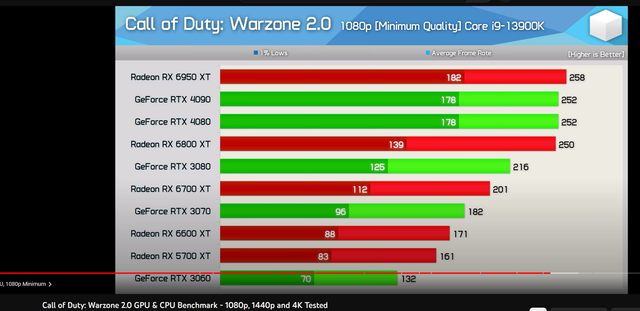
Nah, it’s not the CPU. Running at 1080p on minimum settings with an Nvidia RTX 3060 and an i9-13900K, you should be seeing 1% lows around 80 FPS.
What settings are you actually running, and what’s your monitor's refresh rate? You shouldn't feel those 80 FPS drops too much, though they might dip even lower.
Those two processors are built on different chip architectures. TL;DR, the 5600 is a clear winner, but the 5600G gives you integrated graphics instead.
You don't need to swap out your current M.2 SSD if there's an open slot for a 2.5" drive—and looking at the specs, it seems there is. I'm guessing you aren't running a traditional hard drive in that laptop right now.
Based on what's listed here, the laptop supports 2.5" SATA drives. You could just pop in a standard SATA SSD, which won't break the bank, and then you'll have both drives working at once.
By the way, the RX 6600 and 6600XT are incredibly efficient—they actually pull less power than an old RX 570. They’re a solid pick if you aren't running a massive power supply. Perfect match for a Ryzen 2600.
Hell Let Loose is such a mess when it comes to optimization. I’m honestly just holding off on playing it again until I can finally upgrade my GPU. If we're talking 1080p, that RX 6600 the other guy suggested would be a massive step up
And honestly, an RX 6700 isn't much of a win if you compare it to the 6700XT, which is $67 pricier .
Honestly, 1680x1050 resolution is perfectly fine—as long as we aren't talking about those tiny, cramped screens. Just make sure you're getting an actual LED monitor instead of some prehistoric relic. That graphics card has one VGA port and one DVI port, so you could hook up two older monitors without needing any adapters. Of course, that only works if the second monitor actually has a DVI input (the white one). If it’s just VGA—which is usually the case with that ancient junk—you won't be able to run both at once.
Not really. You're looking at an ancient monitor there, and honestly, the real question is if you can even plug it into your rig if they both rely on VGA.
Besides, a monitor like that shouldn't cost more than maybe $17, definitely not 250 😁
Just look for a 20-22" LED monitor; you should be able to find one for $83. Snap a photo of the back of the PC and list the specs if you know them.
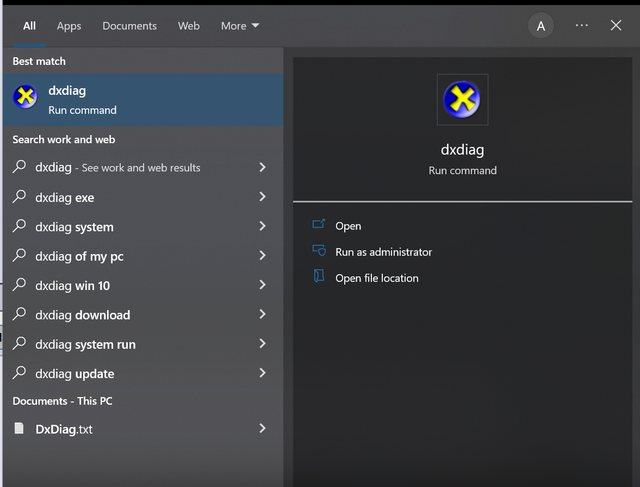
To find your system info, hit the Windows key and search for "dxdiag." Run that and post some screenshots.
The math shows an 8% weak CPU. Not a huge deal though. I think they'd work fine together. Anything stronger is just overkill.
Those bottleneck calculators are pretty much useless. They aren't transparent.
While running general tasks, processor Intel Core i5-12400 will be utilized 100.0% and graphic card NVIDIA GeForce RTX 3060 will be utilized 92.0% .
This means basically nothing...
crimsonstag84 said:The Intel Core i5-12400 is plenty strong for a 3060 Ti, 3070, or even a 6700/6750XT. There's zero bottlenecking with an NVIDIA GeForce RTX 3060. 😁
The NVIDIA GeForce RTX 3060 is a solid buy, just slightly weaker than the NVIDIA RTX 3060.
Depends on the resolution, obviously. You could run an NVIDIA RTX 3080 on it at 1440p. At 1080p, I wouldn't bother with anything more than a 6750XT or similar, and that's not even really about the CPU. Of course, assuming you're aiming for 144Hz+. If you're playing at 1080p 60Hz, both are total overkill.
In two or three months, whoever's still standing can decide then.
Edward Clark78 said:17'' at least I use an external monitor for design work and gaming (Dell) The main thing is getting color accuracy right I've got an external keyboard too
That really limits your options. Gaming laptops usually prioritize high refresh rates over color accuracy, and finding a 17" model is way harder than the standard 15.6".
You can probably find something, but your life would be a lot easier if you dropped either the color requirement or the 17" screen size from the equation.
Does color accuracy actually matter here? Are you planning on using an external monitor for design work or just gaming? Do you need a US layout keyboard?
Jerry Watson2 (No content provided to rewrite.) I'm in a similar spot right now (Core i5-9600K, GTX 1060), so I just stumbled upon this RX 6650 XT. Looks like a solid deal to me. Looking at this listing for an RX 6700 XT 8GB on Amazon.com. Seems alright, I guess. Just another GPU in a sea of overpriced silicon. Nothing special here. That's like 300 bucks.$133 Cheaper than an RTX 3060, but the next step up for your CPU would be an RX 6700 XT or a 3060 Ti for around... $1333Prices might drop further, but I don't see that happening for me anytime soon. I'm not sitting around waiting for new AMD cards to hit the shelves.
👍
steelfalcon71 said:It’s basically a done deal that this 12GB RTX 4080 is just going to be rebranded as the new RTX 4070 Ti. Some leaker dropped it, and honestly, this guy hasn't missed once yet.
For a standard 4070? I haven't the slightest clue what those stats are going to look like.
Yeah, I heard about that 4070 Ti too. It's just a blatant rebrand so they don't look quite as pathetic when they finally dump it on the market at a lower price than what they originally planned. So then the real question is what the hell they’re going to do with the 4070. Price-wise, it needs to drop even further to make sense. It's entirely possible they'll just gut the CUDA core count to save a buck, then mess around with the memory bus and VRAM just to differentiate the tiers.
The 4070 is going to be a beast compared to the last gen, and honestly, it would be a joke if they skimp on it with less than 12GB of VRAM. Look at the 3070Ti—it only had 8GB, which is basically the same amount you'd find on mid-range cards from two years prior. Ridiculous.
When you're looking at monitors with a Type-C input, you're basically dealing with a DisplayPort signal. Since that Type-C cable is carrying DisplayPort data, you could theoretically hook it up to any device with a standard DP output using a Type-C to DisplayPort cable.
This specific monitor supports DisplayPort 1.4 via Type-C, which is more than enough for anything you'd need. Your laptop doesn't strictly need Thunderbolt to work. Thunderbolt just guarantees that you get both the DP signal and the USB data transfer—since the monitor acts as a USB hub and all that—plus, if I recall, it allows for 90W charging back to the laptop through that same cable.
Either way, looks like a solid screen, even if it isn't cheap. It has a 1900R curve, which is slightly less aggressive (flatter) than the standard 1800R, making it better for non-gaming tasks. I’ve got an 1800R setup myself and it's fine for office work.
Bottom line: if your laptop only has a Type-C output, you don't have to hunt down a Type-C monitor just to connect it. Just grab a $17 Type-C to DisplayPort cable and plug it in. That's how I run my dual-monitor setup on my work laptop:
One 3440x1440 screen (same size as this one) goes straight into the laptop's Type-C port via DisplayPort. That means the cable has different connectors on each end. The second screen, a 2560x1440, runs through a standard HDMI cable plugged into a USB Type-C hub that provides HDMI, USB-A, and Ethernet, plus I plug my laptop charger into the hub itself.
Basically, any monitor with a DisplayPort input—which covers pretty much everything in that size range—can be connected to any laptop that outputs video through Type-C.
The bang-for-your-buck ratio on this build is solid, assuming you can actually snag those prices and everything plays nice once it's built.
👍
P.S.
Keep an eye out for someone offloading a motherboard, CPU, and RAM combo because they're jumping over to AM5 or LGA1700. If you get lucky and stumble onto a decent deal, you could score something great. Honestly, looking at the market right now, prices are a mess. People are trying to sell stuff for 20-30% less than what it cost brand new five years ago. It's delusional.
In my opinion, the biggest red flag here is the motherboard quality—it’s practically missing VRM heatsinks.
With a budget B550 like this, you get PCIe 4.0, sure, but if you care about things like power delivery, you're actually better off grabbing a mid-range B450 board. Now, look, the S2H isn't going to kill you since the Ryzen 5600 doesn't pull much power. I’d only suggest stepping up if you're planning an upgrade to something like a 5800X3D or a 5900X down the road when prices finally drop.
Otherwise, I would never recommend liquid cooling for a budget build—especially NOT used liquid cooling... It's just common sense: you don't want something questionable that holds water anywhere near your electronics. Not to mention, liquid cooling is a total waste of money for most CPUs, especially up to the current generation. You can cool a 65W Ryzen with the stock cooler, and if silence is your priority, just grab any decent 120mm air cooler. The one you posted is more than enough.
I’m going to lose my mind if they drop a 4070 with only 8GB of VRAM. Honestly, I suspect it’ll just be some watered-down or downclocked 4070 Ti 12GB—basically a failed 4080 12GB. So, yeah, 10GB isn't off the table, unfortunately.
The specs don't list the exact HDMI version for these laptops, but it's definitely at least 1.4, so you won't run into any issues.
That monitor is a solid deal for an ultrawide IPD.
Just watch out for two things: - A 29" ultrawide isn't as big as it sounds. It’s basically the same height as a standard 24" monitor, just wider (21:9 instead of 16:9). - 250 nits of brightness is fine for most setups, but if your room gets hit by direct sunlight, it’s going to struggle. The one on Amazon claims 300 nits. Also, that Newegg listing is from a third-party seller with a spotty reputation.