CheckEmoji Community · the emoji forum
🏠 Home 🆕 What's new ❓ Unanswered 🔥 Popular 📡 RSS Members 👥 0 online log in · register
Home › wiredotter14 › Posts

Posts by wiredotter14

2114 posts shown.

Lawrence Phillips said:Exactly. With prices being completely insane lately, $350ish—assuming it isn't some total scam—actually looks like a decent price for a 2060.

👍👍

Totally. Given how things are right now, nothing new is hitting that price bracket anytime soon, so it's a solid buy.

P.S. They hiked the price on that link to $1.75, now the cheapest one at that same store is about $0.67.
https://www.google.com/search?q=rtx+2060+&cod=&cdo=
Around $650 for a mid-range model at best? For something three and a half years old, that's not actually insane.

It’s weird that they still have stock, but I bet Nvidia was still cranking these out during the height of the supply crisis, so some warehouse somewhere is just stuck with leftover inventory.
Anyway, distributors are desperate to dump the RTX 3000 series, let alone an entire generation of older cards.

Personally, a 6800XT or an RTX 3080 wouldn't be overkill for me since I'm running a 3440x1440p 144Hz monitor—it's about 60% of the pixel count of 4K.

With my GTX 1650, I am absolutely bottlenecked by the GPU. If I swapped in something much stronger, even if I kept the 2700X, I could probably hit 100+ FPS on Very High or Ultra settings instead of being stuck on Low/Medium like I am now.

Plus, I could always upgrade the CPU to a 5800X3D, a 5800X, or whatever.
GPU upgrade ideas? in Hardware ·
First off, what kind of power supply are you running? Also, what’s your monitor resolution and refresh rate?

Someone dropped a link the other day—this looks like a killer deal.

P.S. What games are we talking about?

Some newer titles might struggle with that CPU, but for most stuff, an RTX 2060 isn't going to be too much for it to handle.
RAM Upgrade in Laptops ·
Open up CPU-Z. It’ll show you the frequency, capacity, and whether you're actually running in dual channel mode.

If you're paranoid about whether your RAM is actually stable or just throwing silent errors, run a stress test—something like Memtest86.
I’m just holding out for the next generation to swap out my RX580. Hoping to land something hitting at least RTX3080 levels, but hopefully for way less cash than what they're asking now.
GPU Buying Guide - (Read first post) in Desktops ·
driftingscout20 said:It was supposed to be around $850, but I'm looking at the RX 6900 XT now. From what I can gather online, it sits somewhere between the 3080 and 3090—basically a 3080 Ti. There's about a $300 gap there, and honestly, putting that extra $300 toward another component, like the CPU, makes more sense...

https://www.mindfactory.de/search_re..._query=6900+xt

https://www.mindfactory.de/search_re...h_query=3080Ti

You could also grab a 6800 XT for under $800. Check some reviews and see if that price jump actually buys you anything worth it.
I think the Nvidia deal is better. You're getting an RTX 3080 with 10-12GB of VRAM compared to 16GB, regardless of the performance or feature set.

As for the CPU, depends on what you're running right now.
GPU Buying Guide - (Read first post) in Desktops ·
It all comes down to your budget and what you actually need. If you're aiming for 1440p at 144Hz, there isn't really a ceiling on how powerful a GPU you can throw in there. Are we talking about spending $2,000, $5,000, or $3.25?
Looking for an A3 printer recommendation in Computer Peripherals ·
Photo quality is okay, thin margins, cheap ink... printing an A3 size for $667, not sure if that's even doable
GPU Buying Guide - (Read first post) in Desktops ·
I honestly have no clue what they were thinking. They could've just left this kind of garbage for the OEMs to deal with. I guess they're just desperate to offload all that Pascal stock that's still sitting on shelves somewhere
Monitor buying guide (mega-thread) in Computer Peripherals ·
Do you actually need USB-C charging—like, the monitor powering your laptop—or just a USB-C port for the connection?

If it's just the connection, honestly, just grab any monitor you want and pick up a cable that runs from USB-C on one end to either HDMI or DisplayPort on the other, depending on what the monitor supports. It's way cheaper than hunting down those specific USB-C monitors, which are pretty hard to find anyway.
WiFi access points + Power over Ethernet in Hardware ·
I actually brought that up myself—I even mentioned how those old AT&T routers used to have a dedicated port just for DirecTV.

The support guy told me it’s not even like that; apparently, DirecTV just needs standard internet access (so it functions like any typical IPTV setup?).
The only real bottleneck is bandwidth. He said on this connection—I think it's 50Mbps—two streams should run fine, but he wasn't so sure about running three at once.
WiFi access points + Power over Ethernet in Hardware ·
Got it.

I checked with AT&T—DirecTV doesn't need to be plugged directly into the router. It just needs internet access (assuming it's on the same IP address), so running it through a switch should work fine.

Here’s the current setup:

image

Netgear seems like a solid brand, but what do you guys think about this combo?
WiFi access points + Power over Ethernet in Hardware ·
John Cook72 said:An AP is a "passive" device; it just bridges WiFi devices to the router, while the router defines the shared subnet (LAN) via DHCP.
Every AP has its own IP so you can access it for configuration, but it stays on the same subnet as everything else (you can set a static IP for an AP, or let it pull one via DHCP from the router—though managing it is easier if you know exactly what the IP is).

I'm looking to get an AP that isn't just for WiFi, but also acts as a LAN switch, so I can plug my TV and PC into it via cable in the room where it's located.

wiredcanyon94 said:You configure all the devices to be on the same network. Meaning, they share the same subnet mask and address "network portion."
Honestly, it might be best to have someone set this up for you. Or at least have them do the initial config so you can see how it works before trying to DIY it later.

It’s going to be a headache if you don't know the basics. And looking at your list, you're planning a total jungle of different devices. For a network, you want it "unified"—keep the hardware as consistent as possible. You don't want one device being this, another being that, and a third being some random router acting as an access point. That's just a mess of everything and anything.

And don't go daisy-chaining access points together. Avoid those "WiFi extenders." All your access points should connect back to a single Ethernet switch via wire. Connect one port on that switch to your ISP's router. One device—either that router or something else on the network—acts as the DHCP server to hand out IPs to everything else. That way, every device is on the same subnet because one central device handles the IPs, masks, and gateways for everyone.

Either study up on this or just pay someone to get it right the first time.

I get what you're saying, and that's basically the plan.
WiFi range extenders and that kind of junk are out of the question. Every AP will be wired to a switch. I'm specifically hunting for an AP with a built-in LAN switch rather than just a router in AP mode, mainly because finding those isn't easy. I've used a Netgear LAN + WiFi AP before and it worked fine.
I haven't decided yet if I need a dedicated switch or if the 4-5 ports on the router will cut it (looks like only 3 rooms + a hallway need Ethernet—one cable each).

I won't be setting this up myself anyway. I don't live at the location, so I'm just picking the gear and having someone else install it (which shouldn't be too complicated).

The current plan is:

- those Netgear Access Points (2x) - connected via Ethernet to the AT&T router
- a wall-mounted Netgear AP and a PoE+ injector, also connecting back to the router

It looks like I don't actually need a PoE switch if all I'm doing is setting up these three APs—especially since only one of them needs PoE, and most rooms only have a single Ethernet jack anyway.
Any devices that need a hardwired connection (like a PC or a smart TV) can just plug directly into the AP's built-in switch.

The big question is: will everything be able to see each other across this setup, or will every device be trapped on its own isolated AP network?

What's the verdict?
WiFi access points + Power over Ethernet in Hardware ·
Thanks for the input, everyone.

I've been looking at PoE switches, and they aren't actually that pricey.

https://www.amazon.com/switches...m_medium=click

Take this one, for example. $214

I should be able to plug this PoE access point into it:
https://www.amazon.com/access-point/...m_medium=click

Now, once you hook up standard access points or routers set to AP mode to that switch:

https://www.bestbuy.com/access-point/...00mbps-3846211

Or

https://www.staples.com/p/netgear-nbg660...m_medium=click

will they all end up on the same LAN, basically the same subnet?

Right now, I've just got a basic Netgear AP in my room connected via Ethernet to the main router from my ISP, and the LAN I'm on has the same name as the WiFi I configured on that AP.

How do I make sure every Ethernet port stays on the exact same LAN across multiple devices?
And if I use the same SSID for all these WiFi networks, will devices—like a phone or laptop—know how to jump between them, or is it better to give each floor its own network name?
WiFi access points + Power over Ethernet in Hardware ·
Hey everyone,

I need some gear recommendations to get full WiFi coverage throughout my house.

Here’s the breakdown:

One Ethernet Switch sitting next to my AT&T router so I can run Ethernet to every room and all my access points (looking at maybe 10 connections).

One or two WiFi access points that take a single Ethernet input and then provide WiFi plus a few extra Ethernet ports for that floor.

One WiFi access point that only has an Ethernet port—no power outlet in that wall. It needs to run via PoE. Do I need a specific device or power adapter for this, and what should I look out for?
Power and Ethernet would come from that first switch/router downstairs, so it’s not a long haul—maybe 10m. Assuming a standard new Ethernet cable handles that fine.

Also, does anyone know how the DirecTV setup works here? They told us we could pay extra to watch on multiple TVs. Does that mean adding more DirecTV boxes, and where do they plug in?

Another thing: once all the access points and Ethernet jacks are plugged into the main Ethernet switch, can I set it up so everything stays on the same LAN? For example, if a PC is plugged into an access point on one floor, can it be on the exact same LAN as a PC plugged directly into the main switch?

And follow-up—does that same logic apply to devices connected via WiFi?

Thanks!
GPU Buying Guide - (Read first post) in Desktops ·
2014 Maxwell
2016 Pascal
2018 Turing
2020 Ampere
2022 Ada Lovelace

People think nothing is happening because cards haven't been available, but the release schedule is just business as usual

AMD has had more gaps and recycled tech over the last decade

Rx200 2013 - architecture similar to the HD7000 series but beefier cards
Rx300 2015 - a mix of GCN 1 (HD7000) up to GCN 3 (new stuff)
RX400 2016 - polaris GCN 4
Rx500 2017 - recycled polaris
Rx Vega 2017 56 and 64 GCN 5
Rx Vega 7 2019 - Vega on 7nm
RX5000 - 2019 RDNA 1
RX6000 - 2020 RDNA 2

With AMD, you can sum it up like this:
Rx200/300 2013-2015
Rx400/500 polaris 2015-2017 (low-mid range)
RDNA 1 2019
RDNA 2 2020

200/300 were successful despite running hot. Polaris was a win, just no high-end presence. RDNA 1 was okay, nothing special
RDNA 2 is decent, sits on par with Nvidia except for Raytracing and other features
GPU Buying Guide - (Read first post) in Desktops ·
I’m wondering how the next generation is going to handle power consumption and those sudden power spikes.
Nvidia cards are notorious for those massive micro-peaks lately.
I’m running a 650W PSU, which is basically just enough to squeeze by with an rtx3080 12.

Is AMD actually better when it comes to dealing with those spikes?
Budget PC build under $700 in Desktops ·
Alexander Moore67 said:The 5500XT is crippled since it only runs on PCIe x8....

Honestly, that’s not even the main issue. Even the 6600XT doesn't really struggle with PCIe x8 on a PCIe 3.0 setup. The real point is that the 5500XT is barely better than a GTX 1060, and it gets absolutely smoked by an RTX 2060.
Budget PC build under $700 in Desktops ·
Christian Mendoza60 said:I stopped giving a damn about this stuff ages ago. Looking at Craigslist, you can find used cards $667 just like that. I have no idea how a new 2300 compares.
What kind of used card should I hunt for up to $667 that actually beats it?

The selection for low and mid-range cards is pretty pathetic right now. You’re basically looking at an RX6500XT, a GTX1650, or whatever. An RTX2060 is older, sure, but it crushes them both—plus you can usually find them floating around. Honestly, it's the best value for the money right now. Craigslist is still charging insane prices though.

Skitter, the RTX2060 is significantly better than the 5500XT
Budget PC build under $700 in Desktops ·
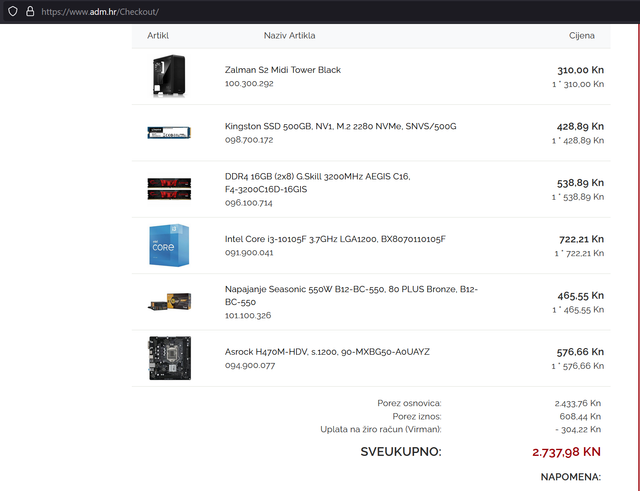
Here’s a build suggestion featuring a decent GPU

I don't know much about Intel motherboards, so there might be better options out there. As for the case, honestly, if he's building it himself, he should just pick whatever looks good at a local shop like Best Buy. I just threw something in here as a placeholder.

image

+ a new GPU https://www.nabava.net/search.php?q=rtx+2060&cod=&cdo=

Sure, you could grab a used card, but make sure the deal is actually worth it compared to buying this new one.