Look, this is my rig, but other people use it too, so I gotta make sure nobody’s snooping around my stuff Is there an easier way to do this? Because honestly, using AutoHotkey feels way too complicated for me
So, I just installed this one program that I really don't want anyone knowing about, like at all. I went ahead and set the folder in Program Files to be hidden, but now I’m trying to figure out how to actually launch the thing using some kind of custom hotkey combo on my keyboard. I swear I saw some utility or app that did exactly this over ten years ago, maybe back when I was first getting into PC stuff. Does anyone here actually know how to pull this off?
So, here’s what I’m wondering I use this Convertxtodvd program pretty much all the time, and man, sometimes these conversions take forever—like, up to 3 hours straight The whole time it's running, my laptop just crawls... everything gets super slow and the whole thing just stutters and hangs out constantly So, I was thinking maybe I could just kick off a conversion right before I crash for the night, but have the laptop actually shut itself down once it's finished? I don't want the damn thing running all night for no reason Is there even a way to pull that off in Windows 7?
I don't get it... you're saying they're free, but then you say you have to go buy some "code" on Amazon just to activate them? What's even the point of an activation if the thing works fine without it anyway?
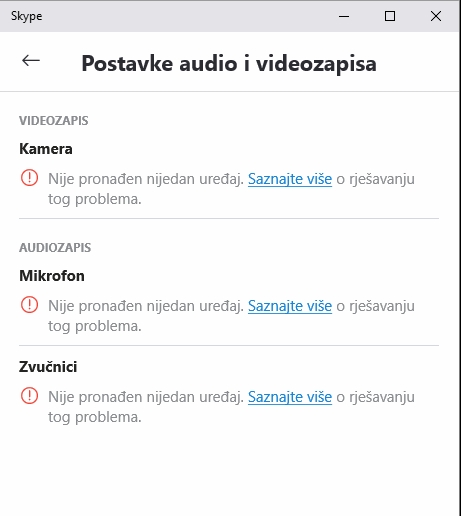
My Webcam and mic are totally dead on Zoom In my Zoom settings/video, I'm just seeing this image here I already tried testing them in another app and everything works fine there, so it's definitely not the hardware Anyone got any ideas or can help me out?
Finally managed to track down the basic instructions Now I'm just wondering how the hell I connect my tablet to my laptop so I can actually move some files over to the tablet Anyone know the best way to pull that off?
So, I just scored this BlueM tablet as a gift, it’s running Windows 8, but there’s zero user manual included in the box. Honestly, it’s making it a total pain to actually get anything done on this thing. I tried to google "manuals for BlueM" and stuff like that, but I can't find a single shred of useful info online. Anyone out there know how I can track down a basic manual for this? Help a guy out.
So, we finally ripped out Norton, and honestly? It’s kind of wild how much faster everything is running now. From what I can see, that Windows Defender real-time protection just kicked in automatically. A buddy of mine told me he went through the exact same thing about a year ago—with Norton installed, everything was just painfully sluggish, but the second he nuked it, his PC felt like it had been reborn. He ended up just putting on "Microsoft Security Essentials" instead, and everything's been smooth sailing since.
A buddy of mine just picked up a laptop running Windows 10 with "Norton" pre-installed And man, from what I can tell, that Norton thing is constantly scanning everything, which is seriously dragging the whole computer down. It won't even let him run basically any portable apps he tries to use. One colleague told me he should just rip Norton out completely since Windows 10 comes with its own "Windows Defender" built right in anyway. Is that actually enough protection? I mean, my friend mostly just uses the machine for typing stuff up in Microsoft Word and scrolling through news sites.
That tiny little nubbin stick I got bundled with the joystick I can't hook up any other antenna—like a standard coax cable or whatever—because there's just this weirdly small circular port on the stick
I tried checking out stuff in Germany and Belgium, but I can't find a single channel anywhere. Is this some kind of glitch with the stick itself, or is it just the YouTube software acting up?
So, I finally picked up one of those “USB FM+DAB+DVB-T+SDR Dongle Radio Receiver STICK USB 2.0 Digital TV Tuner” things, got the drivers all set up, and installed that “YouTube HDTV” app that came bundled with it. After getting everything installed, I fire up YouTube and try to scan channels, but there’s a huge problem—the United States isn't even on the list of countries, so it can't find a single TV signal for me. I'm honestly stuck here... does anyone know if there's some other app out there that actually includes the US in its settings?
It’s just not working at all So, I typed the number 1 into that first field (for depth) and hit finish, then after maybe 5 seconds, it tells me it's done Then I head over to the folder where it saved everything and I see these files: proba backblue.gif fade.gif index.html proba.whtt
But when I click on proba.whtt or index.html, it just opens up some random stuff that has absolutely nothing to do with the webpage
I mean, you can actually just go into the settings within the app itself and tweak how deep the crawler goes when it's grabbing links.
So, I just finished setting this thing up, did everything it asked me to do, but I'm looking all over the place and I seriously cannot find where the option is to set the "link depth" or whatever.
But look, I don't really need that "full page capture" thing to just grab what's sitting there—I need it to actually snag everything hidden behind the links when I click through them. Like, if a site has 20 different links on it, am I seriously supposed to open all 20 of those individual pages and manually go through the whole "file/save as webpage" process 20 separate times? That's ridiculous. I mean, I want the tool to just grab the main landing page along with all those sub-links tucked underneath it in one go.