Videos won't play in Google Chrome
in IT Support ·
Home ›
brightbadger57 › Posts
Posts by brightbadger57
33 posts shown.
Videos won't play in Google Chrome
in IT Support ·
coppersailor28 said:Neither Firefox nor an ad blocker is gonna fix this on 'it' or 'it'.
If we're talking about a 'legit' website, it's pretty unlikely they'd still be running on Flash:
Maybe that 'particular' site you're looking at really is still stuck on Flash, so...
if it's just some weirdness with updated (like an update or whatever) settings in your Google Chrome browser,
maybe try this right on that 'one' page with that specific video of yours (even if you have to dig through 'site settings'):
(the green numbers are left clicks)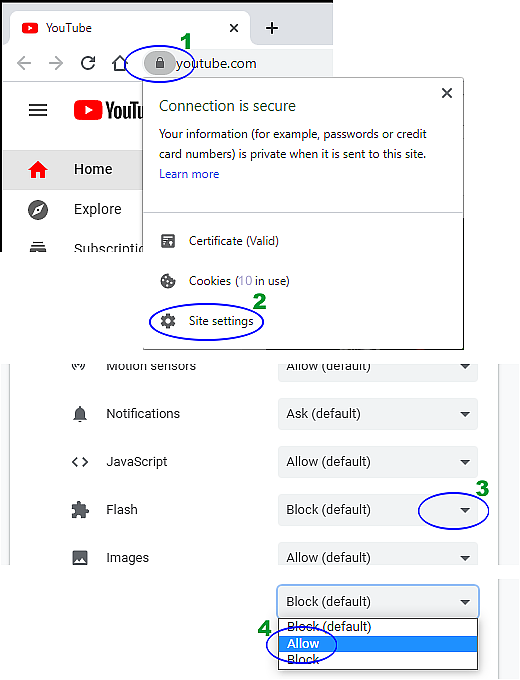
YouTube uses HTML5 instead of Flash.
(you can check for yourself—just right-click on any video over there)
I checked my own setup and I don't even see a Flash menu anywhere...
Videos won't play in Google Chrome
in IT Support ·
Hey, I’m running into a bit of a headache with an online course I'm taking. Everything was working perfectly fine about two weeks ago, but today... nothing. I try to load the video and it just won't budge. I'm using Google Chrome, and I've already tried the whole routine—cleared out all my cookies, wiped the cache, even did a full reset on Google Chrome... still nothing. I have Adobe Flash Player 10 installed too. YouTube works totally fine, but this specific platform is just giving me a blank white screen with zero video controls. Any clue what's going on or how to fix this? I even tried switching over to Opera and Internet Explorer, but it’s the same deal everywhere...
Windows 10 won't connect to Wi-Fi
in IT Support ·
Thanks everyone!! Turns out that second option on this page actually did the trick... finally...
So, I was digging through some old files earlier and stumbled onto this guide about fixing those annoying driver issues on Windows 10... you know the ones where everything just decides to stop working for no reason? It’s actually pretty useful if you're stuck in that loop of "everything is fine" one minute and then total chaos the next. Basically, if your hardware is acting up, the whole thing usually boils down to drivers being outdated or just completely bugged out. The article walks through how to check Device Manager—which, let's be honest, is a bit of a nightmare to navigate sometimes—and how to hunt down the right updates. They suggest using a tool like DriverEasy to just automate the whole headache, which sounds alright if you aren't the type to enjoy spending three hours scouring manufacturer websites at midnight... I remember back when I was trying to get my old rig running after a crash, and nothing seemed to stick... just endless reboots and error messages... anyway, if your PC is throwing a tantrum, might be worth a look. Just don't go clicking random things without knowing what they do... trust me on that one.
So, I was digging through some old files earlier and stumbled onto this guide about fixing those annoying driver issues on Windows 10... you know the ones where everything just decides to stop working for no reason? It’s actually pretty useful if you're stuck in that loop of "everything is fine" one minute and then total chaos the next. Basically, if your hardware is acting up, the whole thing usually boils down to drivers being outdated or just completely bugged out. The article walks through how to check Device Manager—which, let's be honest, is a bit of a nightmare to navigate sometimes—and how to hunt down the right updates. They suggest using a tool like DriverEasy to just automate the whole headache, which sounds alright if you aren't the type to enjoy spending three hours scouring manufacturer websites at midnight... I remember back when I was trying to get my old rig running after a crash, and nothing seemed to stick... just endless reboots and error messages... anyway, if your PC is throwing a tantrum, might be worth a look. Just don't go clicking random things without knowing what they do... trust me on that one.
Windows 10 won't connect to Wi-Fi
in IT Support ·
So I click on the network, punch in my password, hit connect... and then it just sits there saying Secured, not connected. There's this little ⚠️ icon hanging out on the Wi-Fi symbol and nothing works. Can't even get a webpage to load. It's basically dead...
Windows 10 won't connect to Wi-Fi
in IT Support ·
So, I'm trying to get connected to the modem at my place here in the States... obviously. My laptop doesn't have those dedicated internet buttons on the keyboard, so I'll just drop some links to a few screenshots of all my options since it won't let me upload images directly here. Hope that's cool. If you guys could maybe walk me through what I actually need to tweak... I already tried setting the Country/Region option in the first picture, but it's still refusing to connect. Thanks for the help!
https://prnt.sc/o3y887
https://prnt.sc/o3y91d
https://prnt.sc/o3y96i
https://prnt.sc/o3yale
https://prnt.sc/o3y887
https://prnt.sc/o3y91d
https://prnt.sc/o3y96i
https://prnt.sc/o3yale
Windows 10 won't connect to Wi-Fi
in IT Support ·
Hey everyone... so I've got this Windows 10 laptop that worked perfectly fine on my Wi-Fi back home in the States, but now that I'm traveling abroad, things are getting weird. Every time I try to connect to my home modem, it just says "Secured, not connected" and shows that little warning icon ⚠️. Anyone know how to fix this?
My phone connects to the modem without any issues, though... I already tried the whole routine—restarting the modem, rebooting the laptop, even messing around with the password—but nothing's working. Any ideas? Thanks...
My phone connects to the modem without any issues, though... I already tried the whole routine—restarting the modem, rebooting the laptop, even messing around with the password—but nothing's working. Any ideas? Thanks...
Windows 10 running slow
in IT Support ·
Dell Ideapad Z575
Intel Core i3 Processor with Radeon HD graphics 1.90 GHz
RAM 4.00 GB ( 3.47GB usable)
64 byte
It’s the exact same laptop I had before, and honestly... it ran so smooth back when I was using Windows 7. Just gave it a quick restart and now? Feels like it might actually be running better than before... maybe...
Intel Core i3 Processor with Radeon HD graphics 1.90 GHz
RAM 4.00 GB ( 3.47GB usable)
64 byte
It’s the exact same laptop I had before, and honestly... it ran so smooth back when I was using Windows 7. Just gave it a quick restart and now? Feels like it might actually be running better than before... maybe...
Windows 10 running slow
in IT Support ·
Tried running Disk Cleanup, but I'm still stuck staring at that damn
screen forever every time I boot up. Ran scans with Malwarebytes and AdwCleaner too, but nothing... just nothing.
Is it actually worth doing that disk cleaning thing more often? And does Disk Cleanup just grab all the useless junk without touching my actual stuff... you know, like my programs or documents?
screen forever every time I boot up. Ran scans with Malwarebytes and AdwCleaner too, but nothing... just nothing.
Is it actually worth doing that disk cleaning thing more often? And does Disk Cleanup just grab all the useless junk without touching my actual stuff... you know, like my programs or documents?
Windows 10 running slow
in IT Support ·
Man, before that virus hit... I don't even know... probably those updates, for sure... everything's just dragging and running so slow now...
Windows 10 running slow
in IT Support ·
Hey everyone... so I just finished installing Windows 10 about a month ago, but I grabbed my laptop to test it out a couple of weeks back and man... it feels way slower than the Windows 7 setup I was running before. I’ve seen some threads floating around with tips on how to speed things up, so I tried disabling some background apps, but honestly, I'm hesitant to kill everything because I have no clue what half of those processes actually do... plus, my startup list isn't even that crowded. It's not like it's completely unusable, but you know the feeling... it just drags. Especially right after the login screen—it just sits there stuck on Loading forever after I put in my password, and then the sluggishness just follows me through the rest of my session. Windows 7 felt like a literal rocket compared to this... anyone else dealing with this kind of lag, or is it just me...? 🤔
Looking for a video editor.
in Software ·
Hey, I'm dealing with the exact same headache!
I've been hunting for a decent movie maker to download online... anyone know a reliable site where I can grab a full version? I just downloaded the latest one, spent all this time making a video, and now I can't even save the damn thing. 🤦 It's just a trial or something.
Honestly, I don't care if it's an older version, as long as it actually lets me render videos and save them to my hard drive as files... maybe even a torrent from a site you guys actually trust?
Please help me out here?! THANKS IN ADVANCE 🙏🙏🙏
I've been hunting for a decent movie maker to download online... anyone know a reliable site where I can grab a full version? I just downloaded the latest one, spent all this time making a video, and now I can't even save the damn thing. 🤦 It's just a trial or something.
Honestly, I don't care if it's an older version, as long as it actually lets me render videos and save them to my hard drive as files... maybe even a torrent from a site you guys actually trust?
Please help me out here?! THANKS IN ADVANCE 🙏🙏🙏
Issues with photos
in IT Support ·
You’re a total lifesaver! 😁 Thanks a bunch! :clapping:🙏
Issues with photos
in IT Support ·
It just started happening out of nowhere a few days ago... honestly, it's driving me nuts because I can't see any images right when I actually need them... I'm still running Windows 7 though... what's the deal with getting it fixed on that version
Issues with photos
in IT Support ·
Hey everyone,
anyone know why my images are looking like this? instead of actually seeing the picture, I'm just getting these weird graphics... honestly can't even tell which image is which when they show up like this. any idea how to fix it?
I put the pic in a link since I can't upload directly here.
THANKS 🙏
http://prnt.sc/eyctt9
anyone know why my images are looking like this? instead of actually seeing the picture, I'm just getting these weird graphics... honestly can't even tell which image is which when they show up like this. any idea how to fix it?
I put the pic in a link since I can't upload directly here.
THANKS 🙏
http://prnt.sc/eyctt9
Avast acting up – anyone else?
in IT Support ·
Thanks, man, you really saved my skin! Cheers
Avast acting up – anyone else?
in IT Support ·
Hey everyone... does anyone know how to kill this pop-up window? It keeps jumping in and out of my taskbar and it's driving me absolutely nuts... I'm losing it here. Thanks. Check the link for the screenshot since I can't upload directly here.
http://i63.tinypic.com/9hub1y.jpg
http://i63.tinypic.com/9hub1y.jpg
Best cleaning software?
in IT Support ·
Man, thanks a ton, you guys are absolute legends 🙂👍
Best cleaning software?
in IT Support ·
So I ran a scan on my C drive right when I booted up my laptop and... nothing. Zilch. No threats found, which feels weird because everything else is acting super glitchy. Like, whenever I hit "Restart," the thing just shuts down, the lights go on, but then it stays dead. It won't actually reboot itself. I have to force it off manually before I can even try starting it back up again... it’s such a pain. Plus, my Chrome has been dragging like crazy lately, which honestly hasn't happened before. Just feels off
Best cleaning software?
in IT Support ·
I used to run McAfee, but man, it absolutely trashed my laptop... everything just felt so sluggish after I installed it. So I went back to Norton, which has never given me any grief. I might give SpyHunter a shot though. I don't usually have anything else running when Chrome freezes up on me—it just suddenly hits a wall. At first, I was convinced it was a Flash issue, so I uninstalled and reinstalled Chrome, but nope... here we go again. It’s annoying because I’m so used to it being snappy... maybe I'll try that Tune Up thing again, can't really remember if it actually did anything for me last time. I do run Auslogics Disk Defrag every month, though...