CheckEmoji Community · the emoji forum
🏠 Home 🆕 What's new ❓ Unanswered 🔥 Popular 📡 RSS Members 👥 0 online log in · register
Home › IT › IT Support › Videos won't play in Google Chrome

Videos won't play in Google Chrome

Started by brightbadger57 · · 👁 5 views · 6 replies

📡 Subscribe to replies

Participants brightbadger57quietranger132Drew Allen77coppersailor28swiftowl7
brightbadger57 brightbadger57 MemberOP
14 messages
joined Nov 2017
#1 ·
Hey, I’m running into a bit of a headache with an online course I'm taking. Everything was working perfectly fine about two weeks ago, but today... nothing. I try to load the video and it just won't budge. I'm using Google Chrome, and I've already tried the whole routine—cleared out all my cookies, wiped the cache, even did a full reset on Google Chrome... still nothing. I have Adobe Flash Player 10 installed too. YouTube works totally fine, but this specific platform is just giving me a blank white screen with zero video controls. Any clue what's going on or how to fix this? I even tried switching over to Opera and Internet Explorer, but it’s the same deal everywhere...
quietranger132 quietranger132 Newcomer
4 messages
joined Nov 2021
#2 ·
Firefox?
Drew Allen77 Drew Allen77 Active Member
82 messages
joined May 2017
#3 ·
Adblock?
coppersailor28 coppersailor28 Active Member
156 messages
joined Mar 2012
#4 ·
Neither Firefox nor an ad blocker will help you on 'off'.

brightbadger57 said:... I'm having trouble playing a video on this one online course, ...

If it were a legitimate website, they probably wouldn't still be relying on Flash:
(People also ask) What is replacing Flash Player in 2021?
"Written in Rust , Ruffle is compatible with All The major operating Systems available in 2021. It is a free and open-source alternative to Adobe Flash Player for Windows, Mac, & Linux. The Flash Player emulator also works great with browsers such as Google Chrome & Firefox. 9 Apr 2021"


brightbadger57 said:... everything was working fine about two weeks ago, but today I try to load the page to play the video and it won't work, using Google Chrome, ...

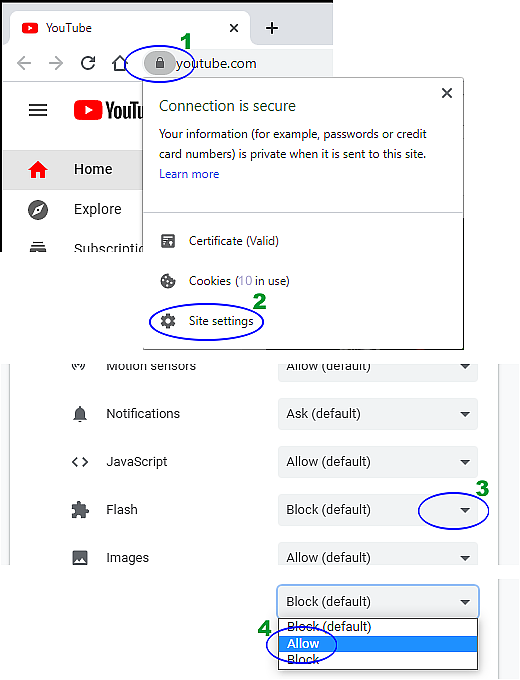
Maybe that site of yours actually is still running on Flash, so
if it's due to changed (updates, for example) settings in your Google Chrome browser,

try this specifically on that 'your' page with exactly 'your' video (even if we are talking about site settings):

(green numbers represent left clicks)
image

brightbadger57 said:... ... YouTube runs perfectly
but on this platform there's nothing, just a white screen with no video options at all. ...

YouTube uses HTML5 not Flash.
(you can verify this yourself—just right-click on any video over there)
swiftowl7 swiftowl7 Member
46 messages
joined Dec 2017
#5 ·
brightbadger57 said:Does anyone have any clue what's going on or what I should try next? I've already attempted to load it using both Opera and Internet Explorer, but I'm getting absolutely nothing.

It looks like that site just isn't streaming video anymore, which usually means it's either down for some scheduled maintenance or the domain registration has simply lapsed.

That being said, if you want me to be 100% sure, dropping the link to the specific address or page would definitely help me take a closer look.
brightbadger57 brightbadger57 MemberOP
14 messages
joined Nov 2017
#6 ·
coppersailor28 said:Neither Firefox nor an ad blocker is gonna fix this on 'it' or 'it'.

If we're talking about a 'legit' website, it's pretty unlikely they'd still be running on Flash:

Maybe that 'particular' site you're looking at really is still stuck on Flash, so...
if it's just some weirdness with updated (like an update or whatever) settings in your Google Chrome browser,

maybe try this right on that 'one' page with that specific video of yours (even if you have to dig through 'site settings'):

(the green numbers are left clicks)
image

YouTube uses HTML5 instead of Flash.
(you can check for yourself—just right-click on any video over there)


I checked my own setup and I don't even see a Flash menu anywhere...
brightbadger57 brightbadger57 MemberOP
14 messages
joined Nov 2017
#7 ·
quietranger132 said:Firefox?


Nice one 😁 Works on Firefox!

You must log in or register to reply here.

Log in Register

🔗 Similar threads