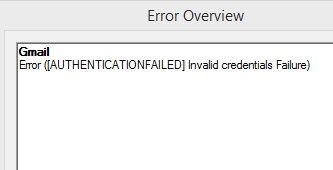
So, I just gave that Gmail notifier a shot, but no luck so far. Right after I hit "check mail," this message pops up: Failed to process account: Authentication failed. Please verify the username and password. "Invalid credentials (Failure) (NO)."
I did make sure to check the "enable IMAP" box in my Gmail settings, though.
Yeah, I went ahead and installed that SSL plugin, but it’s still not working quite right. It’s a bit of a shame, really—I actually found PopPeeper to be incredibly straightforward and easy to use. Everything runs smoothly when I'm checking my Hotmail account, but for some reason, Gmail just won't cooperate.
It honestly bothers me that I have to manually launch the application just to check if any new mail has arrived. I mean, there are days when I simply forget to open it, which feels like a bit of a design oversight—it’s a pretty solid client, yet they missed such an obvious feature. For instance, "PopPeeper" allows you to sit in the system tray, giving you immediate visual or audio alerts the second something hits your inbox. The only real catch is that it refuses to play nice with my Gmail account, which is a shame.
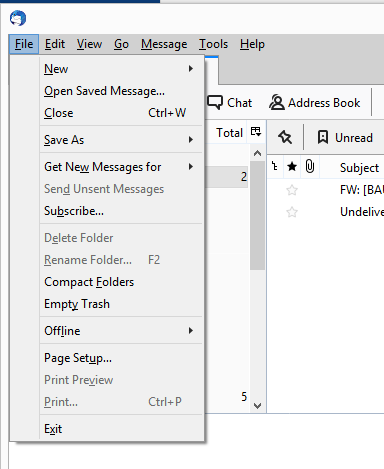
How can I actually get that "Minimizing window hides to tray" feature to work? Well, take a look at what I have set up here in Thunderbird under the file :
So, I’m looking through Thunderbird 60.0 right now, but I’m honestly not seeing what you're talking about —that "Windows" tab where "Minimizing window hides to tray" is supposed to be checked. Would you mind walking me through that a bit more, if it isn't too much trouble?
I’ve been driving myself a bit crazy trying to hunt down an email client that actually checks all my boxes. I have cycled through maybe five or six different clients—Mozilla Thunderbird, Postbox, PopPeeper, and a few others—but I just can't seem to find one that does what I need. Specifically, I want to be able to close the main window and have the application tuck itself away into the system tray, where it can just quietly hang out in the background and keep polling for new messages. Does anyone happen to know of a solution that actually handles this?
Is there a way to pull up a complete list of all my own threads, comments, or replies? And, if possible, could I also see a full list of every thread started by another forum member?
So, I was trying to move some Word documents from a folder on my PC over to a USB flash drive earlier today, but once I hit copy/paste, I ran into this message: Are you sure you want to copy this file without its properties? The file 2 Izrada boot windowsa has properties that can't be copied to the new location.
What exactly is that supposed to mean? I guess I’m just wondering if those files will actually open properly when I try to use them on another computer elsewhere.
I happened to stumble upon Macrium Reflect the other day, which caught my eye—mostly because a friend of mine recently ran into a situation where his Windows 7 system simply wouldn't boot, and he ended up losing everything. To ensure I don't find myself in a similar predicament, I've been looking into testing this software out, though I have a few lingering questions: On this link, it mentions this: "It supports to make Windows PE based on local Windows pre-installation environment or based on downloaded Windows 10 WIM image file" What exactly does it mean by "or based on downloaded Windows 10 WIM image file" ? From what I can gather as a layman, it sounds like it might download Windows 10 itself, but how would that even work? Since those aren't exactly free, I guess...
I’ll try my best to explain this For instance, imagine I have a 6x6 inch square—and there's a specific logo I need to print right in the dead center of the page Then, I want to print another square of the exact same dimensions on the back side of that same sheet, also centered perfectly The goal is to be able to cut these squares out with scissors and have the image on the front line up precisely with the image on the back I hope I've made myself clear enough regarding what I'm looking for
So, I was just attempting to set up an account over at Skype, but for some reason, it simply refuses to let me through. No matter what I try to put down for a username, I keep getting hit with this Sign-up Error (17) message that says, "Please choose another username. This username already exists." I’ve even tried using these ridiculously long strings of characters mixed with random numbers—stuff that shouldn't possibly be taken—yet it keeps flagging them. Do you happen to have any idea what might be causing this?
I’m looking for an app for what people call VOIP calling—basically, I need some solid recommendations from the community for an application that offers the cheapest rates for calling the US
Alright, the only catch is that I'm based out of San Francisco—so I'm really not sure if this is standard practice over here in the States. If I'm being honest, when I talk to my uncle (he's 69), he isn't exactly chasing high-end specs—it just needs to be capable enough to run that specific game and maybe a few others like it.
I'm looking to pick up a desktop tower—just the PC, I don't need a monitor—for my uncle. He mostly spends his time playing games like AoE ii / III and things in that same vein. We have. $667 I was wondering if there might be a specific configuration out there that would actually be suitable for running those games—I guess it depends on how much we're looking to spend, but I'd love to hear some thoughts. I've attached two links from San Francisco—if anyone happens to be feeling generous, maybe you could suggest a decent configuration from this list? I'm looking for something within a reasonable budget. $667) link1 I'm not quite sure what you're looking for here—it seems like a link might have been intended, but nothing came through on my end. If you were trying to share something specific, feel free to drop it again. I'll be around.
A friend of mine has an original Windows XP CD lying around—hasn't touched it in years—so I was thinking about using it to set up a machine for my sister.
"rowdybadger18," you sent over that link for the XP drivers, but I’m having a bit of trouble actually locating them on the page for her Inspiron 1501 model.
I mean, look—some genius decided to wipe a perfectly functional Windows XP setup and install Windows 7 instead, even though the old OS was running flawlessly. The real headache, though, is that the Windows XP installation discs are long gone, and I can't find a single compatible driver to save my life. So, it is what it is—does anyone have any suggestions on how to at least speed things up a bit on this version of Windows?
My sister just picked up a "Dell Inspiron 1501" with these specs: -Windows 7 -1.6 GHz CPU -1 GB RAM
The thing is incredibly sluggish—windows take forever to pop up and browsing the web feels like pulling teeth. I'm no tech expert, but I'm guessing the limited memory is the primary culprit here. Now, I know the immediate suggestion is usually to just go out and buy more RAM, but that isn't really an option right now. She basically uses this machine for nothing more than checking and writing emails and the occasional trip to a website. That's the extent of it. I've heard there might be ways to squeeze a bit more performance out of a system by disabling certain background processes or features that tend to bog down Windows. If anyone has the patience to suggest some tweaks to help us get the absolute most out of this specific setup, I’d certainly appreciate the help.
My apologies if I’m being a bit too demanding here. If anyone happens to have a moment to clear a few things up for me, I'd appreciate it. What am I actually sacrificing if I decide to disable these specific items: Java graphics audio