CheckEmoji Community · the emoji forum
🏠 Home 🆕 What's new ❓ Unanswered 🔥 Popular 📡 RSS Members 👥 0 online log in · register
Home › IT › IT Support › How to keep my email client running in the background?

How to keep my email client running in the background?

Started by swifttinker40 · · 👁 4 views · 11 replies

📡 Subscribe to replies

Participants swifttinker40Karen Doyle72George Murphy12Michael Jackson10analogwalker2
swifttinker40 swifttinker40 MemberOP
21 messages
joined Oct 2014
#1 ·
I’ve been driving myself a bit crazy trying to hunt down an email client that actually checks all my boxes.
I have cycled through maybe five or six different clients—Mozilla Thunderbird, Postbox, PopPeeper, and a few others—but I just can't seem to find one that does what I need. Specifically, I want to be able to close the main window and have the application tuck itself away into the system tray, where it can just quietly hang out in the background and keep polling for new messages.
Does anyone happen to know of a solution that actually handles this?
Karen Doyle72 Karen Doyle72 Active Member
125 messages
joined May 2013
#2 ·
swifttinker40 said:I’ve been driving myself a bit crazy trying to hunt down an email client that actually checks all my boxes.
I have cycled through maybe five or six different clients—Mozilla Thunderbird, Postbox, PopPeeper, and a few others—but I just can't seem to find one that does what I need. Specifically, I want to be able to close the main window and have the application tuck itself away into the system tray, where it can just quietly hang out in the background and keep polling for new messages.
Does anyone happen to know of a solution that actually handles this?

And I guess you're asking which ones *can't* do it?
George Murphy12 George Murphy12 Member
40 messages
joined Apr 2020
#3 ·
I mean, anyone could figure this out, but here's the deal for Thunderbird

Go to the "Windows" tab and make sure "Minimizing window hides to tray" is checked.
If you want the damn thing running 24/7, check "Closing window hides to tray" too... that way it won't actually shut down unless you hit "Quit"
swifttinker40 swifttinker40 MemberOP
21 messages
joined Oct 2014
#4 ·
So, I’m looking through Thunderbird 60.0 right now, but I’m honestly not seeing what you're talking about
—that "Windows" tab where "Minimizing window hides to tray" is supposed to be checked.
Would you mind walking me through that a bit more, if it isn't too much trouble?
swifttinker40 swifttinker40 MemberOP
21 messages
joined Oct 2014
#5 ·
How can I actually get that "Minimizing window hides to tray" feature to work?
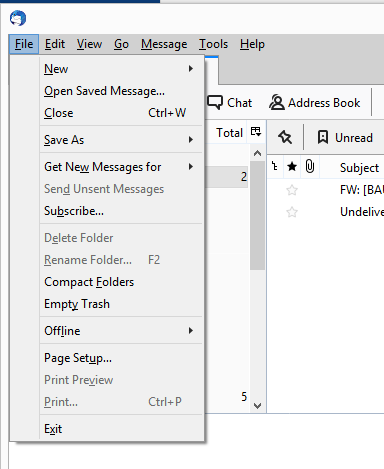
Well, take a look at what I have set up here in Thunderbird under the file
:
image
Michael Jackson10 Michael Jackson10 Active Member
140 messages
joined Feb 2023
#6 ·
George Murphy12 said:I mean, anyone could figure this out, but here's the deal for Thunderbird

Go to the "Windows" tab and make sure "Minimizing window hides to tray" is checked.
If you want the damn thing running 24/7, check "Closing window hides to tray" too... that way it won't actually shut down unless you hit "Quit"

🤔 🤔
Come on, if you can, take it slow—just one click at a time until you get there...

swifttinker40 said:How can I actually get that "Minimizing window hides to tray" feature to work?
Well, take a look at what I have set up here in Thunderbird under the file
:
image


I think you’re out of luck, at least for right now.
Basically, since version 68—and maybe even earlier—Mozilla has been phasing out support for legacy extensions in favor of MailExtensions and WebExtension technology (whatever that means).
The fallout is that old add-ons that used to provide this exact feature, like MinimizeToTray Revived and others, just don't work anymore.
There’s some workaround involving "injecting" a DLL using ThunderBirdTray (TBTray), but people on the forums really don't recommend it. It doesn't act like a standard add-on; it's more like a third-party app that tries to force the program into the tray. It requires constant tweaking because it can be a resource hog. From what I gather, it basically minimizes to the taskbar first and then moves to the tray—it’s doing way too much work just to stay hidden.

So, what does this mean for us users? (And look, I’ve been using this for years; at first, I wasn't a fan of its Linux-style settings, but later I loved how stable it was. It just works, stays out of my way, and doesn't ask for anything in return.)
It looks like we just have to wait for this new tech to mature and for enough developers to jump on board.
You can't really expect old, working extensions to just "port over" to the new system. The differences are likely huge, so it’s probably more about rebuilding everything from scratch rather than just moving it over.

Thunderbird is a bit of a weird beast anyway. It wasn't originally designed as a desktop client, but more as a communication tool for massive systems. Still, people stick with it because it's stable, consistent, and isn't trying to be "trendy" like those Microsoft tools that change constantly just to justify a new version number...
swifttinker40 swifttinker40 MemberOP
21 messages
joined Oct 2014
#7 ·
It honestly bothers me that I have to manually launch the application just to check if any new mail has arrived.
I mean, there are days when I simply forget to open it,
which feels like a bit of a design oversight—it’s a pretty solid client, yet they missed such an obvious feature.
For instance, "PopPeeper" allows you to sit in the system tray, giving you immediate visual or audio alerts the second something hits your inbox.
The only real catch is that it refuses to play nice with my Gmail account, which is a shame.
Michael Jackson10 Michael Jackson10 Active Member
140 messages
joined Feb 2023
#8 ·
I totally get where you're coming from. I use it for work—having an email through my provider feels way more professional than just using Gmail, or at least it did when I first set everything up. Plus, I’ve got several other accounts linked up in there, so... yeah.
The thing is, I’m so used to this setup that switching to something else sounds like a nightmare. I’m constantly searching and sorting through about 16,000 emails across all my different folders and categories... and it handles it all without a single hiccup.
When it comes down to choosing between Thunderbird or Outlook, I didn't even have to think twice. I can barely navigate Outlook anymore (I have to help out some relatives with their computers every now and then, and honestly, it's pure torture...), and those other "budget" options? No thanks. I'm not switching just for a few features.

For now, whenever I need it, it just sits in my taskbar. It's getting pretty crowded in there, but I'll manage (at least until someone finally develops an extension for TB)...

BTW, I checked out PopPeeper. From what I can tell, it works with Gmail via IMAP, you just need to install some SSL plugin. Have you given that a shot yet?
swifttinker40 swifttinker40 MemberOP
21 messages
joined Oct 2014
#9 ·
Yeah, I went ahead and installed that SSL plugin, but it’s still not working quite right.
It’s a bit of a shame, really—I actually found PopPeeper to be incredibly straightforward and easy to use.
Everything runs smoothly when I'm checking my Hotmail account, but for some reason, Gmail just won't cooperate.

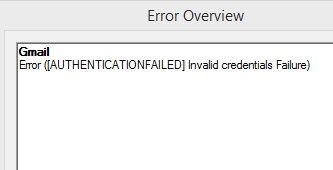
Here is what pops up after I click on check mail
image
analogwalker2 analogwalker2 Active Member
76 messages
joined Dec 2021
#10 ·
Gmail notifier has been working perfectly fine for me—like, for a really, really long time now!
I believe the free version lets you link up to two email accounts, but honestly? I managed to get myself sorted with the pro version instead.
swifttinker40 swifttinker40 MemberOP
21 messages
joined Oct 2014
#11 ·
So, I just gave that Gmail notifier a shot, but no luck so far.
Right after I hit "check mail," this message pops up:
Failed to process account:
Authentication failed. Please verify the username and password.
"Invalid credentials (Failure) (NO)."


I did make sure to check the "enable IMAP" box in my Gmail settings, though.
analogwalker2 analogwalker2 Active Member
76 messages
joined Dec 2021
#12 ·
swifttinker40 said:So, I just gave that Gmail notifier a shot, but no luck so far.
Right after I hit "check mail," this message pops up:
Failed to process account:
Authentication failed. Please verify the username and password.
"Invalid credentials (Failure) (NO)."


I did make sure to check the "enable IMAP" box in my Gmail settings, though.

Honestly, I’m at a bit of a loss here—everything works perfectly fine on my end, and the icon stays tucked away in the system tray just like it should!
Did you happen to see a security alert from Gmail asking if you were trying to connect via an unrecognized app?
Usually, with Google, you have to jump into your account and manually confirm that it was actually you trying to log in.
In my experience, I always get a little notification from Gmail whenever I sign into my account on a new session.

You must log in or register to reply here.

Log in Register

🔗 Similar threads