So, a buddy of mine just gave me a slightly different version of how this went down. He was running his old laptop with just 1 GB of RAM, but he decided to swap it out for a 2 GB stick he picked up on eBay. As soon as he finished the upgrade and hit the power button, the screen immediately flashed that "ENTER CURRENT PASSWORD" prompt at him.
A buddy of mine has this old 10-inch Netbook with 1 GB of RAM, and he just bumped it up by adding another 1 GB. Now, as soon as he hits the power button, he’s just staring at a black screen. First, it displays F-15 first boot device along with F10-BIOS settings, but then it immediately asks for an "ENTER CURRENT PASSWORD" and just locks him out completely. He can't get past it.
So, I figured we’d just wipe it and install a fresh OS. I rebooted the machine and tried hitting F9, but instead of getting into the boot menu, it just loops back to that same "ENTER CURRENT PASSWORD" prompt. Same thing happens when I try pressing F10. Anyone have a clue what's going on here or how we can bypass this?
I don't have Unicode available here, just UTF and ISO, and even when I try to fix it, those specific characters like Č and Ć still show up as gibberish. I honestly had no idea there was actually a dedicated program or editor out there specifically for encoding documents. Do you happen to know the name of it? I'd love to go hunt it down and give it a shot.
It’s driving me absolutely nuts. I’ve got a handful of movies with subtitles that need converting, and I usually just breeze through it using Handbrake without any drama. To get the special characters to show up right, I’d always save the subtitle files in Notepad using "Unicode," but now that option seems to have vanished into thin air from my Notepad menu. Instead of the usual characters, I’m just getting a bunch of weird, glitchy symbols everywhere. Does anyone actually know how to fix this?
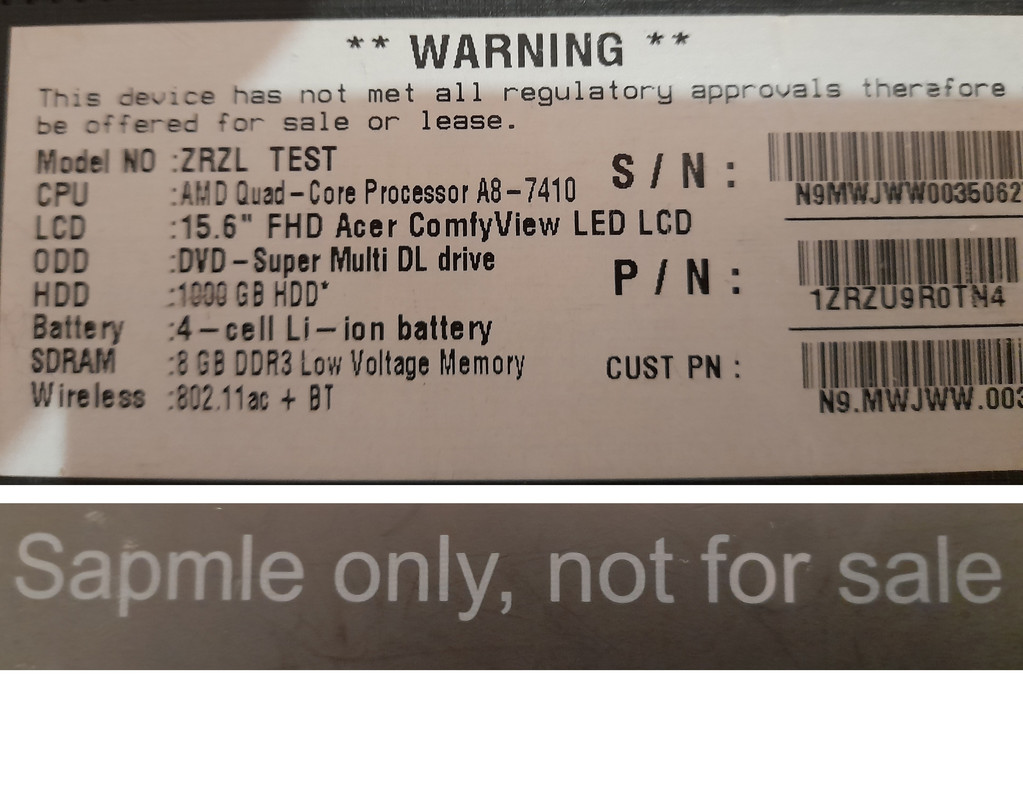
A buddy of mine just picked up this laptop, and honestly, the guy couldn't find his way out of a paper bag if it were open. He’s never owned a computer or even a laptop in his life—doesn't even know how to turn one on. We don't live in the same city, so I can't exactly go over and take a look myself. All he could manage was sending me this photo he snapped with his phone from the back of the machine. What on earth is he looking at here: "this device has not met all regulatory approvals therefore be offered for sale or lease" "sample only, not for sale"
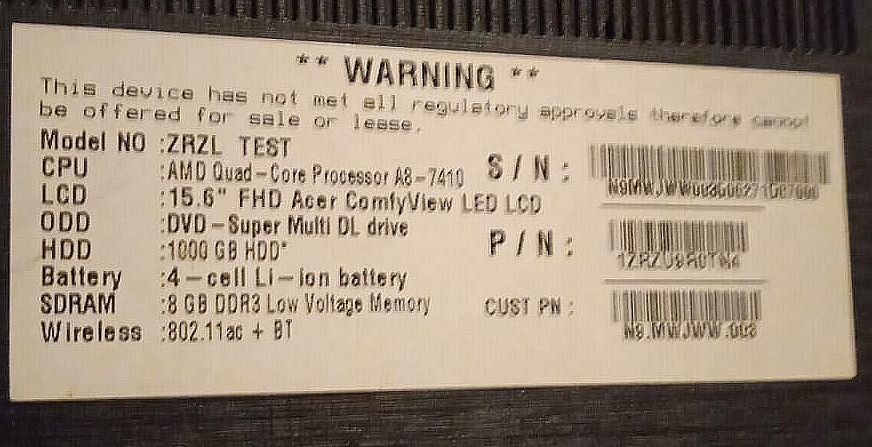
A buddy of mine is trying to hook me up with a laptop for about a third of what it’d cost retail, which sounds tempting, I guess. But I’m a bit of a stickler for the fine print, and I really want to dig into the specs before I even consider it. Here’s the catch: I can’t find a single scrap of info about this thing online. He sent over a photo of the sticker on the bottom, and now I’m staring at it wondering why it says something along the lines of this model isn't actually for sale, but was strictly for testing purposes. The laptop is an "Acer ZRZL- test" Anyone here have any clue what I'm looking at?
So, I just finished installing this Microsoft partition tool, but I’m honestly a bit stumped on how to actually expand my D: drive I've got this nagging feeling that if I click the wrong thing, I might end up making a massive mess of everything.
Pod Windows 10 So, I’ve got two partitions set up—my C: drive and my D: drive.🙂 So, I'm trying to beef up my D: drive. I was following some guide online and ended up selecting the C: partition... So, I was looking at my drive space earlier—you know how it goes, you think you’ve got plenty of room until suddenly you don't—and I realized I really need to shrink a volume. It’s one of those things that sounds straightforward on paper, like just sliding a bar to the left, but then you start thinking about the technicalities and the "what ifs." I'm trying to carve out some unallocated space so I can set up a New Simple Volume later. It feels a bit like rearranging the furniture in a tiny studio apartment; you move one heavy dresser, and suddenly you realize you can't actually open the closet door. You have to be careful where you put the weight. Has anyone dealt with this recently without running into those annoying errors where Windows tells you there's unmovable files in the way? It's always those stubborn little bits of data sitting right where you want to cut. Anyway, if you've got a trick for making this painless, I'm all ears.So, I ended up with a "New Simple Volume " on my drive.So, I was digging around my drive the other day—standard weekend tinkering, nothing too fancy—and I ran into that whole "unallocated" situation again. You know the one. It’s like having a perfectly good extra room in your house, but there's a heavy-duty deadbolt on the door and no key in sight. The space is physically there, sitting right under your nose, but the system just treats it like it doesn't exist. It's just... void. It’s kind of like having an extra seat at a dinner table, but you've somehow taped it to the floor so nobody can actually sit in it. The chair is there, the legs are solid, but according to the party rules, that spot is officially "empty." Anyway, if you're staring at a chunk of unallocated space on your disk and wondering why you can't actually use it for your files, you basically have to tell Windows to acknowledge its existence. You can't just leave it hanging out in limbo. Usually, you'll want to head into Disk Management and try to create a New Simple Volume ” from it, provided the partitions aren't getting in your way. If there's a stubborn partition blocking the path, it gets a bit more finicky—kind of like trying to reorganize a crowded closet when someone left a giant box right in the middle of the aisle. Just a thought while I was poking around. Has anyone else dealt with this being more of a headache than it should be?I went ahead and right-clicked that block and selected "New Simple Volume ".New Simple Volume ”So, I went ahead and picked "G:" as the drive letter. Now the instructions are telling me to go back to the D: partition, right-click it, and select... extend volume So, I'm getting this new G: partition hooked up now. So, here’s the kicker: whenever I try to right-click that D: drive, the "Extend volume" option is just sitting there, totally greyed out. It won't even let me click it. It's like the computer is just staring back at me, refusing to cooperate. I know some people are going to jump in here and tell me there are plenty of great third-party tools out there for this kind of thing, but honestly? I’m not looking to clutter up my system with extra software if Windows already has what I need built right in. Anyone know why this thing isn't working?
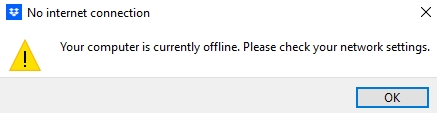
I’ve honestly never had a single issue with Dropbox before, but now? I have no idea what’s going on. It’s driving me absolutely nuts. I went ahead and decided to uninstall it, then did a clean reinstall, but as soon as it’s back up, I get this message shown below. I don't even get why it's flagging anything—everything works perfectly fine when I'm just using my browser to open pages.
I’m feeling a little stuck here. I’ve got two different laptops for work, and I’ve gone ahead and installed Dropbox on both, logging into my account on each one just like you're supposed to. The thing is, when I’m grinding away on my first laptop—working on new docs or just tweaking things already sitting in my Dropbox folder—everything seems to upload to the web version just fine. But then, the moment I switch over to the second laptop, none of those new files show up. It’s like the changes I made on the first machine just... didn't happen. They aren't there, and the edits aren't showing up either. Anyone have a clue what might be causing this hiccup?
I’ve been messing around with it for a few hours now, and honestly, it’s a beast—windows pop open faster than they do on my actual main rig The plan is to bump up the RAM and swap in a bigger hard drive, but I’m dead set on keeping this thing running on Windows XP Right now, the drive is split into two partitions (a 10 GB one and a 30 GB one), so I'm trying to figure out how to migrate the whole Windows XP setup, drivers and all, onto the new drive Anyone out there know how to pull this off?
So, a buddy of mine lent me his power adapter, and I managed to get this laptop to actually boot up. I noticed it's running Windows XP, so I pulled up Aida to see what kind of specs we're dealing with here. The configuration is... well, it's weird, to say the least: -960 GB of RAM -40 GB Hard Drive -3066 MHz processor ??????
Look, I don't mind upgrading the storage or the RAM, but that processor speed? It makes zero sense.
We’ve got three laptops at my place, and none of them even touch the 2 GHz mark, yet they all run just fine.
Is it even worth putting any money into this thing?
My neighbor picked up a new laptop and just left his old one—totally functional, by the way—sitting right next to the trash bins outside I grabbed it, but I’m hitting a wall trying to dig up any basic specs since my neighbor is nowhere to be found at the moment It looks like an older model, but it feels like a waste to just toss it if it still works; I figured it could serve as a decent backup machine for some odd jobs
Here is what’s printed on the casing: DELL MIT-TTT-N S/N: 181305860237
I’ve tried searching on Google, but nothing is turning up regarding this specific unit To make matters worse, there wasn't a power adapter included (needs a 19v charger), so I haven't even been able to boot it up yet
Any chance anyone here knows how I might track down some info on this thing?
So, I just picked up this Dell Inspiron running Windows 8.1, and now that I've actually powered it up, I'm staring at a password prompt. The catch? The previous owner didn't hand over the credentials, so I'm basically locked out of my own purchase. Is there any way to bypass this password, or maybe some other workaround to get past this hurdle?
So, my cousin and I just inherited some property. It’s split up a bit unevenly—I ended up with assets worth about $60,000 and he got the portion valued at $90,000 We have to shell out $2,000 for the lawyer, and the deal we made was that we’d both cover our share based on the value of what we actually walked away with. The problem is, we're stuck. We can't figure out the math on how much each of us should chip in toward that legal fee. Anyone here savvy with this kind of thing?
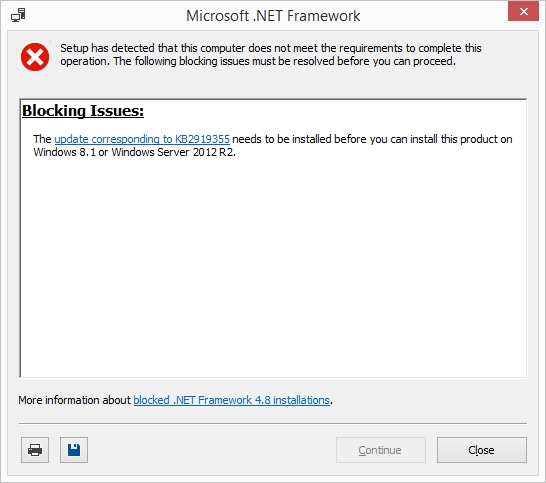
So, I'm running Windows 8.1 I tried installing this one program, and it’s insisting that I need to install .NET Framework 4.8 first. But right when I start the installation process for .NET Framework 4.8, this error pops up at the bottom. The weird thing is, back last year, I was using this exact same machine running Windows 7, and I had zero issues getting this same software and the framework installed just fine. I dug around on this site trying to find some answers, but honestly, I'm a bit lost on what the actual fix is supposed to be. Anyone here have any clue how to get around this?
So, I just grabbed that Free bulk YouTube downloader to give it a whirl. Just for a quick test run, I grabbed four links from YouTube, tossed them into the YouTube URL list field, and hit "start download." But... nothing. Absolutely zilch. It’s like pressing a button on a remote and having the TV just stare back at you blankly. No progress bar, no files popping up, just total silence.