CheckEmoji Community · the emoji forum
🏠 Home 🆕 What's new ❓ Unanswered 🔥 Popular 📡 RSS Members 👥 0 online log in · register
Home › granitecrane2 › Posts

Posts by granitecrane2

112 posts shown.

Nvidia RTX price trends in Desktops ·
wanderingbison9 said:Look, the RTX 2060 is pretty much a relic at this point. It's an old model, though there was an 8 GB version before the 3060 took over, so you might stumble upon some leftover stock somewhere... Are you absolutely certain 6 GB is enough for you? What kind of software are we talking about here? You're clearly eyeing the 3060Ti, right?

Actually, 6 GB is more than enough for my needs. I'm mainly running things like Adobe After Effects, Adobe Premiere, 3ds Max, DaVinci Resolve, and potentially Blender...
Nvidia RTX price trends in Desktops ·
Alexander Diaz4 said:What makes you think that's unjustified?

The complexity of manufacturing doesn't actually dictate current pricing—it’s the massive chip shortage driving everything. There simply aren't enough units on the market, and when they finally do get produced, the costs are sky-high.

And it's not like supply just vanished overnight... why? For years, there was plenty to go around, and now suddenly it's gone. What exactly is TSMC doing that prevents them from keeping up with demand? They manage to churn out Apple M1 SoC chips (I own one, by the way), and they can handle AMD processors too. So what gives?

Alexander Diaz4 said:First off, Ethereum isn't switching from Proof of Work to Proof of Stake yet. That was supposed to happen last year, but now expectations are that the transition will start toward the end of this year, with a full move to Proof of Stake happening sometime next year.

How does that have anything to do with the chip shortage? We're talking about cryptocurrency here. Not everyone is mining; in reality, only a tiny fraction of people are actually involved in that.

Alexander Diaz4 said:Secondly, until the supply and demand dynamics in the chip market shift...
Intel has poured $30 billion into expanding production.
TSMC has invested $100 billion into expanding capacity and building new facilities, which aren't expected to be ready until 2023.

Supply and demand have always been factors.

Alexander Diaz4 said:Not to mention Nvidia moving away from TSMC toward Samsung, where we don't even have much information regarding their production expansion...

That's fair enough.

Alexander Diaz4 said:Look up the architecture and performance metrics if you're so curious.

What do I care about architecture? Performance isn't my priority. I just want to know if modern concepts like raytracing are actually present. I have zero intention of gaming at 4K, and I certainly don't need a card for some massive mining rig. In fact, I don't touch crypto, and I never plan to start.

Alexander Diaz4 said:🤦

I get it. A real "expert."

Alexander Moore67 said:TSMC invested 100 billion dollars—and since they clearly don't speak English, a billion is what we call a milliard!

That’s exactly what I meant by calling him an "expert." It's not just a language barrier; it's a fundamental lack of general knowledge.

It's pretty straightforward:
million - 10^6
billion - 10^12
trillion - 10^18

In some systems, they use intermediate steps like milliard, so
a billion would be 10^9
a trillion would be 10^12
a quadrillion would be 10^15

That's known as the long scale.

But here in America, we use the short scale.
a million is 10^6
a billion is 10^9
a trillion is 10^12

Journalists constantly trip up because they don't realize there are two different scales, leading to massive translation errors. What someone might call a billion in other parts of the world is actually a trillion in the US, and their version of a "billion" doesn't even exist in our standard nomenclature.
Nvidia RTX price trends in Desktops ·
Since I’m currently putting together a new desktop build and picking up parts as I can get my hands on them, I wanted to get your take on current graphics card pricing—specifically regarding Nvidia cards. Right now, they seem unjustifiably overpriced. (And before anyone starts with the usual excuses about how complex they are to manufacture, or mentions things like die shrinks, cooling solutions, or advanced processors... give me a break. It isn't fundamentally different from the old GTX days, yet those cost a third of what we're seeing now.)

I’m not really a hardcore gamer myself, and I definitely don't need 4K resolution, but I do want a GPU that has hardware support for ray tracing and similar tech. VRAM capacity isn't a priority for me either; 6GB is plenty.

So, what’s your prediction? Are prices for Nvidia cards going to drop, making it smarter to wait, or are they just going to keep climbing? Also, any specific recommendations? I’ve been looking at some Gigabyte and Gainward models featuring the RTX 2060, and the prices look decent, but they're mostly out of stock at local retailers (like Best Buy, for instance). What’s the actual difference between the 2xxx and 3xxx series?
mellowcyclist3 said:Exactly. And if I can find the time or the motivation to game, Red Dead Redemption 2 is definitely at the top of my list right now.

1. Do I even really need this if we're talking about using it with a 4K monitor?

4K isn't a bad choice, but you don't necessarily need a 32" screen. You can get 4K on a 27" panel too.

mellowcyclist3 said:2. Is it actually a bad idea to go with a 4K monitor smaller than 32"?

No.

mellowcyclist3 said:3. Anyway, could you drop a link to the best monitor for what I need?

It was that Philips Brilliance 4K one. 10-bit. Wide color gamut.
mellowcyclist3 said:What do I know? Between the hardcore gamers and all those self-proclaimed experts on PCPartPicker and similar forums... honestly, just give me a straight answer to my other questions first. I need to finally settle this monitor situation so I can stop overthinking it and actually move on to buying the rest of my hardware. 🙂

I double-checked the thread title just to make sure I wasn't trolling myself. It says, "PC build for $1,500–$2,000 for digital art, 3D work, and gaming."

So, if that last point is really your top priority, then just go ahead and grab the 144.
Look, if you’re actually prioritizing things in the order you listed in your title, my best advice is to skip the 144Hz monitor entirely. Pushing those high refresh rates through standard electronics often ends up degrading the image quality. Most panels just can't cycle that fast without using specific workarounds that ultimately force a compromise on visual fidelity. You really don't need 144Hz. What you actually need is 10-bit color depth and true blacks—because that’s what makes HDR actually work. That's where your real value lies.
mellowcyclist3 said:Well, now you've gone and made things complicated again 😁
1. I need high image quality. I see everyone recommending 144 Hz, but I honestly have no clue—is there ever a situation where a lower refresh rate is actually better?
2. As for video editing or rendering, that isn't my profession, so let's not get too bogged down in those specs.
3. I want this PC to be primarily for gaming, which seems to be your specialty :P haha. I've been a gamer forever; even though I don't have as much free time as I used to, it would be great to play some newer titles without overdoing it. An RTX 3060 is plenty for me—I'm not looking to drop $6,000+ on a GPU.
4. If you read the whole thread, you might recall me mentioning how people were advising against that General Electric model I liked because they said 4K doesn't really make sense on a 27" screen. Does that actually matter?

So, I'm back in a bit of a dilemma. Right now, I'm leaning most heavily toward the Samsung option.

Let me give you another example: say I'm doing digital art in Photoshop at 4000x6000 resolution and 300dpi (which matters for print, obviously, but 300 is the standard). Will that artwork look the same on a 27" high-quality HD monitor versus a 27" 4K or even 6K monitor?

Who exactly is "EVERYONE"?
wanderingbison9 said:Back in the day, you actually felt a rush of joy if an SD frame rendered in just a few minutes... We used to have thirty-second TV spots taking a full week to finish. Today’s generation would probably jump out a window if they ever faced a situation like that.
The same colleague of mine is still struggling today, spending days rendering a single frame even with three RTX 3090 cards at his disposal... But then again, he’s old school, and he hasn't quite kept up when it comes to modern rendering quality...
I have honestly never had any issues with AMD, aside from the occasional loud stock cooler; I've upgraded about five or six AMD processors and motherboards over the years.

I haven't either. I've never owned one. But I'll let you in on a little secret: a friend advised me to pick up an AMD build, so why not give it a shot? I'm putting together a configuration with 12 or 16 cores, and I'll report back with the results. It won't be fast, because I'm in no rush, but hey—after Apple, AMD is heading straight into my shopping cart.
As for rendering for days on end... thank God, never again. I have absolutely no desire to deal with the kind of people you find in the video industry anymore.
Yes, rendering is demanding; it always has been, and it always will be if you're chasing that "wow" factor. Regarding RTX cards, while they seem impressive, they don't actually help as much in heavy-duty rendering as people think. You're better off having several powerful processors than just piling on more RTX cards.
mellowcyclist3 said:so basically, nothing comes of the 4K monitor idea—it’s just too early for that stage of the workflow,

now I actually need to hunt down a high-quality 1440p monitor,

https://www.samsung.com/us/computing...c27g55tqwnxza/

You don't need a 144 Hz monitor for video editing. In fact, you should probably steer clear of gaming monitors if you're doing serious work. You never edit anything above 60 Hz; there isn't any industry standard that requires it, and the electronics used to drive those 144 Hz refresh rates can actually degrade image quality. I know, I know—the gamers are going to come for me, but that's just the reality.

Just for comparison, here is what a professional monitor looks like (I'm not recommending this one, just using it as a benchmark):
https://www.apple.com/pro-display-xdr/
The refresh rates are 47.95 Hz, 48 Hz, 50 Hz, or 60 Hz.
Nothing near 144 Hz, because that's not meant for professional production.
It features 6K resolution, P3 wide color gamut, 10-bit color, and 1000 nits brightness (peaking at 1600 nits). Honestly, none of the specs you mentioned even come close to this level of performance.
That said, you can find similar specs in more affordable 4K monitors from General Electric. Why would anyone need 144 Hz? Just because the kid next door has one?
Alexander Moore67 said:https://www.amazon.com/fractal-design-cases/b01m2v8y6n
Budget-friendly, but the airflow is top-tier.

It looks a bit "old school." And here's my issue... it looks great in the product photos, but I really need to feel the build quality for myself. That's why I'm planning to head down to the HG spot to check out what kind of materials they actually used, especially those bottom clips holding the hard drives. If it's just cheap recycled plastic, then I'll pass.
wiredotter14 said:Liquid cooling is mostly about aesthetics and saving space, unless you're moving into extreme high-end territory or custom loops that actually outperform air. But you only really *need* that if you're running a scorching hot CPU that you plan to overclock (like an Intel Core i9-10900K or something similar).
If you want a reliable rig that runs 24/7 for years, you aren't going to be overclocking much, if at all.
With an air cooler, you're set. There's zero chance of the cooling system itself causing damage, whereas with liquid, you always have that nagging risk of a leak or a dead pump.
Air is actually quieter most of the time. I can barely hear the fans on my Noctua NH-D14, while with an AIO, that pump has to hum constantly.
The worst-case scenario is a fan dying, which you can swap out for maybe 50-$33. With high-quality coolers (like Noctua or be quiet!), the fans are so quiet and well-built they'll run for years without a hitch.

Modern cases have way more room nowadays since everyone stopped obsessing over HDD bays and DVD drives.
Basically, almost any case will have space for at least one HDD that you can screw directly into place without needing a tray.
If you need more than one, you just have to check the specs, but it shouldn't be hard to find.
As for DVDs, your options are pretty limited now, especially if you're looking at those modern glass-panel cases. Those are built for looks and rarely have room for optical drives, unlike the older office-style cases.
Personally, I'd just grab a $100-$67 external USB-C DVD drive and tuck it away. You probably won't use it often, and it lets you pick a much cleaner-looking case.

Case design has come a long way and is probably plateauing now.
But honestly, almost any modern case costing over $50 will be a massive upgrade over the old stuff.

As for the DVD situation, I actually have an external Blu-ray burner, so that isn't an issue for me. I'm a bit sentimental about my old gear, though—if giving up the old drive is just the price I pay for a modern build, I'll probably just pass it on to someone who actually needs it.
I've got one hard drive that I definitely need to keep using. My motherboard supports two NVMe drives, so I'll be running Windows and Linux (dual booting since I need both environments, and I really don't want them sharing the same physical disk). All in all, I won't be hamstrung by storage space because even my single drive is a 12TB beast, which is plenty for my needs. It would only be a headache if I were trying to set up something like a RAID array, but I've never done that, so I'm not planning to start now.

When it comes to cooling, I prefer larger fans. I'm not a hardcore gamer, so I won't be stuffing a monster GPU into this rig (besides, I can't imagine dropping $1,700$0.00 on those things with how crazy prices are these days). Since the GPU itself won't take up much room, I'll have more clearance for a beefy CPU cooler.

This time around, I'm actually going to focus on proper cable management. I want to route everything neatly so I don't end up with a mess of wires like last time—thankfully, most cables are much thinner nowadays, except for the power supply leads.
bluesurfer66 said:If you can't track down what you need locally here in the States, why not just order from somewhere like Amazon or eBay? It’s much easier.

For instance, you could look into a Corsair Air 540, which gives you the option to add a DVD drive, or perhaps the Corsair 780T. Then there's the Cougar Panzer Max G, which also allows for a DVD installation if that's what you're after.

Now, if you're looking for something a bit more budget-friendly that still accommodates a DVD drive, I'd suggest checking out the Fractal Design Focus G.

Well, there are cases on Amazon and eBay too. But if I can't get a really good, detailed look at the components in the photos—which happens quite often—then it just doesn't appeal to me. That said, I'll go ahead and check out that Corsair case, as well as the Noctua NH-D15 setup.
wiredotter14 said:If you're planning on running a machine 24/7, I’d suggest sticking with air cooling for the sake of reliability. A high-end air cooler like a Noctua NH-D14 or NH-D15 performs roughly the same as a decent 240mm AIO, but without the constant threat of leaks or a pump dying on you. It's rare for a pump to survive years of non-stop operation, whereas an air cooler basically lasts forever.
Water cooling—specifically an AIO, since a custom loop is a whole different beast—is mostly about aesthetics and having a "cleaner" look inside the case.

The be quiet! 500DX is pretty overpriced here in the States, but check out the Corsair 5000D Airflow. That's what I was looking at when I bought mine.

Thanks for the advice. I'll definitely take that into consideration. Honestly, I always assumed liquid cooling was the reliable way to go, but that point about the pump is a game changer. Plus, I still have to rely on fans to move the air anyway.
As far as price goes, I don't really care if the case costs $267 or $180. My main priority is making sure I don't open the chassis one day to swap out a hard drive only to have some cheap plastic bracket snap in my hands. The case I'm using now was a decent unit from a shop called Ve-Mil that doesn't even exist anymore, but even then, the design was flawed because they used such low-grade materials. I've dealt with cutting myself on sharp edges and snapping brittle, aged plastic before... I am absolutely not doing that again.
So, if going with be quiet! means spending a few extra bucks, I'm totally fine with that.
wiredotter14 said:I’m running a be quiet! 500DX and it’s solid. My only gripe is my motherboard lacks a USB-C header for the front panel and an RGB header controlled via software, but if you step up to a high-end board, yours will probably handle it just fine.

I’d definitely recommend it.
If the RGB gets annoying, you can just kill it—either through the motherboard software or a physical button.

Check the reviews and see if it actually meets your specs.


https://www.amazon.com/s?k=500dx

Not entirely sure what you mean by "fans for the rest of the motherboard."
The case comes with 3x140mm fans: one rear, one top, one front.
You could swap the top one to the front and put an AIO at the top instead. I think it supports up to a 360mm radiator.

Some cases come with those massive 2x200mm fans in the front, but looking at the reviews, the thermal and acoustic performance isn't any better than just using decent 140mm fans.

I actually really like be quiet! products. I'm just having trouble finding where to pick one up locally; according to the link, I'd have to order it online.
By "remaining fans," I meant that liquid cooling mostly focuses on the CPU (I don't plan on building a custom loop for every single component myself). Everything else needs to be cooled by the front and rear fans. I am definitely going with an AIO because my goal is to have a machine that runs 24/7.
I figured I’d jump in here and ask a question of my own.

I'm currently putting together a custom build using an ATX form factor and an AIO liquid cooling setup. My motherboard comes equipped with AURA LED controllers.

I'm looking for a chassis that hits these specific marks:
- effective air filters
- dedicated mounting space for an AIO radiator
- large fans to cool the rest of the motherboard (ideally 160 mm)
- room for two large HDDs, and ideally some space for a DVD drive
- nothing with that "insectoid" Asian gamer aesthetic
- a clear tempered glass side panel
- a reasonable footprint—nothing oversized
- some visible LED strips for flair
- an elegant design with easy-to-install components
- no cheap, recycled plastic parts that crack under pressure (I've dealt with enough of those already)
- preferably a front panel with USB audio access, or at least enough room to mount one
- something available at a local US retailer (since I want to see it in person before buying; I can find things online myself)
- "money is no object," but I refuse to pay a premium for tacky gamer gimmicks just because they're overpriced and ugly.
mellowcyclist3 said:Now we can move on to the rest of the build.
Most people keep pushing me toward Core i7 or Core i9 processors, while they seem pretty hesitant about AMD. I'd love to hear your thoughts on this. ^^

Reliability is my main priority. When I sit down to build a desktop, I want to build a beast that won't give me any grief for the next decade. For me, that means choosing a motherboard that won't act up and a processor that plays perfectly with everything else in the system. I never overclock my rigs, and honestly, I think paying extra for overclocking headroom is just throwing money away. You might squeeze out an extra 10%, but you risk ruining the whole stability of the machine.

I hate having work to do only to turn on my computer and have it start acting glitchy.
Regarding the brands, I feel like Intel is more battle-tested and maintains stricter quality control than AMD. Aside from that, the underlying technology is quite similar, and AMD actually offers slightly better performance per dollar. However, that performance gap is so negligible that it's practically irrelevant (just like overclocking).
wiredotter14 said:It’s not the same thing because at that distance, I can see clearly and pack a ton of content onto the screen. It just doesn't work on a smaller display; you have less surface area and lower resolution, so you can't fit nearly as much. If I pull a small screen too close, it strains my eyes, but if I push it back to a comfortable distance, the screen is just too tiny and everything becomes microscopic.

Well, that is precisely the point we are discussing: smaller screens can also feature massive resolutions (higher pixel density). There’s been talk about how this General Electric 27-inch model is too small despite having 4K. So, what's the real choice: 4K on a 27-inch panel or 4K on a 32-inch panel? In my view, it’s better to go with the 27-inch than to constantly strain your eyes scanning a 32-inch. And if you move the monitor further away, from an optical standpoint—if you visualize the viewing frustum—it functions identically to having a 27-inch sitting right in front of you.

Speaking of resolution, I’m running 2560x1600 on my 13" MacBook Pro. Honestly, many people don't even get that kind of clarity on their 27" monitors. Apple, however, utilizes 6K displays for their 32-inch setups (like the Pro Display XDR, though that's really geared toward the high-end graphics industry where teams gather around a single screen to debate whether a logo looks right or not). That extreme level of pixel density is essentially what they market as a "Retina display." It's a clever branding term for pixels so incredibly fine that they effectively mimic the density of the photoreceptor cells in the human retina, making them virtually invisible to the naked eye.
wanderingbison9 said:Look, macOS is macOS and Win is Win. What you just posted won't actually work on a PC within the specific apps I mentioned. Get it together.

Once I get home, I’ll test this out on my PC myself. You can adjust the UI scaling in Windows too, and once you do, AE, AP, and DaVinci all run perfectly fine.
I'll let you know.
wiredotter14 said:A 32-inch screen feels just right to me. Of course, you’d set it back a bit further than you would a standard 24-inch monitor; there's no need to be staring at it from three inches away. For me, the sweet spot is roughly an arm's length away when I'm sitting comfortably in my chair.

But if you're just pushing it further back to compensate, you might have been better off buying a smaller screen and keeping it closer. If you're having trouble visualizing the setup, try sketching it out on a piece of paper first.
The other possibility is that you actually need the distance because of vision issues.
wanderingbison9 said:Some software just struggles with or completely ignores system-wide UI scaling settings... take DaVinci Resolve, for example... and if I recall correctly, neither Premiere Pro nor After Effects really cares about those settings either.

I don't find myself cranking my neck just to see things on a 32" monitor, let alone a 40" UHD TV when I'm working... since I hear people complaining about this on forums all the time, I guess I must be some kind of outlier. 😬

Actually, that isn't an app-specific issue; it’s an operating system function (font size scaling).
The resolution stays the same for images and everything else, but the graphical elements scale up (this includes Photoshop, Premiere Pro, DaVinci Resolve...).
Sending this from a Mac, but Windows users deal with this too.

image
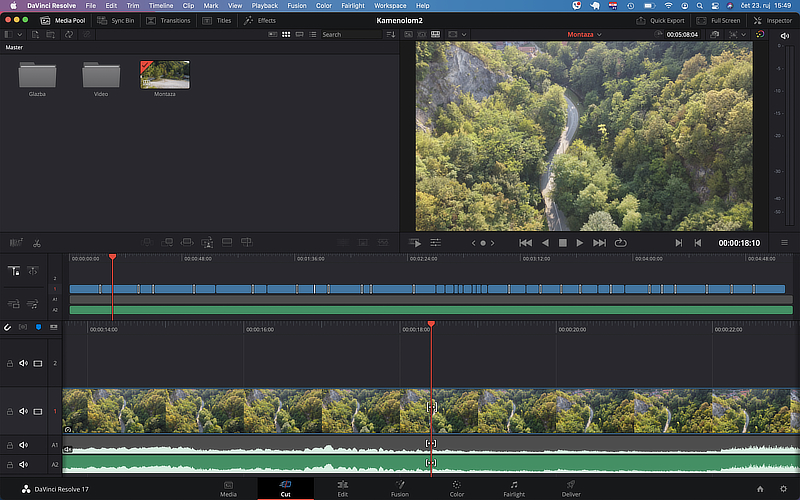
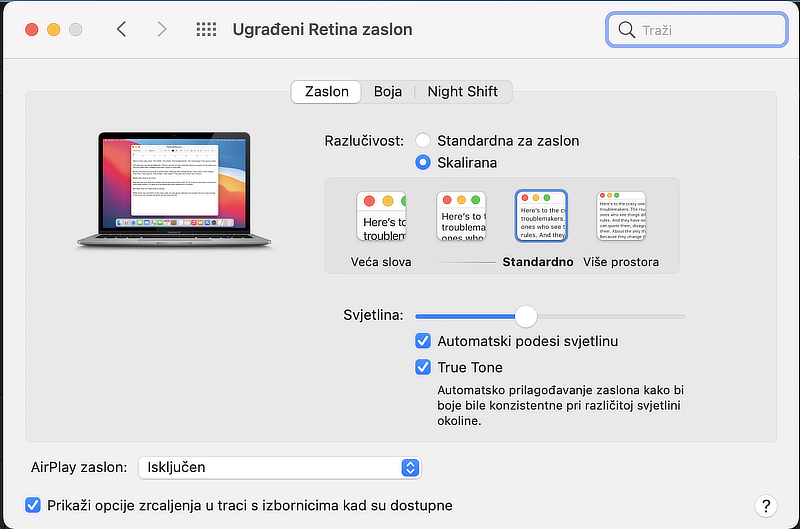
Keep in mind that for a MacBook Pro screen which actually has a native resolution of 2560x1600 (13"), the scaled resolution for graphical elements is 1440x900. This doesn't mean other elements are being displayed at that lower resolution, or that the image looks grainy and shrunk. Even the fonts are rendered at the full native resolution—that is, 2560x1600—but they are drawn larger, as if they were on a 1440x900 screen. And you can adjust this.

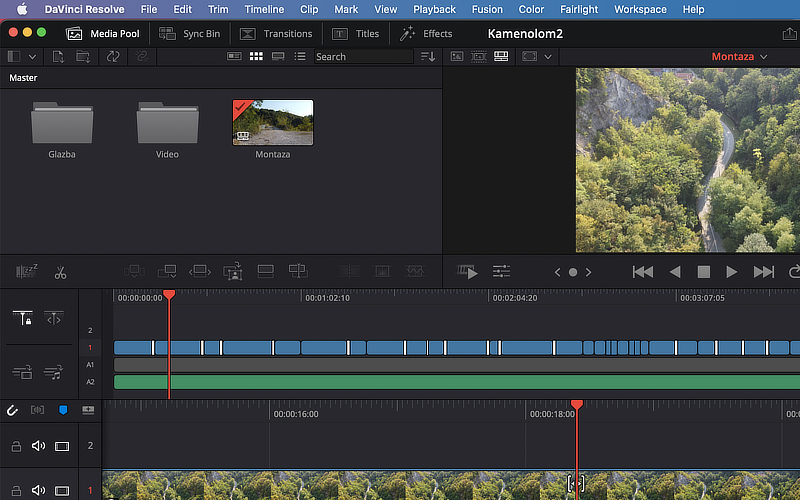
Here is DaVinci Resolve on that exact same screen, but dropped down to just 1024x640. Just to clarify, the screen is still physically 2560x1600, and everything is rendered smoothly at that native resolution even though the letters look massive.
image
And here is the same thing at 1680x1050 (on the same 13" screen).
image

As for the whole "neck turning" thing, I'll just say I've met plenty of people who buy massive monitors, and I won't even bother explaining why they do it.
mellowcyclist3 said:thanks guys, at least I've sorted out the monitor situation for now—Philips it is. 🙂 Everything else is still up in the air.

I'm actually thinking about upgrading my current setup to that 4K model myself.
But there's one thing you really need to know about that Philips model. Users actually end up hating this specific feature, even though it's technically a "pro": it has a built-in surge protector mechanism. It’ll momentarily cut power not just during a grid surge, but also when you plug in things like external hard drive enclosures. Basically, anything that causes a tiny voltage spike will trigger it to shut down for a second.
People complain to Philips that they made a monitor that isn't reliable in places like Africa, but let's be honest, our power grid can feel pretty similar to that sometimes (as Sim Shagay, that major Nigerian entrepreneur and one of the top 10 business leaders in Africa, might say). It's not necessarily a dealbreaker, but it's definitely something to keep in mind.