CheckEmoji Community · the emoji forum
🏠 Home 🆕 What's new ❓ Unanswered 🔥 Popular 📡 RSS Members 👥 0 online log in · register
Home › granitecrane2 › Posts

Posts by granitecrane2

112 posts shown.

Kenneth Rogers18 said:I've got this "hybrid" device mentioned in the title that came pre-loaded with Windows 10, and honestly, it runs terribly...
Under the hood, I'm looking at an Intel Atom Z3735F (2M Cache, 1.33 GHz) paired with 2GB of DDR3L 1333MHz RAM...

What should I install to make this thing actually snappy and usable for daily tasks? Maybe Windows 7?
Linux would probably be the lightest option, but I'm worried about driver support given how niche this hardware is...

Usually, Linux includes most drivers, except for really specialized stuff (like the lighting on a Razer Blade, for example).

Python for Beginners in Software ·
Jeffrey Hughes2 said:Hey everyone. I was wondering if there are any self-taught Python developers here who actually managed to land a job?

I'm really curious about your starting points—what kind of resources did you lean on to learn, and how did you eventually navigate your way into that first role?

Just master Python. There's plenty of work available in the States right now.
Home office PC build ideas? in Desktops ·
mistypanther11 said:You’re better off picking up some used cards. You can snag a GTX 1060 3GB for $400 and it's a solid performer—way better than wasting money on this nonsense that isn't even worth half that price. Personally, I'd say aim for at least a 6600 or 6600 XT; anything less, just buy it used.

I have a question—well, actually two.
I just finished building my brand-new PC, but I don't want to toss my old rig with the ASUS ROG Maximus motherboard. In fact, I'm planning to move it into a fresh case.
Here's the thing: it's a Crossfire-capable board (the Intel X38 Express chipset wasn't exactly the gold standard when it came to dual GPU support, but it gets the job done).
It's also a PCIe 2.0 board, so I really need a decent graphics card that actually supports PCIe 2.0.
What would you guys recommend, and where can I find one? (Used is perfectly fine—actually, preferred, since I doubt anyone is selling PCIe 2.0 cards brand new anymore).
Monitor buying guide (mega-thread) in Computer Peripherals ·
wanderingbison9 said:A 200% scaling feels way too large for me, but 1440p is just too low of a resolution for a 27" screen if you want to avoid seeing the pixel grid—that "Retina display" effect Apple talks about. Honestly, running 4K on anything under 27" doesn't make much sense unless you're nearsighted and staring at the screen from a few inches away...

Personally, I think 1440p is the sweet spot for a 27" monitor; the pixels stay invisible. And if people are buying high-end monitors just to scale them down immediately, you have to ask—why even bother buying them in the first place?
Plus, 4K isn't some holy grail: if you can't actually see the difference, then you don't need it.

Jesse Sanchez4 said:No, because I ended up with the exact same result as if the resolution were 1440p, which I still feel is too high for a panel of this size (given the dot pitch of 0.23 and 109 PPI).

Apple 2560 px is what they use on the 13" displays for the Macbook M1. Why Apple actually needs "Retina" is something even I can't wrap my head around.
Home office PC build ideas? in Desktops ·
boldpilot5 said:What are your thoughts on this one??

https://www.newegg.com/p/products/details...m_medium=click

NVIDIA is a solid company. I actually have an NVIDIA-related card in my old rig, and man, that thing has really been through the wringer.
Home office PC build ideas? in Desktops ·
Alexander Moore67 said:If that's where the pricing lands, then the T600 is definitely the best value right now.
https://www.bestbuy.com/site/fujitsu-workstation-specs-placeholder
$483

Does anyone know the actual difference between the T600 and the T1000? I'm looking at what seem to be identical specs, yet there's a noticeable $333 price gap. That said, it isn't a bad card at all—especially if you're doing design work.
One thing I'm struggling to wrap my head around in these discussions: why an Intel Core i3? Do people seriously think the CPU doesn't matter and that the GPU is going to carry the entire load?
Internal PCIe to USB Type-C header card in Hardware ·
wiredotter14 said:Imgur likes to mess with you sometimes. If you strip this part out first, it actually works.

imgur.com/mXnQFA6.jpeg

Looks like there really isn't one...

But then again, the diagram shows a Thunderbolt header, which is weird because why include that but skip the USB Type-C header?

Can you plug a USB Type-C into a Thunderbolt header? Theoretically, USB Type-C should just be a subset of Thunderbolt functions.

Yes. It has a Thunderbolt header, but that requires a specific expansion card (a Thunderbolt card) to actually function. Essentially, while they use the same connector, Thunderbolt handles video signals too—like how Apple uses Thunderbolt to drive external monitors. That’s why those specific headers exist.
Personally, I'm not too worried about that, though. My main issue is that I have this 20-pin front panel cable that I'm dying to plug into something. I haven't been able to find a Thunderbolt card that also includes a standard internal 20-pin USB-C header.
Internal PCIe to USB Type-C header card in Hardware ·
wiredotter14 said:1) According to the manufacturer's specs, the board has both.

2) The user claims there isn't a single one available, neither USB 3 Type-A nor Type-C.

3) I find option 2 impossible, since basically every motherboard has at least a USB 3 Type-A header.

4) The guy says the board has one 2.0 Header, but it's already being used.

5) Honestly, I'm not even sure how many headers a typical board carries or what the standard baseline should be.

6) My advice was based on having a spare USB 3.0 header, but given point 5, I'm out of ideas.

7) Looking at it now, this case is supposed to have 2x USB 3 Type-A and 1x Type-C on the front. So USB 2 isn't the issue; the USB 3 is likely occupied, leaving nothing else free.

Exactly. There is a USB 3 header, I just misspoke and said 2 earlier. And since that one is already being used, I definitely don't want to use an adapter to turn it into a USB Type-C port. It's perfectly clear now.

bluesurfer66 said:This is actually the first time I’ve suggested grabbing a USB Type-C adapter to plug into the motherboard's existing USB Type-A port. If you’re referring to my previous comment as the "first post," then I’m afraid we are talking past one another entirely. Why on earth would anyone phase out USB Type-A when it’s perfectly obvious that a kid just wants both—Type-A and Type-C—available on the front panel of their case?

Let’s try to apply a little logic here. My point was simply that this specific motherboard lacks a front-panel USB Type-C header. That’s all it was. Either they missed the mark during the marketing phase, or perhaps they didn't, though one can always chalk it up to a simple human error. Yet, instead of addressing that, you’re hitting back at me with this whole diversion about USB Type-A. 🤦

You're right. There's no sense in arguing about this anymore. My question was strictly whether those PCIe cards are available locally here, or if I should just order them from Amazon and eat the extra shipping cost.
Internal PCIe to USB Type-C header card in Hardware ·
wiredotter14 said:image

The specs right here show it has both USB Type-A and USB Type-C

https://rog.asus.com/us/motherboards...-fi-model/spec

Of course it does. This is a high-end board. It features a USB Type-C port on the rear I/O.
However, it lacks the specific front panel header needed to connect a USB Type-C port from a case on the front. And that's exactly what we're talking about.
It’s just like how every motherboard comes with onboard audio, but some people prefer having headphone and mic jacks right on the front of their chassis. For that, you need an audio front panel header.

It doesn't matter to me, though. I'm going to grab this red board anyway, and I'll find a way to make it work.
Internal PCIe to USB Type-C header card in Hardware ·
wiredotter14 said:What motherboard are you running that doesn't even have a USB 3.0 header?

ASUS ROG Strix B550-F WiFi
Internal PCIe to USB Type-C header card in Hardware ·
wiredotter14 said:USB ports on a motherboard—whether they're on the back I/O or connected via headers—usually have pathetic power delivery. In my experience, you can rarely rely on a full 1A. If this fix actually solves that problem for you and it's something you genuinely need, then great.

But honestly, you probably have an open USB 3.0 (USB-A) header lying around. You could just use that for what I linked instead of eating up a PCIe slot. It might even hit 10 Gbps, though I doubt anyone really cares about 10 Gbps speeds on a front panel port.
If you do decide to go the PCIe route, I don't think you'll need extra SATA power. A PCIe slot can pull 75W, which is way more than any device like this would ever demand.

I don't have one. I have a single USB 2.0 header, but it's already hooked up to the USB 2.0 ports on the front panel. So, that's already occupied. Also, I have this cable with a 20-pin connector hanging there that I want to plug in so it isn't just dangling around. I know adapters exist, but I have nowhere to plug them in because the 2.0 header is taken. To make a long story short, the Be Quiet! case has two USB Type-A ports and one USB Type-C port on the front (along with everything else like the fan controller, reset button, lighting controls, and obviously the power button). Everything works perfectly except for that USB Type-C port. Oh well, I'll just drop $100 on Amazon and call it a day. But still, if there were a local supplier nearby, that would be much better...
Internal PCIe to USB Type-C header card in Hardware ·
wiredotter14 said:I don't think you actually need a PCIe card unless you're dead set on hitting 10 Gbps.
I was looking into this myself since I'm in a similar spot. I thought I found an adapter that plugs into a USB-A header, but honestly, you'd probably just be stuck at 5 Gbps.

https://www.ebay.de/itm/324739654774...CABEgInwvD_BwE

It claims to support 10 Gbps, but I wouldn't trust that blindly.

Exactly. If I'm going to sacrifice a PCIe slot anyway, I might as well get some decent speed out of it. Beyond that, the second option is superior because it includes a SATA power connector (the same kind used to power hard drives directly from the PSU). This allows it to pull a solid 3A straight from the power supply instead of taxing the motherboard. As others have pointed out, if you don't plug that in, it'll just draw power from the board. In either scenario, it's pulling 12V, which is then stepped down via an onboard voltage regulator—likely a buck converter—to the 5V standard used by USB. That's actually quite handy if you want to charge devices, like a smartphone, while they're plugged in.
Internal PCIe to USB Type-C header card in Hardware ·
Hi everyone.
I'm currently running a Be Quiet! case (Dark Base 700) and I honestly have nothing but praise for it. The synergy with my ASUS ROG Strix boards and the AURA lighting is seamless—you can set it up so the motherboard handles the lighting, or just let the case controller take the lead. Fan management was also a breeze; I just had to switch the header setting to PWM in the BIOS, and now the motherboard can manage everything perfectly when the front panel is set to AUTO.

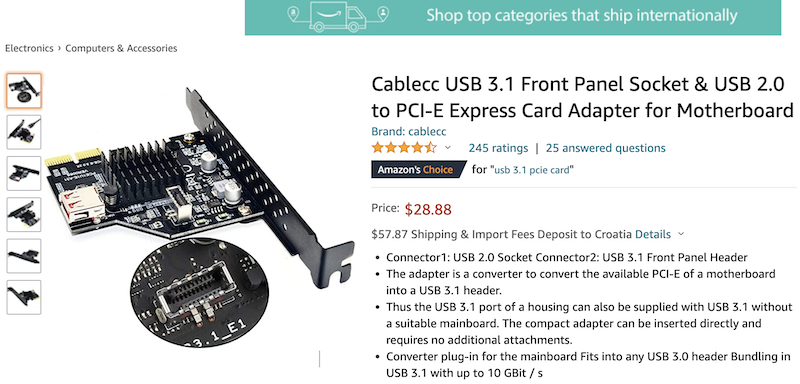
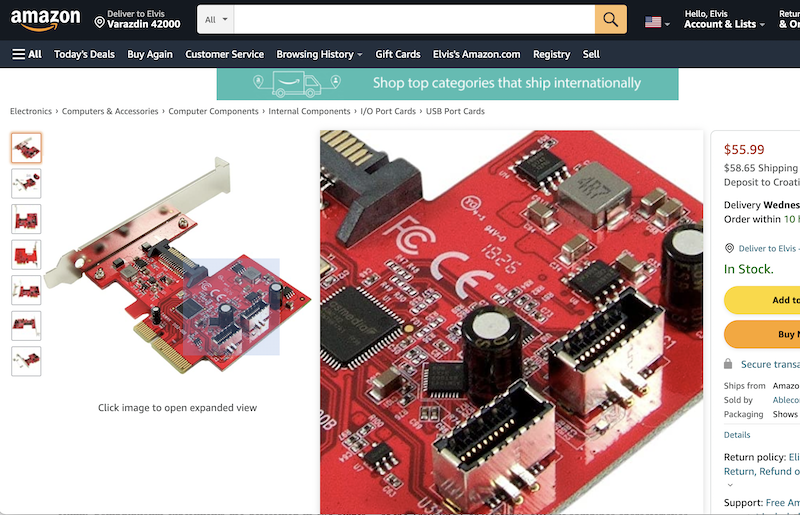
So, here’s the deal. I’ve got one single cable left unplugged: the USB Type-C port on the front of the case. To get that working, you need a 20-pin USB Type-C internal connector (specifically a USB 3.0 (3.1 Gen 2) Internal IDC 20 Pin Motherboard Header), but my motherboard doesn't have the slot for it. You can pick up a PCIe card to solve this, like the one in the photo. They are available on Amazon in two versions—I’d personally go for the red one from the Taiwanese manufacturer since it has two connectors, but I used this Chinese one because the actual connector is easier to see in the shot.
image

The catch? Amazon is charging $50 for shipping, which is exactly what the red version costs on its own.
image

So, my question is this:
Does anyone know if I can find this through our local suppliers or at a brick-and-mortar shop? It’s incredibly difficult to even find the official NAME of this hardware, let alone explain to a clerk what it actually does.
CPU recommendations? in Desktops ·
I'll just post this here instead of starting a whole new thread. I wasn't really sure where else to go with this question.
I’m trying to wrap my head around the logic behind Amazon's pricing. Why on earth are they still holding the price for the Intel Core i9-12900K above $2333, when absolutely everyone else is dropping theirs toward $2067?
It feels like a lose-lose situation: I can't flip mine for a profit, yet they refuse to actually lower their prices during sales. Honestly, I'd rather just walk into Best Buy than deal with them. To make matters worse, they use those fake "sale" tags—like marking something down from $7,500 to $7,200 (okay, I'm exaggerating, but you get the point).
What is even the point of all that?
GPU Buying Guide - (Read first post) in Desktops ·
wanderingbison9 said:It seems to me like you don't have the slightest clue how things actually work in practice. I'll leave you to your little theories.

Well, if "internship" at your firm is just a fancy word for being clueless, then I guess we’re on the same page: I haven't the slightest idea what your version of "professional experience" actually entails.
What part of my explanation did you miss? I clearly stated that the final export comes from the original source files. Proxies are strictly used during the editing process as a lightweight substitute for the raw footage—usually at a much lower resolution—to make the workflow less demanding on your system.
It’s honestly no surprise that our animation and film industries are falling apart here in the States, and advertising is following right down the drain when this kind of "practice" is allowed to continue.
Anyone still running Windows 7? in Software ·
Robin Clark said:Linux is a safe haven for the future because the industry is systematically and intentionally phasing out older operating systems.

With every single update, Windows just gets heavier, slower, and increasingly unfriendly to the user.
But there actually is a solution to this; you should check out my post here:

The other day I stumbled upon a video on YouTube (the downfall of uTorrent)—basically how they ruined uTorrent.
It honestly cracked me up because I’m still rocking the old uTorrent v. 2.2.1 from back in 2011.
After that specific version, they started stuffing every update with bloatware until they turned it into absolute garbage.
Version 2.2.1, once you apply a few tweaks, is absolutely perfect.

It’s the exact same story with operating systems.
A fully updated Windows 10 will gobble up anywhere from 3 to 5 GB of RAM just sitting idle. Once you strip away the bloat and all that non-essential Microsoft shit, it drops down to about a gigabyte and change.

I'm not even sure if I should say this without attracting a wave of anger, whining, or getting banned, but I think this is all a byproduct of increasingly mediocre developers who—due to a lack of fundamental knowledge—rely on overly complex frameworks and inefficient languages. Consequently, whether they realize it or not, they end up writing bloatcode constantly.
These are the people who look down on C and C++ because they consider them "outdated," preferring to do everything in C#.
Anyone still running Windows 7? in Software ·
Robin Clark said:I've been using Debian for quite a while now, but let's be real—the games, Microsoft Office, and that massive pile of niche software I rely on just aren't available on Linux.

For instance: imagine someone working in 3D using 3D Studio Max. They are essentially forced into using Windows because Autodesk doesn't even support macOS, let alone Linux.
If you're a Photoshop user, you can jump between macOS and Windows, but you're out of luck on Linux.
The same goes for anyone relying on Adobe Premiere or After Effects.
Sure, you have DaVinci Resolve, which does run on Linux, and there's Blender too. But you’d have to spend two years grinding just to learn how to achieve the same results—animations, MOCAP, effects, texturing, script programming, procedural modeling, and so on—as you would in Max.
And when it comes to gaming? It's Windows or nothing.

Personally, I love programming on Linux (using C++); I really appreciate tools like Valgrind and the whole underlying philosophy. However, I absolutely need Windows for standard applications like Microsoft Word, Microsoft Excel, and things like that. That is why on every machine I own (with the exception of my Macintosh M1), I run a dual boot setup. I keep both Windows and Linux ready to go.
Anyone still running Windows 7? in Software ·
Robin Clark said:you’re going to have to back that up—what exactly can Windows 10 do that Windows 7 can't?
Aside from driver support, which greedy corporations are intentionally withholding because they want everyone to migrate to these dumbed-down versions where users have less and less control over their own operating systems.

It’s just too expensive for them to develop drivers for hardware that most people consider obsolete and don't even use anymore. If I were you, I'd just hang onto the old motherboard, processor, and Windows 7 as a secondary machine.
Otherwise, you can always run VirtualBox on Windows 11 and keep Windows 7 running inside it.
Best PC Emulator setups? in Desktops ·
Robin Clark said:Can anyone suggest a decent pre-built setup for 4K$1667 without any peripherals?
I don't really need anything beefy enough for modern AAA titles; I’m mostly looking at emulation stuff.
Think Batocera, RetroArch, that kind of vibe.

What do you guys think about this one?

Or maybe this instead?

They're both used machines.

My budget is sitting right around $1667.

Honestly, I haven't kept up with the scene in ages, so I'm feeling a little lost on where to even start.

Why not just go with an Arduino?
Best gaming laptop under $1,500? in Laptops ·
granitegardener said:So, can a gaming laptop with a 1080p screen actually push a signal to a 2K monitor and let me run games at that higher resolution? I’m asking strictly from a technical standpoint here—not worrying about whether my frame rates will tank or anything like that.

Why wouldn't they be able to? 1440p is basically the modern standard anyway (though technically, 1080p is what most people call Full HD).