Home › Miscellaneous › Forum Help! ›
How do I use Multi-Quote?
How do I use Multi-Quote?
Started by Sean Watson11 · · 👁 5 views · 626 replies
Participants


 …
…
…
#42 ·
Jason Evans97 said:Hopefully this works now?
Is that better?
Is it okay now?
Well, I guess I really am a blonde through and through!
#44 ·
Jason Evans97 said:Can someone please weigh in on which of these quotes I've put together actually works?
None of them...
Just click the Quote icon and start typing... it's really that simple...
And if you're trying to break a post up into pieces before replying... just highlight the part you want with your mouse, hit the icon, and go from there... check how it looks before you hit send, because if you end up with "quote" written all over the place, just delete the extra bits... takes a little practice, I guess, but it isn't rocket science...
Can someone please tell me which of my quotes actually looks right?
See? Like that...
#45 ·
[QUOTE="cosmicskipper39, post: 382206, member: 654"]You can even do it "manually" if you want.
AltGr + F = [
AltGr + G = ]
Just type this at the start:
[quote.] (leave out the period)
Then wrap it up with this at the end:
[/quote.](no period here either)
will this actually work?
[QUOTE]at the start you write:
[quote.] (without the period)
at the end you write:
[/quote.](without the period)
let's see about that[/QUOTE][/QUOTE]
AltGr + F = [
AltGr + G = ]
Just type this at the start:
[quote.] (leave out the period)
Then wrap it up with this at the end:
[/quote.](no period here either)
will this actually work?
[QUOTE]at the start you write:
[quote.] (without the period)
at the end you write:
[/quote.](without the period)
let's see about that[/QUOTE][/QUOTE]
#46 ·
Jason Evans97 said:Can someone please weigh in on which of these quotes I've put together actually works?
can someone help me out?
which of these answers
is one of my quotes okay?
If they aren't okay right now, I might actually lose it!
#47 ·
redhawk76 said:redhawk76 As specified by:
Quote:It’s stalling, and we’re nearly at the finish line...
No, that simply wouldn't work.
To what end?Where exactly am I missing the mark? If you could provide some more detailed guidance, I’d appreciate it.
And why exactly is that the case?My process is a bit more convoluted than most—I tend to quote the entire block, strip away the parts that don't serve my point, provide my response, and then repeat the cycle by pasting the full quote again only to prune it once more.
Here is how I’m approaching this (I’ll provide as much detail as possible), From the very beginning....):
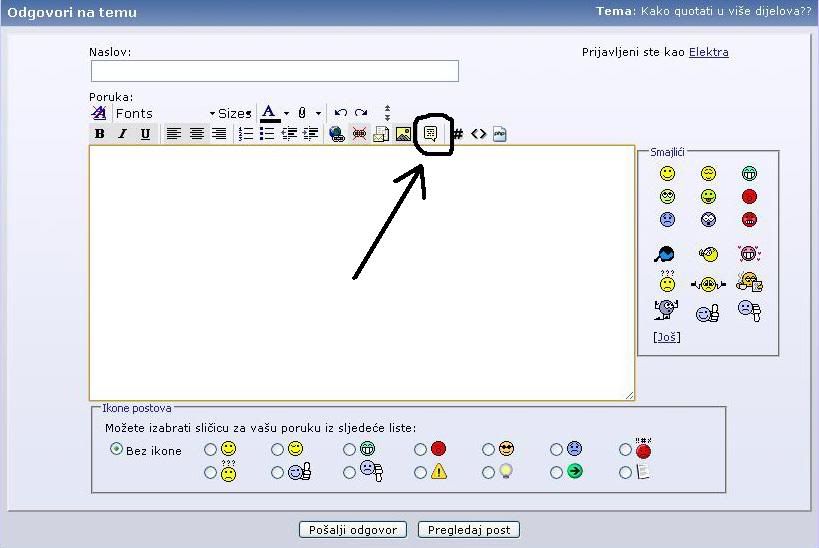
To quote a post, you simply hit the Quote button to trigger the quoted block; then, highlight the specific section of text you intend to address and click the icon—that little speech bubble symbol—to finalize your comment. Wrap Quote the designated portion of the text should be enclosed within quote tags at both the beginning and the end Wrap QuoteI will append my commentary following that Wrap Quote at the end; I’ll highlight the second section once more; add the icon again; and then follow up with another comment right after the quote.
It seems my formatting has gone completely sideways; everything—from my own commentary down to those smaller nested quotes—is getting swallowed up by one massive, oversized quote block at the end of the post. It makes sense, I suppose, given that my own remarks are nested within the primary quote block... wouldn't you agree?
I feel as though I am missing a crucial step in my process, or perhaps there is a fundamental flaw in my approach that remains stubbornly out of reach, yet despite my efforts, the error eludes everyone's perception.🤷
Everyone keeps telling me the same thing: highlight the text, hit the icon, leave a comment. So, I follow the instructions to the letter, but when you look at the actual results... well, the outcome speaks for itself.
Something isn't quite clicking, so I would appreciate it if someone with a bit of patience could take a look at my task list and help me pinpoint exactly where my logic is faltering.🙂
Test
Why does everything end up tucked inside one "giant" quote box—both my small quotes and my own comments? (I mean, I suppose there is some logic to it, since my comments are technically inside the "main" quote too... right?)
I must be doing something wrong,or maybe I'm skipping a step and nobody is catching on...🤷
test 2
Everyone keeps saying: highlight the text, click the icon, then comment... And that is exactly what I am doing, but... look at what happens...
Something isn't clicking, so I'm asking if someone patient could look at my steps and try to figure out where I'm going wrong...🙂[/I]
test 3
#48 ·
rapidrider3 said:None of them...
Just click the Quote icon and start typing... it's really that simple...
And if you're trying to break a post up into pieces before replying... just highlight the part you want with your mouse, hit the icon, and go from there... check how it looks before you hit send, because if you end up with "quote" written all over the place, just delete the extra bits... takes a little practice, I guess, but it isn't rocket science...Can someone please tell me which of my quotes actually looks right?
See? Like that...
marko said:Just click the Quote icon and then start typing... it's really that simple...
now
rapidrider3 said:None of them...
Just click the Quote icon and start typing... it's really that simple...
And if you're trying to break a post up into pieces before replying... just highlight the part you want with your mouse, hit the icon, and go from there... check how it looks before you hit send, because if you end up with "quote" written all over the place, just delete the extra bits... takes a little practice, I guess, but it isn't rocket science...Can someone please tell me which of my quotes actually looks right?
See? Like that...
blah blah
#49 ·
Brian Mitchell44 said:@redhawk76
So, here is how you handle quoting text:
HTML Code:
Now, sure, you could sit there and type out the code manually if you really enjoy wasting your time, but why bother? It’s much simpler to just highlight the entire block of text and click this little icon shown in the image. It’ll generate the code for you automatically. Isn't life easier when you don't have to do everything by hand?
🙂
🙂
#50 ·
rapidrider3 said:None of them...
Just click the Quote icon and start typing... it's really that simple...
And if you're trying to break a post up into pieces before replying... just highlight the part you want with your mouse, hit the icon, and go from there... check how it looks before you hit send, because if you end up with "quote" written all over the place, just delete the extra bits... takes a little practice, I guess, but it isn't rocket science...Can someone please tell me which of my quotes actually looks right?
See? Like that...
Is that right?
And if you want to break a post down into sections before replying... just highlight the specific part with your mouse, hit the icon, and then write... make sure to preview it before sending; if you see too many "quote" labels, just delete them... it takes a little practice, but it isn't hard... just go for it... like that...[/I]
Works?🤷
#56 ·
Sean Watson11 said:You can find the instructions for using the Multi-Quote feature right here:
FAQ - Multi-quote
I need some assistance here... everyone else seems to have this figured out, but I am completely clueless when it comes to this stuff. Could someone please explain how to insert a "quote" when I want to reply to specific parts of someone's post? Please, help!!! 😲
maybe I'll actually get it right this time
Sean Watson11 said:You can find the instructions for using the Multi-Quote feature right here:
FAQ - Multi-quote
I need some assistance here... everyone else seems to have this figured out, but I am completely clueless when it comes to this stuff. Could someone please explain how to insert a "quote" when I want to reply to specific parts of someone's post? Please, help!!! 😲
maybe...
Sean Watson11 said:You can find the instructions for using the Multi-Quote feature right here:
FAQ - Multi-quote
I need some assistance here... everyone else seems to have this figured out, but I am completely clueless when it comes to this stuff. Could someone please explain how to insert a "quote" when I want to reply to specific parts of someone's post? Please, help!!! 😲
if only
yippee, look at me go... absolute genius over here...
#59 ·
redhawk76 said:redhawk76 As specified by:
Quote:It’s stalling, and we’re nearly at the finish line...
No, that simply wouldn't work.
To what end?Where exactly am I missing the mark? If you could provide some more detailed guidance, I’d appreciate it.
And why exactly is that the case?My process is a bit more convoluted than most—I tend to quote the entire block, strip away the parts that don't serve my point, provide my response, and then repeat the cycle by pasting the full quote again only to prune it once more.
Here is how I’m approaching this (I’ll provide as much detail as possible), From the very beginning....):
To quote a post, you simply hit the Quote button to trigger the quoted block; then, highlight the specific section of text you intend to address and click the icon—that little speech bubble symbol—to finalize your comment. Wrap Quote the designated portion of the text should be enclosed within quote tags at both the beginning and the end Wrap QuoteI will append my commentary following that Wrap Quote at the end; I’ll highlight the second section once more; add the icon again; and then follow up with another comment right after the quote.
It seems my formatting has gone completely sideways; everything—from my own commentary down to those smaller nested quotes—is getting swallowed up by one massive, oversized quote block at the end of the post. It makes sense, I suppose, given that my own remarks are nested within the primary quote block... wouldn't you agree?
I feel as though I am missing a crucial step in my process, or perhaps there is a fundamental flaw in my approach that remains stubbornly out of reach, yet despite my efforts, the error eludes everyone's perception.🤷
Everyone keeps telling me the same thing: highlight the text, hit the icon, leave a comment. So, I follow the instructions to the letter, but when you look at the actual results... well, the outcome speaks for itself.
Something isn't quite clicking, so I would appreciate it if someone with a bit of patience could take a look at my task list and help me pinpoint exactly where my logic is faltering.🙂
Is that how it's supposed to look?
#60 ·
redhawk76 said:No, that wouldn't quite work the way you're thinking...
Where am I missing the mark? If you could provide some more specific guidance, I’d appreciate it.
My current process is a bit of a cumbersome workaround—I tend to hit Quote, copy the entire block, strip out the parts I don't need, write my response, then paste the whole thing back in just to prune it again, and repeat the cycle indefinitely.
Just testing this out—I’ve been doing everything by hand lately, just manually copying and pasting everything between the tags.
🔗 Similar threads
- Multiquote keeps saving forever in Forum Help! · Mar 11, 2019
- The "Multi-Hyphenate" Trap: Is it better to master one craft or chase everything? in Other Arts · Jul 30, 2026
- Do we care about multi-sport games anymore? in Fans · Jul 30, 2026
- The mental grind of multi-event sports in Hobbies & Leisure · Jul 29, 2026
- The weirdness of multi-sport influence in Fans · Jul 29, 2026