Home › Miscellaneous › Forum Help! ›
How do I upload images and videos to the forum?
How do I upload images and videos to the forum?
Started by swiftbison7 · · 👁 23 views · 1.9K replies


#1723 ·
Kenneth Rivera3 said:Greetings
Maybe someone could assist me with uploading a photo?
Thanks in advance, I suppose.
you just gotta drop the (image) code here
Just make sure you're grabbing the direct link—and for heaven's sake, watch those dimensions so it doesn't end up massive!
#1725 ·

#1726 ·
Kenneth Rivera3 said:If it isn't happening, then it just isn't happening. I guess.
I'll use these...
https://postimages.org/
I can't quite make heads or tails of what you're trying to get at here... it looks like just a link to a site for language translation services, which feels a bit out of place without any context or actual discussion to go along with it. If there was supposed to be a question about using these tools for American English nuances or perhaps a critique of how they handle local slang versus formal grammar, I'd certainly be interested in diving into that... but right now, it's just a lonely URL floating in the void, leaving me wondering what the actual point of the post was intended to be...
https://imgbb.com/
U "You just need to paste a link that ends in .jpg or some other image format. Quote this specific post of mine so you can see exactly how I managed to get my picture to show up...
#1727 ·
Alright, here is a quick breakdown on how to get this done.
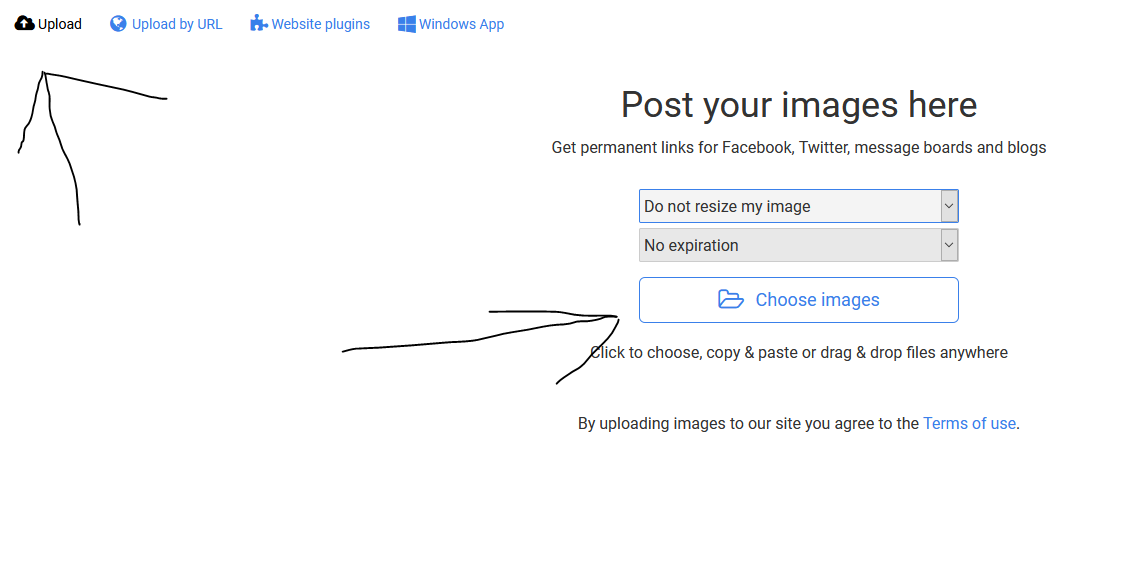
Step 1. - Head over to https://postimages.org/
Step 2. - Just click on the "choose image" button...
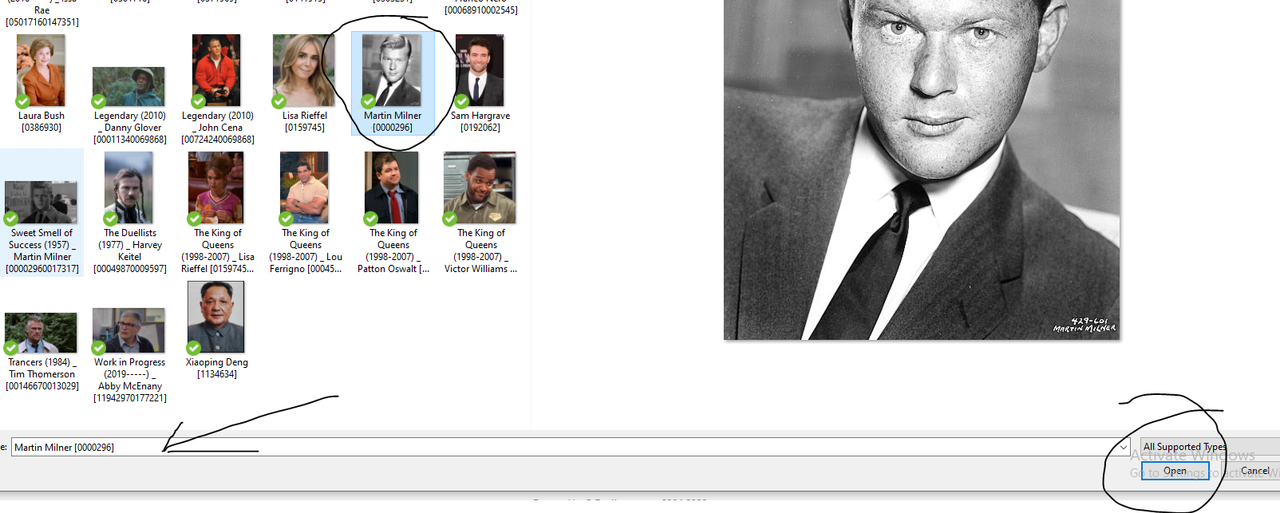
Step 3. - Locate the specific file you want from your hard drive, select it, and hit "open" on the right side.
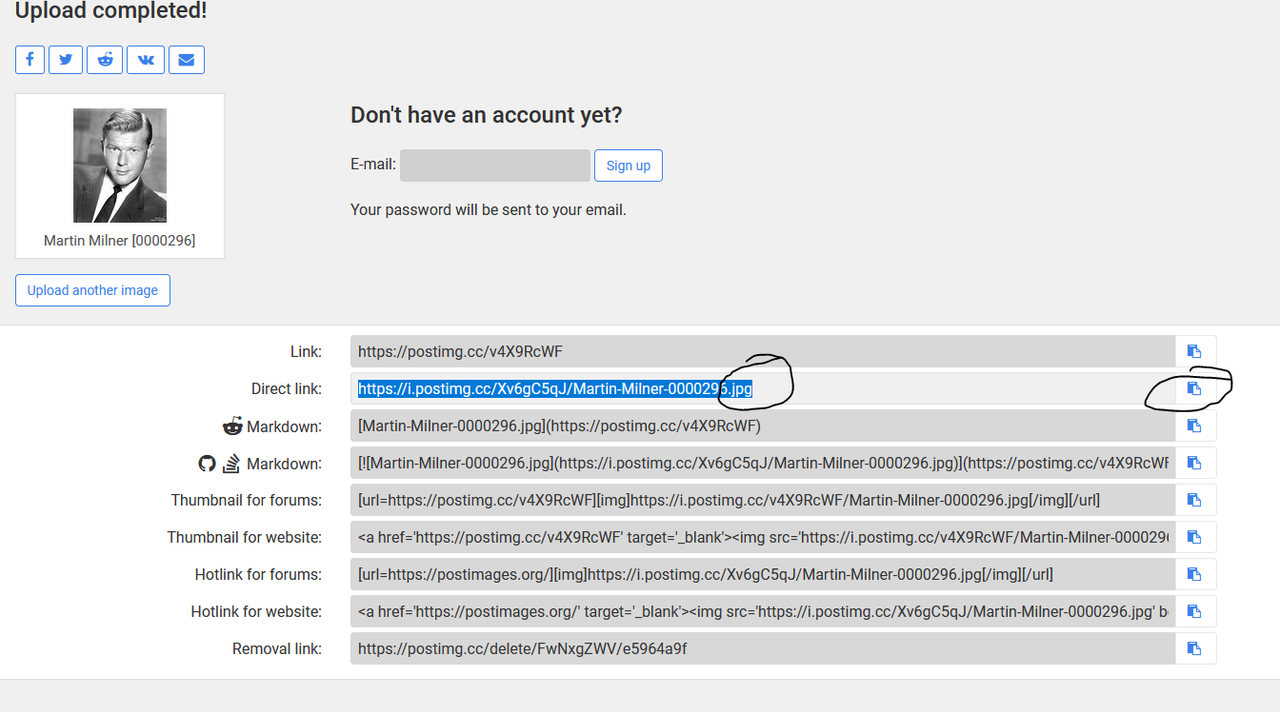
Step 4. - Once that's finished, you'll be presented with a sharing link. Copy that URL, go back to the forum, click on "", and paste it in there. Make sure you're grabbing the direct link that ends in .jpg or .png or something similar...
And there you have it, the uploaded image.

Step 1. - Head over to https://postimages.org/
Step 2. - Just click on the "choose image" button...
Step 3. - Locate the specific file you want from your hard drive, select it, and hit "open" on the right side.
Step 4. - Once that's finished, you'll be presented with a sharing link. Copy that URL, go back to the forum, click on "", and paste it in there. Make sure you're grabbing the direct link that ends in .jpg or .png or something similar...
And there you have it, the uploaded image.

#1728 ·
https://i.postimg.cc/d1XdWt4C/Grigor...utin-1916a.jpg
- Is this actually showing up? — because I can’t see the image at all.
- Is this actually showing up? — because I can’t see the image at all.
#1729 ·
It’s just not showing up. Once you actually see the image on your screen, then you’ll know you finally did it right...

#1730 ·
test

Susan Martinez2, it appears you mistakenly used a URL tag instead of an IMG tag; I've gone ahead and selected the correct one, so now the image is actually visible.
Susan Martinez2, it appears you mistakenly used a URL tag instead of an IMG tag; I've gone ahead and selected the correct one, so now the image is actually visible.
#1731 ·
Look, when you copy a link from Postimages—just like Jessica Morris6 suggested—you simply need to click on the image icon within the forum's post menu. Just open up that little pop-up window, paste the link right in there, and hit OK.
#1732 ·
Casey Bennett said:test
Susan Martinez2, it appears you mistakenly used a URL tag instead of an IMG tag; I've gone ahead and selected the correct one, so now the image is actually visible.
Not really—everything is identical between my post and yours... though once I log out, I can see your image, but mine is nowhere to be found.
No big deal, thanks to both of you for the effort. Moving on 🙂
I guess I'll just write 1,000 words instead of posting one image 😬



#1735 ·
Test



This thing isn't working at all. There isn't even an icon to upload images consistently across the site. It shows up in some places, then completely disappears in others.
This thing isn't working at all. There isn't even an icon to upload images consistently across the site. It shows up in some places, then completely disappears in others.
#1736 ·
Why on earth does this break whenever both images are visible at once?
It’s not an issue everywhere; certain subforums just don't allow direct image uploads. There aren't many of them, though, and even then, you're stuck just posting a link to the image.
It’s not an issue everywhere; certain subforums just don't allow direct image uploads. There aren't many of them, though, and even then, you're stuck just posting a link to the image.


#1738 ·



🔗 Similar threads
- How much influence do forum members actually have on moderator changes? in Feedback & Suggestions · Mar 17, 2023
- dariom2 in the History subforum in Feedback & Suggestions · Feb 24, 2023
- Has there been a security breach on the forum? in Forum Help! · Jan 19, 2023
- Is it against the rules to discuss non-EU immigration on this forum? in Banned Users Corner · Dec 30, 2022
- HTTPS and privacy: How much of our activity is actually being tracked on this forum? in Forum Help! · Dec 21, 2022