Home › Miscellaneous › Forum Help! ›
How do I upload images and videos to the forum?
How do I upload images and videos to the forum?
Started by swiftbison7 · · 👁 24 views · 1.9K replies


#1742 ·
I’d love to upload a photo, but honestly—I just can't be bothered to figure out how to resize it. I’ve tried a few times before, but I kept getting stuck and eventually just gave up.

#1743 ·
Try this online resizer...
- click the blue "Select image" button (that opens your File Explorer)
- pick the file and hit 'Open' in the bottom right
- on the site,
"Define the new size of your image using:" 'dimensions'
- in the "width" box, type (no quotes) '640' / leave 'height' blank
(640px width won't wreck an entire forum thread)
- click the green "Resize"
- once you see "Image filename.ext (jpg, png, etc.) resized", just click "Download"
- click the blue "Select image" button (that opens your File Explorer)
- pick the file and hit 'Open' in the bottom right
- on the site,
"Define the new size of your image using:" 'dimensions'
- in the "width" box, type (no quotes) '640' / leave 'height' blank
(640px width won't wreck an entire forum thread)
- click the green "Resize"
- once you see "Image filename.ext (jpg, png, etc.) resized", just click "Download"

#1744 ·
If you head over to https://postimages.org/, plus plenty of other similar sites, you'll find they all offer a resize option... You just pick something like 800x600 or maybe a bit smaller if that works better for you.

#1745 ·
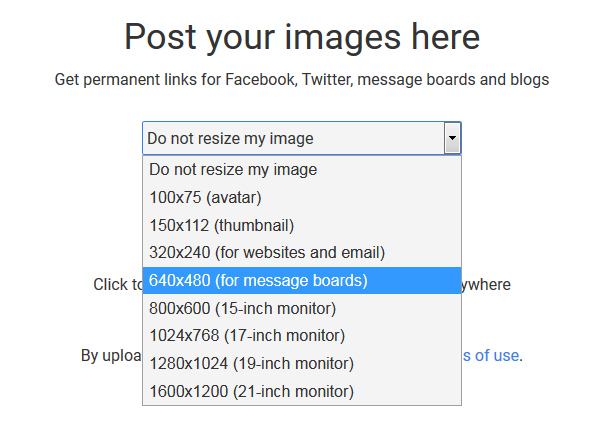
or we just don't touch the image at all—no resizing, no nothing—if the width is already under 640px.
#1746 ·
It only scales down if the dimensions are larger than 640x480; that’s just how the logic is set up...
#1747 ·
Jessica Morris6 said:It only scales down if the dimensions are larger than 640x480; that’s just how the logic is set up...
Yeah, you're absolutely right about that. Maybe I didn't frame my question quite right even though I thought I was being clear enough, but I'm talking about all five of them.

#1748 ·
Is there any way to upload a video directly from my phone's local storage? It seems like Tapatalk lets me post images just fine, but it’s being stubborn about video files.

#1749 ·
urbanfalcon7 said:Is there any way to upload a video directly from my phone's local storage? It seems like Tapatalk lets me post images just fine, but it’s being stubborn about video files.
I'm pretty sure you can't upload videos directly to the forum—it just isn't built that way. Your best bet is to toss it onto an external hosting site and then just drop the link here...

#1751 ·
Test run

(image)[/IMG]
https://ibb.co/d29gNRg
(image)geico gas prices[/IMG]
https://postimg.cc/Z9j7B4PN
https://i.postimg.cc/sXCtL2vT/0-02-0...1-5324cb14.jpg
View on imgur

(image)[/IMG]
https://ibb.co/d29gNRg
(image)geico gas prices[/IMG]
https://postimg.cc/Z9j7B4PN
https://i.postimg.cc/sXCtL2vT/0-02-0...1-5324cb14.jpg
View on imgur


#1754 ·
It’s just like any other process: you save the file locally to your computer and then upload it exactly the way Jessica Morris6 explained right here
#1755 ·
Casey Bennett said:It’s just like any other process: you save the file locally to your computer and then upload it exactly the way Jessica Morris6 explained right here
I actually already have the photo saved locally since I posted it on Instagram. I know I could just dump it onto Flickr or Postimages and link it here, but honestly, who wants to deal with uploading things twice? That's why I haven't posted it on the forum yet.
It’d be pretty sweet if the forum supported direct Instagram embeds—it's super easy on their end since they provide the embed code, so maybe the site just needs a quick little update?
#1756 ·
I’ve gathered all the plugins compatible with this specific version of the forum. When I run a quick search for "Instagram," about six different threads pop up immediately. Take a look through them and see if there’s anything worth integrating here, then feel free to drop a suggestion over on the US General Discussion board...
https://vbulletin.org/forum/forumdisplay.php?f=234
https://vbulletin.org/forum/forumdisplay.php?f=234



🔗 Similar threads
- How much influence do forum members actually have on moderator changes? in Feedback & Suggestions · Mar 17, 2023
- dariom2 in the History subforum in Feedback & Suggestions · Feb 24, 2023
- Has there been a security breach on the forum? in Forum Help! · Jan 19, 2023
- Is it against the rules to discuss non-EU immigration on this forum? in Banned Users Corner · Dec 30, 2022
- HTTPS and privacy: How much of our activity is actually being tracked on this forum? in Forum Help! · Dec 21, 2022