Home › Miscellaneous › Forum Help! ›
How do I upload images and videos to the forum?
How do I upload images and videos to the forum?
Started by swiftbison7 · · 👁 22 views · 1.9K replies






#1766 ·
Hi there. I’ve posted an image, and right now it’s just displaying as a link, which is exactly what I’m aiming for. However, once I log out, the full image appears instead of just the link, and that isn't my intention.
How can I fix this setting?
How can I fix this setting?

#1767 ·
Jason Grant2 said:Hi there. I’ve posted an image, and right now it’s just displaying as a link, which is exactly what I’m aiming for. However, once I log out, the full image appears instead of just the link, and that isn't my intention.
How can I fix this setting?
If you're referring to this specific thread, you set everything up correctly, so the image shouldn't be displaying at all. It sounds like this might be something on your end, honestly...

#1768 ·
Does anyone know where I can find a guide on how to embed a video directly into a post?
I'm trying to do something similar to what was done in this thread:
I'm trying to do something similar to what was done in this thread:
#1769 ·
Joshua Kim39 said:Does anyone know where I can find a guide on how to embed a video directly into a post?
I'm trying to do something similar to what was done in this thread:
Try quoting his post and you'll see exactly how it's formatted. Also, just a heads up, you can only embed videos from YouTube here.


#1772 ·
Just running a quick test to make sure everything is firing on all cylinders! It’s like when you first plug in a new piece of gear—you just want to see if those little lights blink and if the connection holds steady before you dive into the deep end. Everything seems to be working perfectly on my end. Ready to roll!


#1774 ·
Jessica Morris6 said:Try quoting his post and you'll see exactly how it's formatted. Also, just a heads up, you can only embed videos from YouTube here.
How do I get those YouTube tags to work?
Is it some weird CP thing or what?
later

#1775 ·
First, I suppose you just grab the video URL directly from YouTube.
https: //www.youtube.com/watch?v=Ch0wMWnXjeA
Then, if I'm not mistaken, you simply wrap that link in bold brackets like this:
.
And that should result in:
https: //www.youtube.com/watch?v=Ch0wMWnXjeA
Then, if I'm not mistaken, you simply wrap that link in bold brackets like this:
.
And that should result in:
#1776 ·
mistyotter35 said:First, I suppose you just grab the video URL directly from YouTube.
https: //www.youtube.com/watch?v=Ch0wMWnXjeA
Then, if I'm not mistaken, you simply wrap that link in bold brackets like this:
.
And that should result in:
Everything looks good, but how do you pull those YouTube tags?
Cheers

#1777 ·

But why isn't it larger? I followed the recommended dimensions perfectly. It’s not bigger than 800p. Is this an issue with Imgur?

#1778 ·
electricnomad8 said:
But why isn't it larger? I followed the recommended dimensions perfectly. It’s not bigger than 800p. Is this an issue with Imgur?
I’m assuming you selected Hotlinking instead of the Direct link (the second option), which means people actually have to click the image just to see its full size.
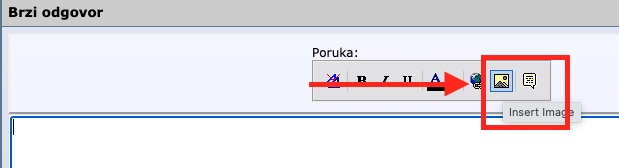
You need to copy the Direct link, select the image icon here, and then paste it. It looks like this:

The final result should look like this.

#1780 ·
mellownomad7 said:Everything looks good, but how do you pull those YouTube tags?
Cheers
I suppose you just type them in manually, since the forum doesn't really provide an option for them.
🔗 Similar threads
- How much influence do forum members actually have on moderator changes? in Feedback & Suggestions · Mar 17, 2023
- dariom2 in the History subforum in Feedback & Suggestions · Feb 24, 2023
- Has there been a security breach on the forum? in Forum Help! · Jan 19, 2023
- Is it against the rules to discuss non-EU immigration on this forum? in Banned Users Corner · Dec 30, 2022
- HTTPS and privacy: How much of our activity is actually being tracked on this forum? in Forum Help! · Dec 21, 2022