+ I know exactly what I'm talking about—this isn't just some random stuff I read online, but actual experience from when I was running a GTX 970. Back then, it only had 3.5 GB of VRAM, and honestly? It caused quite a few stutters in certain games...
Whatever you do, don't go picking up a graphics card with only 3GB of VRAM. In today's gaming landscape, that's just not going to cut it—it's honestly way too little.
+ You can never really stay ahead of the curve—within just six months or a year, there’s always something else hitting the shelves. If you’re the type who absolutely needs the latest and greatest, I guess you have to buy things the second they launch just to get a little breathing room before the next big thing drops... isn't that right? It’s the exact same headache as buying smartphones. I remember picking up a Samsung Galaxy S6 back at the start of 2016, and before I knew it, I was already looking at the S8.
So, I've got the forum pulled up and my RAM usage is sitting at about 51%—even though I'm running on a single 8GB stick. Keep in mind, I've got uTorrent running in the background to seed some files, plus my antivirus and all that good stuff... It seems totally normal to me, so there's really nothing to worry about.
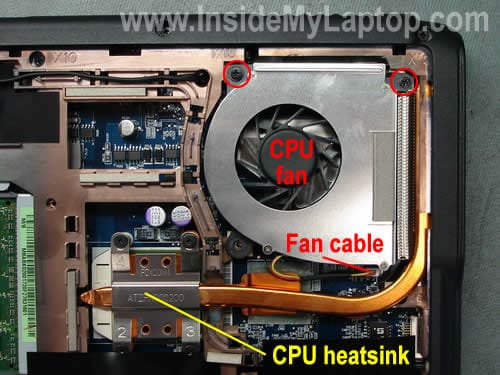
If they couldn't even track down their own authorized service partners, I’m really at a loss for what kind of repair shop to suggest to you... I mean, isn't it just classic? You're basically being held hostage by a heatsink that refuses to cool the processor, right? It’s almost like this...
Try reinstalling both your Nvidia drivers and the Intel HD graphics driver.
It really depends—I think most laptops follow a specific routine where the Intel HD graphics handle all the light stuff, like just browsing the web, while the Nvidia chip only kicks in when you're actually gaming or running something heavy. So, maybe try reinstalling the Intel HD graphics first, and then go ahead with the Nvidia installation?
To start, I’d recommend uninstalling your graphics drivers completely. If that doesn't do the trick, there's a pretty good chance you're looking at a hardware issue—either the GPU itself or the motherboard might be acting up.
Not at all—you might want to take a closer look at the screenshot you posted... Long story short, the forum itself was just offline. It happens from time to time, and honestly, it has absolutely nothing to do with Windows 10 or any other OS. It was just a server issue on our end, but everything should be back up and running now.
It’s kind of like trying to force iOS onto an Android device—it just isn't built that way. This is proprietary software from Verizon, so naturally, it's designed to work exclusively with Verizon SIM cards. Unless I'm totally off base here—and please, feel free to correct me if I am—you probably won't be able to make that switch. You’ll likely just need to pick up a stick from T-Mobile instead.
That's right—you definitely need an invite code first. Honestly, though, you can't just ask anyone for one; people aren't going to hand them out unless you've proven yourself as a solid member of the torrent community. That means once you download something, you actually have to seed it, follow all those specific site rules, and stay active... it's more involved than most people think, isn't it?
Try using this tool to completely wipe out your current graphics drivers, then grab the latest ones straight from NVIDIA—once that's done, let me know if you can actually get into the game. Also, just curious about the games themselves—if updating the drivers doesn't fix the issue, are we talking about official copies or cracked versions? If they're cracked, you might need to try a different crack or maybe find a completely different version of the game altogether...
Just grab http://www.guru3d.com/files-details/...-download.html
It’s a little tool designed to completely wipe out your current graphics drivers—once that's done, just head over to the NVIDIA site and download the latest versions http://www.nvidia.com/Download/index.aspx
Let me know if that actually fixes things for you..
You should probably jump into Disk Management—just delete that existing partition and then create a fresh one. That ought to do the trick... https://www.lifewire.com/how-to-open...gement-2626080
Just one quick question—why would you even bother turning that off? Is it because Windows is taking forever to boot up? Or are you just messing around with the settings for the fun of it? 😁
Maybe give the motherboard a shot... Since that board is pretty old now—we're talking an LGA 1155 socket—you probably won't find one sitting on a shelf at Best Buy or Micro Center. You'd likely have to hunt one down used on eBay or maybe Craigslist.