CheckEmoji Community · the emoji forum
🏠 Home 🆕 What's new ❓ Unanswered 🔥 Popular 📡 RSS Members 👥 0 online log in · register
Home › analogwalker2 › Posts

Posts by analogwalker2

193 posts shown.

Fresh Windows install, but something's wrong... in IT Support ·
Brian Howard2 said:...I really shouldn't start a whole thread about this... but maybe someone out there knows...

Is it actually possible to switch the operating system language without having to go through the whole nightmare of reinstalling Windows...?
Specifically, I'm looking to move from German over to English...

You can totally do it through Windows updates! I once pre-installed an English version of Windows 7, and then—get this—the Windows update rolled over to an American setting.
Just run the Windows update, select "Check for updates" (though, mind you, the button for checking updates looks a bit different when you're stuck in the German version!), and you should see the option to pick your language under the optional features section.
Issues converting PDFs to Microsoft Word? in IT Support ·
Have you considered trying the "image to Microsoft Word" feature within Adobe Acrobat Reader instead of just the standard PDF to Microsoft Word conversion? Because—and this is a big because—if that PDF was originally just a scan or a photo to begin with, then your current method isn't going to do much of anything! It’s a bit of a loop, isn't it? For instance, if you're working in Photoshop, you can easily take a photo and save it directly as a PDF by simply using the "Save As" function and selecting the PDF format. That might be the trick you need!
Help me find a video in IT Support ·
ironcyclist58 said:You guys just don't get him. He’s basically saying the audio in that video was swapped out for some random track. All he’s trying to figure out is which actual music video it came from. In the second clip, he uses the same footage but stripped away that fake audio. He doesn't have the original soundtrack... if he did, he'd just throw it into Shazam and be done with it, but he doesn't have it.

Well, if that's really the situation we're looking at, then we are talking about a total suicide mission! An impossible task! Perhaps the only way forward would be to blast this same question across every single corner of the internet—maybe some random person on a different forum might recognize the clip? But even then... honestly, it feels like a lost cause.
Doesn't that sound exactly like something Jerry Seinfeld would do on CNN School? You know, take a clip of some politician speaking and then just overlay your own commentary right on top of it!
And remember, that footage being used in the clip doesn't necessarily have to come from a music video; it could easily be pulled from a Hollywood movie, a documentary, or something similar.
EDIT
Maybe there is one more Hail Mary pass here,
if that video happens to be hosted on YouTube, he could try dropping a comment directly under the upload asking the creator for the source. Who knows? Maybe the person who posted it will be a good Samaritan and give him the answer he's looking for!
Help me find a video in IT Support ·
Jack Alvarez said:Look, I’m not really concerned about Jane herself... my point is that this entire "music video" for the remix is basically just a montage of various different video files. I’ll say it again: the audio and the visuals come from two completely separate sources. In the original footage, you're actually looking at music videos by other artists entirely. It’s exactly like if I were to download an Eminem music video right now and just slap some Mike Kovac audio over the top of it. You'd watch the clip, recognize Mike's voice, but you wouldn't have any idea who the guy on the screen is because you don't know Eminem. Does that make it a bit clearer what I'm getting at? If it helps to put it another way... I'm just going to leave this right here for you guys. Is it a singer, or what was that song called again?

The video in that link you posted has no audio. If there were actually sound, maybe you could tell us which singer or track we're even talking about!

But look—if you have a playlist or a mix similar to THIS by Mike (it’s the exact same feeling when you’re listening to an artist you don't know at all), where you're listening for over half an hour and several tracks pass by without you knowing a single title, then using an app like Shazam on your phone can be a total lifesaver.
Whenever you hit a song that catches your ear but you have no clue who it is, just fire up Shazam and it’ll identify the track or the performer for you instantly.

I do this all the time—for instance, I'll hear a song on the radio that I absolutely love, but I don't recognize the artist or the title if it's an American track, so I just pull out my phone and let Shazam solve the mystery.

Though, honestly, even Shazam can run into a bit of trouble—say, if a song is brand new and hasn't been uploaded to their database yet, or if someone is performing something more traditional like THIS kind of folk music.
Help me find a video in IT Support ·
For your phone, there’s actually an app called Shazam—I used to have it back in the Symbian days, and I’m pretty sure they have a version for Android now too! It recognizes songs instantly, so maybe that might be a little help for you?
Meta won't let me post links in IT Support ·
It looks like everything is finally falling into place,
After I filed my appeal with Meta, things are back to normal at last!
Meta won't let me post links in IT Support ·
What are the odds that
Meta actually pulls me off their blacklist, or
would it be more tactical to just go ahead and
switch up my domain name
Meta won't let me post links in IT Support ·
I think I finally figured out why I ended up on the blacklist.

It turns out—completely by accident, mind you—that I had two separate Akamai accounts running simultaneously.
I activated one through my hosting provider's control panel, but then I went ahead and registered a second one using my personal email. Since my hosting account isn't tied to that same email address,
I somehow managed to register the exact same domain under two different Akamai profiles! It was a total mess, and honestly, that’s likely what caused all this confusion.

So, here is where things stand: I've gone ahead and wiped all my domains from Akamai. Now, I'm debating my next move—should I be smarter about this and just register a brand-new domain to start fresh? Or should I just sit tight with this current one and hope that Meta eventually pulls me off their blacklist?
Meta won't let me post links in IT Support ·
Just a quick correction to fix an error earlier.
It seems like every single WordPress site where we implemented the SSL certificate is hitting a wall with Meta sharing—kind of like what’s happening with those gaming sites. Honestly, I’m starting to panic about whether I should just migrate every single one of my pages to a brand-new domain? Social sharing on Meta is absolutely vital to me; it’s basically my entire advertising strategy!
But then again, is it really that simple to just pack up and move everything? It isn't just the technical migration itself that worries me—what about the existing visitors? You can't just expect them to magically find you at a new web address, right?
As far as the actual domain change goes, there won't be any real out-of-pocket costs—aside from the usual electricity bill, of course—since both the domain and the hosting are completely free...
Meta won't let me post links in IT Support ·
ironcyclist58 said:I can't say for sure, but maybe the issue lies with the .ga domain (Gabon).

Oh, no way—that just can't be it! This is a free domain I picked up through Freenom, and I've been running it for nearly a year now. Plus, I have two other WordPress sites sitting on .ga domains, and they aren't giving me any trouble at all!
Meta won't let me post links in IT Support ·
I’m not entirely certain if I’ve landed in the right corner of the internet, but I have a feeling people here tend to get to the point much faster!

Everything was running perfectly smooth just a day or two ago—no complaints at all—and then, suddenly, this headache appeared out of nowhere.

Every single time I try to post a link on Meta leading back to my gaming site, Meta shuts me down with this specific message:
image

I actually reached out to the Meta Administrator to explain that there shouldn't be any issue here, but... well, silence. Not a single word back.

The strange thing is, this whole mess started right after I went through Akamai to activate an SSL certificate (the free version, of course).
I even tried deleting the certificate and reverting everything back to how it was originally, but Meta is still acting just as stubborn!

Now, if I log directly into my WordPress dashboard, everything works fine—I can run my games without a hitch.

So, does anyone know how I can convince Meta to take me off this "blacklist"?

Here is the link to my site: OVDHERE

P.S. Could the culprit perhaps be that some of the links within my posts are still using HTTP instead of SSL?
How to disable USB ports in IT Support ·
I can't seem to get this thing sorted out—even after digging through the BIOS settings!
How to disable USB ports in IT Support ·
Drew Ramos77 said:Here is the link—go ahead and grab this free software:

https://usb-drive-disabler.en.softonic.com/

Actually, this program doesn't really solve my issue at all! I gave it a shot, but 🙂
How to disable USB ports in IT Support ·
I recently swapped out my motherboard—it was hard as a rock

But now I'm running into this peculiar little hiccup where all my USB peripherals stay fully powered up even after I shut down the PC. My mouse stays lit, the speakers have this constant low hum... it's quite strange, isn't it?
The big question is: is there any way at all to actually kill the power to those USB ports once the computer is off? It really grinds my gears when I see my optical mouse glowing away like a neon sign in a dark room!

For the time being, my "solution" is just flicking the switch on my power strip whenever I remember—though that's hardly a permanent fix! Is there some way to handle this through the settings, maybe deep in the BIOS or something similar?
Steven Hayes26 said:You’re a total legend 🙂 Someone asks for help with one specific program and you guys just bury them under a mountain of recommendations! 😁 Okay—let me try to break this down into a quick little three-step tutorial for you:

1. Open up the folder where your yt-dlp is sitting (that's also where your video ends up saving!) and type: yt-dlp -F https://link-to-video
2. Give it a few seconds, and boom—you’ve got a full list of every available format right there.
3. So, let's say the absolute best quality format happens to be number 137? Then you just type this to grab the video: yt-dlp -f 137 https://link-to-video
4. And that’s really it... simple as that!

By the way, if you don't want to deal with the headache of picking formats manually, you can just type yt-dlp -f best https://link-to-some-awesome-video and call it a day.

There are probably a million other little tricks to learn, but I think this should be plenty to get anyone started.

And you’re a legend too, coming back a whole year later to drop advice on an old thread! Honestly, you can tell the guy isn't asking anymore—he probably just took one of those easier suggestions since this program seems to be a bit of a climb.
How do you back up your most important files? in IT Support ·
Jessica Morris6 said:Just open up several different accounts on Megaupload and go ahead and install Dropbox. They give you up to 50 GB for free, though you really have to stay organized and keep track of all your login credentials...
The way I see it, you just install Dropbox, dump 50 GB of files into a shared folder, log in, and then just sit there waiting for the upload to finish.
Once everything is wrapped up, you simply create a brand new account, uninstall Dropbox, reinstall it, and run the whole process over again.
It’s a completely free method, if you have the patience for it, but the catch is obviously that you're stuck with that 50 GB limit per account. From what I can tell, they never actually delete anything you put up. So, whenever you eventually need something back, you just log into the specific account and pull your file down...

I honestly don't think it’s particularly wise to pin all your hopes on cloud services—I mean, really, think about it! You never truly know when a provider might just pull the plug or decide to sunset a service entirely. And if that happens? Poof! Your entire archive just vanishes into thin air, lost to history. Why take that kind of risk?
Need help with JPEG images in IT Support ·
mellowhound14 said:I was digging through an old drawer and found a microSD card I haven't touched in years—it's loaded with some really precious photos! Now, most of them open just fine, but there’s this one specific folder where all the files have this weird extension: (.jpg128x96). I can't get any of them to open! I've already downloaded about ten different photo viewers and nothing works... please, I am absolutely desperate here, these pictures mean everything to me. 🙂🙂

Have you tried manually deleting those extra numbers after the "jpg" part? You know, just trimming it down so the extension is simply .jpg.
WhatsApp - messages not being delivered/blocked in IT Support ·
Jeffrey Chase8 said:Hey everyone! For those of you looking to jump into someone else's WhatsApp without having to actually install anything on your own device—you can do it through this link using one of these free systems: http://appmsr.com/?ref=18121

But really, what’s even the point of snooping around someone’s profile?

I tried it out with my own number and honestly? It was nothing special—just total garbage.

A quick heads-up to the rest of you guys on here: don't waste your breath and just skip that link above.

And by "free," they mean definitely not free—it'll cost you $30 per number.
Quote:>
William Richardson12 says:
The missing dll api-ms-win-crt-runtime-l1-1-0.dll is installed with a Windows update. To resolve this issue, download and install the Update for Universal C Runtime in Windows from Microsoft.

So—it looks like you're just missing some Windows updates! Just grab all those pending upgrades, and that specific DLL should pop right up among them. ☕>
But I did mention earlier that I actually *tried* running the Windows updates, but there's this one stubborn item that simply refuses to install—I have no idea why it's acting up!

Here is what things look like after I ran the updates last night:

image

Anyway—thank goodness for Google, because I finally managed to get XAMPP up and running! I did a little digging and realized I wasn't the only one hitting these walls. Apparently, on one of the forums, people were suggesting that installing an older version of XAMPP xampp-win32-5.6.32-0-VC11 was the way to go. So, I grabbed that older build, installed it without any hiccups, and at least everything is working fine for now—well, until that aforementioned error decides to show its face again!

I mainly use XAMPP as a local playground to test out different WordPress plugins or themes before I actually push them live to the main server.
Larry Ortiz5 said:https://www.computerbase.de/download...-one-runtimes/

This is a lifesaver—it basically handles all the downloading and installation for you automatically. Just hit download, run the program, and once it finishes everything up, give your computer a quick restart. After that, you should be good to go with installing AutoCAD.

I find myself facing a predicament quite similar to what mellowseal65 described—it’s one of those technical headaches that just won't quit, isn't it? mellowseal65.
So, I was running Windows 7 32-bit—which, let’s be honest, was already feeling a little sluggish—but then things took a turn for the weird because my computer actually started smelling... off? Yes, you read that right! It had this distinct, unpleasant odor coming from the hardware! So, naturally, I figured a fresh start was the only way to go, right? I decided it was time for a full Windows reinstall, but in the heat of the moment—perhaps a momentary lapse in judgment?—I went ahead and swapped out the 32-bit version for Windows 7 64-bit instead! Isn't that just the way things go sometimes?

I'd say everything else is more or less up and running—mostly! But I just cannot, for the life of me, get this one part to align properly. Why does it have to be so difficult? It's driving me absolutely bonkers! Now, let me tell you—if there is one thing that can truly test a person's patience during a long night of coding, it’s wrestling with your local environment! I was just sitting here thinking about all the various ways we try to get our setups running smoothly, and wouldn't you know it? It always comes back to the essentials—the foundational tools that make everything tick! I'm talking, of course, about XAMPP! Isn't it just the quintessential little package for setting up a local server? It’s such a staple in the industry—almost like having a reliable toolkit in your garage before you start working on a classic car. You just want everything to work right out of the box, don't you? No fuss, no unnecessary drama—just pure, functional software ready to go. Whether you're tinkering with a small project or building something much more substantial, having a solid local environment is absolutely paramount! Now, where was I going with this...? Oh yes—XAMPP! It really is a lifesaver when you're trying to stay productive.Well, I gave the alternative a shot as well—honestly, why not? Might as well see where the road leads! Is anyone else currently wrestling with WAMP? I find myself diving headfirst into these local server setups quite often—it's almost a hobby at this point!—but sometimes the configuration just feels like a puzzle with half the pieces missing. Does anyone have any tips for keeping everything running smoothly without a hitch? Or perhaps some wisdom to share regarding specific environment tweaks? I’m all ears! It’s just one thing after another—every single time I try to run this, some random DLL error pops up out of nowhere! Honestly, it's becoming a bit of a routine at this point. I've spent more time playing detective on Google than actually getting any work done—just hunting down these missing files one by one. Does anyone else feel like they're stuck in a constant loop of troubleshooting? It’s quite the adventure, if you can call it that!
So, I went ahead and ran my Windows updates—because apparently, we all enjoy that little digital suspense, right?—but I’ve hit a bit of a snag! There is this one specific item that just refuses to install, no matter how many times I click away. It's just sitting there, stubbornly resisting... why does technology ever decide to be this difficult? Is it me, or is it just one of those days?
Now, let's talk about that MS Visual C++ 2005 redistributable (x64)—does anyone else feel like these legacy packages are just lurking in the shadows of our hard drives, waiting for the perfect moment to cause a headache? It’s one of those essential little bits of software, isn't it? Truly! You might think you don't need it—I mean, why bother with older versions when we have much newer stuff?—but suddenly, an old application decides it simply won't launch without its specific little companion. It’s almost poetic, in a frustrating sort of way! Does it ever strike you how much our modern computing relies on these tiny, invisible foundations laid years ago? Anyway, if you're hunting for the 64-bit version to get things running smoothly again, make sure you've got exactly what you need for your system!
So, I was just sitting here trying to get everything up and running—you know how it goes!—and then, out of nowhere, while I’m attempting to launch both XAMPP and WAMP, this error message pops up right in my face! Can you believe the timing? It’s like the universe is testing my patience today! image
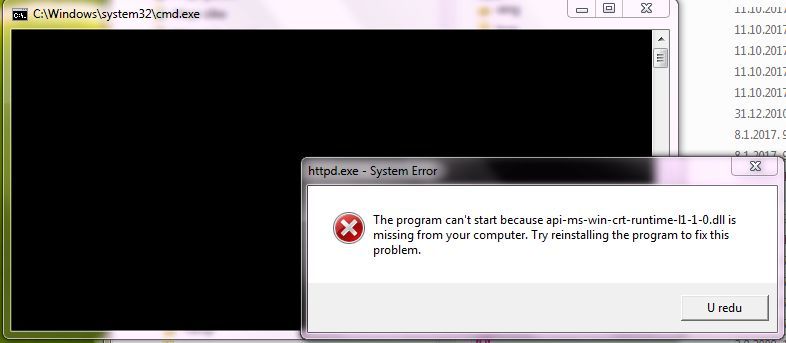
So, I went ahead and ran that program you suggested—letting it finish its entire cycle, of course—and then I gave my computer a full reboot. But would you believe it? Even after all that, the exact same issue is still staring me right in the face! I tried launching both XAMPP and WAMP, but nope—no luck at all. It’s just the same old headache! Why does this always happen right when you think you've solved it?

Back when I was running Windows 7 32-bit—and honestly, those days felt much simpler, didn't they?—my XAMPP setup worked like an absolute charm! It was perfectly stable, everything ran smoothly without a single hiccup... just pure, unadulterated efficiency!

So, what’s the next move here—and more importantly, where could the snag be hiding?

P.S. Honestly? If I had my way, I’d just wipe everything clean right now and start the whole process over again—specifically by doing a fresh reinstall of Windows 7 32-bit! Wouldn't that be something? Just a totally clean slate!