CheckEmoji Community · the emoji forum
🏠 Home 🆕 What's new ❓ Unanswered 🔥 Popular 📡 RSS Members 👥 0 online log in · register
Home › Andrew Peterson2 › Posts

Posts by Andrew Peterson2

313 posts shown.

New laptop acting weird in IT Support ·
let us know what the guys at the repair shop end up saying

Sent from my Samsung Galaxy S series via Reddit
NTLDR is missing error - how to fix? in IT Support ·
Just download Windows XP or borrow a disc, there isn't really any other way...

Then you can run fixmbr and fixboot—I've got some instructions right here for you:
http://helpdeskgeek.com/how-to/fix-mbr-xp-vista/

Look, this doesn't guarantee anything will actually work... it all depends on how badly those system files are trashed.
If that doesn't cut it, your next move is Windows Repair, but for heaven's sake, back up your data first. It would be a smart move to boot from a Linux live DVD—maybe something like Linux Mint—so you can just grab your important files from the hard drive and toss them onto a thumb drive or an external disk. Honestly, though, this might be a bit too technical for you, so maybe find someone nearby who actually knows what they're doing.
I can't promise that the repair tool will just fix the corrupted files either... sometimes those things just end up wiping out your important data entirely.
New laptop acting weird in IT Support ·
Look, regarding that battery—every single one of them has an internal chip designed to report its health back to the computer. It’s entirely possible that chip is just acting up... being unstable or whatever
You should probably just take it to a repair shop and have them swap it out. Tell them exactly what's happening with the power, and while you're there, maybe ask them to look into that BIOS issue too

Sent from my Samsung Galaxy S series via Reddit
Is it safe to download Java from this link? in IT Support ·
So, what are you actually planning to use Java for?
I was checking out that link you mentioned, and honestly, those versions are geared toward developers building Java apps... not really for the average person just trying to get things running. This one here is more for regular users
https://www.java.com/en/download/
If you need it for stuff like web portals or online banking and all that...

The installer you download is pretty tiny, but don't let that fool you—it'll reach out to the internet to grab everything else you need before it actually installs anything.

On the link I sent, it won't even bother asking whether you have the 32-bit or 64-bit version
The whole deal with 32-bit (x86) versus 64-bit (x64) basically boils down to the fact that 64-bit is just the standard now. It wasn't such a big deal back in the day, but we made the jump because 32-bit couldn't address more than about 3.2GB of RAM—you know, that working memory on your motherboard... we really only started moving over once processors could actually handle a 64-bit operating system, like Windows.
It’s been at least a decade-long transition... it was slow at first since plenty of apps didn't support 64-bit yet, so people just stuck with 32-bit for a while longer, but nowadays you just go straight to 64-bit. Some 32-bit apps might run fine on a 64-bit system, but others won't... usually drivers or software that's deeply tied into how the OS functions. For something like banking, if you're running a 64-bit OS, you're definitely going to need the 64-bit version.

If your computer is at least five years old, there's a 95% chance you're already on 64-bit... it would probably help if you told me which version of Windows you're running so I can walk you through how to check.

EDIT
Just so the URL doesn't confuse you—both sites are owned by the same people. Oracle.
Java used to be owned by Sun Microsystems, but then Oracle bought them out and rebranded all their products under the Oracle name. The link I gave you is legit and safe. 🙂
Maybe just hit us up here next time—the folks in this thread actually know their stuff, whereas the IT help desk is usually a total dead end... 🙂
Webcam keeps blinking in IT Support ·
Honestly, you should probably just plug it in when you actually need to use it—kind of like slapping a sticker on your laptop when you're done... keeps things tidy.

Maybe try nuking those drivers and reinstalling them? Sometimes an update just messes everything up and leaves you hanging... nothing a clean install can't fix.

It wouldn't hurt to wipe Skype and grab the latest version, too. Might as well stay current.

If that doesn't do the trick, you might want to look into some kind of software firewall... at least then you'll see who's actually knocking on your door asking for permission and you can decide if they're worth it.

Sent from my Samsung Galaxy S series using Reddit
So, I picked up the ASUS 27... it’s got an AMVA panel ($500)—can't quite remember the exact price in dollars off the top of my head—but honestly, I've got nothing but good things to say about it.
It comes with two HDMI ports, which is a huge plus for me if I ever feel like hooking up something else, maybe an Android TV or whatever...
Plus, it actually has built-in speakers that pull audio straight through the HDMI cable. I used to think built-in monitor speakers were a total gimmick, but after using these, I'm actually impressed. At least I don't have a mess of extra wires cluttering up my desk 🙂

Sent from my ASUS_Z00AD via Tapatalk
Some laptop keys aren't working? in IT Support ·
Did you try grabbing the drivers directly from the HP site? http://h20564.www2.hp.com/hpsc/swd/p...&swEnvOid=4192
Under the keyboard section, look for HP Hotkey Support (American, International)... I went ahead and selected Windows 10 (64bit) on the link myself.

If that doesn't do the trick—and since you mentioned messing with the thermal paste earlier—it’s possible you pulled one of those ribbon cables connecting the keyboard a little too hard...
Internet connection issues in IT Support ·
Maybe try booting up in safe mode? I think you just hold down the F6 key... honestly, I can't remember for sure since I'm typing this out on my phone...
Internet connection issues in IT Support ·
Go ahead and post some screenshots of what’s going on. First things first, though—try grabbing all those latest updates... maybe they finally fixed the bug in this version.

Sent from my ASUS_Z00AD via Tapatalk
Internet connection issues in IT Support ·
Everything's fine 🙂

Honestly, you don't even need an external drive since everything's already sitting right there on your computer... just reset it back to factory settings. There is actually a way to skip wiping your data, but if I were you? I'd back everything up regardless... just to be safe.
It shouldn't touch your D drive—it'll just mess with the C drive—but hey, nothing's ever 100% guaranteed. If that D drive is its own separate physical disk, I’d just move all your important stuff over to it, unplug it from the machine entirely, and then run that "refresh" thing.
Maybe try hunting down some new drivers first. If that doesn't cut it, then unfortunately you're looking at a refresh or a full reinstall.

A bit of a workaround, though... maybe just grab a cheap USB Wi-Fi adapter and use that until you get this sorted out.
Internet connection issues in IT Support ·
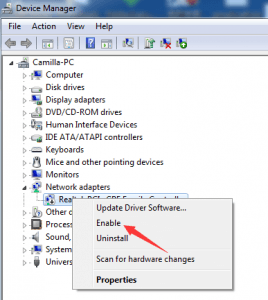
Check your Device Manager first just to make sure nothing got disabled by mistake, image
It’s possible you don’t even have Realtek—maybe it’s listed under some other name entirely.

If that doesn't do the trick, you might want to try reinstalling the drivers for that network card... sometimes that fixes whatever got messed up in the process.

Maybe try downloading a tool like http://www.iobit.com/en/advancedsystemcarefree.php—might be able to clean up the damage.

And honestly, if all else fails, the nuclear option is just to reinstall Windows. Go into the recovery menu and reset everything back to factory settings. It might give you an option to keep your files and just reset the configurations, but seriously... just back everything up first. Better safe than sorry.
Strange wrist/hand pain during pushups in Health ·
So where exactly does it hurt?? In the wrist??

You probably strained your wrist—that's why it's acting up—and honestly, it’s gonna keep throbbing as long as you keep grinding out pushups. You don't have to quit everything entirely, but maybe take at least two weeks off from them... just switch things up for a bit.

I actually did something similar once—I was trying to pry open a fence with my hand, basically just hammering my fist against it to get it to give way since it was stuck tight. A few days later, my wrist swelled up and was super tender to the touch. Everything finally settled down once I just stopped messing with it. If you're hitting pushups pretty regularly, there's a good chance you just overextended the joint, pushed it too far, and now it's paying the price.

Sent from my iPhone 15 using Reddit
PC freezing while playing Battlefield 1 in IT Support ·
Maybe try throwing that GPU into another rig just to see if it freezes up there too?

Another move would be to run MemTest to check your RAM.

It might not even be the memory—could be anything, really—but hey, we gotta narrow things down somehow...

Sent from my ASUS Z00AD via Reddit
PC troubleshooting help needed. in IT Support ·
Is there any chance you could just borrow a GPU from another rig? Or maybe just pop yours into a different PC entirely to see if it actually works...
How to recover a portion of a Word document? in IT Support ·
Just rewrite it—make a backup, throw it on a thumb drive or toss it into the cloud... whatever.
Take this as a lesson learned.

Sent from my iPhone 15 via Reddit
How to recover a portion of a Word document? in IT Support ·
Look, a backup is a safety net—one you clearly didn't set up, so here we are. To answer your question... once you hit save after making changes, they’re permanent.

There’s one part that’s still a bit fuzzy, though. When you closed out and the system asked if you wanted to save your progress, I’m betting you clicked "Yes."

Sent from my iPhone 15 using Reddit
Need some help here! in IT Support ·
Just grab this program, check every single box you see, run the scan, and make sure "automatic fix" is ticked too. It’s gonna take forever—seriously—so just let it run overnight while you're sleeping... Just don't forget to go into your settings and disable the auto-sleep or power-saver mode, otherwise, it'll just hang halfway through.

http://www.iobit.com/en/advancedsystemcarefree.php

image

image

img host

If it doesn't stick the first time, just run it again. Once it's actually finished, your PC should feel a bit snappier...
PC troubleshooting help needed. in IT Support ·
Pull the card out and try plugging the monitor straight into the integrated graphics—see if you can get any life out of it there.

Sent from my ASUS_Z00AD via Reddit
There’s a way to do this, but honestly? It’s a headache. You could grab some partitioning tool, shrink your existing partition on that external drive, carve out some new space from the empty bits to make the partition you actually want, and then shuffle all your data over to it. If you run out of room halfway through—which happens—you’ll just have to delete whatever you moved, shrink it again, and try expanding the other one...

It’s a tedious, long-winded process. I’d say just let it run overnight while you’re asleep so it isn't hovering over your shoulder the whole time.
But there’s a catch—a big one. There’s always a risk. If that partitioning software crashes or if the power flickers—whether it's a freak accident or you accidentally trip over the cord—you’re looking at potential data loss. Beyond just losing files, you might end up with a totally corrupted partition table, and then some stuff is gone for good. No coming back from that.

The easiest, smartest move? Just go buy another drive. Use one as your main and the other as a dedicated backup... you know, just in case one of them decides to kick the bucket.