The only thing is, the Core i7-12700K isn't exactly a steal right now. Sure, it's easily one of the best chips on the market for both gaming and productivity, but the price tag is pretty steep.
Personally? I’d hold out for a better deal on the 5600X or just wait until the 5600 drops. But hey, if this is the budget you've set aside, go for it.
I think you hit a wall at 3800 or 4000MHz with the Core—go any higher and the processor actually slows down because you're messing up the Infinity Fabric multiplier. The board is solid.
Yeah, you could definitely go cheaper on the power supply. Got any specific suggestions from Micro Center?
A smaller chassis is great if you want something you can practically pack up like a laptop and take home from the office—saves a ton of desk space. Otherwise, just stick to a standard tower.
By the way, I called Micro Center and they confirmed the DeskMini X300 comes with a tiny little cooler. You can actually mod a Wraith Stealth to fit, which performs better than whatever stock cooler is inside the DeskMini. It’s pretty sketchy that nowhere in ASRock's official online documentation actually mentions if a cooler is included. 🤦🤦🤦
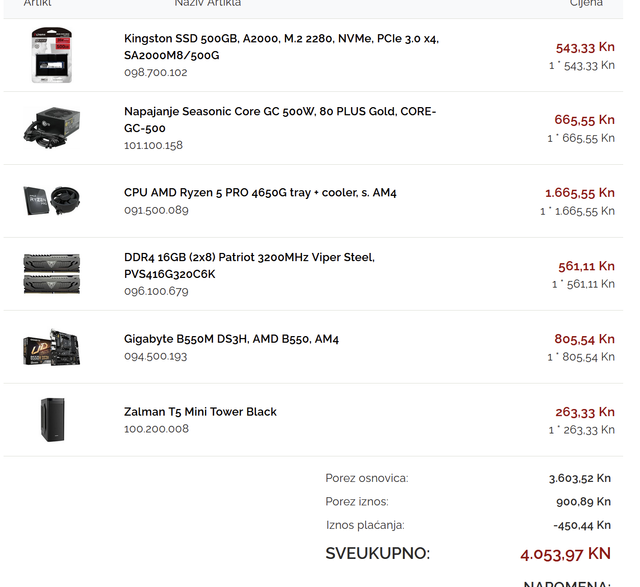
I'm putting together a rig for an engineer, mainly for AutoCAD. Right now, they’re grinding away on a laptop with 8GB of RAM and a 2500U. It gets the job done okay, but we need more horsepower. We already have the monitor and peripherals covered.
One route is just upgrading that current laptop with another 8GB stick.
But I’m looking to cut costs, so I’ve been eyeing a build around a 4650G with 2x8GB of RAM. From what I gather, integrated graphics should be fine for AutoCAD.
Send me your suggestions. Paying cash, any shop works. Happy to buy pre-built or hunt for parts at different retailers if it saves money. Just a 512GB SSD for now—external drive for everything else.
Do those "Pro" features on the Ryzen actually matter? I was also thinking about an ASRock DeskMini X300 I saw at Micro Center, but it doesn't come with a stock cooler out-of-the-box, which makes things a bit more complicated.
Look, if you're doing graphic design where color accuracy is the whole point, the monitor becomes the absolute priority. You don't actually need a beast of a machine just to run Adobe Photoshop. It's hard to give a solid recommendation without knowing which way you're leaning. You could drop $333 on a decent screen, or go way higher depending on what else you want in the build. For a Photoshop setup, you can honestly get away without a dedicated GPU.
I’d personally go with that 31.5" AOC. You aren't exactly gaining anything from the 144Hz refresh rate or a VA panel, and the 31.5" model is significantly cheaper. Plus, a flat 31.5" screen looks perfectly fine to me. Honestly, 27" feels a bit too small once you start dealing with curvature, but hey, that’s just my take. I definitely wouldn't pick up a curved monitor for work—it just feels off. Games are a different story, though. In theory, VA panels are better for movies because of the contrast, but bigger is always better. 😁
I’m running that 31.5" AOC right now. Honestly, it’s solid—great for gaming and even better for work.
That other one is curved and hits 144Hz, so you can't really compare them directly. What kind of GPU are you rocking?
btw, pairing a VA panel with 144Hz isn't exactly the dream setup. VA is inherently "slower" than IPS, even if the contrast is better. My IPS is doing fine, but 75Hz isn't asking for much.
Depends on what you're actually trying to do. In principle, if you want a monitor, just use a monitor. A TV isn't a great choice for sitting right up in front of it.
No big deal. Let me know once you get that rig set up and tell me what you think. You'll be one of the first, probably the very first person on this subreddit with a 3080 😁
Like Kimberly Gomez34 said, it’s a solid build, you just need to sort out the cooling. I'd say the Freezer 34 is plenty—more than enough for a Ryzen 5 5600X. It's a 65W chip and there's zero reason to overclock it for gaming. Honestly, the Freezer 34 beats basically any stock cooler, let alone the Wraith Stealth that comes with the 5600X.
Throw in a couple of extra fans. It's not a huge investment. If you can afford this rig, you've got enough $100 to beef up the cooling.
Look, they’re different in basically every way, so a direct comparison is a headache. If you're just looking to game, I'd say the one with the 1650Ti and the 120Hz screen is your best bet. But don't sleep on the display specs—check the refresh rate, the panel type, and the brightness (nits)—plus the SSD capacity and the GPU.
If I were in your shoes, I wouldn't skimp on the monitor just to afford that build. I’d rather go with the one featuring the GeForce RTX 3070 and a decent display (around 2000-$1000 for 144Hz at 1440p)
And yeah, it looks pretty similar to that Confor build with the GeForce RTX 3070. You're paying a premium regardless; there's no other way to source parts like this. Plus, if I were working with this much cash, I’d probably opt for a more reliable motherboard and power supply (no clue what they used here).
That said, this is basically peak performance. You aren't getting much better than this.
Roger Garcia4 said:How does it stack up against what I wrote above?
Hard to say without knowing the rest of your build, but generally, it's a much better value. You're getting a slightly slower gaming CPU for way less cash, but you get 8 cores instead of 6 and a solid stock cooler, making it more "futureproof."
If you're chasing every single frame in CS:GO or something like that, then stick with the Ryzen 5 3600 (not the XT!) or maybe go Intel.
Alexander Moore67 said:Right now, you can't even find the 1600AF in the US, and since it's priced at about $67, it's actually cheaper than the 2700X, so the 1600AF just doesn't stand a chance in this market.
Availability isn't the point; those parts come and go. And honestly, back when they were around, nobody suggested pairing one with a 2080Ti because of the massive bottleneck. On the flip side, if someone actually plans on upgrading down the road, grabbing a 1600AF for $300 or a 2700X for $383 is a solid move. But I wouldn't build a $2,000 rig where the CPU is destined to be a bottleneck unless I'm planning an upgrade—and most people don't.
Usually, people swap out their GPUs before touching the CPU. It's just a weird outlier right now where picking up an older chip actually makes sense, while picking up an old GPU absolutely does not.