CheckEmoji Community · the emoji forum
🏠 Home 🆕 What's new ❓ Unanswered 🔥 Popular 📡 RSS Members 👥 0 online log in · register
Home › wanderingbison9 › Posts

Posts by wanderingbison9

627 posts shown.

AT&T Speedport - DLNA/UPnP setup in IT Support ·
I’m reaching out here because the networking pdf section seems pretty quiet lately.

I've been trying to get my router—the one mentioned in the thread title—to act as a DLNA server so that the hard drive full of movies I have plugged into its USB port shows up on all my DLNA clients.

In the router's web interface under media playback (DLNA), I shared the specific folder containing my movies, and everything seems to indicate it's active; I even made sure UPnP is enabled, yet not a single device on my network can see it, whether it's my two TVs, my PC, or my phone.

Interestingly, when I shared that same drive via the router as standard network storage (a Windows share), I was able to access it, though it wasn't exactly seamless since it doesn't just pop up automatically—I have to manually type in the IP address and the directory path to get in.

Does anyone have any thoughts on how to fix this? It's becoming a bit of a headache because my plasma TV doesn't support Windows shares, and my other TV, which actually does support them, won't connect to any Windows share at all—not even the one on my PC, despite me entering the credentials perfectly. Could the fact that the second TV is failing to connect be a sign that there's an underlying issue with my network setup? I've already gone through the trouble of resetting everything I possibly could.

Thanks
Monitor buying guide (mega-thread) in Computer Peripherals ·
Thomas Wells5 said:Just wanted to give a quick update—I actually went out and picked up that AOC model at the Best Buy today, and while it was maybe $27 more expensive than I planned, I didn't really mind. But man, I made such a massive mistake by grabbing those 2.1 Logitech speakers for about $117 to go with it. Once I got home and hooked everything up, I realized the sound is only coming through the subwoofer; I tried testing it on five different devices and it’s the exact same issue every single time, so I guess I'll be heading back for a return or exchange

Don't take this the wrong way, because I really don't mean to be pushy, but I have to ask: did you actually connect the satellite speakers to the subwoofer unit? 😬 Is there some kind of volume knob specifically for the satellites? And which exact speaker model are we talking about here?
Monitor buying guide (mega-thread) in Computer Peripherals ·
wiredotter14 said:Yeah, exactly—that’s the real headache because once you lock those settings in, you're stuck without an easy way to adjust the brightness.
I find myself using my monitor both in broad daylight and late at night, so obviously, I can't keep the brightness at the same level. During the day, I usually have it around 80%, but once the sun goes down, I need to drop it to somewhere between 0 and 20%.
It honestly drives me crazy that monitors don't just include a dedicated brightness button; instead, you have to click through five different sub-menus using those tiny little buttons, and if you miss one, the monitor switches the input or something equally annoying...

I really can't wrap my head around why they wouldn't just assign one of the buttons specifically to brightness, especially since it's the one setting people tweak more than anything else, whereas nobody is changing their other settings every single day, right?

Why not just set the Color Temp user settings based on that review and go with Gamma 1. e?

Well, like I mentioned before, I actually prefer my Dell because of where the buttons are placed, and one of them gives you direct access to the brightness. I actually had a similar setup on a 22" Dell back in 2009 too...
Monitor buying guide (mega-thread) in Computer Peripherals ·
wiredotter14 said:Look, I get why some people care about just plugging in the TV without needing an extra tuner. Personally, I don't even watch TV, so that’s really not a factor for me.

By the way, did you end up getting that same AOC model?
Do you have any tips on how to dial in the colors? I feel a little lost trying to navigate all those individual settings versus those pre-set Gaming modes.

Actually, I didn't; I stuck with the Dell, which we figured uses a similar—if not identical—panel.

You can find all the specific settings right here: https://pcmonitors.info/reviews/aoc-q3279vwfd8/

Alternatively, you could just switch over to sRGB mode. You'll get a slightly wider gamut than the standard sRGB, though the blacks and midtones might look a tiny bit darker, and the whites will be a touch cooler. However, you'll be locked at 200 nits, which actually aligns with those newer standards for daytime usage.

There's even a YouTube video in the review that walks through the OSD... if you ask me, just keep that Gaming mode turned off.
Monitor buying guide (mega-thread) in Computer Peripherals ·
wiredotter14 said:The only downside to this monitor is that it doesn't have a built-in TV tuner for watching broadcast television directly.

P.S.

That one you linked is actually a curved monitor, which isn't ideal for watching movies unless you're sitting back in a chair at a distance like you would when you're gaming.

I wouldn't really count that as a flaw, mostly because I'm not even sure you could find a QWHD monitor out there that comes equipped with a DVB-T2 tuner and HEVC decoding. Besides, standalone receivers are so incredibly small these days that they wouldn't even clutter your desk... you could even just grab an HDMI DVB-T2 HEVC stick and call it a day, right?

As for me, I don't typically watch movies on my 32" QWHD anyway; I tend to sit further back than my usual working distance, maybe about 27-31 inches from the screen (unless I'm feeling particularly lazy and decide to just kick back in front of the big screen in the living room😬).

To wrap things up, I honestly don't see any deal-breakers that would stop someone from picking up that AOC.
Best PC builds for 3D modeling? in Desktops ·
amberhawk5 said:When it comes to modeling, I agree that it doesn't really matter, but at the end of the day, modeling results in some kind of photo or video output, which makes it quite important. Everything you need for photo editing is also necessary during 3D visualization, at least according to my clients.

If that's the case, you really have to know exactly what you're doing. You need to understand how to properly activate and configure color management across every single application in your workflow.

The general issue on these forums is that people tend to ask for advice without actually specifying their exact process or the type of output they are trying to achieve, don't you think?
GPU Buying Guide - (Read first post) in Desktops ·
Robin Bennett18 said:Thanks for getting back to me; since I’m working with the Studio version, I assume the GPU will be doing most of the heavy lifting, though I suspect I might still run into some bottlenecking issues regardless. My main workflow revolves around Adobe Photoshop and Lightroom, which aren't exactly the most graphics-intensive programs out there.
I'm also planning on picking up a 4K monitor, so I want to be able to handle some 4K editing here and there, which is why I'm looking closely at this specific card.

..I actually did some reading on that website, which is how I landed on this particular card in the first place... I just wasn't sure which specific model to go with, but it seems it was already clarified above that it doesn't make much of a difference for DaVinci Resolve. Right now, Palit has a pretty decent price point, sitting somewhere around $370-$380...

I am still weighing whether it makes sense to build an entirely new PC, and honestly, would I even notice a massive jump in speed if I switched over to a Ryzen system? (I'm thinking about grabbing an AMD Ryzen 7 2700X because the price is fantastic right now, and it doesn't feel like a huge leap away from the 3800X... plus, having those 8 cores makes it a better bet than an R5 3600X).

I also have a laptop running an Intel Core i7 with an 860M, but I'd prefer to keep that for mobile use; do you think an i5 4670K paired with a modern card might actually outperform my current i7 setup?

It really doesn't matter which specific model you pick, as an Overclocked GPU barely offers any tangible benefit in Resolve; while overclocking the memory might squeeze out a few extra frames, I'm not entirely sure how much headroom the 2060 Super actually has for memory overclocking.

If you move to an AMD platform, the real advantage would be working with an NVMe SSD alongside uncompressed files or proxies, since you'd get four dedicated PCIe lanes straight to the processor—which could be a lifesaver if your current read/write speeds are slowing you down.

It would be incredibly helpful if you could specify what kind of input and output you're dealing with, specifically regarding file types, resolutions, and frame rates.

At the end of the day, just go ahead and grab that graphics card, and then you can see for yourself if the performance boost is actually enough to satisfy your needs.
Best PC builds for 3D modeling? in Desktops ·
amberhawk5 said:In my view, this build looks solid, though I’d definitely suggest double-checking the compatibility between the motherboard and the RAM, as that can sometimes be a bit tricky. I have to disagree with the gentleman above who suggested that a Dell might be overkill for this type of work; if anything, color accuracy is absolutely critical here. It really is vital. Now, whether Dell's quality control is consistent enough to ensure you don't end up with ten different calibrations out of the box is something I can't speak to with certainty, but I do own an older model of this specific monitor and I honestly couldn't be happier with it.

With all due respect, while a properly calibrated monitor is certainly important, there are plenty of Dell monitors available that come factory-calibrated at nearly half the price, even if they lack the wide color gamut that makes this particular model such an advantage. Does one truly need to pay a premium for DCI-P3 or Adobe RGB color space just for modeling purposes? I once had an older, highly-regarded Dell U-series monitor where the "factory-calibrated" sRGB mode was practically useless because the white balance leaned far too red, and even its sRGB gamut felt slightly off; meanwhile, the other modes offered a gamut so wide that you simply can't manage it without a colorimeter. While I would love to own a monitor like this and actually utilize its advanced features, is it strictly necessary for this specific task?
AMD Radeon R7 250 and 4K TV in Desktops ·
wiredotter14 said:[url]

The GT 1030 would honestly be the perfect card for this setup, though I really hope he can find a used one for under $100.

If it weren't such a sentimental piece of gear to me, I'd probably just sell him mine.[/url][/I]
GPU Buying Guide - (Read first post) in Desktops ·
Robin Bennett18 said:Hi there,
My current setup is:

CPU: Intel Core i5 4670k
Motherboard: Z87 OC
PSU: Corsair VX430 (this definitely needs an upgrade)

I was thinking about upgrading to an AMD Ryzen 7 3800X along with a new motherboard to help with video editing and things like Adobe Photoshop, but I'm starting to wonder if I'll actually see a massive difference? If it's only going to be a 15-20% boost, wouldn't it make more sense to just

invest in a better graphics card instead (specifically for DaVinci Resolve)?

Initially, I had my eye on an EVGA GeForce GTX 1660 super, but now I'm feeling like a 2060 Super might be a much smarter pick for that price range...

Does anyone have a recommendation for a solid 2060 Super, or perhaps something else entirely?

If you aren't running Resolve Studio and are sticking with the free version, you might find that a faster CPU with more threads will really help when it comes to decoding and encoding H.264 or H.265 video, especially those tricky RAW camera formats—particularly if you're working with multiple video tracks at once. Plus, if you find yourself using the iPad for Fusion work, keep in mind that almost all native Fusion effects rely heavily on the CPU. Only you can truly judge if your current processor is cutting it for your specific workflow, but realistically, in terms of multi-threading performance, that i5 is likely nearly half as fast as an AMD Ryzen 5 1600X. As for the GPU, I wouldn't suggest anything less than a 2060 Super with 8GB of VRAM. And honestly, I'd avoid anything sitting between that and a 2080 Ti, since the latter costs three times as much while being less than 50% faster.

It might be worth digging into this study here:

https://www.pugetsystems.com/labs/ar...iResolveStudio
Monitor buying guide (mega-thread) in Computer Peripherals ·
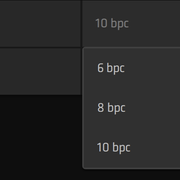
wiredotter14 said:image

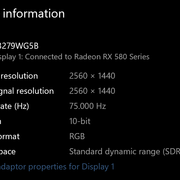
image

If you head into your Windows Settings and check under Display within the Radeon Settings, you should find what you need.

I have a quick little update regarding the Lenovo: I decided to hang onto it because some folks over at the doom9 forums pointed me toward a handy little tool called CRU, which actually allowed me to enable 10 and 12-bit color, and wouldn't you know it, it works perfectly now. Honestly, who knows why those settings weren't already enabled in the EDID?

The color gradations look absolutely flawless now, completely free from any of that annoying dithering from AMD or MadVR...
PC build under $1,000? in Desktops ·
neonheron9 said:I saw those complaints on Amazon too. I was going to ignore it, but since you guys are bringing it up, yeah, better to hunt for something else.

Like this one?

https://www.amazon.com/s?k=monitor

It seems decent enough since the curve helps mitigate those viewing angle issues, but it’s missing FreeSync, isn't it?
PC build under $1,000? in Desktops ·
neonheron9 said:After reading through all your takes, I finally pulled the trigger on this monitor

https://www.displaydb.com/monitor/philips-275e1s

$500, 27", 1440p, 75Hz

Turns out 23" was way too small, but 32" felt massive... so I found this middle-ground option. Hopefully, it's decent. 😁

I'm not some hardcore pro gamer or anything. Pretty sure this setup is more than enough for what I need. 🙂

One person on the forum mentioned they owned this model and complained about the panel quality being poor... Also, would you consider looking into a 144Hz option instead? Since certain games or specific scenes can easily push past 75 fps, relying solely on Vsync might lead to some stuttering—not necessarily screen tearing, but actual stuttering.
The link doesn't even show up unless you actually go into the quote... this forum is such a pain.

First off, I’d suggest stepping down the processor to a Ryzen 7 3800, because once you start adding more cores, you don't really see that much extra bang for your buck with these types of programs. Wouldn't it be better to take those savings and put them toward a Radeon RX 5700 XT, which performs significantly better than the RX 5500 XT when you're working in OpenGL?

As for the memory... I'm not entirely sure if 32GB will be enough, so wouldn't the smartest move be to grab 2x16GB now and just add another 2x16GB later if things get heavy? After all, AM4 doesn't support Quad Channel AFAIK, and besides, the post doesn't even specify which motherboard you're using.
Could you please lay out the full specs from the quote? I'm also wondering if a monitor is included in the package, and if so, what kind we're looking at... Since AutoCAD isn't exactly cutting-edge when it comes to squeezing every bit of power out of modern hardware, I can't help but feel this might be a bit more expensive than it actually needs to be.
Monitor buying guide (mega-thread) in Computer Peripherals ·
wiredotter14 said:image

image

In both Windows Settings and Radeon Settings under the Display tab

Is MadVR some kind of player?
If I download an HDR torrent, can I just watch it straight up in VLC player?

Thanks. So it looks like everything is working fine on your end.

Man, what a headache. I was actually starting to really love this Lenovo. But here's the thing—when I test gradients from a 16-bit image using D3D Fullscreen Exclusive mode via MadVR, they look perfectly smooth, whereas in windowed mode, you see all those nasty banding issues. It seems like Exclusive mode manages to bypass Windows entirely and pushes a 10-bit surface directly to the GPU, which might actually be why it works so much better. I guess I’ll have to give it some more thought.

I just double-checked, and you can definitely watch HDR video converted to SDR directly in VLC, though I'm not entirely sure if VLC provides a true 10-bit render output like the MadVR renderer does. I gave it a shot, and since VLC doesn't utilize that Exclusive mode, you aren't getting a genuine 10-bit signal from a 10-bit source to the monitor; instead, you're just getting 8-bit dithering. Personally, I'm not a huge fan of VLC, so if you're looking for that 10-bit experience, I’d highly recommend using MPC HC combined with MadVR.

With MadVR, you can actually push your monitor to its peak brightness—which is around 280 nits, as you might have seen in reviews—and by saving that value into the MadVR settings, you can achieve a pretty decent HDR-like presentation...
PC build under $1,000? in Desktops ·
Adam Moore3 said:Are you sure about that? I find it hard to believe an RTX 3060 could even come close to THESE kinds of performance levels when we're talking about 4K rendering.
These are more than impressive results for a card like the RTX 3060.

Current headsets only offer about half of that resolution, and you can still see the screen-door effect, which personally feels like it completely defeats the whole purpose of VR.

The future of VR really has to move toward 4K per eye—though developers are currently trying, somewhat unsuccessfully, to hide those visible gaps between pixels with little tricks—but one has to wonder if 4K per eye at 90 fps is even achievable for a 3090. If even an RTX 2080 Super struggles to hit 90 fps in many titles according to recent benchmarks, then the RTX 3060 actually sounds like a total best buy... though, of course, nobody truly knows if upcoming games will push graphical complexity even higher once the 3090 arrives... then again, you can always just dial back the settings, can't you?
PC build under $1,000? in Desktops ·
VR is such a tricky beast because, if you actually want that level of immersion, your GPU has to render two separate 4K images simultaneously while maintaining at least a steady 90 fps. It’s quite a heavy lift, isn't it?

Sent from my iPhone
Monitor buying guide (mega-thread) in Computer Peripherals ·
wiredotter14 said:It looks like it's set to 10-bit at 75Hz. Honestly, I'm still not entirely sure if I'm actually getting true bit color since the screen itself isn't an HDR panel.

Thanks for that. Where exactly are you seeing those specs? Is it under Radeon software > Display > Color Depth? If you don't mind, would you be able to snap a quick photo of the screen for me?

Having that 10-bit support really does matter, because it allows you to download UHD HDR movies which tend to look much sharper on a WQHD screen compared to standard FHD versions, plus you get those much smoother color gradients. When you use MadVR to handle the conversion from HDR to SDR, the results can look absolutely stunning—sometimes even better than a standard Blu-ray. It definitely makes a difference.
Best PC builds for 3D modeling? in Desktops ·
Hmm... You didn't mention Adobe, and they don't really have much in the way of dedicated 3D applications—maybe Dimensions or the occasional Cinema 4D plugin—plus you hadn't mentioned any of them at the start... if she's just starting her journey into the world of 3D, then almost everything I suggested might be a bit off the mark, wouldn't it?