I never doubted that a woman's eye for aesthetics would come into play here. 🤣 Go ahead and pick whichever one you prefer, but if you're splurging a bit, try to ensure it has USB 3.0 ports (it should be noted in the description); the suggestion mentioned above is a solid choice.
Here is a proposal featuring a fast SSD, excluding the case:
1 x Intel Pentium G3220 Processor, 3.00GHz, 512KB, 3MB, Haswell 1 x Asrock s1150 H81M-HDS - Intel H81, mATX, dual Channel 2 1 x DDR3 4GB (1x4GB) Kingston, 1600MHz, CL9, HyperX, KHX1600C9D3B1/ 1 x Western Digital WDC WD1600AAJB-00J3A0 1TB HDD, Caviar Blue 10EZEX, 1000 GB, SATA3, 64 MB, 3.5", 24mo 1 x Samsung SH-224DB sat Bulk Black DVD burner, SATA 1 x Chicony HPA-400W Power Supply, Advanced Highly HPA Series 1 x Advanced Highly HPA Series 1 x Samsung 120 GB 840 evo Basic, SSD, Capacity 120 GB, 2.5"
$854 - For instance, you could lower the price by opting for a cheaper Kingston v300 SSD and a 500GB HDD.
Ryan Hayes82 said:1 x AMD Trinity A8-Series x4 5600 1 x Asrock FM2 FM2A88M EXTREME4 1 x MEM DDR3 4GB 1866MHz HyperX Genesis KIN 1 x 1 x Zalman mid tower case black 1 x LG GH24NS sat Bulk crn 24 x 1 x Zalman 500 w GS Series Retail 1 1 x Zalman 500W GS Series Retail 1 x Spire Kepler Rev.2 1 x Toshiba 1TB,7200rpm, 32MB HDD
$922 futura-it
When you copy that list from the sidebar, it doesn't specify which Zalman case it is.
crimsonstag84 said:The new 250GB drive is... $105And what would you personally go with? $17 Is that really worth $160? 😬
The new 500 GB drive is... $110Why did you use 250GB as your baseline? 😬 There are a few new 500GB drives hitting the market right now for about $150 apiece.$67 It was working fine just a few days ago. Now? Highly suspicious. Honestly, if you're trying to get any real value out of an old 160GB hard drive, you might as well be chasing rainbows. It’s basically worthless. $33 If Srećković is...
Forget about paying that much for just 4GB of VRAM for $578. If you're buying from them, you might as well shell out the extra cash for that 270X Hawk—I've seen it listed online, so check in with 🤷 to see if they have it in stock. From what I can tell, these retailers aren't exactly the brightest bulbs when it comes to pushing off subpar alternatives .
Subject 🙏 You could probably migrate a few more posts over here
Rachel Jones8 - Just to clarify, I meant you keep your old PC case exactly as it is, but everything else inside gets replaced (a total configuration overhaul).
No, regarding the aesthetics, my old setup looks fine. But say Micro Center charges $120 just to build into an old chassis... if I’m buying all new parts, they usually do the assembly for free. It might actually make more sense to just go with a brand-new case... especially since for just a $40 little extra, I could grab something high-quality.
Exactly, if they're charging a fee there. But honestly, you don't need to spend an extra couple hundred bucks on something like a Micro Zalman for $60 or some Z3 Plus around $87. You don't need to go expensive; it's much better to take that extra cash and put it toward beefing up the actual components instead.
You can check their admin listings over at PriceGrabber.net http://www.pricegrabber.com/search.php?tp=...+R9+270+gaming
Regarding the 270x, the cheapest option available is http://www.amazon.com/detalji_proizvo...F623D3FDC.aspx - though I'm honestly not sure if it's actually worth paying more than $67 compared to the standard 270 gaming model
The 270X is just an overclocked 270, so there isn't really a massive difference there. The ASUS gaming model features a superior and quieter cooler, handles overclocking beautifully, and offers a longer warranty than PowerColor—plus, it should actually be cheaper than the 270X.
Here is some video footage if you aren't in the mood to read through reviews. http://www.youtube.com/watch?v=ZLQrZseRlew
Keep what you have. Unless you’re planning on clinging to that ancient PC while upgrading everything else, there's really no point. Look, you mentioned a $2,500 budget—honestly, how much do you actually plan on spending? You aren't going to get any life-changing suggestions based on a case choice alone, so it shouldn't matter to you. I can already guess what kind of advice Rachel Jones8 would give you—probably some low-end Celeron or Pentium setup, maybe an AMD APU, tucked into a cheap ATX Zalman case ($150-$60) and calling it a day. In your situation, the case is irrelevant, unless aesthetics are a priority for you and you want to swap things out just for the look.
Those high-end, feature-packed cases are designed for heavy-duty overclocking rigs. They offer massive airflow, tons of fan mounts, enough clearance for beefy CPU coolers, and space for custom water cooling loops—none of which you actually need.
It’s basically just a PC build. You need to pull the old drive out of the old machine and transplant it into the new one, making sure it’s properly hooked up to the motherboard and power supply. Honestly, though, don't stress yourself out over it—just grab that controller at the same shop where you're picking up your other components and let the pros handle the assembly for you.
If you're feeling adventurous and want to DIY, just check YouTube.
Here is the specific controller that plugs directly into the drive: http://www.youtube.com/watch?v=nYrz-u4-M58
And then there's the standard drive installation process: http://youtu.be/3a9n7G4q30M?t=1m50s
If you want to get this running, you should plug the old hard drive directly into the motherboard of the new PC. That said, you really ought to grab a brand-new drive. That old one is ancient, way too small, and it’s going to be about as fast as a snail in molasses.
Rachel Jones8 said:I’ve got one of those external hard drives myself—nothing huge, though. I was mostly asking because, let’s face it, over the years you just end up accumulating so much digital junk. It’s a total guessing game trying to figure out what’s actually worth saving and what can be tossed. It would definitely be a lot easier if I could just slowly sift through everything and move it over at my own pace. Look, if I'm sticking with this same old tower, then none of that really matters. In my head, I just pictured being able to plug a second computer into a USB port, exactly like you would with a thumb drive, a digital camera, or an external hard drive. You'd just browse through the files and drag over whatever you actually need. Sorry, I don't really know much about how this stuff works!
Listen, if that drive uses a SATA connection—which, from what I’ve gathered through a quick search, it should—you could easily plug it into a new PC and just browse through your files like normal.
You might be able to pick one up eventually. Controller. Then we're good to go.
Rachel Jones8 said:It’s built right into the hardware. When you're buying or building a system, you should probably specify if you need that "SATA" connection... 🙂
Yes, it's internal. You don't even need to mention it when buying a new PC because SATA has been the industry standard for at least 7 or 8 years now. Your old components won't work in a modern build because current motherboards simply don't support those legacy slots anymore.
If you don't have a specific use for it, there's no reason to buy a new optical drive; they aren't even necessary for running a computer these days. Just move your important documents from the old machine onto a USB stick, an external hard drive, or similar—or just burn them to a disc or upload them to OneDrive, then transfer them to the new PC whenever you're ready.
Rachel Jones8 said:Actually, if I understood correctly, they assemble it for free if you buy the parts from them, right? Besides that, what would they even do with this old junk of mine?
Well, you could bring your current case to them and have them install the parts inside (assuming you aren't buying a new case). They provide assembly if you purchase everything brand new. You can find the cheapest ones starting around $80$33, but they'll definitely be lower quality than yours based on your description.
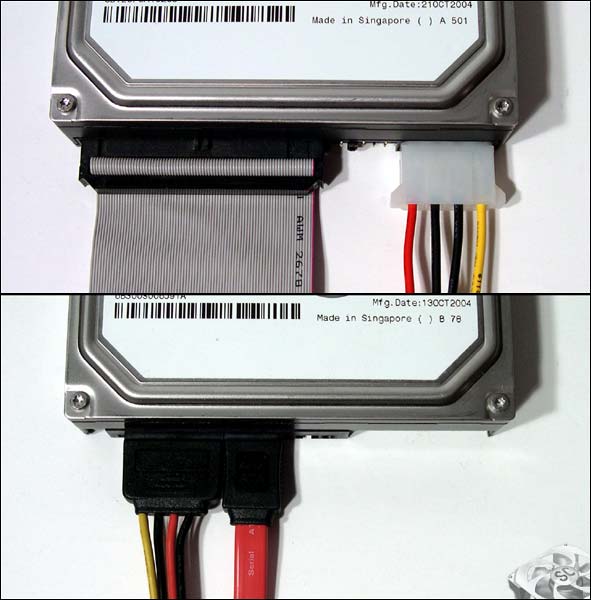
The red cable in the photo below is SATA, and that wide flat one at the top is IDE:
Based on what you posted earlier from CPU-Z, you're going to need a new power supply too.
It's more than doable even for $333 You can just reuse your current case and DVD-RW (assuming it's a SATA drive), and potentially the power supply too.
She could probably stick with the old power supply because, in terms of raw wattage, you don't need anything special; the only reason to swap it would be if the unit is just getting too old. http://www.cnn.com/details_product...-hpa-400w.aspx
cosmicbadger25 said:I was just watching a video, and honestly, the performance is nearly identical to the GTX 760. Plus, it's way cheaper. That's pretty interesting.
The GTX 760 holds a slight edge in raw power. You might see this 270/X catch up or even match it in specific titles that are heavily optimized for AMD, but I really question whether the GTX 760 is actually worth $167 paying more for. Historically, cards in the $433 range have always been that perfect sweet spot—the ultimate best buy.
cosmicbadger25 said:Isn't that card in a similar tier to this R7 265x that comes with the build? How much faster is it compared to the 265x anyway?
I haven't heard of the R7 265X—I know the standard R7 265, which is just a rebranded HD7850, whereas the r9 270 is a rebranded HD7870, making it significantly more powerful. It really all boils down to how much that 265 ends up costing; my estimate is at least $367. You should definitely dig through a few reviews
cosmicbadger25 said:You make a fair point. Some of the tech sites I've been browsing argue that upgrading from a 760 to a 770 isn't really worth the money when you're only looking at a measly 10 FPS difference.
If that's your perspective, then the r9 270 is definitely the best buy here.
For instance, once this becomes available
the price point and the cooling solution are top-tier.