CheckEmoji Community · the emoji forum
🏠 Home 🆕 What's new ❓ Unanswered 🔥 Popular 📡 RSS Members 👥 0 online log in · register
Home › Jessica Morris6 › Posts

Posts by Jessica Morris6

884 posts shown.

Network folder sharing help in IT Support ·
If you aren't constantly battling connectivity issues, honestly, sticking with cloud storage is a much smoother way to go. Everything just syncs up automatically across every single computer where you have those folders shared... it saves so much headache.

Get 50 GB for free via https://mega.nz/sync
Or grab 15 GB for free through https://www.google.com/drive/
I’ve honestly never come across a situation where an .rtf file actually ended up being smaller than a .doc... I already laid out everything I did above.
This probably has something to do with what happens when I hit "save" on my Microsoft document.
I'm going to delete it. I’ll be switching everything over to Microsoft Word just to save some space, since .rtf files end up taking up way more room than they should.
I tried running Disk Cleanup, and the tool claimed it was going to clear out about 2.4 GB once I checked all the boxes, but after it finished, my drive space only increased by maybe 400 MB. I'm wondering if the rest of those files aren't showing up as free space immediately, or if the process just failed to actually delete them... I could really use some advice on how to actually get rid of these extra gigabytes hanging around...

image
I'm running Windows 7. I exported a document from one of my programs as an .rtf file, and it was huge—about 300 MB. To save some space, I saved it as a .doc instead, which brought it down to a much more reasonable 28 MB. However, there's a major issue: every single time I hit Ctrl+S, it seems like the system starts generating massive temporary files. This little habit of mine has already eaten up about 5 or 6 GB of my hard drive space, and since this is my primary work machine, every gigabyte counts...
It’s definitely tied to this specific process, because I’ve tested it a few times with smaller .doc files, and every time I save, my available disk space just shrinks a little more.
I tried running CleanMyMac and manually checking out these two folders, but nothing worked at all.

Paths:
c:\Users\"user"\AppData\Local\Temp\
c:\Users\"user"\AppData\Local\Microsoft\Windows\

Here is what my disk looks like now:

image

Does anyone know how I can clear out this junk? I really don't want to go through the hassle of reinstalling Windows because, honestly, I have no idea how to do that...
PC not detecting hard drive (Windows 7) in Hardware ·
I’ve pinpointed what the issue is, now I just need someone to tell me how to fix it. 🙂
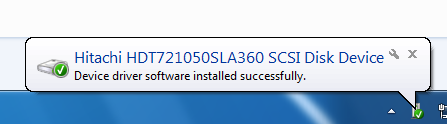
For a couple of days now, my drive hasn't been showing up at all, but then yesterday I fired up the machine and this message popped up saying the driver had installed successfully and I could finally access it. A little window appeared telling me I needed to restart the computer, so I did exactly that, but once the system booted back up, the drive just vanished again...
It's clearly a driver issue. Would simply running Driver Pack Solution again be enough to sort this out, or should I go through the trouble of hunting down the specific driver for this particular model and try installing that manually? If anyone has a better way of handling this, please let me know... I really don't want to start poking around blindly without some solid advice, otherwise I might end up making things even worse.

image
PC not detecting hard drive (Windows 7) in Hardware ·
I've got a single machine running a dual-boot setup with Windows 7 and 8. I didn't set this up myself, and honestly, I’m far from being some kind of IT expert... The Windows 7 side is 32-bit, while the Windows 8 side is 64-bit.

I was running into an issue on the Windows 7 side where I couldn't get online because I was missing a motherboard driver—specifically for the network card. This morning, I decided to run the offline version of DriverPack Solution, which actually fixed the connection issue. But now, I've hit a new snag: one of my hard drives has completely vanished from view.

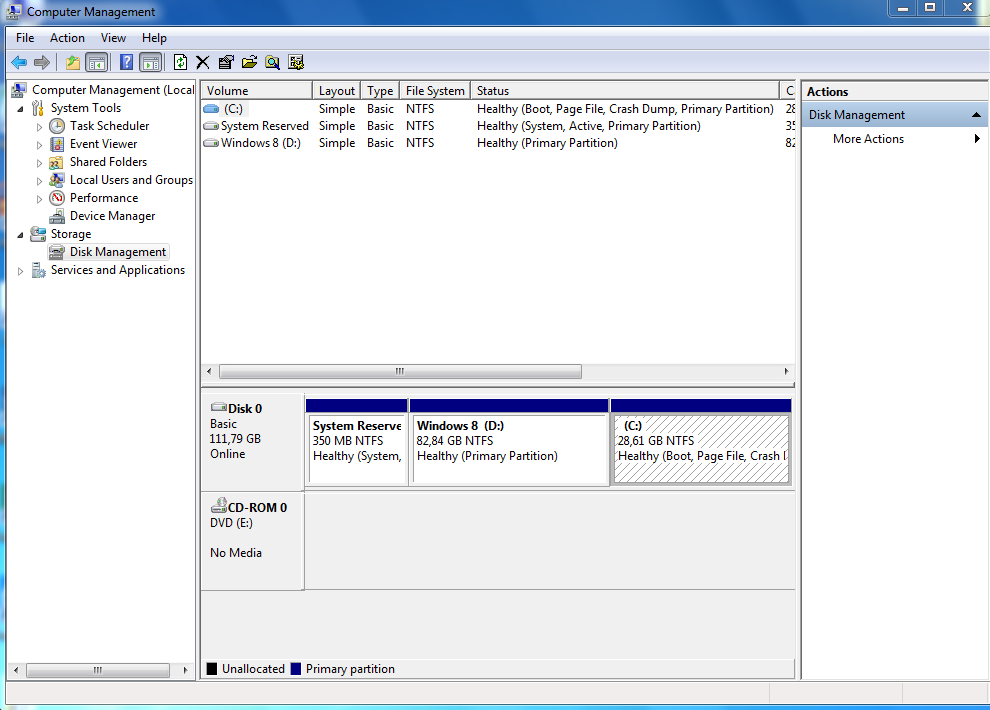
To give you the layout, I have three separate drives: C:, where Windows 7 lives; D:, where Windows 8 is installed; and F:, which I use for all my various files and data.

The weird thing is, drive F: shows up perfectly fine when I'm logged into Windows 8, but it’s nowhere to be found when I boot into Windows 7. Does anyone know a way to make it visible in Windows 7 without having to format the whole thing? I've already tried a few different tips I found online, but nothing seems to work...

Here is how it looks under Windows 7:
image

And here is how it appears in Windows 8:

image
Edward Price6 said:I’m a huge fan of this kind of stuff. Plus, anything by Stephen King is a win...
I'm really hoping it turns out to be good

The numbers just aren't on his side this time.
Google account - issues deleting files in IT Support ·
So, I’m sitting here looking at my usage, and I've finally hit a total of 7 GB used. It honestly feels like Google is taking its sweet time processing all the deletions, especially since I just finished emptying the trash folder... but hopefully, everything should be back to normal now.
Google account - issues deleting files in IT Support ·
My company uses a Gmail account for everything, and we have a shared folder on Google Drive linked to it. Gmail gives you 15 GB of free storage, but I've hit the ceiling and I'm almost completely out of room.
To be honest, neither my boss nor I really grasp how this all works...

So, here is the breakdown of my storage usage:
image

As you can see from the stats, Gmail is sitting at 3.15 GB, while the Drive side is at 11.79 GB. Here’s the kicker: the actual files I see on my Drive only add up to drive 3.24 GB, so I have no idea where those mysterious extra 8+ GB have vanished to...

image

I managed to dig through the Drive cloud and clear out the Trash, which helped a little, but I'm still left staring at an unexplained 5 GB surplus on the disk. Does anyone have any clue where these hidden files might be hiding or how I can actually scrub them out?

image

image
Printer scanning issues in Hardware ·
Is it actually a good idea to go through the driver pack Solution? I’m honestly a little nervous about messing around with it... I really don't want to end up stuck without any way to print later on.
Printer scanning issues in Hardware ·
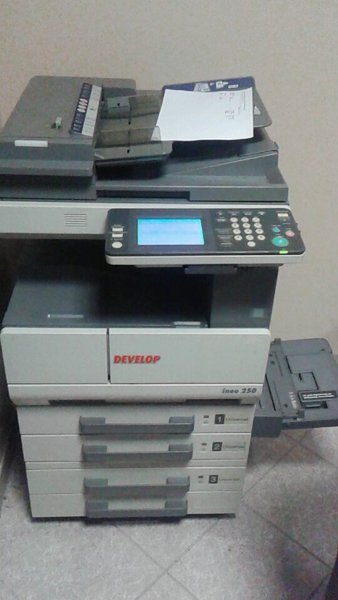
So, the other day I ended up yanking the modem out of the wall and disconnecting it from my computer because I had to move things around, and ever since then, scanning just isn't working. Printing directly from the PC seems perfectly fine, but when I try to scan, I start getting these error messages... instead of the scan popping up on my screen as a PDF like it’s supposed to, the machine just spits out a physical piece of paper stating there was an error. That printed error slip is what you see in the first photo, sitting right above the printer.
I'm guessing maybe I need to go back into the settings and re-establish the path so the scanned files actually show up in the same folder they used to go to, but honestly, I'm no tech expert here. Does anyone happen to know how to fix this?...

This is the printer I'm using. It should be a Xerox Altalink.

image

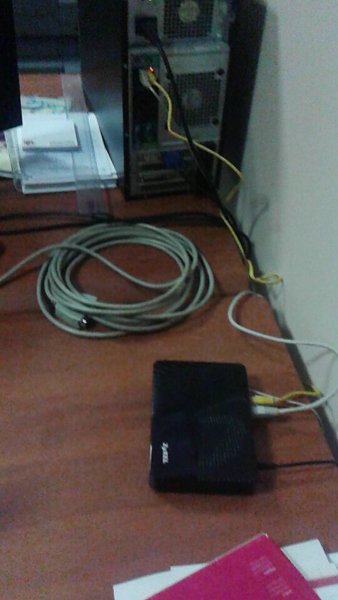
And this is the white cable running from the unit into the modem.

image
What is an .odt file? in IT Support ·
Maybe you should just ask the person who sent it to you in the first place?
English translation for this software? in Feedback & Suggestions ·
That’s a solid concept, but you might want to hire an editor first if you actually want people to take it seriously.
Thread Index Opening in Feedback & Suggestions ·
Since you guys aren't ever going to bring back that specific search function—and let's be honest, half the people here don't even know how to use Google properly—I’m suggesting that we start opening thread indexes in all the subforums where duplicate topics are a headache. We're talking about sections like movies, TV shows, musicians...

There’s a real possibility that all it takes is dropping a link to an index that automatically generates itself in alphabetical order. I don't know the exact technical steps to pull it off, and the forum I saw this on is completely dead now. It was running on vBulletin 3 just like this one, so the architecture should be identical. It probably just requires a little bit of tinkering with the settings. If this were implemented, the moderators wouldn't have any extra work to do other than creating the thread and dropping the link inside...
You would just head over to this archive and set the links for individual sections to display all threads alphabetically. For some reason, those links aren't working for me right now; they just throw a "404 Not Found" error. For example, this would be the link to the topic list for the "Movies" section.
Every day is someone's birthday (actors). in Movies ·
Karl Malden really holds his own, even in a series like "San Francisco Street." On the flip side, you have William Shatner taking on this absolutely bizarre role in the "Ray Bradbury Theater," where he starts hallucinating things about kids at a playground, and he just ends up sitting there on a swing, rocking back and forth in this total state of madness...
Q&A: General Movie Discussion in Movies ·
Found it. The Stay Puft Marshmallow Man.
Q&A: General Movie Discussion in Movies ·
Does anyone actually remember what we used to call that Stay Puft Marshmallow Man back in the day... I was just sitting here thinking about how much pop culture tends to lean on the most ridiculous, over-the-top imagery to get a reaction out of us, and honestly, looking back at some of those classic tropes, it’s almost funny how much we just accept it... Take that iconic giant marshmallow entity from the Ghostbusters flick, for instance. There is something inherently absurd about a massive, sugary, smiling mascot stomping through the streets of New York City like he owns the place, yet it manages to stick in your brain more than half the serious horror icons we see today. It’s that weird blend of childhood nostalgia and pure, unadulterated chaos that really gets under my skin, because you know deep down that if something that big actually showed up in Manhattan, the sheer scale of the panic would be unlike anything we've ever seen... it’s just one of those things that stays with you, no matter how many times you revisit it.
He was actually in Ghostbusters...
Is he some kind of marshmallow man, or what...?
Every day is someone's birthday (actors). in Movies ·
I just stumbled upon a fascinating bit of trivia... it turns out Peter Graves was actually the younger brother of that legendary cowboy icon James Arness, the man who headlined what remains the longest-running western series in television history, Gunsmoke. They were both part of the same family tree...

image

Every day is someone's birthday (actors). in Movies ·
Today we’re honoring two pretty famous faces.
Robert Donat. To be honest, I don't know the first thing about him...
image

Then there's Edward Everett Horton. I honestly love seeing him pop up in any movie... the second he appears on screen, the whole film just jumps up a notch in my estimation. He was in >, if I recall correctly, which I think is his most iconic role. It seems like he was always cast in these lighthearted comedies, though I couldn't tell you if he ever tackled a heavy drama... and I've never actually seen him carry a film as the lead.
image

We're also celebrating these two guys who have spent their careers mostly in the shadows, despite being well-known names. They haven't had many leading roles...
Peter Graves
image

Brad Douriff
image