I’m actually looking for some clarification on what exactly "DDR" refers to... because when I look online, I see everything from DDR2 and DDR3 to DDR4 and DDR5 listed for sale.
To get this laptop up to speed, I'd need to pick up some RAM that looks exactly like what you see in this photo here. I'm honestly not entirely sure which specific type it is—or even what the technical name for it might be, if I'm being honest.
I’m looking to reconnect with some former colleagues after quite a few years apart I happen to have their last names and home addresses, but I don't have any phone numbers—they all seem to be old-school types who still rely on landlines I tried searching for them through online directories like WhitePages and AnyWho, but I haven't had much luck finding anything useful... Does anyone know if there might be another way to track down their numbers?
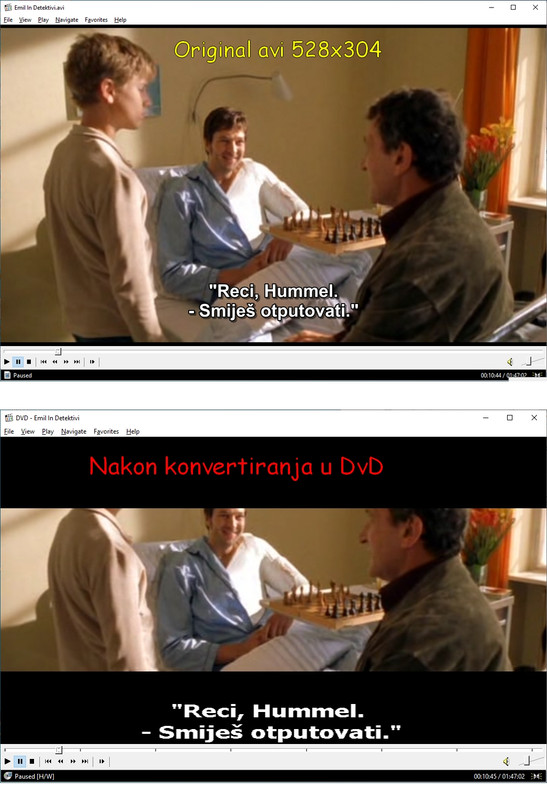
I recently picked up a movie file in an AVI format (1920 x1080) that I needed to convert over to a DVD format so I could burn it onto a disc I went ahead and used Handbrake to get the job done, but—for some reason—the aspect ratio seems totally off. The image looks squashed vertically; it’s at the point where characters are losing the tops of their heads, and the subtitles are stuck right at the bottom on a black bar, making the second line of text nearly impossible to read on a TV screen because it gets cut in half I've attached a few screenshots here so you can see exactly what I'm dealing with Does anyone happen to know what might be causing this? I'm just trying to figure out how to maintain the original video dimensions during the conversion process so everything looks normal again
I ended up with this movie file in an Adobe format (1920 x 1080) that I needed to convert over to a DVD format so I could burn it onto a disc So, I tried using "Handbrake" to get the job done, but the aspect ratio is all messed up—the image looks squashed vertically, which means characters are losing the tops of their heads, and the subtitles are stuck at the very bottom on a black bar where the second line gets cut off halfway when you try to watch it on a TV I've attached some screenshots here so you can see exactly what I mean by the distortion Does anyone happen to know what's causing this, or how I might be able to maintain the original video dimensions during the conversion process?
I have this one image that I need to scale up by about 30%, but whenever I try to resize it, I just end up with that annoying pixelation effect everywhere. Now, I've heard whispers that if you use a more recent version of Photoshop—specifically with some newer AI-driven tools—you might be able to pull this off while keeping the quality relatively intact. Does anyone happen to know if there's any truth to that? If so, how exactly does one go about doing it—or perhaps there's some other software out there that handles this better?
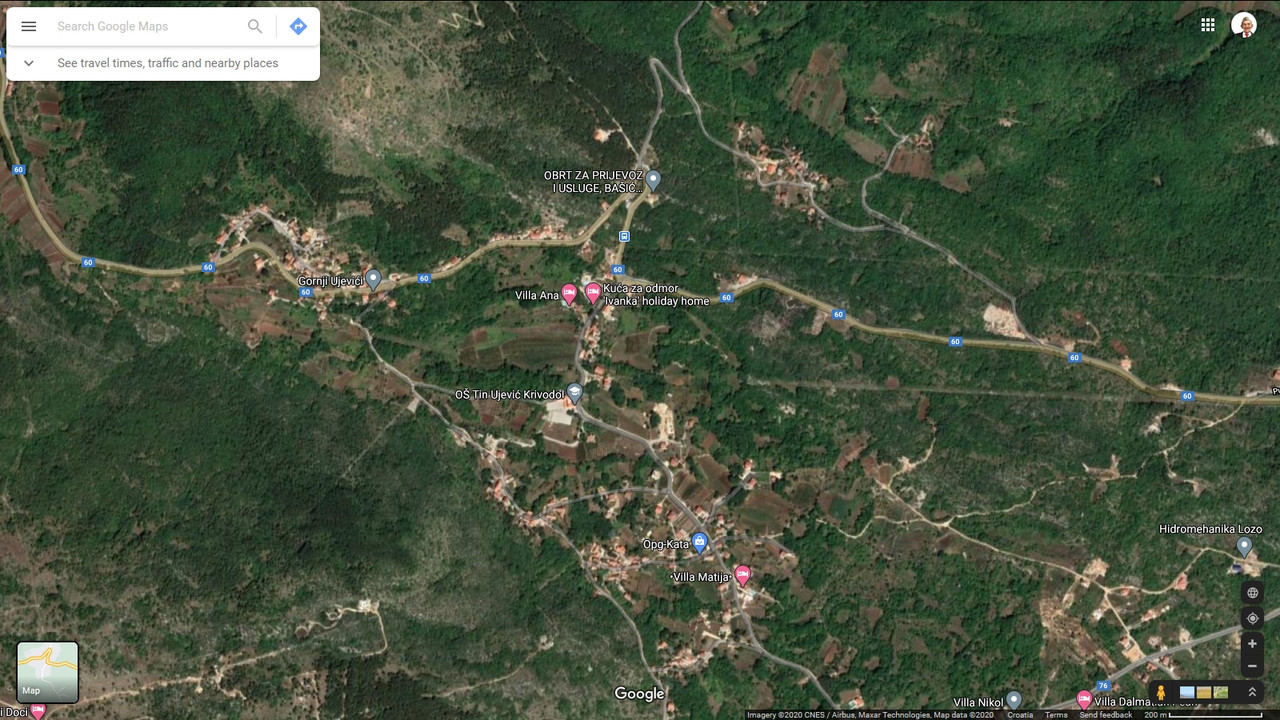
I mean, I’m a bit puzzled—why aren't any of the street names showing up on the map, and there isn't even a mention of Pope John Paul II anywhere With the information provided, finding number 35 is basically impossible—there are just way too many houses and tiny little side roads scattered around I have to say, I'm honestly a little disappointed in Google
I’m honestly having a hard time seeing what you're talking about—I’ve been staring at the map for a bit now, and while it shows a whole web of tiny little backroads, none of them actually have names assigned to them, and I definitely don't see any sign of Pope John Paul II Street anywhere
The thing is, I really need to pull this up on Google Maps, but Google just isn't finding it. It’s acting like the street doesn't even exist—it won't show it at all. My plan was to grab the GPS coordinates so I could track the location using a GPS unit in my car. If you try typing in "Pope John Paul II 35, Krivodol," you'll see for yourself—it comes up completely blank.
We’re getting ready to head out on a road trip soon—we'll be passing through the Sedona area—and we’re hoping to drop in on an old colleague we haven't seen in about 30 years. We spoke on the phone recently, and he gave us his address: Pope John Paul II 35, Krivodol The thing is, as much as I'd like to believe otherwise, Google just can't seem to find that specific address at all. I'm a bit stumped here—does anyone have any advice on how we might actually track down this location?
I recently stumbled upon some old video files recorded on a camcorder about 50 years ago—well, maybe not quite that long, but they've definitely been sitting around for decades. They were burned onto a DVD and are in that old VOB format (specifically VTS_01, VTS_02, VTS_03, and so on). What I'm looking for is a way to extract a few specific segments from these files and merge them into one single, cohesive file. I've tried messing around with a few standard video editors, but it seems they don't actually support the VOB format out of the box. Does anyone have a recommendation for a program that can handle this kind of export?
I tried performing a full format, but I kept getting hit with this error message: "macOS can't format F Check to see that the disk and drive are connected properly, make sure that the disk is not read-only, and then try again. For more information , search Help for read-only Files and How to Change them."
A few months back, I picked up a 32 GB flash drive, but when I plugged it into my computer yesterday, I got that annoying prompt asking me to format it. So, I tried running the format, only to be met with the message: “macOS was unable to complete the format.” I’m honestly not quite sure where things went sideways here—does anyone have any idea if there's a way to salvage this thing, or am I just looking at a paperweight?
So, a colleague just pointed this out to me: It seems Word displays page sizes based on whatever printer is currently set as the default in the system.
Unfortunately, I’m running Word 2003, and when I look through the paper size options, A3 just isn't there—all I see is A4, A5, A6, and a whole bunch of other formats. I actually just checked my brother's laptop, which is running Word 2018, and it looks like he doesn't have the A3 format in his list either.
I’m trying to put together an A3-sized calendar using Word 2003—I'm planning to take the file over to a local print shop—but I've hit a bit of a snag because my home printer only supports standard letter size in the page setup options. Someone suggested that if I install a PDF reader, a virtual PDF printer should show up in my list of available printers within Word, which would theoretically let me "print" the document to a file. Following that advice, I went ahead and installed Adobe, but for some reason, Word isn't showing any kind of PDF printer option in the printer selection menu . Does anyone happen to know a workaround for this? Any advice on how to get this formatted correctly would be much appreciated.
I’m running into some confusion regarding how BurnAware works For instance, let's say I have an ISO file for Windows that I want to burn onto a DVD, but I'm not quite sure what the actual distinction is between these three options: 1 Make Boot ISO 2 Burn ISO 3 Boot Disc If I set my computer to boot from the optical drive as the primary device and then restart, what actually happens if I use a disc created via “Make Boot ISO” versus one made through “Burn ISO” or "Boot Disc"?