That’s pretty much how I saw it too, honestly. I haven't really kept up with the constant hardware treadmill for quite a while now—probably since back in 2018 when I picked this unit up. These days, you kind of go into a purchase expecting the tech to hit its limit or start acting up after maybe five years tops. It’s just the nature of the beast. I never felt like it was a bad machine or anything; it still gets the job done when I need to knock out some video editing or touch up some photos, but... well, there's always something faster or better out there if you're looking for it.
Everything kicks into gear in an instant—all the fans spin up, all the LEDs on the motherboard and the fans light up, and then everything just goes pitch black. I actually gave the suggestion from Alexander Diaz4 a shot, and it worked! It turns out I just had to give the main motherboard connector a tiny, tiny little nudge. To be honest, I was pretty skeptical that his idea would do anything since this PC hasn't been opened, moved, or even breathed on in ages. I was already halfway through scouting out a brand new PC, but I think I'll hold off on that for a while longer now. Thanks so much to everyone for the help. By the way... I misspoke earlier, it’s actually an i7 8700 and an MSI Z370 gaming Pro carbon, not a Gigabyte 😵 but hey, it's already five years old, so it probably won't be around much longer anyway.
Hey everyone, first off, my apologies for the title but I honestly wasn't sure how else to phrase it. So, here’s the deal: I’ve got this older PC that was working perfectly fine just this past Sunday. As far as I can tell, the parts are from around 2018—it's running an i7 4700, a GTX 1080, and some kind of Gigabyte motherboard. Today, though, things have gone sideways. When I hit the power button, the fan LEDs light up and the fans spin for maybe a second or two before everything just shuts down. Then, about five seconds later, the whole cycle repeats itself over and over again until I finally pull the plug to stop the loop. I know there's a million little things that could be causing this kind of hiccup, but based on your experience, what do you think is the most likely culprit that gave out? Thanks!
We were playing around with NordVPN for a little bit, but lately, the Chrome extension has been acting up, and the desktop app kept getting flagged by my antivirus as a threat. So, I decided to make the switch over to ExpressVPN for just $2 a month, and honestly, it’s been a total game changer—they have great servers located right here in the States and the connection speeds are lightning fast.
Jack Cook7 said:Haha, a smart dad keeps an eye on those logs just to see how the kids are piggybacking off the home router.
Honestly, I don't even need to go that deep... a quick glance at my phone tells me everything I need to know based on whether I see the WiFi icon or the LTE one. She’s got her own 24GB a month of LTE data, but that doesn't amount to much when you want to be scrolling through TikTok, Snapchat, and all that stuff 24/7. If she tries to handle any important tasks while dealing with massive ping spikes—or if things just stall out until she finally hits ENTER, if you catch my drift—well, I tend to lean toward automation. I like to set things up once so they run according to protocol without me having to lift a finger unless I decide to change the code. It isn't about handing down heavy, life-altering responsibilities; it's really more of a matter of principle. If my teenager can't remember to take out the trash without being prompted—and then gives me that classic eye roll when I do remind her—then... well, then we're looking at a MAC filter. Because, let's face it, for a teenager these days, WiFi is the real currency.
George Murphy12 said:But kids will always find some hotspot to jump on, or they'll just try to snag access from the neighbors...
Let her look for a hotspot all she wants, but there aren't any roaming around her room since she basically lives in there unless she absolutely has to come out. It sounds like you might not fully grasp what today's teenagers are like! As for the neighbor thing, they'd sooner die than actually ask a neighbor for their password. They won't say a single word to anyone unless it's one of the other three teenagers in their social circle. I don't know, maybe American teenagers are just built differently than kids over in Europe. Android + Tapatalk
Honestly, that feels like something from a different century; times have changed so much since then. Nowadays, you could practically leave a teenager home alone for three days with a fridge packed full of groceries and they’d still starve because there isn't anyone around to... ...check in on them to make sure they actually eat, or ...serve them a proper meal. I'm going to keep an eye on how things develop, and if she manages to set up the MAC filter—which is a win in itself, whether she ends up using it or not, because the effort counts—then we can move on to the next stage. Everyone else has decent signal strength, but our teenager is stuck at Level 2. By the way...what exactly is Level 3? I need to go hit the books so I'm fully prepared when the right moment rolls around.
Jack Cook7 said:Good grief, did you seriously just broadcast your router's admin password to the entire internet, or has my eyesight finally gone from "blurry" to "completely blind"? 😁
I think you might have misread me there... that wasn't actually my real password, just a quick little example to show you what I mean. My point was really just that I don't use something basic like 12345678; instead, I go with a random mix of letters, numbers, and special characters. Honestly, I know I can be a bit of a scatterbrain sometimes, but I promise I'm not quite that crazy!
Jack Cook7 said:Way to go to the young lady! 👍 (We’re all rooting for the future tech genius whose potential is being stifled by her overly protective dad 🤣 )
Development?! What kind of development? Is she just perfecting her skills at using TikTok, Instagram, and Snapchat filters?
I manage my home router from a PC, and honestly, a teenager could probably crack it... my router password looks something like this...(kA2g+@Q*6u5)...just 13 random characters thrown together... The only people who can get in are whoever has access to that specific PC on the LAN, plus two laptops via WiFi that have their MAC addresses specifically whitelisted. If my teenager manages to bypass all that and hop onto our WiFi, I'm pretty sure even the WiFi at the Pentagon wouldn't be considered secure.
Thanks for the heads-up, though honestly, this might actually work out in my favor by helping me limit my teenager's WiFi access... My main goal is to keep the home network running for all our other devices, but I want to make sure she can't just hop online with her iPhone whenever she feels like it... Or maybe there's a more sophisticated way to handle this? Essentially, what I'm thinking is that she'd have to somehow "crack" the router's password to change settings or figure out which MAC addresses are whitelisted so she could spoof them on her iPhone (is that even doable?). She isn't exactly a tech wizard when it comes to this kind of stuff, though she did manage to use Google to hunt down the WiFi password on a connected laptop because she needed it for school
I managed to track it down... once you log into the router settings, just head over to the wireless section and look for the WLAN MAC Filter option. From there, you can just plug in the specific MAC addresses you want to authorize, and that’s really all there is to it!
I’d really appreciate it if you could walk me through the exact steps to get this done properly Edit🙏I actually managed to figure it out on my own in the meantime... thanks so much for the tip though!
Hey there! So, I was wondering if it's actually possible to set a specific limit on how many devices can jump onto a WiFi network... like, if I wanted to cap it at exactly two specific devices that I choose, making it so absolutely nobody else can get in, even if they somehow managed to figure out the password?
Hey there! I was wondering if anyone could point me toward a Windows 10 download that features the most recent version available? My goal is to find an installation that’s pretty much up to date right out of the box, so I don't end up stuck in a loop of doing a hundred different updates immediately after finishing the setup. I still have my old installation DVD floating around, but that’s from back when Windows 10 first launched, so it's definitely outdated. Ideally, I'd love to just grab the files, burn them to a drive, run the install, pop in my product key, and maybe only have to deal with one or two minor patches.
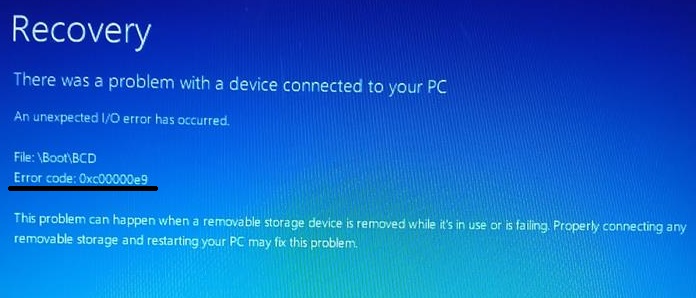
So, I’m messing around with this prehistoric Sony Vaio laptop of mine, and I keep hitting this error message. But the real kicker is when I try to pop in a Windows 7 DVD, I get hit with this instead:
Does anyone have any bright ideas on what might be going on here?
Look, I’ve opened and closed these things plenty of times before without any issues, so I'm fairly certain that opening it up isn't what caused the trouble here. It’s definitely not the culprit. What exactly happened to the motor? Did it just burn out or something?
I was wondering if anyone might happen to know why my IBM is acting up like this. The BIOS isn't even picking it up... I'm really just trying to salvage my data before it's too late.
Is this really worth dropping $650 on? HP Pavilion - 15.6 inch full HD IPS, Slim notebook, Intel Core i5-8250U, 8GB RAM, 1TB HDD, 128GB SSD, NVIDIA GeForce MX130 2GB, Windows 10 Home 64-bit
What do you guys think about this ASUS VivoBook 15 F540UA priced at around $560? https://geizhals.at/asus-vivobook-15...loc=de&hloc=uk It’s rocking an Intel Core i5-8250U, 8 GB RAM, and a 256 GB SSD.