I've got this massive pile of photos sitting on my computer, all over the place with different dimensions, and I really need to get them down to a specific 12x8 cm size. I’ve messed around with a few different programs that claim they can resize stuff, but the catch is they all seem obsessed with pixels or percentages. For some reason, none of them seem to give me the option to just type in centimeters like a normal person. Does anyone know of a program that actually lets you work in centimeters?
urbanheron4 said:So, which specific drivers did you grab from that link? For Windows 10 64-Bit edition, go with the adrenalin 22.6.1 recommended (WHQL). That should get things moving. If that doesn't cut it, maybe give the adrenalin 21.5.2 recommended
Sorry if I’m being a bit difficult here, but I really just want to get this thing sorted out. Following some advice I got from a few of you, I went ahead and installed Linux Mint just to test the waters, and surprisingly, the internet is working perfectly fine now. I've been messing around on Linux for a few hours now—just browsing the web, watching stuff on YouTube—and everything seems to be running smooth as silk. No hiccups whatsoever. The whole "Blue Screen" nightmare has vanished, which is great, but now I'm stuck. I want to go back to Windows 10, but honestly, I'm terrified that the same old headaches will just come right back to haunt me.
urbanheron4 suggested I grab the drivers from a specific link, but like I mentioned before, I already gave that a shot and it just hit me with this error:"AMD installer cannot continue due to an unsupported operating system"
Just to be clear, I'm installing the 64-bit version of Windows, though I'm considering maybe taking a stab at Windows 7 if anyone thinks that might actually help solve this mess.
So, I just finished installing Linux Mint (taking your advice here), and everything seemed to go smooth as silk at first. During the setup, it asked if I wanted to connect to my network; I picked my home Wi-Fi, punched in the password, and it gave me the thumbs up saying it was connected. But now that the installation is totally done and I've booted back up, there’s this little message sitting at the bottom of the screen saying “connection failed.” I tried clicking that network icon to see what was going on, and sure enough, my network shows up right there with the exact password I entered, but it’s just... stuck. It refuses to actually connect. Honestly, I'm a bit lost here. What's the move?
But I can't wrap my head around why I'm not getting that Blue Screen while I'm just watching movies, yet the second I fire up a browser, there it is...
I’ve gone through the whole "clean install" routine three times now, wiped the drive completely, and honestly? It hasn't made a bit of difference. I just started trying to get those AMD drivers up and running, and after only a few minutes, I get hit with this message: “AMD installer cannot continue due to an unsupported operating system” It’s weird, because we have five laptops in the house—all Dell—and we’ve reinstalled Windows 10 on them at least ten times without a single hiccup. But this specific HP desktop setup is giving me nothing but Blue Screen issues. I don't get it. On all our other laptops, the drivers from the disc install perfectly every single time without any drama. It’s pretty unbelievable, especially since this machine is actually the newest one we own and barely gets any use.
Look, I already told you, I tried to google it and followed a few different YouTube tutorials, but I’m still hitting the exact same wall I honestly don't get what's going on here. I've probably installed Windows 10 on at least ten different laptops by now, and I have never run into anything even remotely close to this kind of mess
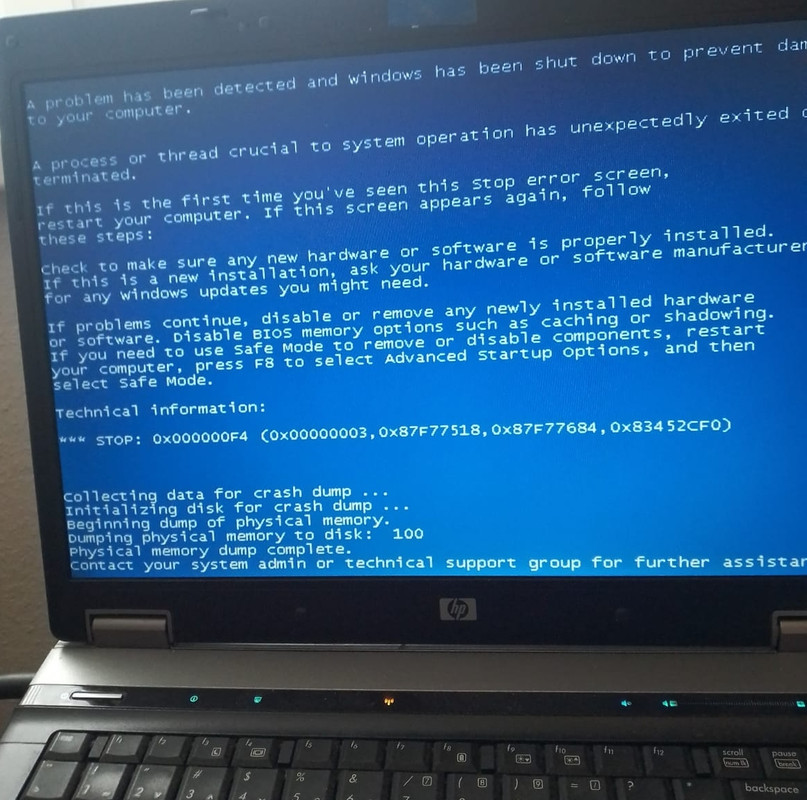
So, I picked up a laptop back in 2020. HP DeskJet 15 – rb031nm I’ve been running Windows 10 for about two years now, and honestly, it was smooth sailing—no issues whatsoever. Then, about a year back, I picked up... Dell. That old HP was basically my backup rig. I’d probably only fire it up once a month, just for a few minutes here and there, just to make sure everything was still running smooth. So, I had this extra machine lying around and figured I’d pass it off to my sister. To get it ready, I did a clean reinstall of Windows 10, and ever since that, things have been acting weird. The funny thing is, everything else seems totally fine. It opens windows and folders lightning fast, music plays without a hitch, movies stream perfectly—no issues there at all. But the second I fire up a web browser, like Chrome or Firefox, the whole thing falls apart. It doesn't matter how long I wait; sometimes it happens after five seconds, other times maybe fifteen, but then—boom—Blue Screen. And it always shows this message: So, there it is. That dreaded screen. You’re right in the middle of something—maybe finishing up a project or just scrolling through some news—and suddenly everything just freezes. Then comes that inevitable message: "Your PC ran into a problem and needs to restart." It’s like when you're driving down a highway in the Midwest and your engine just decides to quit out of nowhere. One minute you're cruising along, and the next, you're staring at the shoulder wondering what went wrong. It’s frustrating, it’s jarring, and honestly, it can drive you crazy if it happens more than once. Usually, this means Windows hit a wall it couldn't climb over. Maybe a driver decided to go rogue, or a recent update didn't play nice with your hardware. It's rarely just one thing, either. It could be anything from a faulty RAM stick to a software conflict that nobody saw coming. If this is a one-time thing, you might just want to chalk it up to bad luck and move on. But if you're seeing it constantly? Yeah, we should probably dig into it. Check your recent updates, look at your drivers, and maybe see if any new hardware you plugged in is causing the headache. Just stay calm—it's usually fixable, even if it feels like a total disaster in the moment. So, I ran into this absolute headache today: a video TDR failure involving atikmpag.sys. Honestly, it’s enough to drive anyone crazy. It’s one of those things where everything seems fine for a second, and then—boom—your screen decides to take an unscheduled vacation. It feels a bit like when you're driving down a highway in a perfectly good Ford, everything is smooth, and suddenly the engine just cuts out for no reason. You're left sitting there wondering if you're going to make it to your destination or if you'll be calling AAA from the shoulder. That’s basically what this error feels like for my system. I'm still digging through the causes, but it's clearly something deep in the driver communication. Just one of those technical glitches that makes you want to throw the whole tower out the window and start over. So, I went ahead and installed a different version of Windows 10, thinking maybe that would clear things up, but nope. Same exact issue right after the installation finished. Just back to square one. I’m honestly about to lose my mind here. I’ve just finished installing the third version of Windows 10, and yet again—for the third time now—it’s the exact same story. Same result. Total madness. I was honestly losing my mind because this laptop is brand new—barely even been out of the box, really. I tried to google it and followed all the instructions to a T, but honestly? Nothing is working. Still stuck. Someone told me this whole mess is just down to the graphics drivers, so I'm diving in headfirst. Device Manager. You know, sometimes you just have to dive into that little corner of the OS to see what’s actually going on under the hood. It's like opening the dashboard of a car when a warning light flickers—you aren't necessarily a mechanic, but you need to see if the engine is actually breathing or if something's disconnected. Whether you're hunting down a driver that's acting up or trying to figure out why a peripheral isn't playing nice, it's usually the first stop. Just don't go clicking things blindly unless you enjoy troubleshooting for three hours straight. So, I was poking around under the Display Adapters section, right? Just doing that thing where you right-click... So, I was looking at my specs the other day and saw this "AMD Radeon(TM) R3 Graphics" thing staring back at me. Honestly, it’s one of those labels that sounds much more impressive than the actual reality of what it does. It’s like seeing "Luxury SUV" on a brochure only to realize you're actually driving a sedan with a slightly taller suspension. It gets you from A to B, sure, but don't go expecting it to handle any heavy lifting or high-end gaming without breaking a sweat. It's fine for basic stuff—browsing the web, maybe some light video playback—but if you try to push it too hard, you'll quickly find out where its limits are. Just a little bit of modest hardware tucked away in there. I went ahead and picked... Time to update the drivers. And then they tell me there isn't even a newer driver available. Anyone out there have any ideas on what I should do? I'm a bit stuck.
Honestly, I’m losing my mind here. Nothing is working. My screen looks nothing like the instructions on the website. It is just unbelievably overcomplicated. So, I fire up the Amazon Alexa App on my phone, and this window pops up saying create a home. I don't get it—what kind of "home" are we talking about? What does building a house have to do with setting up an Apple AirPlay? Fine, I tap the plus sign, and it tells me to create a new home. Then, name your home. I type in some random name, and then suddenly it asks me to invite a home member. After that, I hit settings and click add device. Then I tap new device, and it starts searching for devices. A message pops up: Apple AirPlay found. Then: connecting to Apple AirPlay device. And then this shows up: This device was previously set up by another user Please perform a factory reset on the device. Fine, whatever, I'll do it, OK... but still, absolutely nothing is happening.
I just can't seem to get anything to work here. So, I opened the Amazon Alexa App on my phone, and after jumping through a few hoops, it claims it found the Apple AirPlay and that everything is connected. But when I look at my TV? Nothing. It’s just sitting there displaying some random nature photography. On my phone, I'm looking everywhere, but there isn't a single command or button in sight that actually tells the TV to show what's on my screen. Then, thinking maybe I was doing it wrong, I downloaded this "AirPlay Screen Mirroring" app. I fire it up, it starts searching for the Apple AirPlay, and... crickets. It won't find it no matter what I do. Just to be clear, the Apple AirPlay is physically plugged into the TV and looks fine—the blue light is glowing and all that. It honestly feels ridiculous that this is such a headache. You read stuff online saying this is supposed to be a quick, three-step process, but clearly, the internet lied to me.
Open the Amazon Alexa App. At the top left, tap Add Set up Device plus New Device. Complete the setup steps.
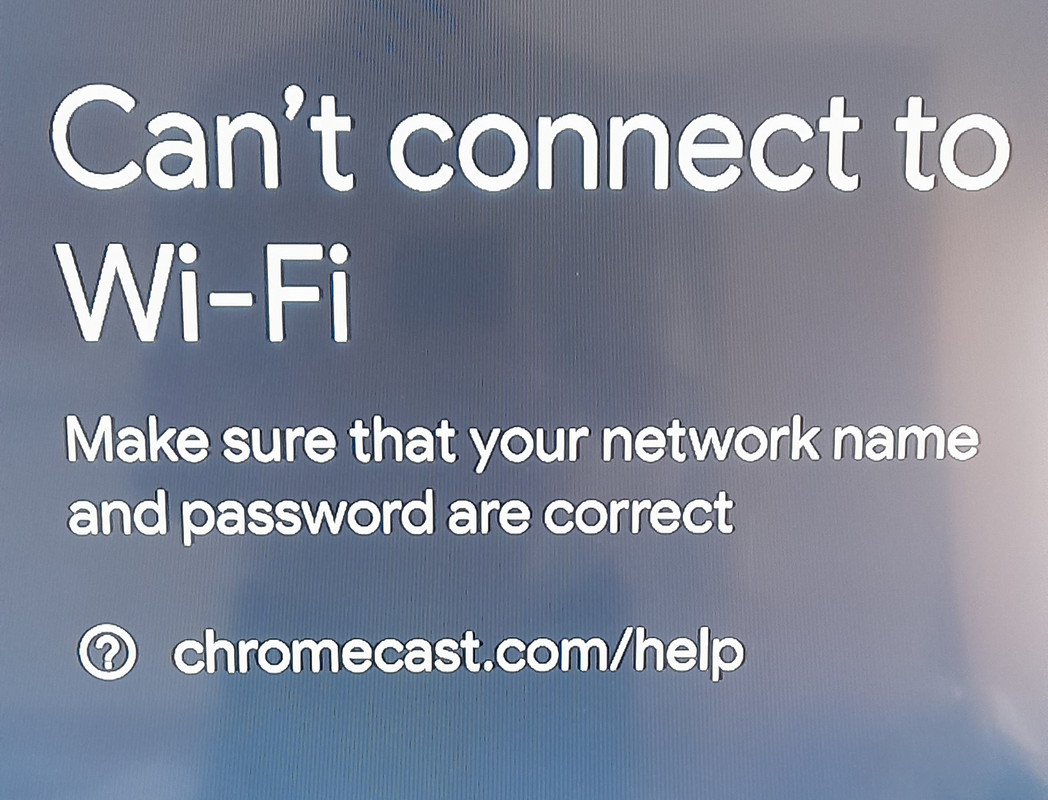
So, I was trying to get my phone hooked up to the TV. I picked up an Apple AirPlay, followed the manual to a T, and plugged everything into the HDMI and USB ports on my smart TV. On my phone, I went ahead and downloaded "TV Cast for Apple AirPlay." Then, I grabbed the remote, switched the source to that specific HDMI input, and this message pops up on the screen: I tried doing the exact same thing on a different TV, and yeah, same result. The weird part? Nowhere in the instructions does it say anything about needing to connect the TV to the WiFi. Does anyone have a clue what I'm missing here?
So, look, I don't even know how to describe it, but I think I’ve actually made some headway here. I managed to get my laptop and phone to play nice together via Bluetooth. Just as a little test run, I went to a photo on my laptop, right-clicked, hit sendto/bluetooth and picked my phone from the list. Sure enough, I checked the downloads folder on my phone and there it was. Now, I tried doing the reverse. I grabbed a photo on my phone, tapped share/bluetooth and selected my laptop's name . But then, after waiting a few seconds, my phone just throws this error at me: "sending failed" It's weird. Sending stuff from the laptop over to the phone works like a charm, but trying to go the other way? Total dead end. Does anyone have a clue what might be causing this hiccup?
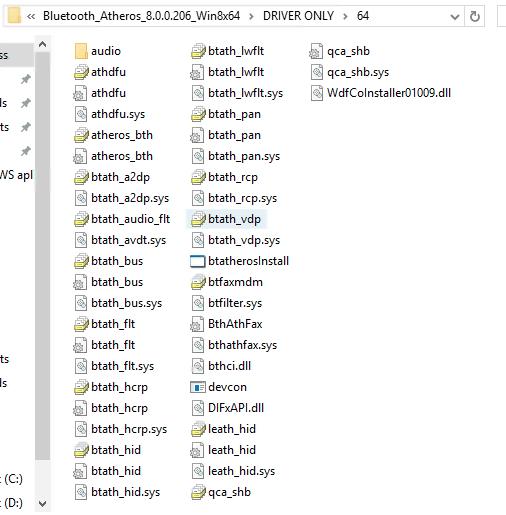
So, I picked up this Dell Inspiron 15 running macOS and I’m trying to get the Wi-Fi working I went ahead and grabbed the driver from http://acer.drivercan.com/driver/3353829/ But here's the thing—when I actually open the folder, it's just a massive pile of files. I've been digging through them, but I can't find a single thing that looks like an actual installer Anyone out there know what I'm missing? Any ideas on how to handle this Here is everything inside the folder
My sister just sent me a screenshot of her laptop screen... she can't even get Windows to boot up. Does anyone have a hunch as to what might be causing this mess? Here's the shot she sent.
So, I picked up an old ASUS memo pad 10 (found it on Yahoo!) that’s running Android 4.2.2 right out of the box. Since the thing is about five years old now, I figured I’d try to bump it up to a newer version of Android, but I'm hitting a wall here. I went through settings/about/system update and hit check update. But then this message pops up: "internet connection error or the server is busy". I've been messing with it all day and nothing is working. Anyone have any clue what's actually going on?
It’s just not working. It keeps auto-redirecting me to web.facebook.com and then I'm stuck staring at a blank screen forever. The only way I can actually get Facebook to load is if I fire up my VPN first.
Lately, I’ve been having a hell of a time just trying to get onto Facebook. Every single time I try to launch the app or pull up the site, the URL just decides to pivot on its own. Instead of the usual address, it keeps forcing me over to web.facebook.com. It's one of those weird little digital glitches that just stalls everything out. www.facebook.com It’s funny how people still get hung up on that little detail—you know, when they type "web" instead of "www." It’s such a minor thing, really. Just a tiny quirk in how someone types, like choosing a different brand of coffee or deciding to take the scenic route through the suburbs instead of hitting the interstate. People notice, though. They always seem to spot those little inconsistencies. Still can't get the damn thing to open. Anyone know what's going on?
I’m honestly at my wit's end with this thing. I picked up one of those tiny "JXLCAM" WiFi cameras and the manual that came with it. So, I did everything by the book: downloaded the app on my phone, plugged the camera into a 5V power source, and fired up the software. The instructions say something like this: Open the list of mobile phones WIFI, connect to B/xCCQ…, open the APP Icon page after success, click “AP” as shown in the figure below, and watch the video. Here’s the kicker: when I pull up the WiFi settings on my phone, there isn't a single trace of that "B/xCCQ…" network anywhere. It’s just totally blank, so nothing shows up when I try to get the app running. Has anyone dealt with this kind of headache before? I could really use some help getting this thing online. It’s right here in the manual .
amberhound8 said:Who even remembers that? He sent you a link that tells you exactly which password to use. It’s probably the same factory default for all those models anyway. Not sure why you're still dwelling on it.
Look, I already cycled through every single one of those passwords and nothing works. Nothing. I honestly have no clue what happened. Why on earth is it asking for a password when nobody has even touched the settings?