ironcyclist58 said:Whenever I switch from the OWNED tab over to the ALL tab on that page, I start seeing all these random maps popping up.
On my screen, it just says "you don't own any cards"—everything is completely blank. I guess my real question is: what is even the point of this card crafting system? It seems much more straightforward to just set a route using the classic method—it feels redundant, doesn't it?
I happened to stumble upon this section and noticed the option to create a new map To be perfectly honest, I’m struggling to grasp the utility of this feature—what exactly is the intended purpose behind generating a custom map? Would anyone be kind enough to provide an explanation?
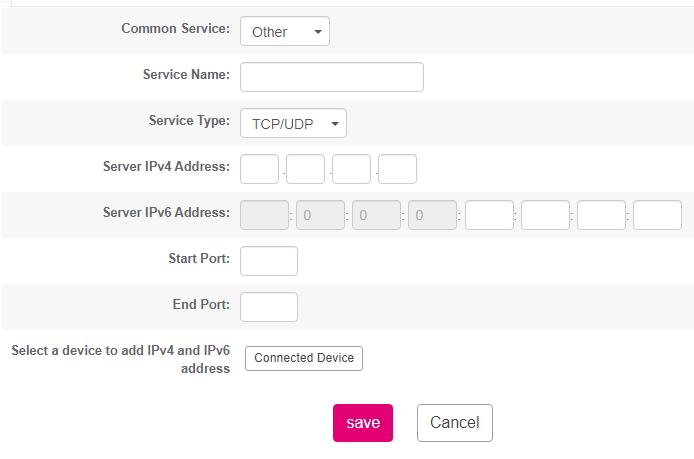
I’ve been using the BitTorrent application quite frequently lately—it’s become a bit of a staple in my digital routine.BitTorrentI can see that it’s being displayed right there at the bottom of my screen— Listen, I’ve noticed that my listening port is currently blocked—which, frankly, is a bit of a headache—so you might find that connection speeds aren't exactly lightning-fast right now. Specifically, Port 27546 is being blocked. And if you actually need to go through the trouble of opening ports within your router settings—specifically on that ARCADYAN VRV9518BA-2C model I’ve been tinkering with—I followed these exact instructions: I typed it right into my browser—straightforward enough, I suppose. 192.168.1.1 I entered "admin" into the username field and then typed in the password—straightforward enough—and once that was done, I proceeded to... Advanced > NAT > Port Forwarding > Add Service And here—right here—is where this image is displayed. Does anyone happen to know exactly what needs to go into these fields?
Alright, but how does this actually impact performance? Are these drivers truly essential—I mean, really—or am I just overthinking things? Because, honestly, I haven't noticed a single hiccup or issue while using my laptop without them installed.
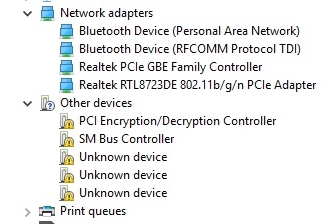
Well, I finally have the driver list showing up—I managed to get everything installed, and my internet connection is actually working at last! The only thing bothering me now are those little yellow exclamation marks; I have no idea what they signify or if they’re going to cause any issues with my computer's performance.
I have to say, this situation is driving me absolutely mad—and I am talking about a laptop here "HP notebook 15 - rb031nm" serial number: CND94714W1 So, here is the deal: I am sitting at my other computer right now, trying to hunt down some drivers on the official support site, but it is being completely useless. It just keeps spinning and searching, over and over again, without actually finding a single thing
Those instructions aren't helping me one bit—I just finished a completely fresh installation of Windows 10, and yet, here I am facing the exact same issue again. I'm seeing this listed in my Device Manager, so if anyone happens to know what might be causing this headache, please let me know.
Don't worry about it—I've actually gone through the process of installing Windows 10 on this exact machine at least three times over the last four years, and every single time, that icon just popped up automatically right after the installation finished.
I just finished installing Windows 10 Home, and while the installation process itself went off without a hitch, I’ve hit a major snag—I have absolutely no internet access. To make matters worse, that little Wi-Fi icon is completely missing from the taskbar at the bottom of my screen. Does anyone here happen to know how I might be able to troubleshoot this? It really baffles me, honestly—I’ve performed clean installs of Windows 10 more than ten times over the years, and in every single instance, that icon would simply appear right where it belongs once the setup was complete.
It seems I wasn't being entirely clear in my previous message. Here is what I am actually trying to achieve: I want to install an operating system—either Windows 7, 8, or 10—directly onto that external hard drive (the 500 GB one) so that I can run it on any computer I plug it into. For instance, if I go over to my sister's place and she’s running Windows 7, I could just plug in my drive and have my own OS boot up right from that external hardware. The only reason I'm asking all these questions is because I heard a rumor that this was actually possible—essentially creating a sort of "portable" Windows environment. A colleague of mine mentioned that I might be able to pull this off using a program called "Rufus". I believe I've been much more specific now.
I’m honestly at a total loss here. I managed to get Windows 7 installed onto a USB drive—which, mind you, took quite a bit of trial and error—but when I plugged that USB into my other laptop running Windows 10, things went sideways. I specifically set the boot order to prioritize the USB, and after the restart, the "Setup devices" process actually began. It ran for about 20 minutes—quite a while, really—and eventually, the screen told me the computer was going to restart. The problem is, once it restarts, instead of booting from the USB as intended, it just goes right back into Windows 10 rather than starting the Windows 7 installation from the USB.
So, I was just sitting here attempting to install Windows 7 onto a USB drive using the WinToUsb utility—an interesting little tool, really—when I hit a bit of a crossroads. Right in the middle of the process, it stops and asks me to pick between these three specific options: 1 MBR for BIOS 2 GPT for UEFI 3 MBR for BIOS and UEFI
I'm feeling a bit stuck—which of these should I actually go with?
A colleague of mine was mentioning this software called "WinToUsb" to get the job done. I can't help but wonder—what is the actual difference between installing Windows using that specific tool versus just doing a standard installation?
I recently picked up a used 500 GB external HDD—it was quite a deal!—and I've been wondering if it’s actually feasible to install Windows 10 (or even Windows 7) directly onto it. If this is doable, what would be the best way to go about the process?
But the real headache is that I'm not seeing any option to translate at all. When I pull up a webpage, there isn't even a prompt or a suggestion to translate the text
I was over at a friend's place recently and witnessed something quite fascinating. He opened a German website in his "Microsoft Edge" browser, and—get this—it translated the entire page into English within just two seconds. He assured me he hadn't installed any extra plugins or anything; apparently, this feature is built directly into the "Microsoft Edge" browser itself. Now, here's the thing: I’ve been using Windows 10 at my own place, and whenever I open various international sites—German, English, you name it—in my "Microsoft Edge" browser, absolutely nothing happens. It doesn't offer to translate a single thing. I'm honestly stumped as to why it isn't working for me—does anyone happen to know what the issue might be?